Clickup Vs Jira: Ultimate Showdown for Project Management Pros
When it comes to managing your projects efficiently, choosing the right tool can make all the difference. You’ve probably heard about ClickUp and Jira—two powerful platforms designed to keep your team on track.
But which one fits your unique needs better? Whether you’re juggling software development tasks or coordinating a variety of business projects, understanding the strengths and weaknesses of each tool can save you time, money, and a lot of headaches. ClickUp stands out with its all-in-one approach, combining AI-powered features, project management, chat, and more into a single platform that adapts to your workflow. It’s designed to help you and your team work together seamlessly, no matter what you’re managing. On the other hand, Jira shines when it comes to software teams needing deep customization for Agile workflows and bug tracking. Ready to discover which tool aligns perfectly with your goals? Dive into this detailed comparison to see how ClickUp and Jira stack up, and find out which one can truly transform the way you work. If you want to explore ClickUp’s powerful features firsthand, check it out here: ClickUp. Your next productivity boost might be just a click away!
Introduction To Clickup And Jira
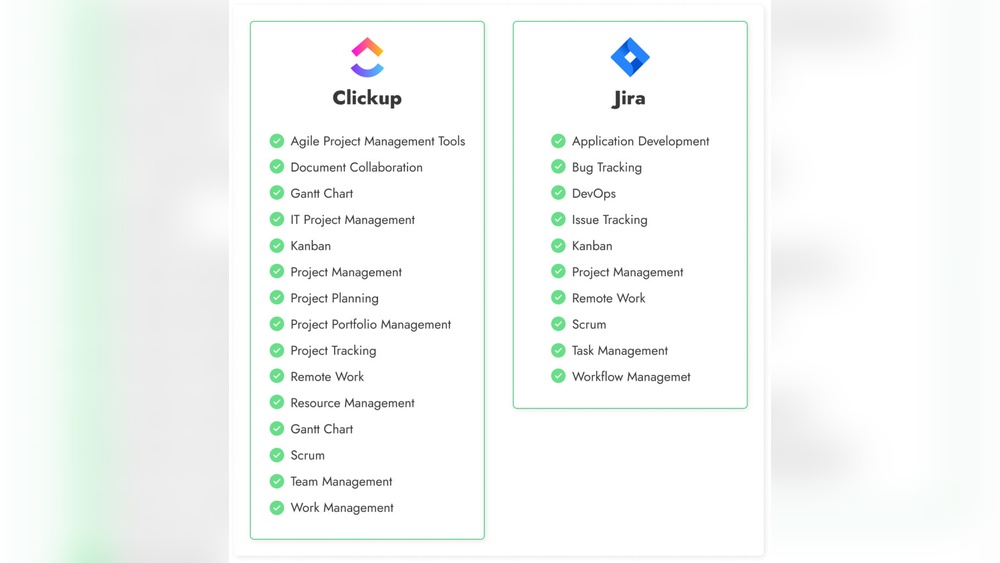
Project management tools play a vital role in organizing work and boosting team productivity. ClickUp and Jira stand out as two popular options. Both serve different purposes and target users. Understanding their core features helps teams choose the right tool for their projects.
Overview Of Clickup: Purpose And Target Users
ClickUp is an all-in-one project management platform. It aims to replace multiple apps by combining tasks, docs, chat, and AI features into one place. The tool saves time and money by uniting all work in a single system with perfect context.
ClickUp suits a wide range of users:
- Small to large teams seeking a flexible workspace
- Businesses needing easy setup and customization
- Teams wanting to collaborate with integrated chat and AI tools
Overview Of Jira: Purpose And Target Users
Jira focuses on software development and Agile project management. It excels at bug tracking and handling complex workflows. Jira supports detailed processes that match real company needs, not just simple task lists or boards.
Jira targets:
- Software teams practicing Agile or Scrum
- Organizations requiring custom workflow automation
- Enterprises managing detailed product development cycles
Why Comparing Clickup And Jira Matters For Project Management Pros
Both tools serve project management but with different strengths. Choosing the right one affects team efficiency and project success. Here is why comparing them matters:
- Fit for Purpose: ClickUp suits broad team needs; Jira focuses on software projects.
- Workflow Complexity: Jira handles intricate workflows; ClickUp offers flexible customization.
- Ease of Use: ClickUp offers faster setup; Jira requires more configuration.
- Collaboration Features: ClickUp integrates chat and AI; Jira centers on issue tracking.
- Cost and Scalability: Teams must consider budgets and growth plans.
Understanding these differences helps professionals select the best tool for their unique workflows and goals.
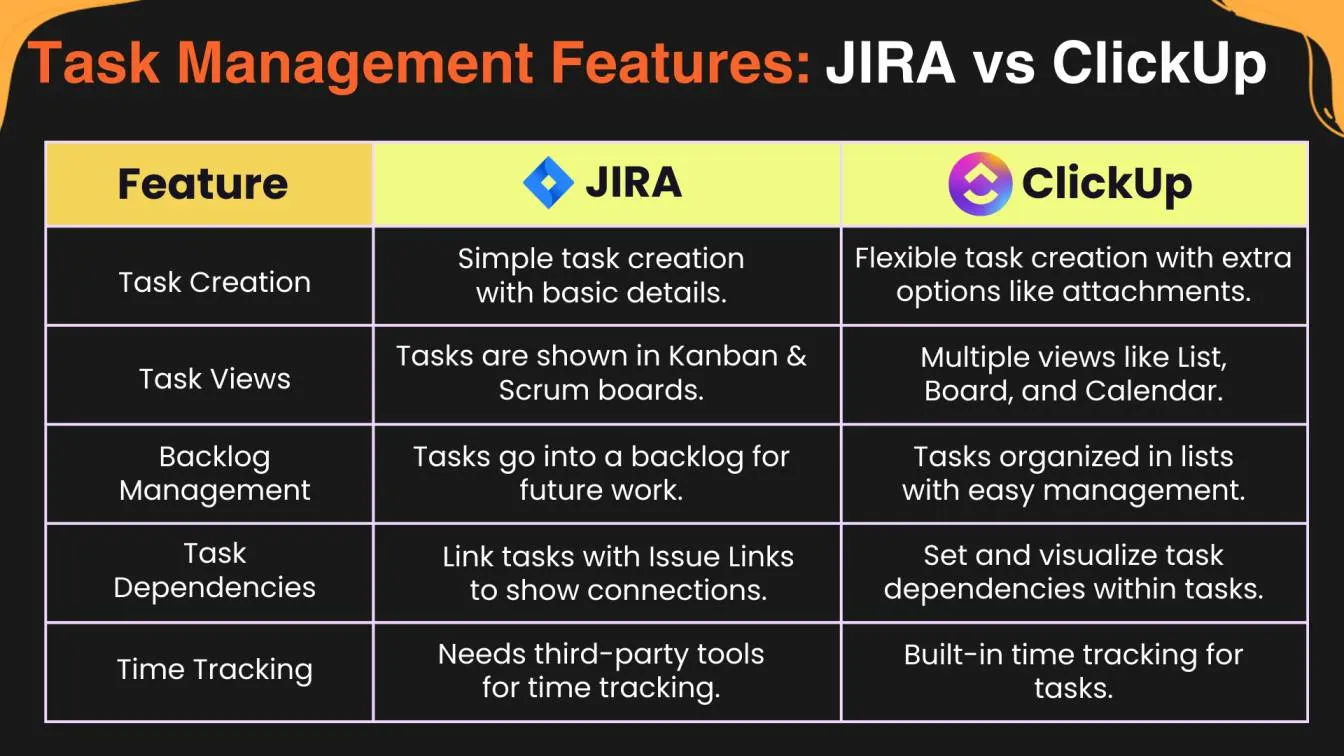
Credit: www.frugaltesting.com
Key Features That Define Clickup
ClickUp stands out with features designed to boost team productivity and simplify project management. Its flexibility suits various business types. The platform combines powerful tools in one place, helping teams organize work clearly and work together smoothly.
Flexible And Intuitive User Interface: Simplifying Project Tracking
ClickUp offers a clean and easy-to-use interface. Users can switch between different views like lists, boards, or calendars. This flexibility helps teams track projects in the way that suits them best.
- Drag-and-drop task management
- Quick task creation with customizable fields
- Clear visual indicators for task status and priority
The interface reduces confusion. Teams spend less time learning and more time doing.
Built-in Documents And Whiteboards: Enhancing Team Collaboration
ClickUp includes integrated documents and whiteboards. Teams can write notes, create plans, and brainstorm ideas without switching apps.
- Real-time collaboration on docs
- Visual whiteboards for mapping ideas
- Comments and mentions to keep conversations organized
This feature helps teams stay aligned and share ideas instantly.
Customizable Workflows And Views: Adapting To Diverse Business Needs
Workflows in ClickUp are highly customizable. Teams can tailor task statuses, priorities, and processes to fit their specific needs.
| Feature | Description |
|---|---|
| Custom Statuses | Create task stages matching company processes |
| Multiple Views | Choose from lists, boards, calendars, and more |
| Automations | Set rules to automate repetitive tasks |
This adaptability makes ClickUp fit for teams in sales, marketing, software, and more.
Integrated Time Tracking: Streamlining Productivity Monitoring
ClickUp’s built-in time tracking helps teams measure task time easily.
- Start and stop timers directly on tasks
- Review time reports to understand productivity
- Integrate with other tools for billing and payroll
This feature saves time and helps managers make better decisions about resources.
Key Features That Define Jira
Jira stands out as a powerful project management tool, especially built for software development teams. Its core features focus on managing complex workflows, supporting agile methodologies, and integrating deeply with developer tools. These strengths make Jira a popular choice for teams requiring detailed control and data insights.
Advanced Agile Workflow Management: Supporting Scrum And Kanban Teams
Jira offers robust support for agile workflows with tailored tools for both Scrum and Kanban teams. Users can easily create and manage sprints, backlogs, and boards to fit their project style.
- Customizable Scrum boards for sprint planning and tracking
- Kanban boards with real-time work-in-progress limits
- Easy backlog grooming and issue prioritization
- Drag-and-drop interface for task movement
This flexibility allows teams to adapt workflows to their agile process without losing visibility or control.
Robust Reporting And Advanced Roadmaps: Driving Data-driven Decisions
Jira includes comprehensive reporting tools that provide deep insights into project progress and team performance. These tools help managers make informed decisions and optimize workflows.
| Report Type | Purpose | Key Features |
|---|---|---|
| Burndown Charts | Track sprint progress | Visualize completed vs remaining work |
| Velocity Reports | Measure team output | Analyze story points completed per sprint |
| Advanced Roadmaps | Plan long-term projects | Visualize dependencies and timelines across teams |
These reports enable teams to spot bottlenecks and forecast delivery dates more accurately.
Deep Integration With Developer Tools: Enhancing Software Development Processes
Jira connects seamlessly with popular developer tools, enhancing coding, testing, and deployment workflows.
- Integration with Git, Bitbucket, and GitHub for code management
- Automatic linking of commits and pull requests to Jira issues
- Continuous integration and deployment (CI/CD) pipeline support
- Bug tracking with direct code references
This integration streamlines communication between developers and project managers.
Custom Workflows For Complex Company Processes: Tailored Project Control
Jira allows teams to design custom workflows that fit complex business processes beyond simple task lists.
- Define unique issue statuses and transitions
- Set permission schemes per workflow stage
- Automate actions like notifications and field updates
- Use conditional logic to control task progression
These features provide precise control over task flow and ensure compliance with company policies.
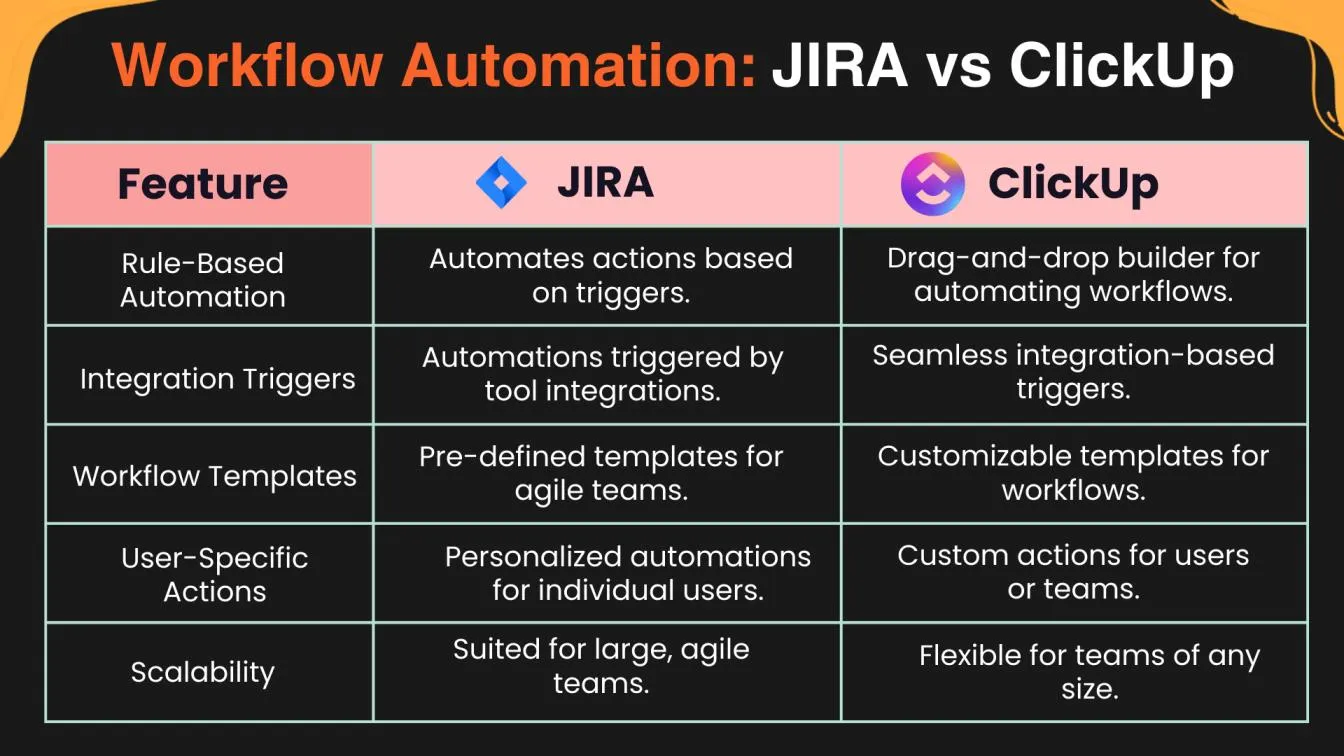
Credit: www.frugaltesting.com
Pricing And Affordability Breakdown
Understanding the pricing and affordability of ClickUp and Jira helps teams choose the right tool. Both offer plans suited for different needs and budgets. The key is comparing their costs against the features they provide. This section breaks down each platform’s pricing and shows which offers better value for various team types.
Clickup Pricing Plans: Value For Cross-functional Teams
ClickUp offers a simple pricing structure that fits cross-functional teams well. It combines project management, chat, docs, and AI in one platform.
| Plan | Price (per user/month) | Main Features |
|---|---|---|
| Free | $0 | Unlimited tasks, 100MB storage, 1,000 uses of AI features |
| Unlimited | $5 | Unlimited storage, integrations, unlimited AI features |
| Business | $12 | Advanced automation, goals, portfolios, custom exporting |
ClickUp’s pricing suits teams needing flexibility across roles. It supports project tracking, communication, and AI-powered tools in one place.
Jira Pricing Structure: Investment For Software Development Teams
Jira targets software development teams with a pricing model based on user tiers and feature access.
| Plan | Price (per user/month) | Main Features |
|---|---|---|
| Free | $0 | Up to 10 users, basic Scrum and Kanban boards |
| Standard | $7.75 | Advanced roadmaps, audit logs, 250GB storage |
| Premium | $15.25 | Global scale, advanced analytics, unlimited storage |
Jira’s pricing is designed for teams focused on Agile workflows and bug tracking. Its advanced features support complex software projects.
Cost-effectiveness: Which Tool Offers Better Roi For Different Team Types
ClickUp offers strong value for cross-functional teams needing diverse tools in one place. Its lower pricing and built-in AI reduce the need for extra apps.
Jira is better for software development teams requiring deep Agile and bug tracking features. The higher cost matches its specialized capabilities.
- Small teams: ClickUp’s free and low-cost plans save money and simplify workflows.
- Mid-sized teams: ClickUp’s business plan adds automation and reporting at a fair price.
- Large software teams: Jira Premium supports scaling with advanced tools but at a higher cost.
Overall, ClickUp delivers a higher return on investment for teams wanting all-in-one software with AI. Jira justifies its price for software teams needing complex process management.
Pros And Cons Based On Real-world Usage
Users of ClickUp and Jira often share clear insights from their daily work experience. Each tool suits different team needs and work styles. Examining real-world pros and cons helps pick the right fit for your projects.
Clickup Pros: Flexibility, Ease Of Use, And Versatility
- Flexible Setup: ClickUp allows quick setup with customizable fields. Teams can adapt it easily without heavy technical skills.
- User-Friendly Interface: Its design is simple and clear. New users find it easy to learn and use daily.
- Versatile Features: It combines project management, chat, AI tools, and more in one platform.
- All-in-One Tool: ClickUp replaces multiple software, saving time and money for teams.
- Good for Diverse Teams: Works well for marketing, sales, and operational teams, not only developers.
Clickup Cons: Potential Limitations For Highly Specialized Software Needs
ClickUp may not fit well for teams needing deep software development tools. Its features focus more on general project work than complex coding or agile workflows.
Some users find:
- Limited advanced developer tools compared to specialized software.
- Customization options may not cover very specific company processes.
- Occasional performance issues with very large projects or data sets.
Jira Pros: Powerful Agile Capabilities And Developer-centric Features
- Agile Workflow Strength: Jira excels in supporting Scrum, Kanban, and complex agile practices.
- Custom Workflows: It allows creating detailed workflows that match real company processes.
- Developer Focus: Integrated tools for coding, bug tracking, and release management.
- Scalable for Large Teams: Handles big enterprise projects and multiple teams efficiently.
- Strong Reporting: Provides detailed analytics and progress tracking tailored for software projects.
Jira Cons: Steeper Learning Curve And Less Flexibility For Non-technical Teams
Jira requires more time to learn, especially for users without technical background.
- Interface can feel complex and overwhelming for new users.
- Customization mostly targets software development, less suited for other teams.
- Setup and management often need dedicated administrators or experts.
- Not as versatile for marketing or operational teams compared to ClickUp.
Specific Recommendations For Ideal Users And Scenarios
Choosing the right project management tool depends on your team’s needs and work style. Both ClickUp and Jira serve different types of users and scenarios. Understanding where each tool excels helps teams work more efficiently.
When To Choose Clickup: Non-technical, Marketing, And Cross-functional Teams
ClickUp fits best with teams outside of software development. It offers a fast setup and easy customization without complex workflows. This makes it ideal for:
- Marketing teams managing campaigns and content calendars.
- Non-technical teams handling general project tasks and deadlines.
- Cross-functional teams needing a single platform for chat, docs, and task tracking.
ClickUp’s user-friendly interface helps teams save time and stay organized. Its all-in-one approach supports multiple workflows without needing deep technical knowledge.
When To Choose Jira: Software Development And Agile-focused Teams
Jira is designed for software development teams focused on Agile methods. It excels in:
- Bug tracking and issue management.
- Creating custom workflows that reflect real company processes.
- Supporting Scrum, Kanban, and other Agile frameworks.
Jira’s power lies in handling complex development projects with strict process requirements. It suits teams that need detailed control over tasks and progress.
Hybrid Use Cases: Combining Strengths For Complex Organizational Needs
Some organizations use both tools to maximize benefits. For example:
| Use Case | ClickUp Role | Jira Role |
|---|---|---|
| Company-wide collaboration | Manage marketing, sales, and HR projects | Manage software development workflows |
| Product Launch | Coordinate cross-team tasks and communications | Track bugs and development sprints |
| Agile Transformation | Support non-technical teams adapting Agile | Lead Agile software delivery |
This hybrid approach ensures each team uses the best tool for their work. It keeps workflows clear and reduces tool overload.
Conclusion: Making The Right Choice For Your Team
Choosing between ClickUp and Jira depends on your team’s unique needs. Both tools offer powerful features but suit different workflows and project styles. Understanding their key differences helps you pick the best fit. Consider your team size, project complexity, and preferred workflow style carefully.
Summary Of Key Differences And Benefits
| Feature | ClickUp | Jira |
|---|---|---|
| Setup Speed | Fast and easy to start with | Requires more time for configuration |
| Customization | Accessible custom fields, flexible layouts | Powerful custom workflows for complex processes |
| Best For | Versatile teams across industries | Software teams focused on Agile and bug tracking |
| User Interface | Simple and intuitive for all users | More technical, suited for developers |
| Collaboration | Integrated chat and document sharing | Strong issue tracking and sprint planning |
Assessing Your Team’s Needs And Workflow Requirements
Identify your team’s workflow style and project type first. Use this checklist:
- Project Complexity: Simple or complex workflows?
- Team Size: Small, medium, or large groups?
- Technical Skills: Developers or general users?
- Collaboration Needs: Do you need integrated chat and docs?
- Customization Level: Basic fields or custom workflows?
Teams needing rigid, Agile-focused workflows benefit from Jira. Teams requiring flexibility and fast setup favor ClickUp.
Final Thoughts On Clickup Vs Jira For Project Management Professionals
ClickUp suits teams wanting a simple, all-in-one tool. It combines tasks, chat, and AI features for smooth teamwork. It adapts quickly and saves time.
Jira fits software teams needing detailed issue tracking and custom workflows. It supports complex project structures and Agile methods well.
Both tools improve productivity but serve different users. Choose based on your team’s skills, project needs, and preferred workflows. The right choice boosts teamwork and project success.
Credit: jadealm.com
Frequently Asked Questions
Which Is Better, Clickup Or Jira?
ClickUp suits general, cross-functional teams with flexible workflows and built-in docs. Jira excels for software teams needing Agile, advanced reporting, and developer tool integration. Choose based on your team’s technical focus and workflow complexity.
Who Is Jira’s Biggest Competitor?
Jira’s biggest competitor is ClickUp, known for its versatile, user-friendly platform serving general and cross-functional teams.
Is Jira Being Phased Out?
Jira is not being phased out. Atlassian continues to support and update Jira for software teams and enterprises.
What Are The Pros And Cons Of Clickup?
ClickUp offers versatile customization, built-in docs, and an intuitive interface. It suits general teams well. Its complexity may overwhelm beginners. Some advanced features require paid plans.
Conclusion
Choosing between ClickUp and Jira depends on your team’s needs. ClickUp suits teams wanting a simple, flexible tool with many features. Jira fits software developers needing detailed workflows and bug tracking. Both tools offer strong project management but serve different purposes. Explore ClickUp’s benefits and features to see if it fits your workflow. Learn more about ClickUp here and decide which tool works best for your projects.