Todoist Vs Slack: Ultimate Showdown for Productivity Tools
Struggling to keep your tasks organized while staying connected with your team? You’re not alone.
When it comes to boosting productivity, you might wonder whether a powerful to-do list app or a robust communication platform will serve you better. That’s where the showdown between Todoist and Slack comes in. Todoist helps you gain clarity by managing your personal and work tasks seamlessly, while Slack keeps your team conversations flowing smoothly. But which one fits your style and needs? Whether you want to simplify your daily workflow or enhance team collaboration, understanding the strengths of both can transform how you work. Ready to see which tool can truly elevate your productivity? Dive into this detailed comparison and find out how Todoist might be the clarity boost you’ve been searching for.
Introduction To Todoist And Slack
Choosing the right productivity tools can shape how work gets done. Todoist and Slack serve different yet complementary purposes. Understanding their core functions helps to see how each fits in daily workflows. Both tools are popular and widely used by millions globally.
Overview Of Todoist: Purpose And Core Functionality
Todoist is a task management app focused on helping users organize personal and work tasks. It features a clean, simple interface with a to-do list view that supports drag-and-drop task management.
- Create tasks with due dates and labels for easy sorting
- Organize tasks into projects for better structure
- Receive reminders and view tasks in calendar format (Pro version)
- Sync tasks seamlessly across all devices
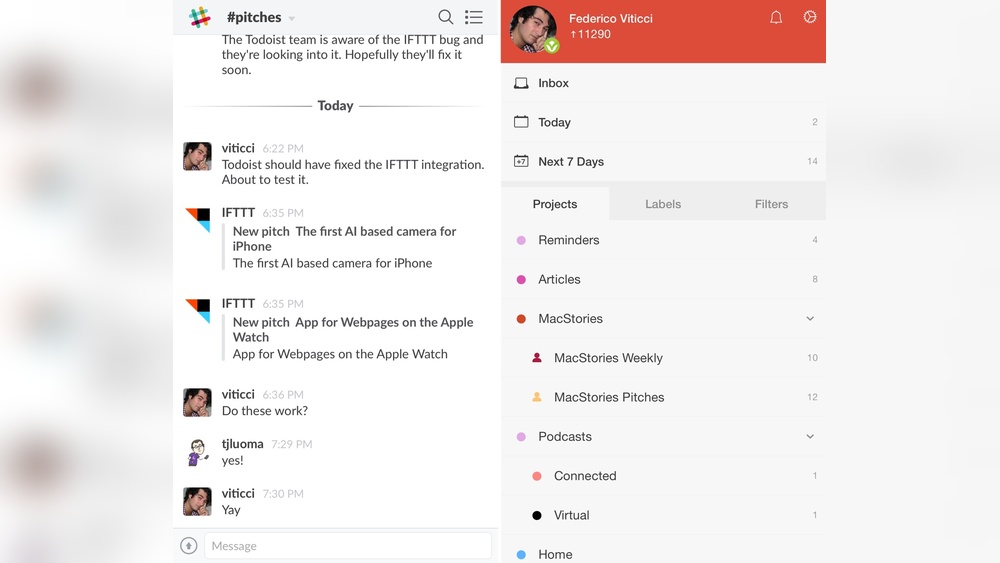
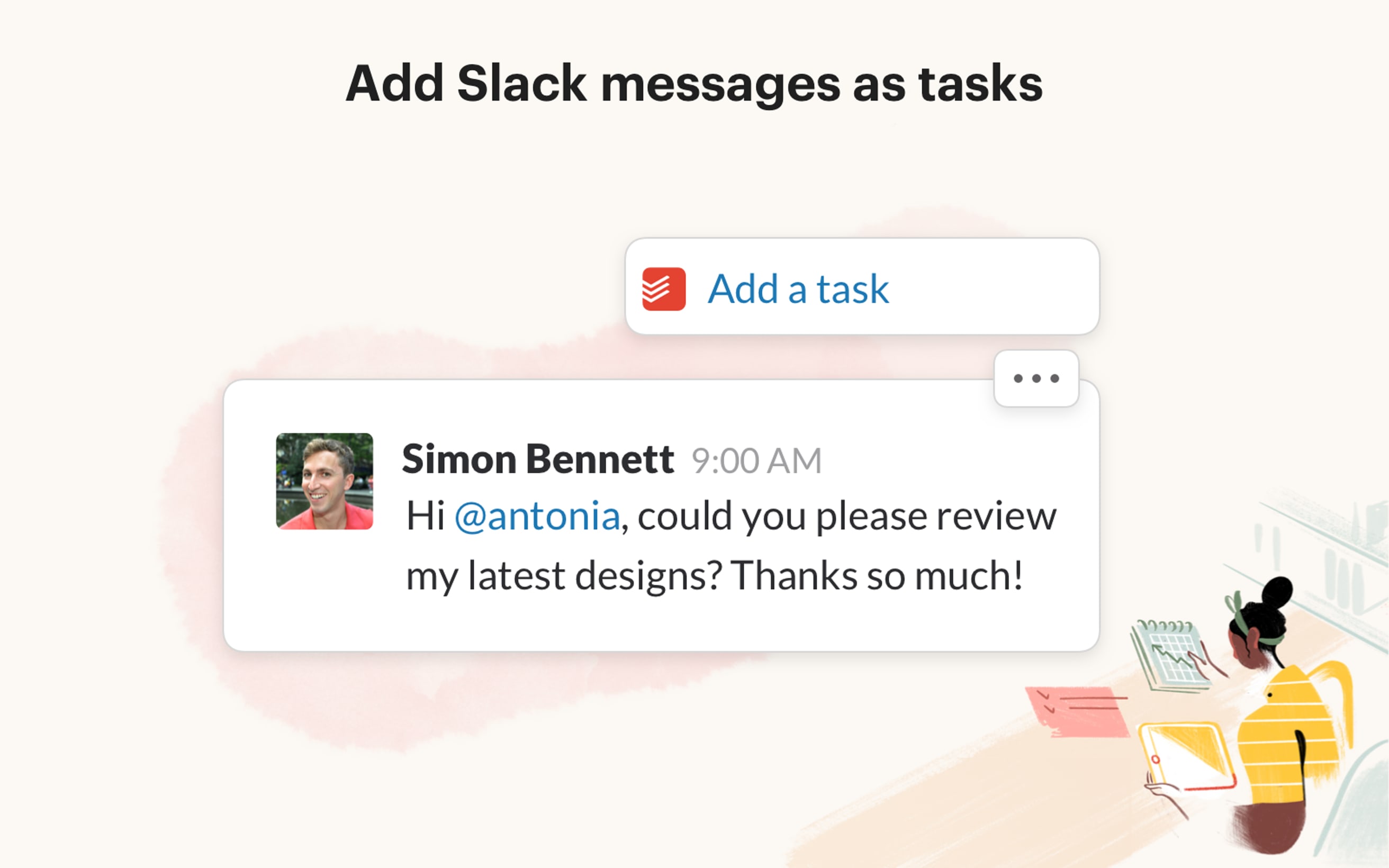
- Integrate with Slack to add tasks directly from chats using
/todoist
Todoist’s focus is clarity. It helps users keep track of what matters most without distractions.
Overview Of Slack: Purpose And Core Functionality
Slack is a communication platform designed for teams to collaborate efficiently. It brings messaging, file sharing, and workflow automation into one place.
- Organize conversations into channels or direct messages
- Share files instantly and search message history
- Connect with many productivity apps including Todoist
- Use workflow automation to reduce repetitive tasks
- Get real-time notifications to stay updated
Slack focuses on improving team communication and streamlining collaboration.
How Both Tools Fit Into The Productivity Landscape
| Aspect | Todoist | Slack |
|---|---|---|
| Primary Purpose | Task and to-do list management | Team communication and collaboration |
| Main Users | Individuals and teams managing tasks | Teams needing real-time messaging |
| Key Features | Task scheduling, reminders, project organization | Channels, direct messages, file sharing |
| Integration | Works with Slack to add tasks from chats | Supports Todoist and other productivity apps |
| Use Case | Tracking personal and team tasks clearly | Facilitating team discussions and workflows |
Together, Todoist and Slack support productivity by combining clear task management with smooth communication. This balance helps individuals and teams stay organized and connected.
Credit: www.todoist.com
Key Features That Define Todoist
Todoist stands out as a simple yet powerful task management app. It helps users organize daily tasks and projects clearly. Its design focuses on ease of use and smooth workflow. The app suits both personal and professional needs. Below are the key features that make Todoist a preferred choice for millions.
Task Management And Organization: Simplifying To-do Lists
Todoist offers a clean to-do list view with drag-and-drop functionality. Users can easily create, reorder, and group tasks. Tasks can be sorted into projects for better clarity.
- Create tasks quickly with natural language input.
- Organize tasks using labels and filters.
- Use priority levels to highlight important tasks.
This structure reduces clutter and keeps the focus on what matters most.
Reminders And Due Dates: Staying On Track Effortlessly
Setting due dates and reminders helps users meet deadlines. Todoist supports:
- One-time or recurring due dates.
- Push notifications to remind about upcoming tasks.
- Location-based reminders on mobile devices.
These features ensure tasks are completed on time without extra effort.
Cross-platform Syncing: Accessing Tasks Anytime, Anywhere
Todoist syncs tasks instantly across all devices and platforms. Users can:
| Platform | Access Method |
|---|---|
| Desktop | Windows, Mac App |
| Mobile | iOS, Android Apps |
| Web | Browser-based interface |
This ensures seamless task management wherever users go.
Project And Collaboration Features: Enhancing Team Productivity
Todoist supports collaborative projects for teams. Features include:
- Shared projects with task assignment.
- Comments on tasks for clear communication.
- Activity tracking to monitor progress.
Teams stay aligned and productive with real-time updates.
Integration With Other Tools: Extending Todoist’s Reach
Todoist connects with popular apps to streamline workflows. Key integrations include:
- Slack: Create tasks inside Slack using the
/todoistcommand. - Calendar apps to view tasks alongside events.
- Other productivity tools via third-party services.
These integrations reduce app switching and keep tasks centralized.
Key Features That Define Slack
Slack stands out as a powerful platform built to enhance team communication and collaboration. It combines messaging, file sharing, and automation in one place. This helps teams stay connected and work efficiently across different projects and tasks. The features below highlight what makes Slack a preferred tool for many teams.
Real-time Messaging And Channels: Streamlining Team Communication
Slack offers real-time messaging that keeps conversations fast and clear. Teams can create channels for specific topics, projects, or departments. Channels organize discussions and reduce email overload.
- Public and private channels for focused communication
- Direct messages for one-on-one chats
- Threaded replies to keep conversations tidy
This system helps teams avoid confusion and stay on the same page.
File Sharing And Collaboration: Centralizing Work Resources
Slack allows users to share files easily within conversations. This centralizes documents, images, and other resources in one place. Team members can comment on files, making feedback quicker.
- Drag and drop file uploads
- Preview files without leaving Slack
- Searchable file history for quick access
This feature removes the need for separate file-sharing tools and keeps everything connected.
Integration Ecosystem: Connecting With Various Productivity Apps
Slack supports integrations with hundreds of productivity apps. This creates a hub where teams can manage tasks, calendars, and more without switching tools.
| App Type | Examples | Purpose |
|---|---|---|
| Task Management | Todoist, Asana | Create and track tasks inside Slack |
| File Storage | Google Drive, Dropbox | Access and share cloud files |
| Calendars | Google Calendar, Outlook | View and manage events |
These integrations help teams work without losing focus or time.
Custom Notifications And Workflow Automation: Reducing Noise And Boosting Efficiency
Slack offers custom notification settings to control alerts. Users can mute channels or set keywords to get alerts only when needed.
Workflow automation tools automate routine tasks, reducing manual work. For example:
- Automatically assign tasks based on messages
- Send reminders for deadlines
- Create task boards using third-party apps
This keeps teams productive and limits distractions.
Video And Voice Calls: Supporting Remote Interaction
Slack includes built-in video and voice call features. Teams can start calls directly from channels or direct messages. This supports remote work and quick problem-solving.
- One-on-one or group calls
- Screen sharing for presentations
- Integration with tools like Zoom for advanced needs
These tools help teams maintain clear and personal communication despite distance.
Credit: thesweetsetup.com
Pricing And Affordability Breakdown
Choosing between Todoist and Slack often depends on the cost and value each offers. Both tools provide tiered pricing plans designed to fit different needs. Understanding their pricing structures helps decide which suits your budget and requirements best.
Todoist Pricing Plans: From Free To Premium And Business Options
Todoist offers a straightforward pricing model with three main plans:
| Plan | Price (Monthly) | Key Features |
|---|---|---|
| Free | $0 | Basic task management, 5 active projects, 5 collaborators per project |
| Premium | $4/month | Reminders, labels, filters, calendar view, automatic backups |
| Business | $6/user/month | Team management, admin controls, priority support, 50+ active projects |
Todoist’s plans suit individuals and teams who want simple task management with added productivity tools at affordable prices.
Slack Pricing Tiers: Free, Standard, Plus, And Enterprise Grid
Slack’s pricing includes multiple options to scale with team size and needs:
| Plan | Price (Per User/Month) | Key Features |
|---|---|---|
| Free | $0 | 10k message history, 1:1 video calls, 10 integrations |
| Standard | $7.25 | Unlimited message history, group calls, guest accounts, unlimited integrations |
| Plus | $12.50 | Advanced identity management, compliance exports, 24/7 support |
| Enterprise Grid | Custom pricing | Enterprise-level security, compliance, and support |
Slack’s pricing reflects its focus on communication and collaboration for teams of all sizes.
Value For Money: Which Tool Offers Better Roi Based On Features
Todoist delivers excellent value for task management. The Premium plan adds useful features like reminders and calendar views at a low monthly cost. Business users get team controls and project limits that scale well.
Slack is more expensive but offers richer collaboration tools. The free plan limits message history, which may slow teams. Paid plans unlock full communication and integration potential.
For pure task organization, Todoist offers a higher return on investment. For teams needing real-time chat and file sharing, Slack’s pricing fits its broader feature set.
Considerations For Small Teams Versus Large Enterprises
- Small Teams: Todoist’s Business plan is affordable and easy to use for managing tasks without extra communication layers.
- Small Teams: Slack’s Free or Standard plans suit teams needing active chat and quick collaboration on projects.
- Large Enterprises: Slack’s Enterprise Grid offers security and compliance crucial for big organizations.
- Large Enterprises: Todoist Business may be paired with Slack or other tools for comprehensive workflow management.
Choosing depends on team size, budget, and whether task management or communication is the priority.
Pros And Cons Based On Real-world Usage
Choosing between Todoist and Slack depends on what users need most. Each tool shines in different areas. Understanding their strengths and weaknesses helps pick the right one for daily work and life management.
Advantages Of Using Todoist: Simplicity, Task Focus, And Flexibility
Todoist offers a clean and simple interface. This makes managing tasks easy and fast. Users can create tasks, set due dates, and organize projects with just a few clicks.
- Intuitive To-Do Lists: Drag-and-drop tasks help prioritize work quickly.
- Task Focus: The app centers around task completion, reducing distractions.
- Flexibility: Works on multiple devices, syncing tasks in real time.
- Custom Labels and Filters: Users can tailor task views to fit personal workflows.
Todoist also integrates with Slack, so users can add tasks without leaving chats.
Limitations Of Todoist: Collaboration Constraints And Feature Gaps
Todoist lacks some collaboration features that teams need. It focuses more on individual task management.
- Limited Team Communication: No built-in chat or video calls.
- Basic Sharing Options: Task comments and file attachments are minimal.
- Feature Gaps: Advanced project management tools like Gantt charts are missing.
Users may find it less suitable for large teams needing constant communication.
Advantages Of Using Slack: Robust Communication And Integration
Slack excels at keeping teams connected. It offers multiple ways to communicate and share files.
- Real-Time Messaging: Channels and direct messages keep conversations organized.
- File Sharing: Easy to upload and access documents within chats.
- Wide Integrations: Connects with many tools including Todoist for task management.
- Workflow Automation: Bots and apps reduce repetitive work.
This makes Slack ideal for team collaboration and fast decision-making.
Limitations Of Slack: Potential For Distraction And Complexity
Slack can overwhelm users with constant notifications and messages. This may reduce focus.
- Distraction Risk: Frequent alerts interrupt deep work.
- Complex Setup: Managing channels and integrations can be confusing.
- Learning Curve: New users may need time to navigate all features.
Slack’s strength in communication can become a challenge without proper boundaries.
Ideal Users And Use Cases For Todoist And Slack
Choosing between Todoist and Slack depends on your team’s workflow and communication style. Both tools serve different purposes but can complement each other well. Understanding who benefits most from each platform helps in selecting the right tool for your needs.
Who Benefits Most From Todoist: Individual Contributors And Task-oriented Teams
Todoist suits individuals and teams focused on managing tasks and deadlines clearly. It excels at organizing personal and work tasks with simple to-do lists and powerful features.
- Individual contributors who need to track daily tasks and projects
- Task-oriented teams that prioritize clear task assignments and deadlines
- Users who prefer a clean, distraction-free interface for planning
- People who want to categorize tasks with labels, due dates, and projects
Features like drag-and-drop task management and calendar views help users stay focused on what matters. Todoist also syncs tasks across devices, so work stays updated everywhere.
Who Benefits Most From Slack: Collaborative Teams And Fast-paced Work Environments
Slack is built for teams that thrive on communication and quick collaboration. It connects people through messaging, channels, and file sharing.
- Collaborative teams needing real-time conversations
- Groups working in fast-paced environments requiring instant updates
- Teams that benefit from integrating multiple tools into one platform
- Users who want to automate workflows and share files easily
Slack’s channels organize conversations by topic, project, or team. Its strong integration ecosystem keeps work flowing without switching apps.
Scenarios Where Combining Todoist And Slack Enhances Productivity
Using Todoist and Slack together brings clarity and collaboration into one workflow. Here are ways they work well combined:
| Use Case | Benefit |
|---|---|
| Task creation from Slack messages | Create Todoist tasks directly within Slack using the /todoist command |
| Team updates with task progress | Share task status in Slack channels for transparency |
| Reducing app switching | Manage tasks and conversations without leaving Slack |
| Combining communication and organization | Keep conversations in Slack and detailed task plans in Todoist |
This integration suits teams needing both clear task management and dynamic communication.
When To Choose Alternatives Or Complementary Tools
Some teams need more than what Todoist or Slack offer alone. Consider other options if:
- You require advanced project management with Gantt charts or resource allocation
- Your team needs video conferencing combined with messaging
- Task dependencies and complex workflows are critical
- You want a unified platform that covers all collaboration and task needs
Complementary tools like Trello, Asana, Microsoft Teams, or Zoom may fit better in these cases. Each tool has strengths tailored to specific work styles.
Integration Possibilities Between Todoist And Slack
The integration between Todoist and Slack connects task management with team communication. This blend helps users stay organized while chatting and collaborating. It reduces the need to switch apps, saving time and effort.
Combining these tools supports smoother workflows and clearer task tracking. Teams can manage tasks directly inside Slack, keeping work focused and efficient.
How Todoist Integrates With Slack To Streamline Task Management
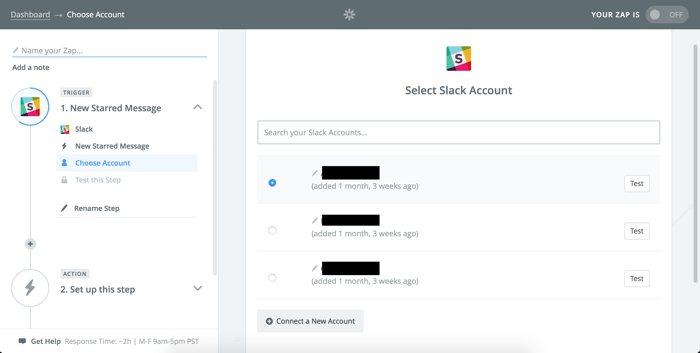
Todoist links to Slack through the Todoist Slack app. Users add this app to their Slack workspace to start managing tasks instantly.
- Use the
/todoistcommand to create new tasks inside Slack. - Assign tasks to projects and set due dates without leaving chat.
- Receive notifications about task updates and completions in Slack channels.
This integration bridges communication and task tracking, making task management part of daily conversations.
Benefits Of Using The Todoist Slack App: Creating And Tracking Tasks Seamlessly
The Todoist Slack app offers several benefits:
- Quick task creation: Add tasks instantly from messages using simple commands.
- Task tracking: Get updates on task progress within Slack.
- Centralized workflow: Manage tasks without switching between apps.
- Improved team coordination: Share tasks and deadlines easily in channels.
This tool suits individuals and teams who want to keep work organized inside Slack.
Examples Of Workflow Enhancements Through Integration
| Scenario | How Integration Helps |
|---|---|
| Team Meeting Action Items | Create tasks during meetings directly from Slack messages for follow-up. |
| Project Updates | Receive automatic task status alerts in project channels to track progress. |
| Deadline Reminders | Get reminders about upcoming due dates without leaving Slack. |
| Collaborative Task Assignment | Assign tasks to team members in Slack conversations instantly. |
Limitations And Areas For Improvement In The Integration
Some limits exist in the current Todoist-Slack integration:
- Limited task editing: Complex task edits often need switching to Todoist.
- Notification overload: Frequent alerts in Slack may distract users.
- Restricted features: Some Todoist Pro functions do not appear in Slack.
- Interface constraints: Slack’s chat-based interface limits detailed task views.
Users may expect deeper integration and more control directly within Slack in the future.

Credit: productivity.academy
Comparing Todoist And Slack Against Their Key Competitors
Todoist and Slack serve distinct but overlapping roles in productivity and communication. Todoist focuses on task management, helping individuals organize their work and personal tasks. Slack excels in team messaging and collaboration, streamlining communication in real time.
Both platforms face strong competitors that challenge their features and user base. Understanding these alternatives helps users choose the right tool for their needs.
Microsoft Teams: The Main Rival In Enterprise Communication
Microsoft Teams stands as the strongest competitor to Slack in enterprise settings. It offers:
- Integrated chat with channels and direct messages
- Video conferencing and calling features
- Deep integration with Microsoft 365 apps like Outlook, Word, and Excel
- Robust security and compliance tools for businesses
Teams blends communication and collaboration into one platform, making it popular in large organizations. Its seamless Office app integration often gives it an edge over Slack in workflows tied to Microsoft products.
Google Chat And Zoom Team Chat: Alternatives For Collaboration
Google Chat and Zoom Team Chat provide solid alternatives for teams seeking simple chat solutions combined with video calls.
| Feature | Google Chat | Zoom Team Chat |
|---|---|---|
| Messaging | Threaded conversations, group chat | Channels and direct messages |
| Video Calls | Integrated with Google Meet | Zoom video conferencing built-in |
| Integration | Google Workspace apps | Zoom ecosystem and third-party apps |
| Use Case | Best for Google users | Best for video-focused teams |
Both platforms support collaboration but lack some task management depth found in Todoist.
Project Management Competitors: Asana, Clickup, And More
Todoist’s main rivals in task and project management include Asana and ClickUp. They offer:
- Asana: Visual project tracking, timeline views, and team collaboration features.
- ClickUp: Highly customizable workflows, docs, and goal tracking tools.
Both platforms cater to complex project needs with:
- Multiple task views (list, board, calendar)
- Advanced automation and integrations
- Team collaboration spaces
Todoist remains simpler and focused on personal and small team task management.
Niche Alternatives: Mattermost, Rocket.chat, And Ai-first Apps
Mattermost and Rocket.Chat offer open-source chat solutions. They appeal to teams needing control over data and customization. Features include:
- Self-hosting options
- End-to-end encryption
- Custom integrations and bots
AI-first apps are emerging as new alternatives. They provide:
- AI-powered task suggestions
- Smart message summaries
- Automated workflows
These niche players push innovation but lack the broad user base of Todoist or Slack.
Final Verdict: Choosing Between Todoist And Slack
Deciding between Todoist and Slack depends on your team’s specific needs. Both tools serve different purposes but can complement each other well. Todoist focuses on task management and personal productivity. Slack excels at team communication and collaboration. Understanding their strengths and weaknesses helps make the right choice.
Summary Of Strengths And Weaknesses
| Feature | Todoist | Slack |
|---|---|---|
| Main Function | Task management with to-do lists and deadlines | Team chat and collaboration platform |
| User Interface | Simple, clean, drag-and-drop tasks | Channels and messaging with file sharing |
| Key Strength | Organizing personal and team tasks clearly | Real-time communication and workflow automation |
| Integration | Connects with Slack for task creation inside chats | Supports many apps including Todoist |
| Limitations | Limited communication features | Not designed for detailed task management |
Decision Factors Based On Team Size, Workflow, And Priorities
- Small teams or individuals: Todoist suits those needing clear task tracking.
- Medium to large teams: Slack fits teams needing fast, organized communication.
- Workflows focused on task completion: Todoist helps plan and track progress easily.
- Workflows needing collaboration: Slack supports instant messaging and file sharing.
- Priority on deadlines and reminders: Todoist’s features keep tasks on schedule.
- Priority on discussions and quick updates: Slack’s channels keep everyone in sync.
Future Trends And How Each Tool Is Evolving
Todoist continues to improve task management with better calendar views and reminders. It aims to simplify personal and team productivity further.
Slack focuses on enhancing integrations and workflow automation. It works to create smoother communication and reduce app switching.
Both tools are evolving to work better together. Their integrations help teams manage tasks and communicate without leaving one platform.
Recommendations To Maximize Productivity Regardless Of Choice
- Use Todoist for detailed task planning and deadline tracking.
- Use Slack for fast, clear communication and sharing files.
- Connect Todoist with Slack to create and update tasks within chats.
- Set clear priorities and deadlines to stay on track.
- Regularly review tasks and conversations to avoid missing updates.
- Customize notifications to reduce distractions and focus on important work.
Frequently Asked Questions
Who Is Slack’s Biggest Competitor?
Slack’s biggest competitor is Microsoft Teams, offering strong enterprise integration and widespread adoption. Other notable rivals include Google Chat, Zoom Team Chat, and Mattermost. These platforms provide alternative communication and collaboration features suited for various business needs.
Is Todoist Still Worth It?
Todoist remains worth it for simple task management and productivity. Its Pro version adds useful features like reminders, themes, and backups. Integration with tools like Slack enhances workflow. It suits users seeking a straightforward, reliable digital planner.
Does Todoist Sync With Slack?
Yes, Todoist syncs with Slack through its app. Use the /todoist command to create tasks directly in Slack. Tasks sync automatically across Todoist apps.
What Is Replacing Slack?
Microsoft Teams is the leading Slack replacement, offering deep integration and enterprise adoption. Other alternatives include Google Chat, Zoom Team Chat, Mattermost, and AI-focused apps like Glue. These tools provide various collaboration and communication features to suit different business needs.
Conclusion
Choosing between Todoist and Slack depends on your needs. Todoist keeps tasks clear and organized. Slack helps teams talk and share easily. Many find using both tools together works best. Manage tasks in Todoist while chatting on Slack. This combo makes work smoother and less stressful. Explore Todoist’s features yourself by visiting https://lifetimedeallab.com/todoist. Simple task management can bring more focus to your day. Give it a try and see what fits you best.