Todoist Advanced Features: Unlock Productivity Like a Pro
Are you ready to take your productivity to the next level? If you’ve been using Todoist for managing your daily tasks, it’s time to discover its advanced features that can transform the way you organize your work and life.
These powerful tools are designed to help you gain clarity, reduce overwhelm, and focus on what truly matters. Whether you want to break down big projects, set smart reminders, or customize your workflow, Todoist has the options you need to stay on top of everything effortlessly. Don’t just manage your tasks—master them with Todoist’s advanced features. Ready to unlock your full potential? Check out Todoist here and start simplifying your life today: Get Todoist Now.
Credit: zapier.com
Introduction To Todoist And Its Advanced Features
Todoist is a popular productivity tool designed to help millions organize tasks clearly and efficiently. It offers a simple yet powerful way to manage daily tasks, projects, and goals. The app’s advanced features provide extra tools for users seeking greater control and clarity over their work and life.
These features improve task management and support focus, especially for users with busy schedules or special needs like ADHD. Understanding these capabilities can transform how you plan your day and achieve your objectives.
Overview Of Todoist As A Productivity Tool
Todoist is a to-do list app used by over 50 million people worldwide. It works on many devices, syncing tasks across phones, tablets, and computers.
- Task Management: Add, organize, and prioritize tasks easily.
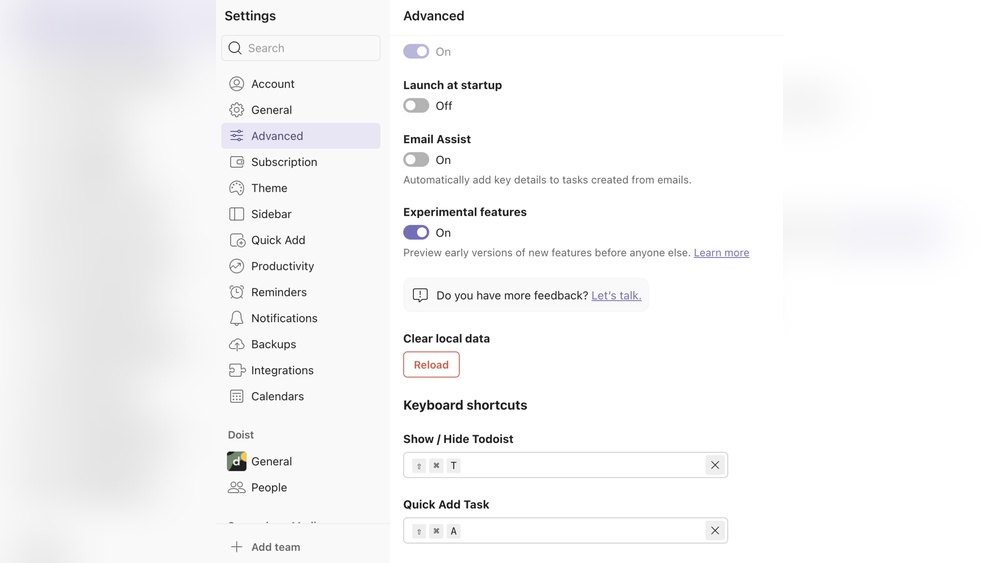
- Natural Language Input: Quickly create tasks using simple phrases like “Meeting tomorrow at 9 AM.”
- Visual Organization: Use projects, labels, and filters to keep tasks clear and sorted.
- Reminders and Due Dates: Set alerts to never miss deadlines.
- Collaboration: Share projects and assign tasks to team members.
The interface is clean and minimal, reducing distractions and helping users focus on what matters most. It supports breaking down big projects into smaller steps, making work less overwhelming.
Purpose And Benefits Of Unlocking Advanced Features
Advanced features in Todoist add depth to basic task management. They help users manage complex workflows and improve productivity.
| Feature | Benefit |
|---|---|
| Custom Filters | Focus on specific tasks by filtering by date, priority, or project. |
| Task Labels | Tag tasks to group and find them easily. |
| Reminders | Receive alerts for important deadlines and routines. |
| Task Comments & File Attachments | Add details and relevant files directly to tasks. |
| Productivity Trends | Track your task completion patterns to improve habits. |
These features reduce mental load by keeping your tasks clear and manageable. They support building routines and maintaining focus, which is especially helpful for people with executive function difficulties.
Using advanced options leads to better task clarity, stronger work habits, and less stress. It turns Todoist into a powerful tool for both simple daily tasks and complex projects.
Unique Advanced Features Of Todoist And Their Benefits
Todoist offers several advanced features that improve task management and boost productivity. These tools help users organize tasks clearly and handle complex projects with ease. Each feature is designed to save time, reduce stress, and keep your focus sharp.
Smart Quick Add: Capture Tasks Instantly With Natural Language
The Smart Quick Add lets you add tasks fast using natural language. Type phrases like “Call John tomorrow at 3pm” and Todoist automatically sets the task and reminder.
- Speeds up task entry
- Understands dates and times
- Reduces manual setup
This feature keeps your workflow smooth and avoids forgetting important tasks.
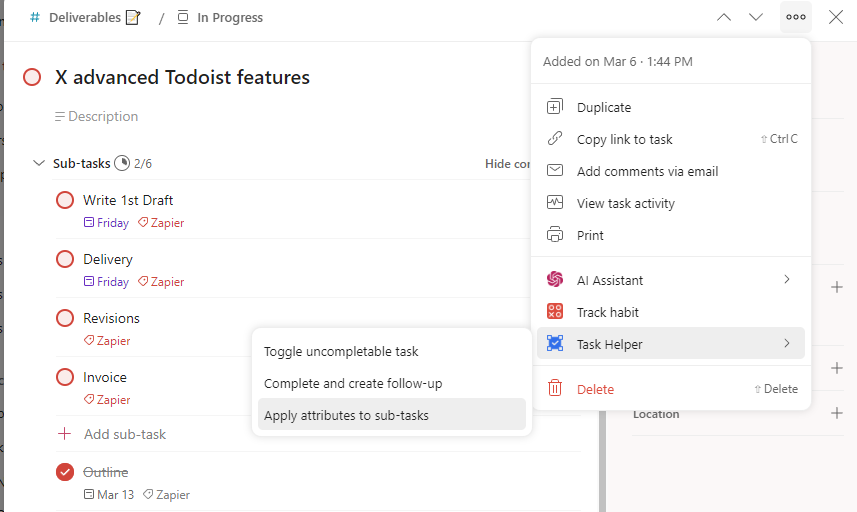
Task Breakdown With Subtasks: Simplify Complex Projects
Large projects can be overwhelming. Todoist allows you to break tasks into subtasks, making them easier to manage.
- Divide big tasks into small steps
- Track progress clearly
- Focus on one step at a time
Subtasks improve clarity and help finish projects without stress.
Custom Filters And Labels: Personalize Task Views For Focus
Custom filters and labels let you sort and view tasks your way. Create filters based on priority, project, or due dates to focus on what matters.
| Feature | Benefit |
|---|---|
| Custom Filters | See tasks by specific criteria |
| Labels | Group tasks by type or context |
Personalized views reduce distractions and enhance focus.
Reminders And Recurring Tasks: Build Consistent Routines
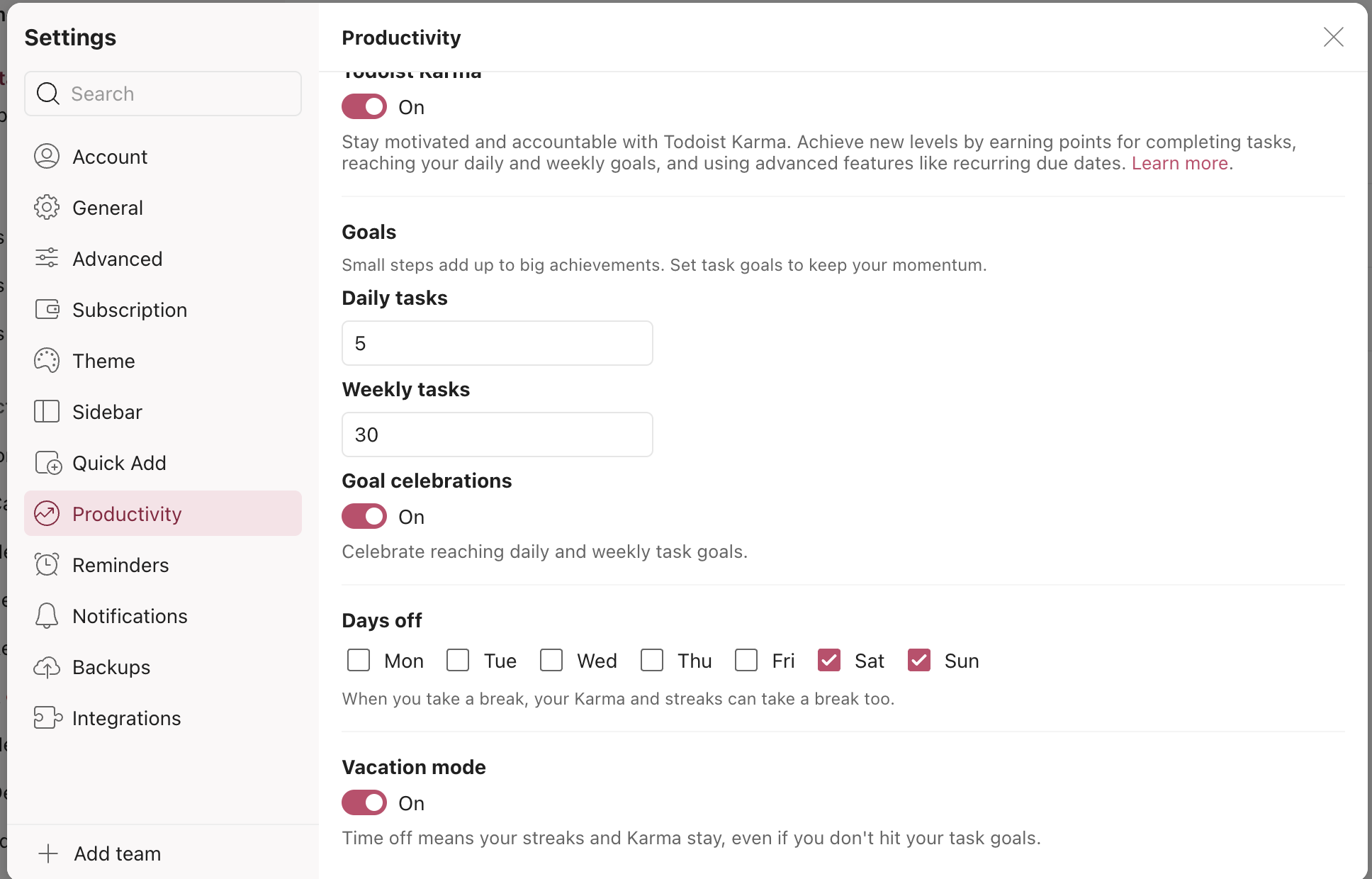
Set reminders for important deadlines and create recurring tasks for daily habits. Todoist keeps routines steady and prevents missed tasks.
- Never forget deadlines
- Establish regular habits easily
- Customize alerts by time or location
Email-to-task Integration: Seamlessly Convert Emails Into Action Items
Turn emails into tasks with Todoist’s email-to-task feature. Forward emails to your Todoist inbox to add them as actionable tasks.
This helps you manage work without switching apps or losing important info.
Board And List Layouts: Visualize Tasks Your Way
Choose between board or list layouts to organize tasks visually.
- List view offers a classic, simple task list
- Board view uses columns to track task stages
This flexibility helps match your workflow style and improves task tracking.
Ai-powered Suggestions And Task Prioritization
Todoist uses AI-powered suggestions to recommend task priorities and deadlines.
- Prioritize tasks based on urgency
- Get smart reminders for key tasks
- Optimize daily task lists
AI support keeps your plan realistic and focused.
Two-minute Rule Implementation: Quick Decision-making For Small Tasks
Apply the Two-Minute Rule by completing tasks under two minutes immediately. Todoist helps spot and manage these small tasks fast.
- Prevents task buildup
- Keeps your list lean
- Boosts daily productivity
This habit reduces overwhelm and clears your to-do list quickly.
Pricing And Affordability Of Todoist Advanced Features
Todoist offers a simple pricing structure that fits various needs. Its advanced features come in different plans, designed to suit both casual users and professionals. Understanding the cost and benefits helps decide which plan works best for you.
Comparison Of Free Vs. Premium Plans
| Feature | Free Plan | Premium Plan (Todoist Pro) |
|---|---|---|
| Tasks & Projects | Up to 80 active projects | Up to 300 active projects |
| Reminders | Not included | Included (push, email, SMS) |
| Labels & Filters | Not included | Up to 150 labels and filters |
| File Uploads | Up to 5 MB per file | Up to 100 MB per file |
| Activity History | 7 days | 30 days |
| Collaboration | Basic sharing | Advanced sharing with comments |
The free plan covers basic task management. It fits users who want simple to-do lists. The Premium plan offers more tools for organization and productivity. It suits professionals or users with complex needs.
Value For Money: What You Get With Todoist Pro
Todoist Pro costs less than many productivity apps. It adds powerful features that improve focus and task control. These include:
- Reminders: Never miss important deadlines.
- Labels and Filters: Sort tasks by context and priority.
- Comments and File Uploads: Add details to tasks easily.
- Activity Log: Review task changes over 30 days.
- Project Templates: Save time with reusable project setups.
These tools help manage work clearly and reduce stress. The cost is reasonable compared to the benefits.
Discounts And Special Offers For Users
Todoist offers occasional discounts, especially for annual subscriptions. Common deals include:
- Annual Plan Savings: Up to 17% off the monthly price.
- Student Discounts: Special pricing for verified students.
- Team Plans: Reduced rates for multiple users.
Keep an eye on the official website for seasonal promotions or bundle offers. Subscribing yearly often lowers the overall cost.
Pros And Cons Based On Real-world Usage
Todoist offers advanced features that many users find helpful for managing tasks. These features improve productivity but also come with some challenges. This section explores the benefits and drawbacks based on actual user experience. Understanding these points helps to decide if Todoist fits your workflow.
Advantages Of Using Todoist’s Advanced Features For Productivity
- Quick Task Capture: Add tasks fast using natural language, like “Call dentist tomorrow.”
- Visual Clarity: The clean interface and customizable filters reduce distractions and keep focus on important tasks.
- Task Breakdown: Subtasks allow breaking big projects into small, manageable steps, lowering overwhelm.
- Reminders and Routines: Set due dates and recurring tasks to maintain consistency and avoid missing deadlines.
- Flexible Organization: Labels, priorities, and project views help tailor task management to personal needs.
These features support users, including those with ADHD, by simplifying task handling and improving focus.
Challenges And Limitations To Be Aware Of
- Advanced features can feel complex and overwhelming at first.
- Too many filters and labels may cause confusion instead of clarity.
- Some users report occasional syncing delays across devices.
- Learning curve exists for mastering all functionalities.
- Free version limits access to some powerful features.
Despite its strengths, Todoist requires time to adapt and optimize usage for personal workflows.
User Feedback And Common Pain Points
| Positive Feedback | Common Pain Points |
|---|---|
| Easy task entry with natural language. | Feature overload can lead to distraction. |
| Helps maintain routines and deadlines. | Sync issues occasionally disrupt workflow. |
| Supports breaking down projects effectively. | Customization options sometimes confusing. |
| Simple, clean interface favored by many. | Limited free plan features frustrate some users. |
Users appreciate the productivity boost but suggest careful setup to avoid overwhelm.
Ideal Users And Scenarios For Unlocking Todoist’s Advanced Features
Todoist’s advanced features suit many users who need clear, flexible ways to handle tasks. These features help organize complex projects, manage habits, and keep focus strong. People with different needs find value here—from students to professionals and those with attention challenges. Understanding who benefits most helps users apply Todoist smartly.
How Adhd Users Benefit From Structured Yet Flexible Task Management
People with ADHD often struggle with focus and task overload. Todoist offers a structured system that stays flexible enough to adjust daily. The quick task capture lets users add tasks instantly using natural language, like “Email boss tomorrow”. This reduces mental clutter.
The clean interface and custom filters highlight important tasks, reducing distractions and helping with “time blindness.” Breaking big tasks into smaller steps prevents overwhelm. Reminders and recurring tasks support building steady routines. Todoist’s design keeps users on track without feeling restricted.
Suitability For Professionals Managing Complex Projects
Professionals juggling many projects find Todoist’s advanced tools practical. Features like project templates, labels, and filters organize tasks by priority, deadline, or team member. This clarity improves workflow and deadlines.
| Feature | Benefit |
|---|---|
| Project Templates | Save time by reusing common task structures |
| Labels & Filters | Sort and view tasks by context or urgency |
| Comments & File Attachments | Keep all info and feedback in one place |
Collaboration features help teams stay aligned. These tools reduce confusion and increase productivity in busy work environments.
Use Cases For Students And Daily Habit Builders
Students use Todoist to manage assignments, exams, and study schedules. The ability to set recurring tasks and reminders helps maintain study habits and deadlines. Breaking down projects into smaller tasks makes large assignments less daunting.
- Track homework and project deadlines
- Set daily review or reading habits
- Plan study sessions with reminders
Habit builders use Todoist to create daily routines, like exercise or meditation. The app’s flexibility adapts to personal goals and changing schedules.
Tips For Getting Started Without Overwhelm
- Start with basic task lists before adding filters or labels.
- Use natural language to add tasks quickly.
- Focus on one feature at a time, like reminders or project templates.
- Break big tasks into small, manageable steps.
- Review and adjust task priorities weekly.
Taking small steps helps users learn Todoist without stress. Avoid adding too many features at once to keep the system clear and useful.
Credit: www.todoist.com
Conclusion: Maximizing Productivity Like A Pro With Todoist
Todoist offers powerful tools to boost productivity and keep tasks organized. Its advanced features help users focus on what matters most. These tools simplify task management, reduce stress, and improve daily routines.
Using Todoist effectively means working smarter, not harder. The app’s design supports clear thinking and task clarity. This leads to better time use and more consistent progress toward goals.
Summary Of Key Takeaways
- Quick Capture: Add tasks fast using natural language input.
- Visual Clarity: Use custom filters and calendar views to see priorities.
- Task Breakdown: Create subtasks to manage large projects easily.
- Reminders & Routines: Set due dates and recurring tasks to build habits.
- ADHD-Friendly Design: Supports focus with minimal distractions and clear structure.
These features help reduce overwhelm and keep your workflow steady. Todoist turns complex task lists into simple, manageable steps.
Next Steps To Unlock And Master Advanced Features
- Explore Natural Language Input: Type tasks like “Email John tomorrow at 9 AM” to save time.
- Set Up Custom Filters: Focus on specific projects or task types with tailored views.
- Use Labels and Priorities: Organize tasks by context and urgency for better clarity.
- Create Recurring Tasks: Automate regular duties to build strong habits.
- Integrate with Your Calendar: Sync Todoist with calendars for a clear daily overview.
- Review and Adjust Weekly: Check progress and tweak task lists to stay on track.
Practice these steps regularly. Over time, advanced features become second nature, making task management effortless. Todoist helps maintain focus and keeps your goals in sight.
Credit: zapier.com
Frequently Asked Questions
What Is The 1/3/5 Rule In Todoist?
The 1/3/5 rule in Todoist means planning one big task, three medium tasks, and five small tasks daily. It balances workload effectively.
Is Todoist Adhd Friendly?
Yes, Todoist suits ADHD well. It offers quick task capture, clear visuals, reminders, and task breakdowns to reduce overwhelm and boost focus.
What Is The Two Minute Rule In Todoist?
The two-minute rule in Todoist means completing tasks that take less than two minutes immediately. Delegate or delete non-actionable tasks. Assign due dates to time-sensitive items.
What Features Does Todoist Have?
Todoist offers task management, subtasks, due dates, reminders, labels, filters, project organization, collaboration, and productivity tracking features.
Conclusion
Todoist offers advanced features that help organize tasks clearly and simply. Breaking big projects into smaller steps makes work less stressful. Reminders and recurring tasks build good habits over time. Custom filters and labels help focus on what matters most each day. Using Todoist can improve your daily routine and reduce overwhelm. Explore these features to see how they fit your needs. Try Todoist today to bring clarity and ease to your tasks. Learn more at https://lifetimedeallab.com/todoist.