Fibery Vs Clickup: Ultimate Comparison for Productivity Boost
Are you struggling to choose the right tool to manage your projects, tasks, and team communication? When it comes to Fibery vs ClickUp, the decision can feel overwhelming.
Both promise to boost your productivity, but they work very differently. ClickUp offers a powerful all-in-one platform that combines tasks, chat, AI, and more, helping your entire team stay perfectly in sync without juggling multiple apps. On the other hand, Fibery takes a unique approach, focusing on flexibility and customization for complex workflows. If you want to save time, cut costs, and bring all your work under one roof, you owe it to yourself to explore what ClickUp has to offer. Ready to see if ClickUp is the game-changer you need? Check it out here: ClickUp and discover how it can transform your workday. Keep reading to find out which tool fits your style and goals best!
Introduction To Fibery And Clickup
Choosing the right productivity tool can shape your workday. Fibery and ClickUp offer distinct approaches to managing tasks and projects. Understanding their core features helps find the best fit for your team. This section introduces both platforms and explains why comparing them matters for productivity.
Overview Of Fibery: Purpose And Core Functionality
Fibery is a flexible work management platform designed to adapt to complex workflows. It combines databases, documents, and tasks into a single system. Users can create custom apps tailored to their unique needs.
- Focuses on connecting data, tasks, and teams in one place
- Supports custom workflows and relationships between work items
- Ideal for product development, research, and knowledge management
- Emphasizes flexibility over rigid structures
Fibery’s strength lies in its ability to model complex processes and link various types of information. It suits teams needing tailored solutions rather than fixed templates.
Overview Of Clickup: Purpose And Core Functionality
ClickUp is an all-in-one productivity platform aimed at replacing multiple tools. It focuses on task management with added features like chat, docs, and goal tracking.
- Designed for fast, flexible task organization and project tracking
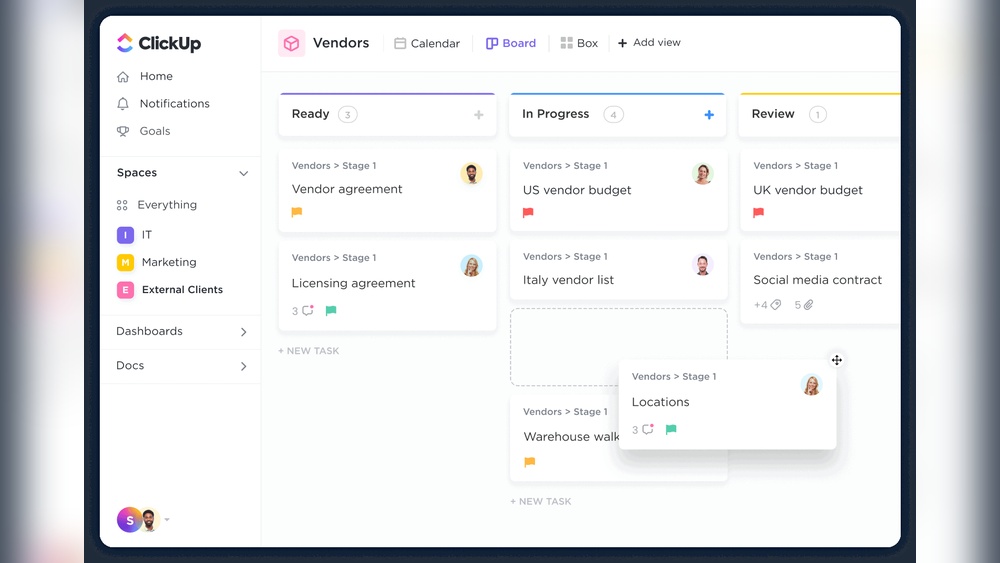
- Offers dozens of views: list, board, calendar, and more
- Includes built-in chat and document editing
- Targets teams seeking a unified workspace to save time and cost
ClickUp supports quick setup and adapts as projects evolve. It suits teams valuing speed and simplicity with rich collaboration tools.
Why Compare Fibery And Clickup For Productivity Enhancement?
Fibery and ClickUp serve different work styles and goals. Comparing them helps choose the right tool for your workflow.
- Workflow complexity: Fibery handles intricate workflows better.
- Task management: ClickUp excels at quick task creation and tracking.
- Customization: Fibery allows deeper customization of processes.
- Collaboration: ClickUp integrates chat and docs for team communication.
- Learning curve: ClickUp is easier for new users; Fibery requires setup time.
Understanding these differences improves productivity by matching platform strengths to team needs.
Key Features Of Fibery And Their Benefits
Fibery offers a unique blend of features designed for teams managing complex projects and workflows. Its strengths lie in adaptability and integration, making it ideal for evolving business needs.
Customizability For Complex And Evolving Processes
Fibery excels in customizability. It allows users to create tailored workspaces that fit specific project requirements.
- Custom Entities: Build unique data types beyond standard tasks and projects.
- Dynamic Relationships: Link different data types for better context and tracking.
- Adaptable Views: Switch between tables, boards, timelines, and lists easily.
This flexibility supports teams that face changing project scopes and complex workflows. Users can adjust their systems without starting from scratch.
Integrated Knowledge Management And Collaboration Tools
Fibery combines knowledge storage with collaboration features, keeping work and information in one place.
- Centralized Docs: Write and organize documents alongside project data.
- Real-Time Comments: Discuss tasks directly within the workspace.
- Linked Data: Connect notes and projects for quick reference.
This integration reduces tool switching and improves team communication and knowledge sharing.
Flexible Data Modeling And Workflow Automation
Fibery supports advanced data modeling tailored to unique business needs.
| Feature | Benefit |
|---|---|
| Custom Fields | Track specific information important to your projects. |
| Automations | Set triggers and actions to save time and reduce errors. |
| API Access | Integrate Fibery with other tools and systems seamlessly. |
These capabilities streamline workflows and increase productivity without complex coding.
Support Quality And Community Engagement
Fibery offers solid customer support and an active community.
- Responsive Support: Quick help via chat and email.
- Documentation: Clear guides and tutorials for easy onboarding.
- Community Forum: Users share tips and custom templates.
These resources help users resolve issues fast and learn new ways to optimize Fibery.
Key Features Of Clickup And Their Benefits
ClickUp offers a robust set of features designed to streamline project management and team collaboration. Its task-centric design supports quick project setup and adjustment. Frequent updates add new tools, keeping the platform modern. Built-in communication tools help teams stay connected. A large user base and strong integrations make ClickUp versatile for many workflows.
Task-centric Design For Fast, Ad-hoc Project Management
ClickUp focuses on tasks as the core unit of work. This helps teams quickly create projects without complex setup. Users can start with basic tasks and add details later.
- Create, assign, and track tasks effortlessly.
- Adjust priorities and deadlines on the fly.
- Supports both simple and complex projects.
This design suits teams needing fast, flexible project management. It reduces delays and increases productivity.
Extensive Feature Set With Frequent Updates
ClickUp offers many features to cover diverse needs:
| Feature | Benefit |
|---|---|
| Task Lists, Boards, Gantt Charts | Visualize and manage projects in different views |
| Time Tracking | Monitor work hours for better planning |
| Automation | Reduce repetitive tasks and save time |
| Custom Fields | Adapt tasks to specific project needs |
Regular updates bring new tools and improvements. This keeps ClickUp current and responsive to user feedback.
Built-in Communication And Commenting Systems
ClickUp integrates communication directly into tasks. This keeps conversations in context and easy to follow.
- Comment on tasks to share updates or ask questions.
- Tag team members to notify them instantly.
- Use chat features for quick discussions without leaving the app.
These tools reduce the need for external emails or messaging apps.
Wide User Base And Ecosystem Integration
ClickUp supports many third-party apps and services. This helps teams connect their existing tools with ClickUp.
- Integrates with calendars, file storage, and communication apps.
- Supports API access for custom workflows.
- Large community offers templates, tips, and plugins.
This broad ecosystem makes ClickUp flexible for different industries and team sizes.

Credit: clickup.com
Pricing And Affordability Breakdown
Understanding the pricing models of Fibery and ClickUp helps decide which tool fits your budget and needs. Both platforms offer distinct plans tailored for different team sizes and functionalities. This section breaks down their pricing tiers and compares cost-effectiveness.
Fibery Pricing Tiers And Value Proposition
Fibery’s pricing is structured to suit growing teams and complex workflows. The plans focus on customization and integration capabilities.
| Plan | Price (per user/month) | Key Features |
|---|---|---|
| Free | $0 | Basic apps, limited records, up to 10 users |
| Team | $10 | Unlimited records, automation, integrations |
| Enterprise | Custom pricing | Advanced security, priority support, unlimited users |
Fibery excels in offering customizable workflows for teams needing flexibility. The Team plan provides strong value with unlimited records and automation.
Clickup Pricing Plans And Cost-effectiveness
ClickUp provides multiple pricing plans focused on collaboration and AI-powered productivity tools.
| Plan | Price (per user/month) | Key Features |
|---|---|---|
| Free | $0 | Unlimited tasks, 100MB storage, basic integrations |
| Unlimited | $5 | Unlimited storage, integrations, dashboards |
| Business | $12 | Advanced automation, goals, custom permissions |
| Enterprise | Custom pricing | Enterprise-grade security, personalized onboarding |
ClickUp stands out with affordable entry-level pricing and a rich feature set, especially for small to medium teams.
Comparing Cost Vs. Features For Different Team Sizes
Choosing between Fibery and ClickUp depends on team size and required features.
- Small Teams (1-10 users): ClickUp’s Free or Unlimited plans offer essential tools at low cost.
- Medium Teams (10-50 users): Fibery’s Team plan and ClickUp’s Business plan provide automation and integrations.
- Large Teams (50+ users): Both platforms require Enterprise plans with custom pricing and advanced support.
| Team Size | Fibery | ClickUp |
|---|---|---|
| Small | Free plan limited but flexible | Free plan with more storage and tasks |
| Medium | $10/user with automation and integrations | $12/user with advanced automation and goals |
| Large | Custom Enterprise pricing, advanced features | Custom Enterprise pricing, enterprise security |
Fibery suits teams needing deep customization. ClickUp fits teams wanting easy setup and broad features at lower cost.
Pros And Cons Based On Real-world Usage
Choosing between Fibery and ClickUp depends on how each tool fits into everyday workflows. Both platforms offer unique features and approaches that impact productivity. This section breaks down the strengths and weaknesses of each tool based on real user experience. It also highlights common challenges users face.
Strengths And Weaknesses Of Fibery In Practice
Fibery excels in flexibility and customization. It allows teams to create tailored workflows that suit complex projects. Users appreciate its relational database model, which links different types of data seamlessly.
- Strengths:
- Highly customizable workspace
- Strong data linking and relationship features
- Good for managing complex projects
- Integrates well with other tools
- Weaknesses:
- Steeper learning curve for new users
- Can feel overwhelming due to complexity
- Interface less intuitive than simpler tools
- Limited built-in templates for quick setup
Strengths And Weaknesses Of Clickup In Practice
ClickUp shines with its fast setup and all-in-one approach. It supports tasks, docs, chats, and more, all in one place. Users find it ideal for quick project launches and flexible adjustments.
- Strengths:
- Fast and easy to start projects
- Combines many features like chat, docs, and tasks
- Regular updates with new features
- User-friendly interface for beginners
- Weaknesses:
- Too many features can cause clutter
- Some users report inconsistent performance
- Customization options less deep than Fibery
- Can feel complicated over time as projects grow
User Feedback And Common Challenges
Users mention distinct challenges with both tools. Fibery’s complexity can slow down teams new to it. ClickUp’s broad feature set sometimes leads to confusion and clutter.
| Aspect | Fibery | ClickUp |
|---|---|---|
| Learning Curve | High, needs training | Low to moderate |
| Customization | Extensive, powerful | Moderate, simpler |
| User Interface | Complex, less intuitive | User-friendly, but can be cluttered |
| Performance | Stable but slower setup | Occasional bugs reported |
| Best For | Complex, custom projects | Fast setup, general project management |
Both tools serve distinct needs. Fibery suits teams needing deep customization. ClickUp fits teams wanting quick, all-in-one solutions.

Credit: www.reddit.com
Ideal User Scenarios And Recommendations
Choosing the right tool depends on your team’s needs and workflow complexity. Fibery and ClickUp serve different purposes with unique strengths. Understanding ideal user scenarios helps pick the best fit for your projects and teams.
When To Choose Fibery: Best Fit For Complex And Custom Workflows
Fibery excels in managing highly customizable and complex workflows. It offers a flexible platform to create tailored processes and data structures.
- Teams requiring custom databases and linked workflows
- Organizations handling multiple project types with interdependencies
- Users who want to combine project management with knowledge management
Fibery suits product development, research, and innovation teams that need a single source of truth. Its adaptability allows building unique solutions without coding.
When To Choose Clickup: Best Fit For Agile And Task-focused Teams
ClickUp is ideal for teams focused on task management and agile project execution. It supports quick setup and iterative progress tracking.
- Teams managing daily tasks and sprints
- Organizations needing easy communication and real-time collaboration
- Users preferring a ready-to-use, feature-rich platform
ClickUp offers numerous built-in views, templates, and automation. It helps teams stay organized, meet deadlines, and keep workflows simple.
Industry-specific Use Cases For Both Platforms
| Industry | Fibery Use Cases | ClickUp Use Cases |
|---|---|---|
| Software Development | Custom product roadmaps, bug tracking, feature backlog linking | Agile sprint planning, task assignments, progress tracking |
| Marketing | Campaign planning with linked data and content repositories | Task lists, calendar scheduling, team communication |
| Consulting | Knowledge base integration with project workflows | Client task tracking, time management, meeting notes |
| Research & Innovation | Complex data relationships, experimentation tracking | Task prioritization, collaboration, deadline reminders |
Choosing between Fibery and ClickUp depends on workflow complexity and user focus. Fibery fits custom, interconnected workflows. ClickUp suits straightforward, task-driven teams.
Conclusion: Making The Right Choice For Productivity Boost
Choosing between Fibery and ClickUp depends on your team’s work style and project needs. Both tools offer strong features but serve different purposes. Understanding their differences helps pick the best fit for your team.
Summary Of Key Differences And Benefits
| Feature | Fibery | ClickUp |
|---|---|---|
| Primary Focus | Flexible, all-in-one workspace for complex workflows | Task management with fast, ad-hoc setup |
| Customization | High customization for unique workflows and data linking | Wide range of built-in features and templates |
| Ease of Use | Requires some setup time due to complexity | Quick to start with, intuitive for task tracking |
| Team Collaboration | Supports complex team interactions and data relationships | Strong real-time collaboration and chat features |
| Best For | Teams needing custom, interconnected workflows | Teams wanting rapid task management and communication |
Final Thoughts On Matching Tools To Team Needs
Teams that value flexibility and deep customization benefit from Fibery. It fits projects with complex data and connections.
Teams requiring a simple, ready-to-use tool with strong task management and communication find ClickUp useful. It adapts quickly to changing priorities.
Consider the team’s size, project complexity, and workflow style. The right tool aligns with how your team works daily.
Next Steps For Evaluating Fibery Vs. Clickup
- List your team’s core needs for project management and collaboration.
- Try free versions or demos of both tools to see their interfaces.
- Test how each tool handles your typical workflows and tasks.
- Gather team feedback on ease of use and feature fit.
- Decide based on which tool improves your team’s productivity and clarity.
Choosing wisely saves time and enhances teamwork across projects.

Credit: fibery.io
Frequently Asked Questions
What Are The Main Differences Between Fibery And Clickup?
Fibery focuses on customizable workflows and relational databases, ideal for complex projects. ClickUp emphasizes task management with many built-in features, suitable for fast, ad-hoc work. Fibery offers flexibility, while ClickUp provides extensive task-oriented tools.
Which Tool Is Better For Project Management, Fibery Or Clickup?
ClickUp is better for straightforward task and project tracking with many integrations. Fibery excels in managing complex projects that need custom data structures and workflows. Your choice depends on project complexity and customization needs.
How Do Fibery And Clickup Handle Team Collaboration?
Both tools support team collaboration through comments and real-time updates. ClickUp uses task-based chats, while Fibery allows comments on any entity, enhancing flexible discussions. Each promotes efficient communication within teams.
Is Fibery Suitable For Startups Compared To Clickup?
Fibery offers high customization, which suits startups needing tailored workflows. ClickUp provides ready-to-use templates and features for quick setup, ideal for startups wanting fast deployment. Startups should choose based on their workflow complexity.
Conclusion
Choosing between Fibery and ClickUp depends on your project needs. ClickUp suits quick, flexible task management. Fibery offers deeper customization for complex workflows. Both tools improve teamwork and project tracking. Consider your team’s size and style before deciding. For a versatile, all-in-one solution, try ClickUp. It combines apps, AI, and chat in one place. Save time and keep everyone on the same page. Whatever you pick, clear organization helps your projects succeed.