Todoist Vs Omnifocus 4: Ultimate Productivity Showdown 2026
Choosing the right task manager can make all the difference in how you organize your day and get things done. If you’re torn between Todoist and OmniFocus 4, you’re not alone.
Both apps promise to boost your productivity, but they do it in very different ways. Whether you want a simple, cross-platform tool that just works or a deep, Apple-focused system tailored to your every need, this comparison will help you decide which one fits your style best.
Keep reading to find out which app can truly bring clarity to your workflow and help you take control of your tasks.
Introduction To Todoist And Omnifocus 4
Choosing the right productivity app can shape your daily workflow. Todoist and OmniFocus 4 serve distinct purposes but aim to boost task management. This section introduces both tools, highlighting their features and user focus. Understanding these apps helps decide which fits your needs best in 2026.
Overview Of Todoist: Purpose And User Base
Todoist is a popular to-do list app used by over 50 million people worldwide. It focuses on simplicity and clarity to help users manage work and life tasks efficiently.
- Cloud-based and cross-platform
- Simple interface with powerful features
- Supports individual users and teams
- Designed for broad user base, from casual to professional
The app suits those who want a clean, easy-to-use tool to organize daily tasks without complex setups.
Overview Of Omnifocus 4: Purpose And Apple-centric Approach
OmniFocus 4 is built exclusively for Apple users, including Mac, iPad, and iPhone. It offers a deep, customizable task management system tailored for personal productivity.
| Feature | Description |
|---|---|
| Platform | Apple devices only |
| Task Management | Advanced and customizable |
| Methodology | Supports Getting Things Done (GTD) |
| Views | User-defined custom filters |
| Reminders | Strong, flexible deadline alerts |
This app is ideal for users who want full control over their workflow and prefer Apple’s ecosystem.
Why Comparing Todoist And Omnifocus 4 Matters In 2026
Productivity tools evolve fast. In 2026, users seek apps that match their work style and devices. Comparing Todoist and OmniFocus 4 highlights key differences:
- Platform compatibility: Todoist works everywhere; OmniFocus is Apple-only.
- User focus: Todoist serves broad audiences; OmniFocus targets Apple power users.
- Complexity vs simplicity: OmniFocus offers deep customization; Todoist stays simple and flexible.
Choosing wisely improves task tracking, reduces stress, and enhances productivity.

Credit: www.youtube.com
Key Features That Set Todoist Apart
Todoist stands out with features designed for ease, flexibility, and teamwork. It helps millions manage daily tasks smoothly across devices. The app’s design focuses on simplicity without sacrificing power.
These features enhance personal and team productivity, making task management less stressful. Todoist supports natural task input and keeps the interface clean for quick adoption.
Cross-platform Availability: Work Seamlessly Anywhere
Todoist works on almost all devices and platforms:
- Windows, macOS, Linux
- iOS and Android mobile apps
- Browser extensions and web app
- Smart watches and voice assistants
This wide support means tasks sync instantly everywhere. Users can switch devices without losing focus. It fits all lifestyles and work setups.
Robust Collaboration Tools: Enhancing Team Productivity
Todoist offers strong tools for teamwork:
- Task assignment to team members
- Shared projects with real-time updates
- Comments and file attachments on tasks
- Notifications to keep everyone informed
Teams stay organized with clear task ownership and communication. This cuts down confusion and missed deadlines.
Natural Language Input: Quick And Intuitive Task Creation
Todoist understands simple language to create tasks fast. Examples:
Meeting tomorrow at 10am Work @OfficeBuy groceries every FridayThe app reads dates, times, priorities, and labels automatically. This saves time and reduces typing errors.
Clean And Simple Interface: Getting Started With Ease
Todoist’s interface is minimal and user-friendly. Features include:
- Clear layout with projects and tasks
- Easy navigation with a sidebar
- Color-coded priorities and labels
- Quick add button always visible
New users learn quickly without feeling overwhelmed. The design helps users focus on what matters.
Unique Strengths Of Omnifocus 4
OmniFocus 4 stands out as a task management tool tailored for Apple users who want precise control over their productivity. It offers features that go beyond basic to-do lists, focusing on customization, advanced organization, and seamless integration within the Apple ecosystem. These strengths make it ideal for users who follow structured productivity methods and need powerful filtering options.
Deep Customization: Tailoring Productivity For Apple Power Users
OmniFocus 4 allows users to shape their task management experience in unique ways. It supports:
- Custom workflows to fit individual productivity styles
- Multiple project layouts and task hierarchies
- Personalized task flags, tags, and priorities
This deep customization helps users organize complex projects without clutter. The interface adapts to personal preferences, making task tracking intuitive.
Getting Things Done (gtd) Method Integration: Streamlining Task Management
OmniFocus 4 is built around the Getting Things Done (GTD) productivity method. It supports GTD by:
- Allowing clear capture of tasks and ideas
- Organizing tasks into contexts, projects, and next actions
- Facilitating regular reviews with reminders and flagged items
This integration helps users stay organized and maintain focus on what matters next.
Advanced Filtering And Perspectives: Creating Personalized Views
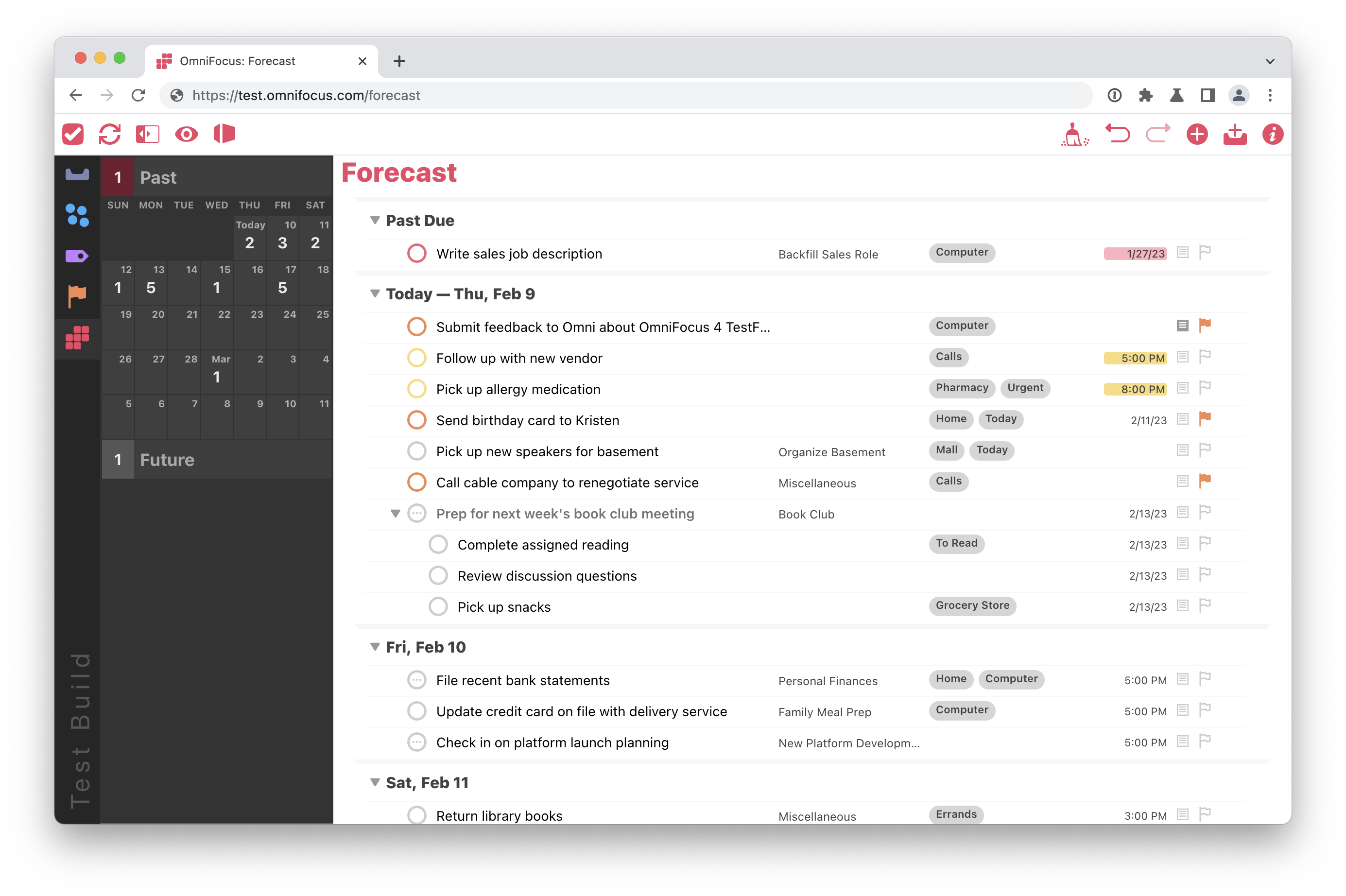
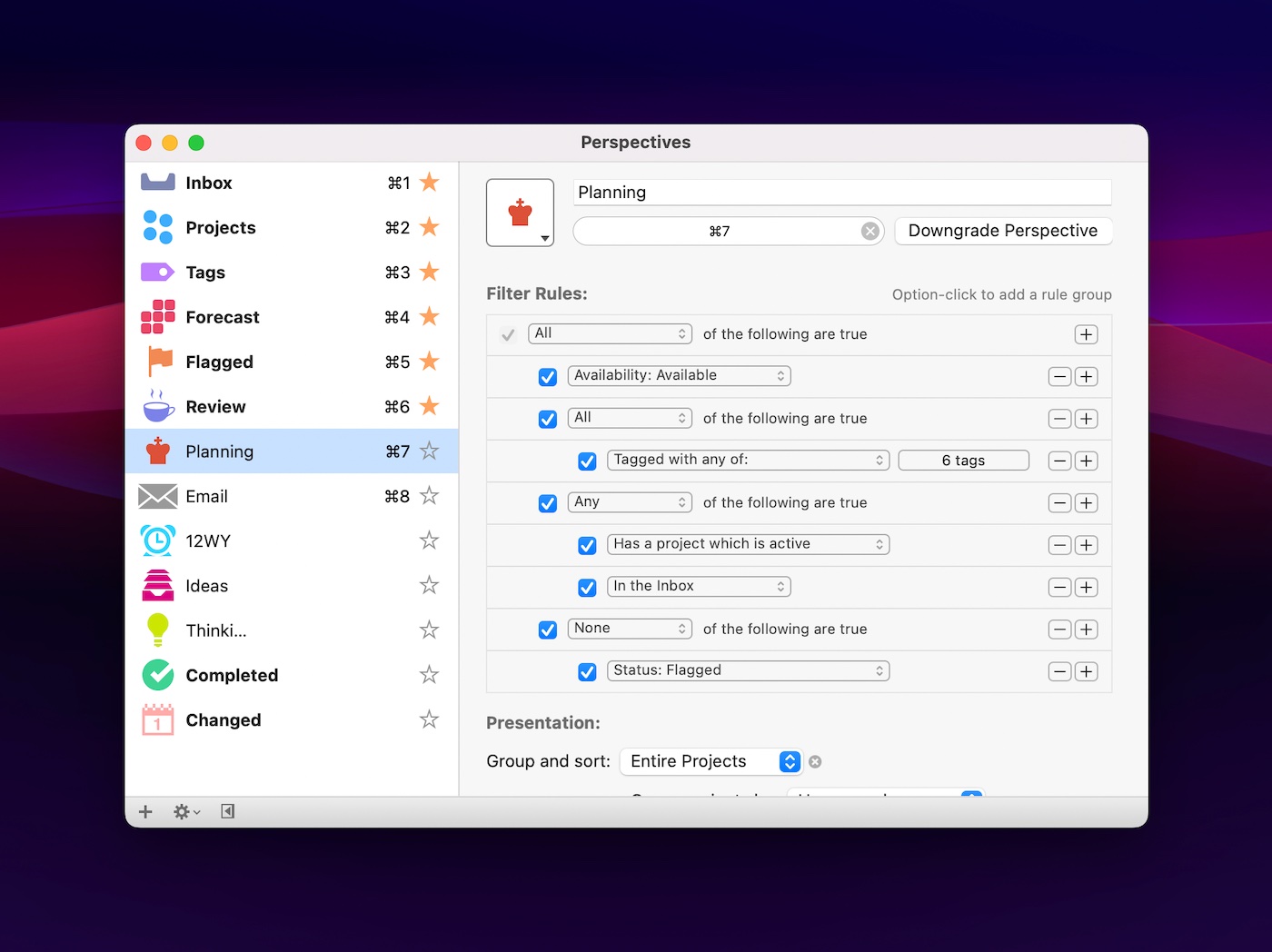
Users can create custom perspectives in OmniFocus 4. These are filtered views that show only relevant tasks. Features include:
| Filter Type | Purpose | Example |
|---|---|---|
| Tag-based | Show tasks with specific tags | Tasks tagged “Urgent” |
| Project-based | Focus on a single project | Weekly report tasks only |
| Due Date | Display tasks due soon | Tasks due this week |
These perspectives help users focus and reduce distractions.
Apple Ecosystem Synergy: Leveraging Siri And Native Features
OmniFocus 4 works smoothly within the Apple ecosystem. It uses:
- Siri for hands-free task entry and reminders
- Native Apple notifications for alerts
- Synchronization across Mac, iPad, and iPhone
This synergy ensures tasks stay updated and accessible on all Apple devices. It fits naturally into users’ daily Apple workflows.
Credit: www.omnigroup.com
Pricing And Affordability Comparison
Pricing plays a key role in choosing between Todoist and OmniFocus 4. Both apps serve productivity needs but differ in cost and subscription models. Understanding their pricing tiers and value helps decide which fits your budget and requirements better.
Todoist Pricing Tiers And Value For Money
Todoist offers a straightforward pricing structure with multiple tiers:
| Plan | Price (per month) | Main Features |
|---|---|---|
| Free | $0 | Basic task management, 5 active projects, simple reminders |
| Pro | $4 | Up to 300 active projects, labels, filters, reminders, comments |
| Business | $6 | Team collaboration, admin controls, project templates |
Todoist Pro offers excellent value for individuals with advanced needs. It balances price with powerful features. The free version is good for simple task lists.
Omnifocus 4 Pricing Structure And Subscription Options
OmniFocus 4 uses a premium pricing model focused on Apple users. It offers two subscription options:
- Standard Plan: About $10 per month or $100 per year
- Pro Plan: About $20 per month or $200 per year
One-time purchases for Mac and iOS apps are also available but at a higher upfront cost. OmniFocus pricing is higher due to its advanced features and Apple integration.
Cost Vs. Features: Which Offers Better Roi For Different Users?
Todoist fits users needing a simple, affordable tool with team options. It suits casual users and small teams who want good features without high cost.
OmniFocus suits power users who want deep customization and advanced task management. Its higher price matches its rich feature set and Apple ecosystem focus.
Choosing depends on your needs:
- Casual or team users: Todoist offers better ROI with lower cost and solid features.
- Apple power users: OmniFocus provides better value through detailed control and GTD support.
Pros And Cons Based On Real-world Usage
Choosing between Todoist and OmniFocus 4 depends on how each app fits daily needs. Both apps offer strong task management but differ in approach and features.
Todoist: Strengths And Limitations In Everyday Scenarios
Todoist is widely used for its simplicity and cross-platform availability. It works well for users who want to organize tasks quickly and collaborate with others.
- Strengths:
- Easy to use with a clean interface
- Available on many devices and platforms
- Supports collaboration and shared projects
- Natural language input for fast task entry
- Free plan with essential features
- Limitations:
- Less depth for complex task management
- Limited advanced customization compared to OmniFocus
- Some features require premium subscription
Todoist works best for simple to moderate task tracking and teams needing easy sharing.
Omnifocus 4: Advantages And Challenges For Users
OmniFocus 4 offers deep task management tailored for Apple users. It fits those who need detailed control over projects and tasks.
- Advantages:
- Highly customizable task views and filters
- Strong support for Getting Things Done (GTD) system
- Advanced reminder and notification options
- Natural language input for fast task creation
- Designed for individual productivity focus
- Challenges:
- Only available on Apple devices (Mac, iPhone, iPad)
- Steeper learning curve for new users
- Premium pricing may deter casual users
- Limited team collaboration features
OmniFocus 4 suits users needing deep task control within Apple’s ecosystem.
User Feedback And Common Pain Points
| App | Common Praise | Frequent Complaints |
|---|---|---|
| Todoist |
|
|
| OmniFocus 4 |
|
|
Real users appreciate Todoist’s simplicity and OmniFocus’s power but note clear trade-offs.
Credit: thesweetsetup.com
Ideal Users And Use Cases For Todoist
Todoist suits a wide range of users seeking a simple yet powerful task manager. It fits well for teams, individuals, and anyone needing flexible task handling across devices. The app’s design emphasizes clarity and ease, making daily task management smooth and efficient.
Teams And Cross-platform Workers Who Need Collaboration
Todoist supports real-time collaboration, perfect for teams of any size. It allows task assignment, comments, and shared projects, helping teams stay aligned.
- Assign tasks to team members easily
- Track progress with shared project views
- Comment on tasks for clear communication
- Works on Windows, macOS, Android, iOS, and web
This cross-platform availability ensures seamless teamwork, regardless of device or location.
Users Seeking Simplicity And Quick Task Management
Todoist offers a clean interface with fast task entry. Natural language input lets users add tasks like “Call John tomorrow at 3pm” instantly.
- Quickly create tasks without navigating complex menus
- Use labels and filters to organize without clutter
- Set priorities with simple color codes
- Focus on tasks without unnecessary distractions
Ideal for users who want to manage tasks with minimal fuss and maximum speed.
Individuals Who Value Flexibility Across Devices
Todoist syncs tasks instantly across all platforms. Users can start a task list on a phone and finish it on a desktop.
| Device Type | Todoist Features |
|---|---|
| Mobile (iOS, Android) | On-the-go task addition, notifications, voice input |
| Desktop (Windows, macOS) | Full project overview, keyboard shortcuts, batch task editing |
| Web | Access anywhere, quick sharing, browser extensions |
This flexibility suits freelancers, remote workers, and busy individuals who switch devices often.
Who Should Choose Omnifocus 4?
OmniFocus 4 stands out as a powerful task management app built exclusively for Apple users. It suits those who want deep control and flexibility over their productivity tools. Its design caters to individuals who need detailed organization and prefer a structured approach to managing tasks. Below are the key user groups that benefit most from OmniFocus 4.
Apple Enthusiasts Focused On Deep Customization
OmniFocus 4 is made exclusively for Mac, iPad, and iPhone users. It offers extensive customization options that let users tailor views and workflows.
- Create custom task views with filters and sorting rules.
- Use natural language input for quick task entry.
- Set advanced reminders to keep deadlines on track.
These features appeal to Apple enthusiasts who want a personalized productivity experience that integrates tightly with their devices.
Users Following The Gtd Method Rigorously
OmniFocus 4 fully supports the Getting Things Done (GTD) methodology. It helps users capture, organize, and review tasks effectively.
- Manage complex projects with multiple contexts and perspectives.
- Track next actions, waiting-for items, and project statuses.
- Utilize built-in GTD workflows to maintain focus.
This makes it ideal for users who apply GTD principles strictly and need a system to keep their productivity on point.
Those Who Prefer Advanced Task Filtering And Automation
OmniFocus 4 offers powerful filtering options to view tasks by custom criteria. It supports automation for recurring tasks and project management.
| Feature | Benefit |
|---|---|
| Custom Views | Focus on tasks that matter most at any time |
| Advanced Reminders | Never miss deadlines with precise alerts |
| Automation Support | Simplify repetitive tasks and improve workflow |
Users who want to filter tasks deeply and automate routine activities find OmniFocus 4 a fitting choice.
Migrating Between Todoist And Omnifocus 4
Migrating between Todoist and OmniFocus 4 can be a smart move to better fit your productivity style. Both apps have unique strengths, but switching requires careful planning. Understanding challenges, tools, and reasons for switching makes the process smoother.
Challenges And Solutions In Switching Platforms
Moving tasks from Todoist to OmniFocus 4 or vice versa involves some common challenges:
- Data Compatibility: Both apps store tasks differently, causing import/export issues.
- Feature Differences: OmniFocus focuses on GTD and complex views, while Todoist is simpler and cross-platform.
- Learning Curve: OmniFocus has a steeper learning curve compared to Todoist’s straightforward design.
- Platform Limitations: OmniFocus only works on Apple devices; Todoist works everywhere.
Solutions:
- Export tasks as CSV or plain text from Todoist to import into OmniFocus.
- Use manual re-creation for complex OmniFocus features not supported by Todoist.
- Focus on core tasks and projects first, then refine advanced settings after migration.
- Take time to learn OmniFocus’s GTD framework with tutorials and guides.
Tools And Tips For Smooth Migration
Several tools and tips help reduce migration headaches:
| Tool/Method | Description | Use Case |
|---|---|---|
| Todoist Export to CSV | Export all tasks and projects in CSV format from Todoist. | Starting point for importing data into OmniFocus or manual recreation. |
| OmniFocus Import | Import CSV files or use AppleScript for task creation. | Automates task import but may require adjustments. |
| Manual Task Recreation | Recreate tasks and projects manually in OmniFocus. | Best for complex or highly customized setups. |
| Third-Party Scripts | Community scripts automate some migration steps. | Useful for advanced users comfortable with scripting. |
Tips:
- Backup all data before starting migration.
- Migrate in small batches to avoid overload.
- Test task syncing and reminders after import.
- Use OmniFocus tutorials to understand new features.
When And Why You Might Consider Switching
Switching between Todoist and OmniFocus 4 depends on your needs:
- Choose Todoist if you want a simple, cross-platform to-do list.
- Choose OmniFocus 4 if you use Apple devices and need deep task customization.
- Switch to OmniFocus for advanced GTD support and detailed task views.
- Switch to Todoist for team collaboration and easier task sharing.
- Consider switching if your workflow outgrows the current app’s features.
Evaluate your task complexity, platform preference, and productivity style before switching. Migration effort pays off when the new app fits your needs better.
Conclusion: Making The Ultimate Productivity Choice In 2026
Choosing the right productivity app shapes how tasks get done daily. Todoist and OmniFocus 4 serve different needs with unique strengths. Picking one depends on device use, workflow style, and task complexity. Below is a clear guide to help decide between these two popular tools in 2026.
Summary Of Key Differences And Strengths
| Feature | Todoist | OmniFocus 4 |
|---|---|---|
| Platform | Cross-platform (Windows, macOS, iOS, Android, Web) | Apple devices only (Mac, iPad, iPhone) |
| Task Management | Simple, intuitive task and project lists | Highly customizable with complex project and task organization |
| Productivity Method | General task management with some automation | Built-in support for Getting Things Done (GTD) methodology |
| Collaboration | Strong team and shared project features | Primarily focused on individual use |
| Natural Language Input | Supported but basic | Advanced and quick natural language task creation |
| Reminders & Notifications | Standard reminders and notifications | Advanced reminder system with flexible options |
| Pricing | Affordable with free tier available | Premium pricing reflecting advanced features |
Decision Framework Based On User Needs And Preferences
- Device Ecosystem: Choose Todoist for multi-platform needs. Pick OmniFocus 4 if fully invested in Apple devices.
- Task Complexity: Simple lists fit Todoist better. Complex, detailed projects suit OmniFocus 4.
- Productivity Style: Prefer GTD? OmniFocus 4 aligns well. For general task management, Todoist works fine.
- Collaboration: Need to share tasks or work in teams? Todoist offers stronger support.
- Budget: Todoist offers free and lower-cost plans. OmniFocus 4 requires premium investment.
Final Thoughts On Todoist Vs Omnifocus 4
Todoist excels with simplicity, cross-platform access, and team features. It fits users who want clarity without complexity. OmniFocus 4 delivers deep customization for Apple users who want full control over their workflow. It suits those following GTD and managing intricate projects.
Each app has clear strengths. The best choice depends on what fits daily work style and device preference. Both tools can boost productivity when matched well with user needs.
Frequently Asked Questions
What Is The 1/3/5 Rule In Todoist?
The 1/3/5 rule in Todoist suggests planning one big, three medium, and five small tasks daily. This prioritizes focus and productivity.
Is Todoist Still Worth It?
Todoist remains worth it for users seeking cross-platform access, easy collaboration, and efficient task management. Its clean interface boosts productivity effectively.
Is Omnifocus Any Good?
OmniFocus excels as a powerful, customizable task manager for Apple users. It suits those following Getting Things Done methods and needing detailed organization.
How Do I Migrate From Omnifocus To Todoist?
Export OmniFocus tasks as a CSV file via File > Export. Use a migration script to convert and import tasks into Todoist. Organize projects and verify tasks after import.
Conclusion
Both Todoist and OmniFocus 4 offer strong task management tools. OmniFocus suits Apple users who want detailed control and customization. Todoist works across many devices and supports team collaboration. It keeps task tracking simple and clear for all users. Choosing depends on your device and style. For easy and flexible task management, try Todoist. It helps millions stay organized every day.