Clickup Vs Github: Ultimate Comparison for Productivity Pros
Are you trying to decide between ClickUp and GitHub for managing your projects and workflows? Both tools have strong features, but they serve different purposes and can impact how you work every day.
If you want to streamline your tasks, collaborate effortlessly, and save time with an all-in-one AI-powered platform, ClickUp might just be the game-changer you need. On the other hand, if your focus is on code hosting and version control, GitHub has long been the go-to solution for developers. You’ll discover the key differences between ClickUp and GitHub, so you can choose the right tool for your needs and boost your productivity. Ready to explore a platform that could replace multiple apps and bring your whole team together with perfect context? Check out ClickUp and see how it can save you both time and money. Keep reading to find out which one fits your workflow best!
Introduction To Clickup And Github
ClickUp and GitHub serve different but vital roles in today’s productivity and development worlds. Both tools help teams work better, yet each focuses on unique needs. Understanding their core purposes and audiences reveals why they often come up in productivity discussions.
Overview Of Clickup: Purpose And Target Audience
ClickUp is an all-in-one productivity platform designed to replace many separate apps. It combines project management, chat, document storage, and AI tools in one place. ClickUp aims to save teams time and money by uniting workflows under a single roof.
- Target audience: Businesses and teams wanting to streamline work with one tool.
- Project managers needing task tracking and collaboration.
- Teams that value integrating AI for smarter workflows.
ClickUp is ideal for groups seeking a flexible, customizable workspace that fits many tasks.
Overview Of Github: Purpose And Target Audience
GitHub is a platform built around software development and version control. It hosts source code and enables collaboration through git repositories. Developers use GitHub to share code, track changes, and manage projects.
- Target audience: Software developers and engineering teams.
- Open source communities collaborating on code.
- Organizations needing structured code management and review.
GitHub focuses on coding projects, offering tools for version control, issue tracking, and continuous integration.
Why Compare Clickup And Github For Productivity Pros?
Both tools boost team productivity but in different ways. Comparing them helps choose what fits specific workflows best.
| Aspect | ClickUp | GitHub |
|---|---|---|
| Primary Use | Project management and collaboration | Code hosting and version control |
| Audience | Cross-functional teams and businesses | Software developers and engineers |
| Key Features | Task tracking, chat, docs, AI integration | Git repositories, pull requests, code review |
| Goal | Unify work apps to save time and money | Manage and collaborate on code effectively |
Understanding these differences assists productivity experts in selecting the right tool for their team’s needs.
Key Features Of Clickup And Their Benefits
ClickUp combines many tools into one platform, making project management easier. It offers features that help teams work faster and smarter. These features improve task tracking, team collaboration, and overall productivity.
All-in-one Task And Project Management: Streamlining Workflows
ClickUp provides a unified space for managing tasks and projects. Users can create, assign, and track tasks all in one place. This reduces the need to switch between multiple apps, saving time.
- Centralized task lists and project boards
- Built-in time tracking and goal setting
- Easy progress monitoring with status updates
Teams stay organized and focused, which helps deliver work on time.
Customization And Visual Workflows: Enhancing Team Collaboration
ClickUp allows users to customize views and workflows to fit their needs. Visual tools like boards, calendars, and Gantt charts make it simple to see project status at a glance.
- Multiple view options: List, Board, Calendar, Gantt
- Custom fields to capture important task details
- Flexible workflows to match team processes
Customization helps teams communicate better and reduces confusion.
Automation Capabilities: Saving Time And Reducing Errors
ClickUp supports automation to handle repetitive tasks. Automations reduce manual work and minimize mistakes.
- Automatic task assignments based on triggers
- Notifications and reminders for deadlines
- Custom rules to update task statuses
Teams can focus on high-value work instead of routine tasks.
Mobile App And Cross-platform Support: Staying Productive On-the-go
The ClickUp mobile app lets users manage work anywhere. It works well on iOS, Android, Windows, and Mac, ensuring smooth access across devices.
- Real-time updates and syncing
- Task creation and editing on mobile
- Collaboration features like chat and comments
This flexibility keeps teams connected and productive, even outside the office.
Key Features Of Github And Their Benefits
GitHub offers a robust platform tailored for developers and teams. Its key features enhance code management, teamwork, and project delivery. These features streamline development processes, reduce errors, and improve communication.
Version Control And Code Collaboration: Empowering Development Teams
GitHub uses Git version control to track changes in code. It allows multiple developers to work on the same project without conflicts.
- Branching and merging: Developers create branches to work independently and merge changes safely.
- Pull requests: Review and discuss code before merging it to the main branch.
- Commit history: Full record of every change helps in tracking and reverting errors.
These tools improve collaboration and ensure code quality across teams.
Integrated Issue Tracking And Project Boards: Managing Tasks Within Codebase
GitHub provides built-in issue tracking to report bugs and plan features. It links tasks directly to code changes.
- Create issues to describe bugs or feature requests.
- Use labels, milestones, and assignees to organize and prioritize work.
- Project boards offer a visual way to manage issues and pull requests using Kanban-style columns.
This integration keeps task management close to the code, improving team focus and transparency.
Continuous Integration And Deployment Support: Accelerating Devops
GitHub supports CI/CD pipelines to automate building, testing, and deploying code.
- GitHub Actions allow custom workflows triggered by code events.
- Automated tests catch bugs early before deployment.
- Deploy applications directly from GitHub to cloud platforms.
These features speed up development cycles and reduce manual errors.
Community And Open Source Ecosystem: Leveraging Shared Knowledge
GitHub hosts millions of open source projects, fostering a global developer community.
- Access to reusable code libraries and tools.
- Collaborate on open source projects to learn and contribute.
- Community feedback and peer review improve software quality.
This ecosystem supports innovation and shared learning among developers worldwide.
Credit: help.clickup.com
Pricing And Affordability Breakdown
Understanding the pricing and affordability of ClickUp and GitHub helps teams choose the best fit. Both platforms offer various plans tailored to different needs and budgets. This section reviews their pricing tiers, free options, and enterprise plans.
Clickup Pricing Tiers And Value For Money
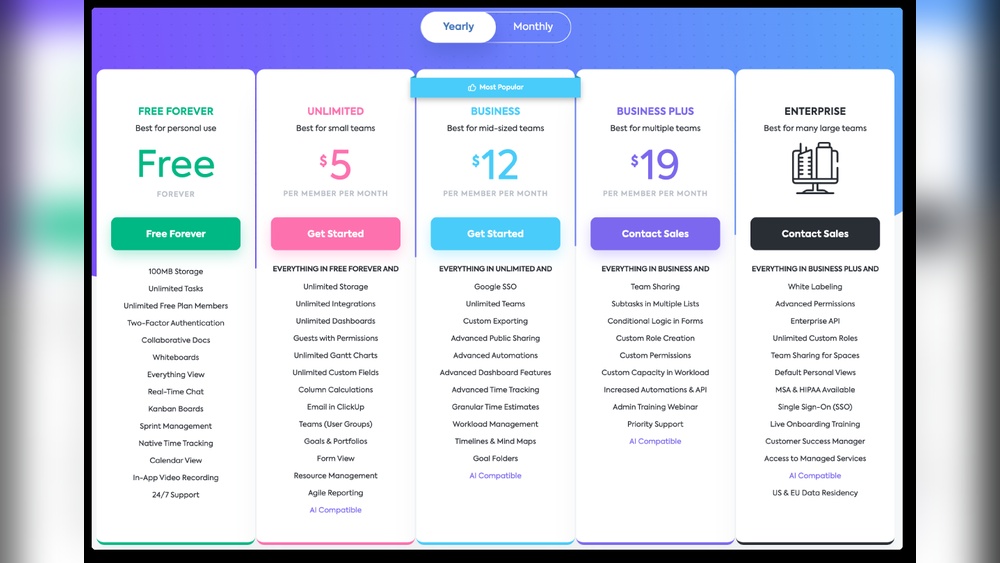
ClickUp provides flexible pricing with clear tiers. It aims to replace multiple software by combining apps, AI, projects, and chat.
| Plan | Price (per user/month) | Key Features |
|---|---|---|
| Free | $0 | Unlimited tasks, 100MB storage, 100 uses of AI features |
| Unlimited | $5 | Unlimited storage, unlimited integrations, advanced reporting |
| Business | $12 | Goal tracking, time tracking, custom exporting |
| Business Plus | $19 | Advanced automation, increased API limits |
| Enterprise | Custom pricing | White labeling, custom permissions, dedicated support |
ClickUp’s pricing provides excellent value for teams needing multiple tools in one app. The AI features add extra productivity without extra cost on lower tiers.
Github Pricing Plans And Cost Considerations
GitHub focuses on code hosting and collaboration with competitive pricing.
| Plan | Price (per user/month) | Key Features |
|---|---|---|
| Free | $0 | Unlimited public/private repos, basic CI/CD, community support |
| Pro | $4 | Advanced code review tools, more storage, GitHub Pages |
| Team | $4 | Team management, required reviewers, code owners |
| Enterprise | Custom pricing | Advanced security, compliance, dedicated support |
GitHub’s plans are ideal for software developers needing robust version control and collaboration tools.
Comparing Free Plans And Enterprise Options
- Free plans: Both ClickUp and GitHub offer free tiers with strong features.
- ClickUp’s free plan suits teams needing task and project management with AI support.
- GitHub’s free plan fits individual developers or small teams working on code repositories.
- Enterprise plans on both platforms provide custom pricing and advanced features.
- ClickUp focuses on workflow customization and support.
- GitHub emphasizes security, compliance, and developer tools.
Assessing Cost Efficiency For Different Team Sizes
Cost efficiency depends on team size and needs.
- Small teams (1-5 users): Both free plans work well for startups or small projects.
- Medium teams (6-50 users): ClickUp’s Unlimited or Business plans offer great value for collaboration and AI tools.
- GitHub’s Team plan is cost-effective for developer groups needing code review features.
- Large teams (50+ users): Enterprise plans are tailored to complex needs and include dedicated support.
- ClickUp helps manage multiple workflows with fewer apps.
- GitHub excels in handling large codebases securely.
Choosing depends on whether your team focuses on project management or software development.
Pros And Cons Based On Real-world Usage
Choosing between ClickUp and GitHub depends on your specific needs. Both tools serve different purposes but overlap in managing projects and tasks. Understanding their strengths and challenges helps make the right choice. The following sections break down real-world pros and cons based on user feedback and practical experience.
Clickup Strengths: Feature-rich Platform And Flexibility
ClickUp offers a wide range of features suitable for teams of all sizes. It combines task management, chat, document creation, and project tracking in one platform.
- All-in-one Workspace: Integrates tasks, docs, goals, and chat seamlessly.
- Highly Customizable: Custom views, statuses, and workflows adapt to various team needs.
- AI Tools: Built-in AI helps automate tasks and improve productivity.
- Collaboration: Real-time editing and comments keep team members in sync.
- Cost-Effective: Replaces multiple apps, saving money and reducing tool clutter.
This flexibility suits teams seeking a single platform for work management and communication.
Clickup Challenges: Learning Curve, Performance, And Support Issues
Users report some drawbacks that affect experience.
- Steep Learning Curve: Rich features require time to master.
- Performance Lag: Heavy interface can slow down on older devices.
- Support Delays: Customer service response times vary and can be slow.
- Overwhelming Options: Too many features may confuse new users.
These challenges suggest ClickUp works best for teams willing to invest time upfront.
Github Strengths: Robust Version Control And Developer Tools
GitHub is a top choice for software development with powerful features.
- Version Control: Git-based system tracks changes efficiently.
- Collaboration: Pull requests, code reviews, and issue tracking enhance teamwork.
- Integration: Supports many developer tools and CI/CD pipelines.
- Community: Large user base and open-source repositories encourage knowledge sharing.
- Security: Advanced access controls protect code and projects.
Ideal for developers managing code and software projects with precision.
Github Challenges: Limited Non-development Features And Complexity For New Users
GitHub’s focus on code management brings some limitations outside development.
- Not Designed for General Project Management: Lacks built-in task and document management features.
- Steep Learning Curve for Beginners: Git commands and workflows can confuse new users.
- Minimal UI for Non-Technical Teams: Interface prioritizes code over visual project tracking.
- Requires External Tools: Teams often need add-ons for full project management.
Best suited for technical users who need strong version control but less ideal for broad team collaboration.

Credit: productive.io
Ideal Use Cases And User Recommendations
The choice between ClickUp and GitHub depends on team goals and workflow needs. Each tool shines in specific scenarios, offering unique benefits. Understanding these use cases helps teams pick the right platform or combine both for better results.
When To Choose Clickup: Teams Needing Comprehensive Project Management
ClickUp suits teams that require all-in-one project management. It covers task tracking, time management, document sharing, and communication within a single platform.
- Ideal for marketing, sales, and operations teams.
- Supports multiple workflows: Kanban, Gantt charts, calendars.
- Offers strong AI features to save time and improve context.
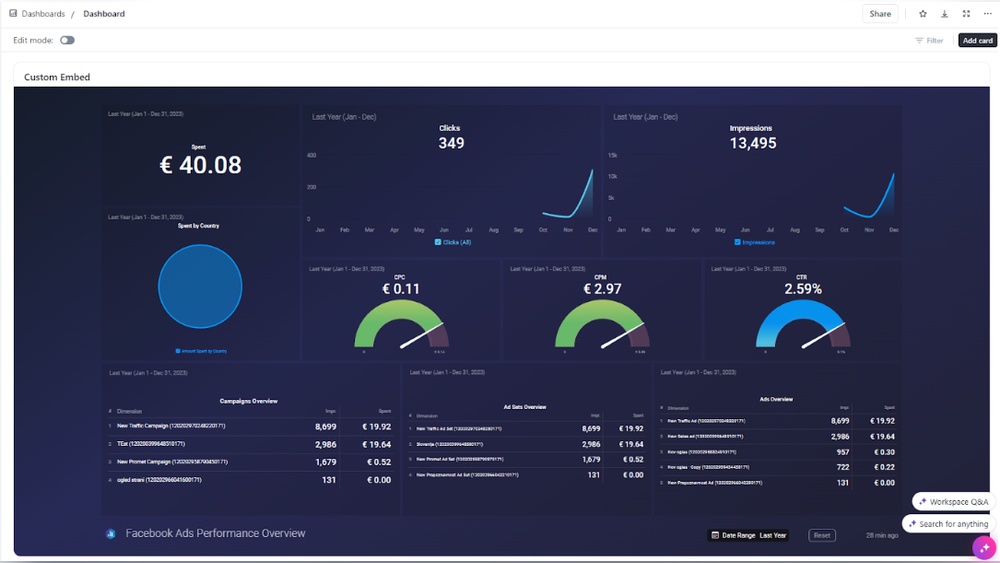
- Helps manage complex projects with customizable dashboards.
Teams seeking to replace multiple tools with one unified system benefit most. ClickUp centralizes work and reduces app switching.
When To Choose Github: Development Teams Focused On Code Collaboration
GitHub is perfect for software developers focused on code collaboration and version control. It provides robust tools for managing source code and tracking changes.
- Supports pull requests, branch management, and code reviews.
- Integrates with continuous integration/continuous deployment (CI/CD) pipelines.
- Ideal for open-source projects and developer communities.
- Helps teams collaborate on code with transparency and history.
Development teams needing a secure, scalable platform for code find GitHub essential.
Hybrid Scenarios: Combining Clickup And Github For Maximum Productivity
Teams can benefit by using ClickUp and GitHub together. ClickUp manages overall project tasks, deadlines, and communication.
Meanwhile, GitHub handles code development, version control, and code reviews.
| Function | ClickUp | GitHub |
|---|---|---|
| Task Management | Comprehensive task tracking and workflows | Limited, focused on code issues |
| Code Collaboration | Minimal support | Advanced code versioning and reviews |
| Communication | Built-in chat and comments | Comments on code and issues |
| Project Visibility | Dashboards and reporting | Repository insights and contribution graphs |
Integration between these tools aligns project management with development workflows.
Alternatives To Consider Based On Specific Needs And Preferences
Other project management and collaboration tools may fit better depending on team needs. Consider these options:
- Monday.com – Visual workflows and customizable dashboards
- Asana – Clean task lists and simple project tracking
- Notion – Flexible workspace for docs and databases
- Trello – Simple Kanban boards for task organization
- Wrike – Complex project management with advanced features
- Smartsheet – Spreadsheet-style project planning
Choosing the right tool depends on workflow style, team size, and project complexity.
Conclusion: Making The Right Choice For Productivity Pros
Choosing between ClickUp and GitHub depends on your team’s needs and work style. Both tools offer unique strengths that can boost productivity.
Understanding these differences helps in selecting the best fit for your projects and workflows.
Summary Of Key Differences And Strengths
| Feature | ClickUp | GitHub |
|---|---|---|
| Primary Use | All-in-one productivity platform for tasks, projects, and communication | Code hosting and version control for software development |
| Best For | Teams needing task management, docs, chat, and AI tools in one place | Developers focused on code collaboration, version control, and CI/CD |
| Key Strengths | Customizable workflows, multiple views (Kanban, List, Gantt), AI assistance | Robust code review, branching, pull requests, and open-source collaboration |
| Integration | Integrates with many apps for project and team management | Integrates primarily with developer tools and CI/CD pipelines |
| User Interface | User-friendly for non-technical and technical users | Technical and developer-focused UI |
Factors To Consider Before Deciding
- Team Role: Are your team members developers or a mix of roles?
- Project Type: Does your project require code versioning or task management?
- Workflow Complexity: Do you need customizable workflows or straightforward code collaboration?
- Integration Needs: What other tools must connect with your platform?
- Ease of Use: Is simplicity or technical depth more important?
- Budget: Consider cost efficiency for your team’s size and needs.
Final Recommendations For Different Team Types And Workflows
- Software Development Teams: Use
GitHubfor code hosting, version control, and collaboration. - Cross-Functional Teams: Choose
ClickUpfor managing tasks, docs, chat, and AI tools in one place. - Small Teams & Startups:
ClickUpoffers affordable all-in-one productivity features. - Open-Source Projects:
GitHubis ideal for public collaboration and code sharing. - Project Managers:
ClickUpprovides flexible views and workflow customization.

Credit: clickup.com
Frequently Asked Questions
Is There Anything Better Than Clickup?
Several tools can outperform ClickUp depending on your needs. Monday. com excels in visual workflows, Asana offers clean task management, Notion provides flexible workspaces, and Wrike suits complex projects. Choose based on your team’s focus for the best productivity and customization.
Is There Anything Better Than Github?
The best GitHub alternative depends on your needs. GitLab offers an all-in-one platform, Gitea is lightweight and self-hosted, and Bitbucket suits Atlassian users. Each excels in different areas, so choose based on your team’s workflow and preferences.
What Are The Cons Of Clickup?
ClickUp has a steep learning curve and can overwhelm new users. Its interface sometimes feels cluttered. Mobile app performance may lag. Customization options can be complex, causing setup delays. Frequent updates occasionally introduce bugs or change workflows unexpectedly.
Does Clickup Integrate With Github?
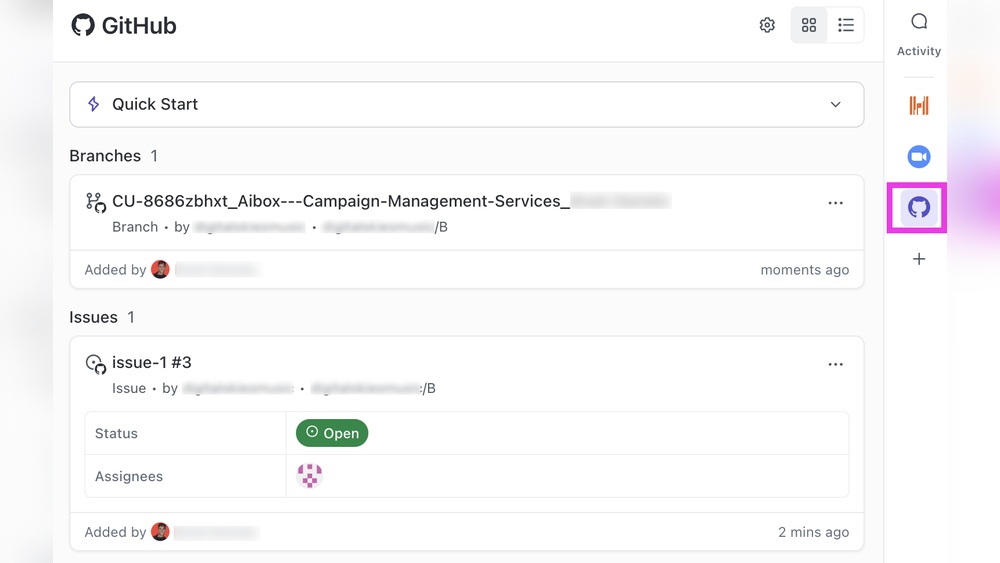
Yes, ClickUp integrates with GitHub. It syncs commits, branches, and pull requests to streamline development and project management.
Conclusion
Choosing between ClickUp and GitHub depends on your team’s needs. ClickUp offers an all-in-one workspace for tasks, chat, and projects. GitHub focuses mainly on code collaboration and version control. ClickUp suits teams wanting more than just coding tools. GitHub fits developers needing strong source code management. Both have unique strengths for different workflows. Explore ClickUp’s features to see if it fits your work style. Visit ClickUp to learn more about this versatile platform. Make the choice that helps your team work better together.