Clickup Business Vs Unlimited: Ultimate Plan Comparison Guide
Are you trying to decide between ClickUp Business and Unlimited plans for your team? Choosing the right ClickUp plan can make a huge difference in how smoothly your projects run and how much time you save every day.
Whether you’re managing a small agile team or leading multiple departments, understanding what each plan offers is key to getting the most value out of ClickUp’s powerful all-in-one AI software. The Unlimited plan gives you unlimited storage, custom fields, and integrations—perfect if you want to keep things simple but flexible. On the other hand, the Business plan unlocks advanced features like detailed dashboards, workload management, private views, and mind maps, ideal if you need deeper insights and stronger control over your projects. Curious which plan fits your needs best? Dive into the full breakdown and find out how ClickUp can transform your workflow and save you money by replacing all your other apps. Ready to explore? Check out ClickUp here: ClickUp Plans and make the smart choice for your business.

Credit: www.youtube.com
Introduction To Clickup Business Vs Unlimited Plans
Choosing the right ClickUp plan is key for smooth project management. The Business and Unlimited plans offer distinct features. Understanding their differences helps teams work better.
Overview Of Clickup And Its Purpose As A Project Management Tool
ClickUp is a versatile platform designed to replace multiple software tools. It combines project management, AI, chat, and more in one place. Teams save time by working together with full context. Its goal is to simplify workflows and reduce software costs.
ClickUp supports task tracking, automation, collaboration, and integrations. It suits businesses that want a unified workspace for all projects and communications.
Brief Introduction To The Unlimited And Business Plans
The Unlimited plan provides unlimited integrations, custom fields, and guests with permissions. It fits teams needing flexible collaboration with freelancers or clients.
The Business plan includes everything in Unlimited plus advanced features like multiple-step automations and sprint management. It targets businesses with complex project needs and multiple teams.
| Feature | Unlimited Plan | Business Plan |
|---|---|---|
| Integrations | Unlimited | Unlimited |
| Custom Fields | Unlimited | Unlimited |
| Guests with Permissions | Included | Included |
| Automation Steps | Single-step automations | Multiple-step automations |
| Sprint Automation | Not Available | Available |
Who Typically Uses Each Plan And Why This Comparison Matters
Unlimited plan suits freelancers, small teams, and startups. They need basic automation and easy access for external collaborators.
Business plan fits growing companies with multiple teams and complex workflows. It supports detailed automation and project tracking.
This comparison matters for choosing the right tools. Picking the correct plan avoids paying for unused features or missing needed functions.
- Small teams save money with Unlimited.
- Larger teams gain efficiency with Business.
- Both plans improve task management and teamwork.
Key Features Of Clickup Unlimited Plan
The ClickUp Unlimited Plan offers essential tools for teams wanting flexibility and control. It removes many limits found in free versions, helping teams work smoothly and connect all their apps. This plan suits growing businesses that need more integrations, custom options, and collaboration freedom.
Unlimited Integrations: Enhancing Workflow Connectivity
ClickUp Unlimited allows unlimited integrations with other apps. This means you can connect all the tools your team uses without restrictions. Integrations improve your workflow by:
- Bringing data from multiple apps into one place
- Automating tasks across different platforms
- Saving time by reducing manual work
With no cap on integrations, your team stays connected and productive.
Guests With Permissions: Collaborate Effortlessly With Freelancers And Clients
This plan lets you add guests with permissions. You can invite freelancers, contractors, or clients to work on projects. Guests see only what you allow, keeping sensitive info secure. Benefits include:
- Easy collaboration without full team access
- Clear control over guest permissions
- Improved communication with external partners
Guests can comment, update tasks, or share files based on permissions.
Unlimited Custom Fields And Views: Tailoring Projects To Specific Needs
The Unlimited Plan offers unlimited custom fields and views. Customize projects with fields like dropdowns, dates, or checkboxes. Adjust views to fit your workflow, such as:
- List, Board, or Calendar views
- Custom statuses and priorities
- Filters to focus on important tasks
This flexibility helps teams organize work clearly and efficiently.
Automation Limits: Understanding The Scope Of Single-step Automations
Automations in this plan allow single-step actions to save time. You can set simple triggers and actions like:
- Move a task when marked complete
- Assign a task when status changes
- Send notifications for updates
Note that multi-step automations are not included. Still, these automations reduce repetitive work and keep projects moving.
Key Features Of Clickup Business Plan
The ClickUp Business Plan offers powerful tools designed for teams that need advanced project management. It helps teams stay organized, track progress, and manage workloads smoothly. This plan adds features that improve privacy, reporting, and automation for better control and efficiency.
Advanced Dashboards And Reporting: Optimizing Team Performance Tracking
ClickUp Business includes advanced dashboards that show key project metrics in one place. Teams can create custom reports to track progress, deadlines, and productivity. These dashboards help managers see where the team stands and identify any issues early.
- Customizable widgets for tailored views
- Real-time data updates
- Easy export of reports for sharing
These features ensure teams stay on track and improve over time.
Workload Management: Balancing Team Capacity Effectively
The plan includes tools to manage team workload and avoid burnout. Managers can assign tasks based on each member’s capacity. The workload view shows who is busy and who has free time.
- Visual workload charts
- Task prioritization and reassignment
- Better resource allocation
This balance keeps the team productive without overload.
Private Views, Dashboards, And Documents: Ensuring Data Privacy And Control
ClickUp Business allows private views, dashboards, and documents. Team members can create personal workspaces not visible to others. This keeps sensitive information secure and lets users focus on their tasks.
- Control access to important data
- Reduce distractions from irrelevant info
- Protect confidential project details
Advanced Features: Mind Maps, Timeline Views, And Goal Folders For Strategic Planning
Teams get access to advanced planning tools like mind maps, timeline views, and goal folders. These features help visualize projects and set clear objectives.
| Feature | Purpose |
|---|---|
| Mind Maps | Visualize ideas and project structure |
| Timeline Views | Track deadlines and dependencies over time |
| Goal Folders | Organize and monitor key project goals |
These tools support clear planning and help teams meet targets.
Multi-step Automations: Streamlining Complex Workflows
ClickUp Business supports multi-step automations. This means users can create workflows with multiple actions triggered by one event.
- Automate task assignments and status updates
- Send notifications after task completion
- Integrate with other tools for seamless work
Multi-step automations save time and reduce manual work.
Credit: www.zenpilot.com
Pricing And Affordability Breakdown
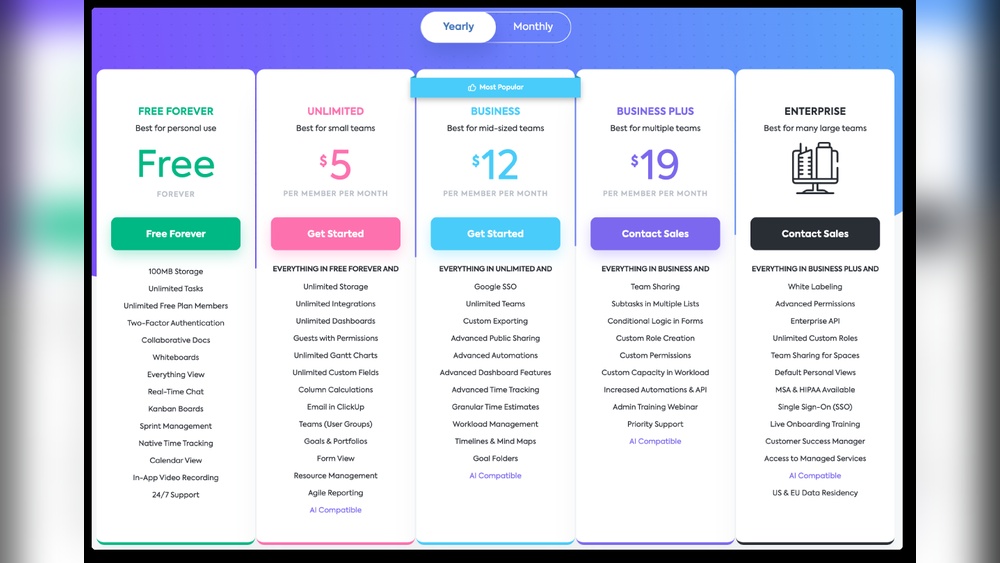
ClickUp offers two popular paid plans: Unlimited and Business. Both plans provide enhanced features beyond the free version. Understanding their cost and benefits helps teams pick the best fit. This section breaks down pricing, value, scalability, and guest seat options.
Cost Comparison Per User Between Unlimited And Business Plans
| Plan | Price per User (Monthly) | Key Feature |
|---|---|---|
| Unlimited | $5 | Unlimited integrations and custom fields |
| Business | $12 | Multiple automation steps and advanced reporting |
Unlimited is more affordable per user, ideal for small to medium teams. Business costs more but adds automation and reporting features.
Value Proposition: What You Get For The Price
- Unlimited: Unlimited integrations, guests with permissions, custom fields, and no task limits.
- Business: All Unlimited features plus:
- Multi-step automations to save time
- Advanced time tracking and dashboards
- Goals and portfolios for project oversight
The Business plan targets teams needing better control and workflow automation.
Scalability Considerations For Growing Teams
Unlimited suits teams expanding without complex needs. Business supports scaling with:
- Custom roles for clear team responsibilities
- Enhanced reporting to track progress
- Automations that reduce manual work
Teams can start on Unlimited and upgrade as needs grow. Business handles larger teams with diverse workflows.
Permission-controlled Guest Seats And Their Impact On Pricing
Both plans include guest seats with permission controls. Guests can be freelancers or clients with limited access.
- Guests in Unlimited do not increase cost significantly
- Business allows more advanced permission settings per guest
- Managing guest seats effectively keeps overall costs down
Controlling guest permissions helps protect data and optimize spending.
Pros And Cons Based On Real-world Usage
Choosing between ClickUp’s Business and Unlimited plans depends on team size, project needs, and budget. Both plans offer unique features that suit different work styles and goals. Understanding their strengths and limitations helps teams pick the best option for productivity and cost efficiency.
Unlimited Plan: Strengths And Limitations For Small, Agile Teams
The Unlimited plan fits small teams that need flexibility without complex features. It offers:
- Unlimited integrations with various tools, ensuring smooth workflows.
- Guests with permissions to include freelancers or clients easily.
- Unlimited custom fields for personalized task management.
Strengths include easy setup and cost-effectiveness for teams that prioritize speed.
Limitations involve automation capabilities. The plan supports only single-step automations, which may slow down complex workflows.
Teams needing advanced automation or deeper project management may find this plan limiting.
Business Plan: Benefits And Challenges For Established Businesses
The Business plan suits established businesses managing multiple teams and projects. Key benefits include:
- Multi-step automations for advanced process automation.
- Custom role permissions to control user access precisely.
- Better support for project sprints and workload management.
This plan enhances collaboration and control, helping larger teams stay organized.
Challenges include a higher price point and a steeper learning curve for new users.
Smaller teams may find some features unnecessary and overwhelming.
User Feedback Highlights And Common Pain Points
| Plan | Positive Feedback | Common Pain Points |
|---|---|---|
| Unlimited | Easy to use, affordable, good for simple projects | Limited automation, fewer advanced controls |
| Business | Powerful automation, detailed permissions, good for scaling | Higher cost, complexity for small teams |
Which Plan Offers Better Roi Depending On Project Complexity
Simple projects with fewer steps benefit most from the Unlimited plan’s affordability and ease.
Complex projects involving multiple teams, workflows, and automation gain better ROI from the Business plan.
Consider task complexity and team size before choosing. Business plan features justify higher cost for detailed control and automation.
Unlimited plan suits smaller budgets and straightforward needs.
Ideal Users And Scenario Recommendations
Choosing between ClickUp Business and Unlimited plans depends on your team size, project complexity, and privacy needs. Each plan offers distinct features suited for different workflows. Understanding these helps match the right plan to your unique requirements.
When To Choose The Unlimited Plan: Small Teams And Flexible Project Needs
The Unlimited Plan suits small teams or businesses with simple, flexible projects. It provides:
- Unlimited integrations to connect all your favorite tools.
- Guests with permissions for freelancers or clients.
- Unlimited custom fields to tailor tasks and projects.
This plan supports teams needing easy collaboration without complex project management features.
When The Business Plan Is The Better Fit: Multi-project Management And Privacy Needs
The Business Plan fits teams managing multiple projects with stricter privacy requirements. It offers:
- Advanced automation, including multi-step workflows.
- Higher security with increased privacy controls.
- Goal tracking and resource management tools.
This plan works well for teams needing organized project oversight and data protection.
Use Cases Highlighting Each Plan’s Strengths
| Plan | Ideal Use Case | Key Strengths |
|---|---|---|
| Unlimited Plan | Startups, freelancers, or small teams with flexible workflows | Unlimited integrations, guest access, customizable fields |
| Business Plan | Medium to large teams with multiple projects and privacy needs | Multi-step automations, goal tracking, enhanced security |
Tips For Transitioning From Unlimited To Business As Your Organization Grows
- Assess project complexity: Identify if your workflows require advanced automation.
- Review team size: Larger teams benefit from added privacy and management features.
- Plan training: Prepare your team for new tools and features in the Business Plan.
- Migrate data carefully: Ensure all tasks and custom fields move smoothly.
- Evaluate regularly: Adjust your plan based on evolving business needs.
Following these steps ensures a smooth upgrade and better team productivity.
Conclusion: Making The Right Choice Between Clickup Business And Unlimited
Choosing between ClickUp Business and Unlimited depends on your team’s size, needs, and goals. Both plans offer strong features to boost productivity. Understanding their key differences helps pick the best fit for your work style and project demands.
Summarizing Key Differentiators And Benefits
| Feature | ClickUp Unlimited | ClickUp Business |
|---|---|---|
| Automations | Single-step automations only | Multi-step automations for complex workflows |
| Integrations | Unlimited integrations with external tools | Unlimited integrations plus advanced app connections |
| Custom Fields | Unlimited custom fields | Unlimited with enhanced customization options |
| Guest Access | Guests with permissions for freelancers/clients | Advanced guest roles for better control |
| Support | Standard support | Priority support for faster issue resolution |
How To Align Plan Selection With Your Team’s Goals
Consider your team size and workflow complexity. Smaller teams or startups may find Unlimited enough. It covers basic automations and integrations well.
For larger teams or businesses needing automation across multiple steps, Business fits better. It handles complex workflows with ease.
- Define project needs and daily tasks clearly.
- Check if multi-step automations will save time.
- Assess the need for advanced guest permissions.
- Evaluate support needs for quick problem solving.
Match these factors to the plan features. This ensures smooth workflow and effective collaboration.
Final Thoughts On Maximizing Productivity With Clickup
Both plans help teams work smarter. The Unlimited plan suits simple, growing teams. The Business plan works well for complex projects and bigger teams.
Choose the plan that fits your current work style. You can always upgrade as your team grows.
Use ClickUp’s tools to keep all tasks, chats, and projects in one place. This saves time and reduces confusion.
Focus on clear communication and automation. Let ClickUp handle routine tasks. Your team stays focused on what matters most.

Credit: www.youtube.com
Frequently Asked Questions
What Is The Difference Between Unlimited And Business Clickup?
ClickUp Unlimited suits small teams with unlimited storage and custom fields. Business targets larger teams, adding advanced dashboards, private views, workload tracking, and features like Mind Maps and Timeline views. Business offers more detailed reporting and enhanced permissions than Unlimited.
What Is Included In Clickup’s Unlimited Plan?
ClickUp’s Unlimited plan includes unlimited integrations, guests with permissions, unlimited custom fields, storage, and views. It suits small teams needing flexible project management without advanced reporting or private dashboards.
What Is The Difference Between Clickup Enterprise And Business Plus?
ClickUp Business Plus supports multiple teams with custom role permissions and priority support. Enterprise offers advanced customization, unlimited roles, SSO, and organization branding.
How Many People Can Be On The Clickup Unlimited Plan?
The ClickUp Unlimited plan supports unlimited users, making it ideal for small, agile teams needing extensive features.
Conclusion
Choosing between ClickUp Business and Unlimited depends on your team’s needs. Unlimited suits small teams wanting basic features and integrations. Business fits larger teams needing advanced dashboards and multiple automation steps. Both plans help manage projects and save time effectively. Check your requirements before deciding. Explore more details and get started with ClickUp here. This way, you pick the best plan for your workflow and budget.