Amazing Marvin Vs Clickup: Ultimate Productivity Showdown
Choosing the right productivity tool can transform the way you manage your tasks and projects. If you’re torn between Amazing Marvin and ClickUp, you’re not alone.
Both promise to boost your efficiency, but which one truly fits your style and needs? Amazing Marvin focuses on helping you organize and focus on what matters most, while ClickUp offers an all-in-one platform designed to replace multiple apps with AI-powered features that save you time and money. You’ll discover the strengths and weaknesses of each, so you can decide which tool will elevate your productivity the most. Ready to find out which one wins? Let’s dive in—and if you’re curious about ClickUp, check it out here: ClickUp.
Introduction To Amazing Marvin And Clickup
Productivity tools shape how teams and individuals manage tasks and projects. Two popular options, Amazing Marvin and ClickUp, serve different needs and styles. Understanding their features and goals helps users pick the right fit.
Overview And Purpose Of Amazing Marvin
Amazing Marvin is a task and project management app designed to boost personal productivity. It combines customizable strategies to help users focus, plan, and complete work more efficiently.
- Offers unique productivity methods and timers
- Highly flexible interface tailored to individual workflow
- Focuses on personal time management and task prioritization
- Ideal for users seeking deep customization and self-management tools
Overview And Purpose Of Clickup
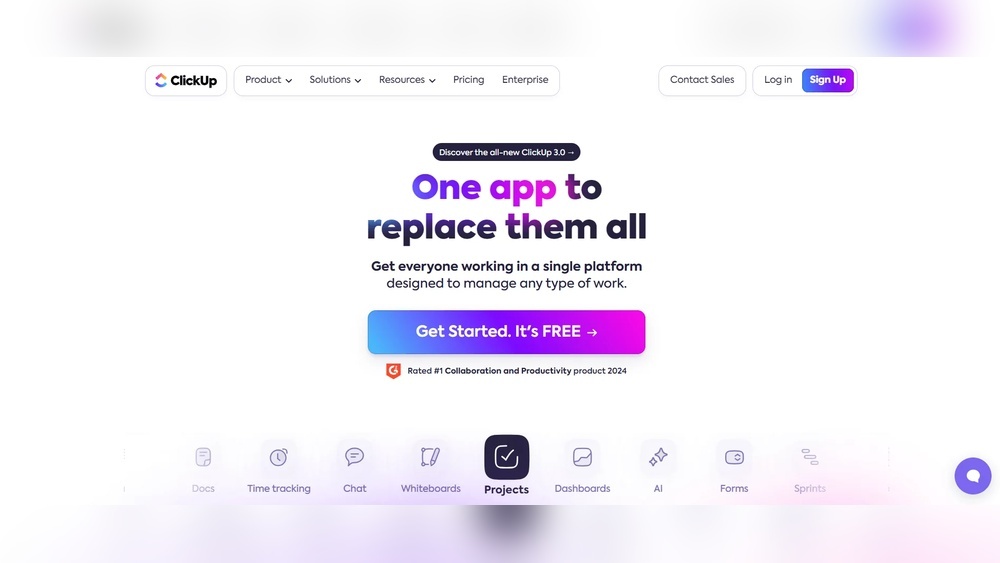
ClickUp is an all-in-one AI-powered platform aiming to replace multiple apps. It supports teams by uniting project management, communication, and automation in a single space.
- Combines tasks, chat, docs, and AI tools
- Designed for seamless team collaboration and project tracking
- Aims to save time by providing context-rich workflows
- Suitable for businesses seeking an integrated software solution
Why Compare Amazing Marvin And Clickup?
Both tools serve productivity but with different approaches and audiences. Comparing them helps users find software that matches their needs and work style.
- Scope: Marvin targets personal task management, ClickUp focuses on team projects.
- Features: Marvin offers deep customization; ClickUp provides broad integrations.
- Use Cases: Individuals seeking self-optimization vs. teams needing unified collaboration.
This comparison guides users to select the best platform for their productivity goals.

Credit: www.youtube.com
Key Features That Set Amazing Marvin Apart
Amazing Marvin stands out with unique features designed to boost productivity and simplify task management. It combines deep customization, behavioral science, and integrated tools to create a focused work environment. These features help users manage tasks better without relying on many separate apps.
Comprehensive Task And Project Management With Customization
Amazing Marvin offers flexible task and project management that adapts to different workflows. Users can:
- Create tasks with detailed tags, priorities, and deadlines.
- Organize projects into smaller steps for clear progress tracking.
- Customize the interface to fit personal work styles.
- Use multiple views like lists, calendars, and boards.
This customization supports various productivity methods, making task handling efficient for each user.
Behavioral Design To Enhance Focus And Productivity
Amazing Marvin uses behavioral design techniques to improve focus and reduce procrastination. Features include:
- Time tracking to measure work periods and breaks.
- Task batching to group similar tasks and complete them faster.
- Reminders and rewards to motivate consistent work habits.
- Focus modes that limit distractions during work sessions.
These tools support better concentration and help users build positive work routines.
Integrated Tools To Eliminate The Need For Complementary Apps
Amazing Marvin packs many tools in one platform, reducing the need for extra apps. It includes:
| Feature | Description |
|---|---|
| Calendar Integration | Sync tasks with calendars for seamless scheduling. |
| Note-Taking | Store project notes and ideas inside tasks. |
| Pomodoro Timer | Built-in timer to improve time management. |
| Goal Setting | Track long-term goals alongside daily tasks. |
This all-in-one approach saves time and keeps work organized in a single place.
Unique Features Of Clickup And Their Benefits
ClickUp stands out with its rich features that improve productivity and task management. Its tools help teams and individuals stay organized and focused. Each feature targets specific needs, making work smoother and clearer.
Versatile Task Breakdown And Subtask Management
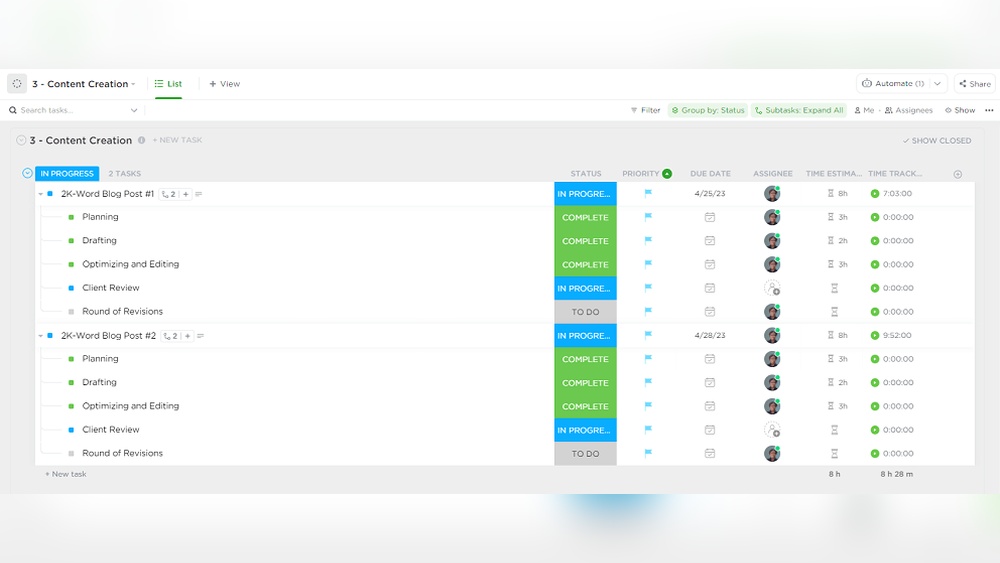
ClickUp allows users to break down tasks into smaller, manageable parts. This task breakdown helps to focus on detailed steps and track progress easily.
- Create multiple levels of subtasks for complex projects
- Assign different team members to subtasks for clear responsibility
- Set due dates and priorities on each subtask
This structure ensures no step is missed and deadlines are met. It improves clarity and reduces overwhelm.
Custom Views Including Kanban, List, And Calendar For Visual Organization
ClickUp offers several custom views to organize work visually. Users can switch between:
- Kanban board: Drag and drop tasks for workflow tracking
- List view: See detailed task lists with filters and sorting
- Calendar view: Visualize tasks over time and deadlines
These views help match personal or team preferences. Visual organization reduces confusion and speeds up task handling.
Specialized Adhd And Neurodivergent Templates For Focused Task Management
ClickUp includes templates made for ADHD and neurodivergent users. These templates support better focus and task control by:
- Breaking tasks into clear, small steps
- Using timers and reminders to maintain attention
- Providing simple layouts to avoid distractions
This focus support helps users stay on track and reduces stress in managing tasks.
Centralized Workspace To Reduce Context Switching
ClickUp offers a centralized workspace where all work tools come together. This setup reduces the need to jump between apps, which can waste time and cause errors.
- Manage tasks, chats, documents, and calendars in one place
- Use built-in AI features for quick task updates and automation
- Collaborate with team members without leaving the platform
Keeping work in one place improves focus and efficiency by reducing distractions from multiple apps.
Pricing And Affordability Comparison
Choosing the right productivity tool depends heavily on pricing and value. Both Amazing Marvin and ClickUp offer plans for different budgets and needs. Understanding their cost structures helps decide which fits best. This section breaks down each tool’s pricing and the value they deliver.
Amazing Marvin Pricing Structure And Value
Amazing Marvin offers a straightforward pricing model with a focus on flexibility.
- Monthly Plan: $12 per user per month.
- Annual Plan: $8 per user per month (billed yearly).
The tool includes all features in every plan. Users get access to:
- Advanced task management
- Customization options
- Time tracking
- Focus modes
This simplicity means no hidden fees or tier restrictions. The annual plan offers a good discount for long-term users.
Clickup Pricing Plans And Affordability
ClickUp provides multiple pricing tiers targeting different user groups.
| Plan | Cost | Features Included |
|---|---|---|
| Free | $0 | Basic tasks, unlimited users, 100MB storage |
| Unlimited | $5 per user/month (billed annually) | Unlimited storage, integrations, dashboards |
| Business | $12 per user/month (billed annually) | Advanced automation, goal tracking, time tracking |
| Enterprise | Custom pricing | Advanced security, onboarding, dedicated support |
ClickUp’s free plan is robust for small teams or individual users. Paid plans unlock more features and storage.
Which Tool Offers Better Roi For Different User Types?
Freelancers and Individuals: Amazing Marvin’s flat pricing and full features suit solo users well. No need to upgrade for extra tools.
Small to Medium Teams: ClickUp’s tiered plans allow teams to scale features with budgets. The free plan can support startups with basic needs.
Large Enterprises: ClickUp’s advanced plans and customization provide higher value for bigger teams needing complex workflows and security.
ROI depends on user needs. Amazing Marvin offers consistent value with one price. ClickUp provides flexibility but requires careful plan selection.
Pros And Cons Based On Real-world Usage
Choosing the right productivity tool depends on real-world experience. Users share insights on strengths and weaknesses. This helps in understanding how each tool performs daily. Below, we explore Amazing Marvin and ClickUp from actual user views.
Amazing Marvin: Strengths And Limitations
Amazing Marvin stands out for its deep customization options. Users can tailor workflows to fit unique needs. It offers many features focused on task management and productivity strategies.
- Strengths:
- Highly customizable task views and workflows
- Built-in productivity techniques (e.g., time blocking, task batching)
- Strong focus on habit building and task prioritization
- Simple, clean interface with minimal distractions
- Limitations:
- Steeper learning curve for new users
- Limited collaboration features compared to competitors
- No native chat or document sharing
- Less suited for large teams or complex projects
Clickup: Advantages And Challenges
ClickUp offers an all-in-one platform combining project management, chat, and AI tools. It targets teams needing centralization of multiple apps into one.
- Advantages:
- Comprehensive feature set including task, doc, chat, and AI
- Highly scalable for individuals and large teams
- Multiple views: list, board, calendar, and more
- Automation and integration with many apps
- Challenges:
- Interface can feel complex and overwhelming
- Some users report slower performance on large projects
- Customization options may require significant setup time
- Occasional bugs and feature inconsistencies reported
User Feedback Highlighting Efficiency, Complexity, And Performance
| Aspect | Amazing Marvin | ClickUp |
|---|---|---|
| Efficiency | Efficient for personal productivity and task prioritization. | Efficient for team collaboration and multi-project management. |
| Complexity | Moderate complexity; requires time to master customization. | High complexity; steep learning curve for new users. |
| Performance | Lightweight and fast for individual use. | Can slow down with large data and many integrations. |
User comments often note Amazing Marvin’s helpful task strategies. Some find ClickUp powerful but sometimes overwhelming.
Choosing depends on user needs: simple personal focus or full team collaboration.
Ideal Users And Use Cases For Amazing Marvin
Amazing Marvin suits users who want a task manager with a unique behavioral approach. It helps users understand their habits and improve productivity. This tool fits well for those who want to customize their workflow deeply.
Its flexibility makes it ideal for both personal and professional needs. Users who struggle with procrastination or focus issues find it especially helpful. The app offers many strategies to tackle common productivity challenges.
Who Benefits Most From Amazing Marvin’s Behavioral Approach?
Amazing Marvin benefits users who want to change their work habits. It supports those who need reminders and motivation to complete tasks. The behavioral focus helps people with:
- Procrastination challenges
- Difficulty in prioritizing tasks
- Lack of focus or motivation
- Need for personalized productivity methods
The app provides tools like time tracking, task batching, and reward systems. These help users build better work routines step by step. The behavioral approach suits anyone ready to adjust habits for better results.
Best Scenarios For Using Amazing Marvin In Personal And Professional Settings
Personal Use:
- Managing daily chores and errands
- Setting and tracking personal goals
- Improving study habits and focus
- Breaking large projects into simple steps
Professional Use:
- Organizing complex projects with multiple tasks
- Customizing workflows for different job roles
- Tracking work habits and productivity trends
- Handling deadlines and shifting priorities
Amazing Marvin shines where users want a personalized system. It fits freelancers, students, and professionals who value self-awareness in task management.
Ideal Users And Use Cases For Clickup
ClickUp serves a wide range of users, from individuals to large teams. It fits users who want to manage projects, tasks, and communication in one place. Its flexibility and rich features suit different work styles and industries. This makes ClickUp ideal for users needing both structure and customization.
Teams that require collaboration with real-time updates find ClickUp very useful. Also, users who prefer visual organization and ready-to-use templates gain efficiency. The platform adapts well to many workflows, enhancing focus and productivity.
Why Clickup Excels For Adhd And Neurodivergent Users
ClickUp offers multiple ways to reduce overwhelm. Users can switch between list, board, and calendar views to match their thinking style. This visual flexibility helps maintain focus and reduce distractions.
The platform supports custom reminders and notifications, which aid in managing time and tasks. ClickUp’s ability to break down projects into small steps fits well with ADHD users’ needs.
Its integrated AI tools help with prioritization and task automation, making task management easier. Users can customize dashboards to highlight important tasks and hide less urgent ones.
Best Situations To Leverage Clickup’s Visual And Template Features
ClickUp’s visual tools shine in complex projects needing clear structure. Use cases include:
- Project management with multiple teams and deadlines
- Content planning using calendar and timeline views
- Product development tracking with stages and checklists
Templates save time by providing pre-built frameworks for:
- Agile sprints and task workflows
- Marketing campaigns and editorial calendars
- Client onboarding and support ticketing
Visual dashboards allow quick status checks and progress tracking. They work well for managers and team leads who need an overview without deep diving into every task.
| Feature | Ideal Use Case | Benefit |
|---|---|---|
| Multiple Views (List, Board, Calendar) | Users with ADHD or neurodivergence | Improves focus and reduces overwhelm |
| Templates Library | Teams needing fast project setup | Saves time, ensures consistency |
| Dashboards and Reporting | Managers tracking progress | Clear visualization of goals and tasks |

Credit: x.com
Final Verdict: Which Productivity Tool Wins?
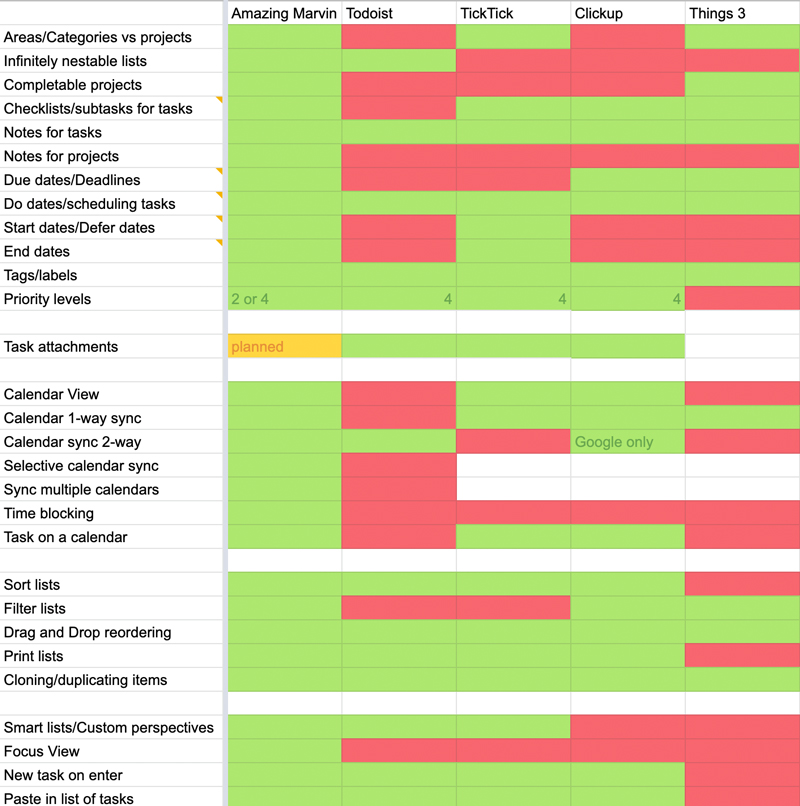
Choosing between Amazing Marvin and ClickUp depends on what you need from a productivity tool. Both have unique strengths that serve different styles of work. This section breaks down their key differences, offers recommendations, and suggests alternatives for those seeking other options.
Summary Of Key Differences And Strengths
| Feature | Amazing Marvin | ClickUp |
|---|---|---|
| Core Focus | Task and project management with deep customization | All-in-one platform combining AI, chat, projects, and more |
| User Interface | Simple, focused on task flow and productivity techniques | Feature-rich, but can feel complex for new users |
| Customization | Highly customizable workflows and task management | Custom views, automations, and integrations across many apps |
| Collaboration | Limited to task sharing and personal productivity | Strong team collaboration tools including chat and context sharing |
| Pricing | Affordable for individuals focusing on task mastery | Scales for teams with varied needs, including AI features |
Recommendations Based On User Needs And Preferences
- Choose Amazing Marvin for focused task management with deep customization.
- Choose ClickUp if you want an all-in-one tool with AI, chat, and project tracking.
- For individuals who prefer simplicity and control over their tasks, Amazing Marvin fits well.
- For teams needing collaboration, context sharing, and multiple app replacements, ClickUp is better.
- Users new to productivity apps may find ClickUp’s complexity challenging.
Alternative Tools To Consider If Neither Fits Your Workflow
If Amazing Marvin and ClickUp do not suit your style, consider these options:
- Trello – Visual boards for simple, clear task management.
- Asana – Clean interface with straightforward task tracking.
- Basecamp – All-in-one tool focusing on simplicity and team communication.
- Teamwork – Great for client services with time tracking and billing.
These alternatives offer different balances of simplicity, collaboration, and features.
Credit: amazingmarvin.com
Frequently Asked Questions
Is There Something Better Than Clickup?
Some alternatives to ClickUp offer simpler interfaces or specialized features. Tools like Trello, Asana, and Teamwork may suit specific needs better. The best choice depends on your project requirements and preferred workflow style.
Is The Amazing Marvin Worth It?
The Amazing Marvin offers comprehensive task management with unique, customizable features. It suits users seeking focus and organization. Many find it worth the investment for boosting productivity and handling complex projects efficiently.
Why Not Use Clickup?
ClickUp can feel overwhelming due to its complex features. Users report slow loading times, which may reduce productivity. Simpler tools might better suit some needs.
Is Clickup Good For Adhd?
Yes, ClickUp suits ADHD with task breakdowns, customizable views, reminders, and ADHD-friendly templates. It boosts focus but may overwhelm due to many features.
Conclusion
Both Amazing Marvin and ClickUp offer strong task management features. Amazing Marvin suits users wanting deep focus and personal organization. ClickUp fits teams needing all-in-one project and communication tools. Consider your workflow and feature needs before choosing. Explore ClickUp’s options and see if it fits your style. Learn more about ClickUp’s capabilities here. Choose the tool that helps you stay organized and productive daily.