Sunsama Vs Clickup: Ultimate Battle for Productivity Supremacy
Are you struggling to find the perfect tool to organize your workday and boost your productivity? Choosing between Sunsama and ClickUp can feel overwhelming, especially when both promise to help you manage tasks and projects effectively.
But here’s the thing: they are designed with different goals in mind. Sunsama focuses on helping you start calm, stay focused, and end your day confident by combining a task manager, calendar, and daily planner into one seamless experience. ClickUp, on the other hand, offers a powerful all-in-one platform packed with customization and advanced project management features. If you want a digital daily planner that helps you eliminate distractions and find your flow without burning out, you’ll want to learn how Sunsama stands out. Ready to see which tool fits your style better? Dive into this detailed comparison and discover how Sunsama could transform your productivity. Check it out here: Sunsama.
Introduction To Sunsama And Clickup
Sunsama and ClickUp are popular tools designed to improve how people manage their work and time. Both help users organize tasks, plan days, and boost productivity. Understanding their key features helps choose the best tool for personal or team use.
Overview Of Sunsama: Purpose And Core Functionality
Sunsama focuses on creating a calm and focused workday. It acts as a digital daily planner that combines task management with calendar integration. The goal is to help professionals stay on track, avoid distractions, and complete meaningful work without stress.
- Integrates tasks and calendar in one place
- Supports daily planning to set clear priorities
- Encourages focus by limiting distractions
- Designed for individual professionals seeking flow and calm
Overview Of Clickup: Purpose And Core Functionality
ClickUp is a versatile project management platform built for teams and individuals. It offers a wide range of tools to manage tasks, projects, and workflows. ClickUp adapts to different work styles with features for collaboration, tracking, and automation.
- Task and project management with rich customization
- Multiple views: lists, boards, calendars, and timelines
- Collaboration tools like comments, sharing, and notifications
- Automation and integrations to streamline work processes
Why Comparing Sunsama And Clickup Matters For Productivity
Choosing between Sunsama and ClickUp affects how efficiently work gets done. Each tool serves different needs and work habits. Sunsama supports focused daily planning and calm workflows. ClickUp suits teams needing detailed project tracking and collaboration.
Knowing strengths and limits helps pick the right tool. The comparison guides users to improve productivity by matching tool features with work style and goals.
| Aspect | Sunsama | ClickUp |
|---|---|---|
| Main Focus | Daily planning and focus | Project management and collaboration |
| Best For | Individual professionals | Teams and individuals |
| Key Features | Task-calendar integration, distraction control | Custom workflows, multiple views, automation |
| Use Case | Stay calm and focused on daily tasks | Manage complex projects and teamwork |

Credit: www.youtube.com
Unique Features Of Sunsama And Their Benefits
Sunsama stands out with features designed to help professionals plan their day calmly and focus deeply. This tool combines task management, calendar integration, and daily planning into one easy-to-use platform. The unique features of Sunsama improve productivity by reducing distractions and helping users organize tasks clearly. These features promote better time management and keep users confident about their daily goals.
Daily Planning With Time Blocking: Enhancing Focus And Time Management
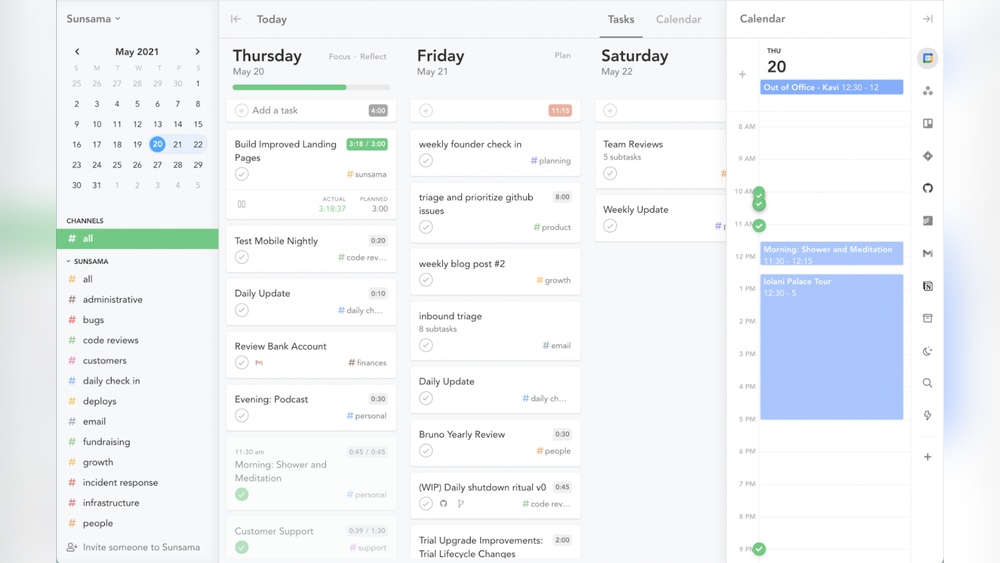
Sunsama uses time blocking to divide your workday into focused periods. You assign specific tasks to fixed time slots. This method helps prevent multitasking and improves concentration.
- Visual layout shows tasks aligned with calendar slots.
- Encourages setting realistic daily goals.
- Reduces stress by limiting the number of tasks per day.
By planning daily with time blocks, users stay on track and manage work without feeling overwhelmed.
Integration With Calendars And Email: Streamlining Workflow
Sunsama connects smoothly with your calendar apps and email. This integration centralizes tasks and meetings in one place.
- Syncs with Google Calendar, Outlook, and others.
- Allows importing emails as tasks.
- Updates tasks automatically when calendar events change.
This feature reduces app switching and keeps your schedule accurate, saving time and effort.
Task Time Prediction And Actual Time Tracking: Boosting Accountability
Sunsama lets you predict how long tasks will take and then track the actual time spent. This comparison helps improve planning skills.
- Enter estimated task durations during planning.
- Track real time spent while working.
- Review differences to adjust future plans.
Users gain clearer insights into their productivity and become more accountable for time use.
User Experience And Interface: Simplifying Daily Task Scheduling
The user interface of Sunsama is clean and intuitive. It focuses on simplicity to avoid distractions.
- Drag-and-drop tasks into calendar slots easily.
- Minimalist design reduces clutter.
- Clear visual cues highlight priorities.
The simple layout helps users schedule their day quickly and stay focused on what matters most.
Unique Features Of Clickup And Their Benefits
ClickUp stands out with features designed to boost productivity and team collaboration. Its tools fit varied workflows and project types, making it a flexible choice for many teams. These unique features help teams organize work, communicate, and track progress all in one place.
All-in-one Workspace: Combining Tasks, Docs, And Communication
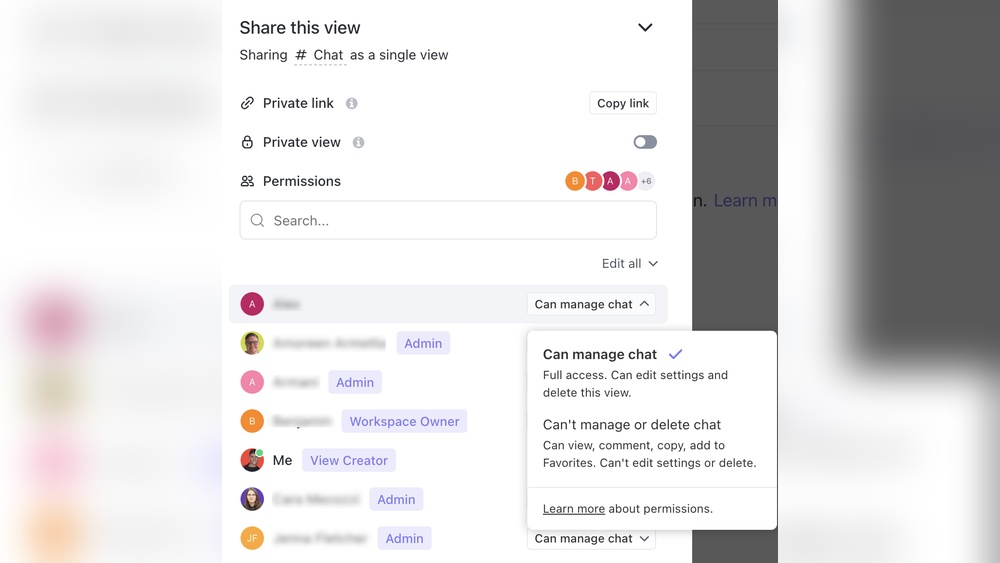
ClickUp merges task management, document creation, and team communication into a single platform. This integration reduces the need to switch between apps. Teams can create tasks, write docs, and chat without leaving ClickUp.
- Centralized tasks: Manage all project tasks in one place.
- Built-in docs: Collaborate on documents without extra tools.
- Team chat: Discuss work directly within tasks or projects.
This setup saves time and keeps everyone aligned on project goals.
Customizable Workflows And Views: Catering To Diverse Team Needs
ClickUp offers flexible workflows and multiple view options. Teams can tailor setups to fit their unique processes and preferences.
| Feature | Benefit |
|---|---|
| Custom statuses | Track progress with terms that fit your workflow. |
| Multiple views | Choose from list, board, calendar, Gantt, and more. |
| Custom fields | Add specific data points for tasks and projects. |
These options help teams stay organized and work in ways that suit them best.
Ai-powered Chat And Automation: Increasing Efficiency And Collaboration
ClickUp integrates AI tools for chat and automation. This streamlines routine work and boosts team interaction.
- AI chat: Get instant help or generate content within the app.
- Automations: Set rules to automate repetitive tasks like assigning or status updates.
These features reduce manual work and keep projects moving smoothly.
Advanced Reporting And Resource Management: Supporting Complex Projects
ClickUp provides detailed reports and resource tracking for larger projects. Managers gain insight into team workload and progress.
- Custom reports: Visualize project data with charts and tables.
- Resource view: Monitor team member capacity and task allocation.
- Time tracking: Record hours spent and improve project estimates.
These tools help balance resources and meet deadlines effectively.

Credit: akiflow.com
Pricing And Affordability Comparison
Choosing the right productivity tool depends heavily on pricing and the value offered. Sunsama and ClickUp serve different user needs with distinct pricing models. Understanding their costs and features helps pick the best fit for individuals and teams.
Sunsama Pricing Structure: Plans And Value For Individuals And Teams
Sunsama offers a simple pricing plan focused on individual professionals and small teams. It provides a single plan priced at $20 per user per month, billed monthly or annually.
- Includes daily planner, task management, calendar integrations
- Designed to reduce distractions and enhance focus
- Offers a free trial to test features
The pricing suits users wanting a calm, focused daily workflow without complex project management features. The flat rate keeps costs predictable, ideal for freelancers and small teams.
Clickup Pricing Structure: Plans, Features, And Scalability
ClickUp offers multiple plans with varied features to support scalability.
| Plan | Price (per user/month) | Key Features |
|---|---|---|
| Free | $0 | Unlimited tasks, 100MB storage, basic integrations |
| Unlimited | $5 | Unlimited storage, integrations, dashboards |
| Business | $12 | Advanced automation, goals, portfolios |
| Enterprise | Custom pricing | Custom features, support, security |
ClickUp’s tiered pricing fits startups to large enterprises. The free plan suits basic needs. Paid plans add powerful tools for collaboration and project tracking.
Which Tool Offers Better Roi Based On Different User Profiles
Individuals and Freelancers:
- Sunsama offers simplicity and focus for a fixed price.
- ClickUp’s free plan works but may feel complex for daily planning.
Small to Medium Teams:
- ClickUp provides flexibility and scalable features at lower cost per user.
- Sunsama’s single plan may be costly as team size grows.
Large Teams and Enterprises:
- ClickUp supports advanced needs with custom pricing and features.
- Sunsama lacks enterprise-level scaling and customization.
Overall, ClickUp delivers better ROI for teams needing customization and growth. Sunsama fits best for individuals focused on daily productivity without complexity.
Pros And Cons Based On Real-world Usage
Choosing between Sunsama and ClickUp depends on how you work daily. Both tools serve different needs and styles. Sunsama focuses on simple, calm daily planning. ClickUp offers a powerful and flexible platform for detailed project management.
Below is a breakdown of their strengths and weaknesses from real users’ experiences. This helps understand which tool fits your work style best.
Sunsama Pros: Simplicity, Focused Daily Planning, And Calendar Integration
- Simplicity: Sunsama has a clean, minimal interface that reduces distractions.
- Focused Daily Planning: It guides users to plan daily tasks thoughtfully, improving focus.
- Calendar Integration: Sunsama syncs seamlessly with Google Calendar and Outlook.
- Stress Reduction: The tool encourages a calm approach to work, avoiding burnout.
- Task Prioritization: Users can easily rank tasks by importance for better productivity.
Sunsama Cons: Limited Advanced Project Management Features
- Basic Task Management: Lacks complex features like dependencies or detailed reporting.
- Not Ideal for Large Teams: Limited collaboration options for bigger projects.
- No Time Tracking: Missing built-in tools to monitor time spent on tasks.
- Less Customization: Few options to tailor workflows or views compared to other tools.
Clickup Pros: Versatility, Customization, And Robust Feature Set
- Versatility: Suitable for individuals, small teams, and large organizations.
- Customization: Offers customizable task statuses, views, and workflows.
- Robust Features: Includes time tracking, task dependencies, and goal tracking.
- Collaboration Tools: Built-in chat, comments, and real-time notifications.
- Multiple Project Views: List, board, calendar, Gantt, and more for flexible work styles.
Clickup Cons: Complexity And Learning Curve For New Users
- Steep Learning Curve: Beginners may feel overwhelmed by the many features.
- Complex Interface: The dashboard can seem cluttered and confusing at first.
- Setup Time: Customizing workflows and automations requires effort and time.
- Possible Overload: Too many options can distract users from simple task management.
Ideal Users And Use Case Recommendations
Choosing the right productivity tool depends on your work style and project needs. Sunsama and ClickUp serve different types of users and use cases. Understanding who benefits most from each helps pick the best fit.
Who Should Choose Sunsama: Freelancers, Individuals, And Focused Planners
Sunsama is designed for individuals who want to stay calm and focused. Its strength lies in daily planning and managing tasks without distractions.
- Freelancers who juggle multiple projects but want clear daily goals
- Individuals seeking a simple yet powerful task manager combined with a calendar
- Focused planners who prefer a calm workspace to track tasks and reduce burnout
The tool helps users build a daily workflow, allowing them to prioritize high-impact work. It fits well for those who want to end the day confident about their progress.
Who Should Choose Clickup: Teams, Enterprises, And Complex Project Managers
ClickUp suits teams and enterprises managing complex projects with multiple workflows.
- Teams needing collaboration features and task assignment
- Enterprises requiring customization and integration with other tools
- Project managers handling detailed project timelines and multiple dependencies
ClickUp supports diverse project views like Kanban, Gantt charts, and calendars. It offers deep customization to fit complex workflows and team sizes.
Scenario-based Recommendations: Matching Tool Strengths To Needs
| Scenario | Best Tool | Reason |
|---|---|---|
| Solo professional planning daily tasks | Sunsama | Simple interface with daily focus and calm workflow |
| Small team collaborating on shared projects | ClickUp | Robust collaboration and task management features |
| Enterprise managing complex projects and integrations | ClickUp | Advanced customization and scalable project views |
| Individual needing a daily planner with minimal distractions | Sunsama | Focus on daily flow and reducing burnout |
Matching the tool to your working style maximizes productivity. Sunsama suits those valuing simplicity and focus. ClickUp fits those requiring collaboration and complexity.
Conclusion: Making The Right Productivity Tool Choice
Choosing between Sunsama and ClickUp means understanding your work style and needs. Both tools offer unique strengths that fit different productivity goals. Sunsama helps you plan daily tasks calmly and stay focused. ClickUp provides a powerful platform for managing complex projects and teams.
Summary Of Key Differences And Strengths
| Feature | Sunsama | ClickUp |
|---|---|---|
| Purpose | Daily planner focused on calm and flow | Project management with wide customization |
| User Interface | Simple, clean, distraction-free | Feature-rich, customizable dashboards |
| Best For | Individual professionals seeking focus | Teams managing multiple projects and workflows |
| Task Management | Integrates tasks with calendar and daily planning | Advanced task tracking, dependencies, and automation |
| Learning Curve | Minimal, easy to start quickly | Steeper, requires setup and training |
| Collaboration | Basic team sharing features | Robust collaboration tools and communication |
Tips For Trial And Adoption
- Start with a free trial to explore core features.
- Test Sunsama for daily focus and task flow management.
- Use ClickUp’s templates to speed up project setup.
- Involve your team early if collaboration is key.
- Watch tutorials or attend demos to reduce learning time.
- Set small goals to measure productivity improvements.
Final Thoughts On Achieving Productivity Supremacy
Productivity depends on the right fit, not just features. Sunsama suits those who want calm and clear daily focus. ClickUp works best for teams needing complex project control and flexibility.
Choose based on how you work, your team size, and project complexity. Both tools can boost output when used well. Focus on habit building with your chosen tool for lasting results.

Credit: akiflow.com
Frequently Asked Questions
Is There Anything Better Than Clickup?
Several tools may suit specific needs better than ClickUp. Monday. com excels in visual workflows, Asana offers clean task management, Notion provides flexible workspaces, and Wrike handles complex projects well. The best alternative depends on your team’s workflow, project complexity, and preferred features.
Is Sunsama A Good Productivity Tool?
Sunsama is a good productivity tool for daily planning and time blocking. It helps organize tasks and track time effectively.
Does Netflix Use Clickup?
Netflix does not publicly confirm using ClickUp. They likely use custom or enterprise project management tools tailored to their needs.
What Are Sunsama Alternatives?
Top Sunsama alternatives include ClickUp, Asana, Trello, Monday. com, Notion, Wrike, and Smartsheet. Each suits different project management needs.
Conclusion
Choosing between Sunsama and ClickUp depends on your daily work style. Sunsama offers a calm, focused daily planner that blends tasks and calendar smoothly. ClickUp provides extensive project management features for complex team workflows. For individuals seeking simplicity and flow, Sunsama fits well. Teams needing detailed customization might prefer ClickUp. Both tools aim to boost productivity but in different ways. Explore how each matches your needs before deciding. Start your focused journey with Sunsama and see how it helps you stay calm and organized.