How to Use Sunsama: Boost Your Productivity Effortlessly
If you want to take control of your day, stay focused, and end each workday feeling accomplished, Sunsama is the tool you need. Imagine having a single place where your tasks, calendar, and daily plan come together seamlessly—helping you eliminate distractions and work smarter, not harder.
Whether you struggle with staying organized or just want to boost your productivity without burning out, learning how to use Sunsama can transform the way you work. In this guide, you’ll discover simple, effective steps to set up and use Sunsama to its full potential. From prioritizing your tasks to managing your schedule with ease, you’ll learn how to create a calm and focused workflow that fits your lifestyle. Ready to start your journey toward more productive and stress-free days? Check out Sunsama here and let’s dive in: Get Sunsama now.
Introduction To Sunsama And Its Purpose
Sunsama is a daily planner designed to help professionals stay calm, focused, and confident. It blends task management, calendar scheduling, and mindful planning into one tool. This approach helps users eliminate distractions and concentrate on high-impact work without feeling burned out.
The main goal of Sunsama is to support a balanced workday. It encourages planning with intention, so users can manage tasks effectively while maintaining mental clarity. The tool suits modern professionals who want to improve productivity and reduce stress.
What Is Sunsama? An Overview Of The Daily Planning Tool
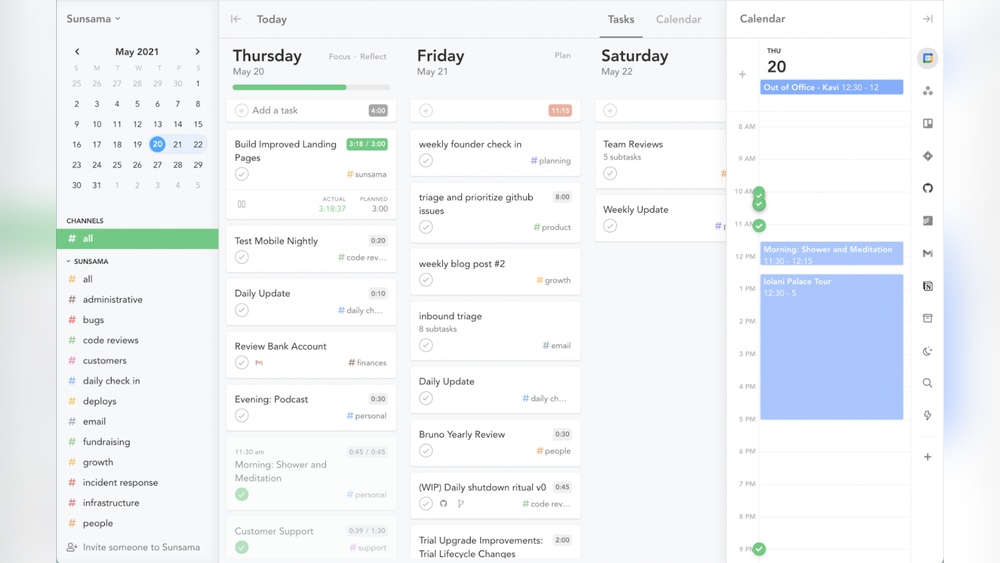
Sunsama combines a task manager, calendar, and daily planner into a single platform. It lets users organize daily work by integrating tasks and appointments seamlessly.
- Task management with easy drag-and-drop features
- Calendar integration to view all events and deadlines
- Mindful daily planning sessions to set realistic goals
- Focus on completing meaningful work without overload
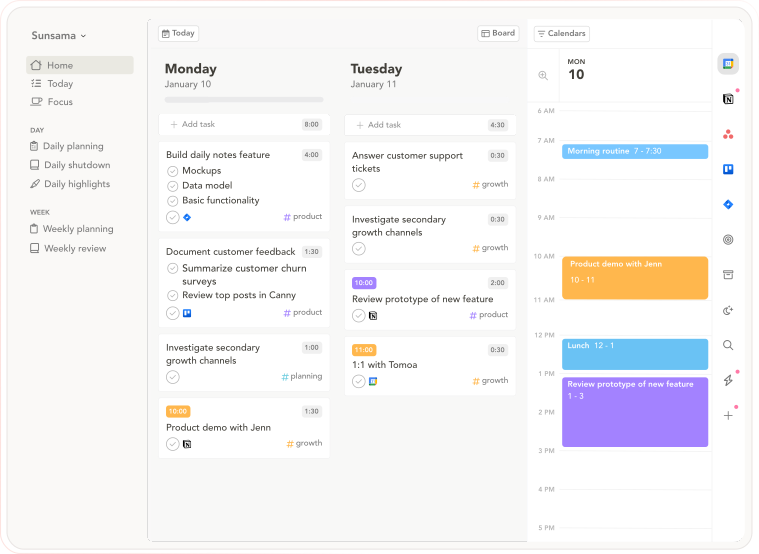
The interface is clean and intuitive, making it simple for users to plan their day thoughtfully. It helps track progress and adjust priorities throughout the day.
Why Choose Sunsama? Enhancing Productivity Mindfully
Sunsama stands out for its mindful approach to productivity. It encourages deliberate planning, helping users avoid overwhelm and burnout.
- Focus on flow: Plan tasks to create a smooth work rhythm.
- Reduce distractions: Keep only essential tasks visible each day.
- Balance workload: Set achievable goals instead of overloading.
- Stay calm: Use planning time as a moment to reflect and organize.
This method helps users complete more important work with less stress. Sunsama supports a healthy work-life balance by encouraging realistic daily schedules.
Who Can Benefit Most From Sunsama?
Sunsama suits many professionals but is ideal for:
- People managing multiple projects and deadlines
- Individuals seeking to reduce distractions and focus better
- Those who want a mindful, calm approach to daily planning
- Professionals who use both tasks and calendars to organize work
- Users with ADHD needing gentle structure without complexity
Teams and freelancers also find Sunsama helpful for aligning daily goals with bigger projects. Anyone wanting to improve daily focus and end the day confident will benefit.
Credit: www.sunsama.com
Key Features Of Sunsama And Their Benefits
Sunsama offers a set of powerful features designed to help professionals plan their day, manage tasks, and maintain focus. These features work together to create a calm, organized, and productive work environment. Each tool in Sunsama aims to reduce distractions, improve task management, and support mindfulness, helping users finish their work with confidence.
Daily Planning Rituals: Structuring Your Workday Effectively
Sunsama encourages a daily planning ritual where you select tasks to focus on each day. This habit helps break down overwhelming work into manageable chunks. Planning your day in the morning creates clear priorities and sets a focused path.
- Choose specific tasks for the day
- Balance work with breaks
- Reflect on completed tasks
This ritual boosts productivity by giving you control over your work and reducing anxiety.
Task Management: Organizing And Prioritizing With Ease
The task management feature lets you organize and prioritize your to-dos simply. You can add, edit, and reorder tasks based on importance or deadlines. Sunsama helps you avoid multitasking by focusing on a limited number of tasks daily.
Using this feature helps you:
- Keep track of all tasks in one place
- Set clear priorities
- Complete high-impact work first
Channels And Contexts: Categorizing Tasks For Better Focus
Sunsama uses channels and contexts to group tasks by project, client, or type of work. This categorization improves focus by allowing you to work on related tasks together. It also makes it easier to switch between different work areas without losing track.
Benefits include:
- Clear separation of work categories
- Improved mental clarity
- Faster task retrieval
Calendar Integration: Syncing Your Schedule Seamlessly
Sunsama integrates with popular calendars like Google Calendar. This synchronization lets you see meetings and tasks in one view. It helps avoid scheduling conflicts and ensures your daily plan fits your real schedule.
| Feature | Benefit |
|---|---|
| Two-way calendar sync | Updates tasks and events in real-time |
| Visual timeline | Shows work blocks and appointments clearly |
| Reminders | Keeps you on track throughout the day |
Global Add Task Shortcut: Quick Task Entry Anytime
The global add task shortcut allows you to add tasks instantly without opening Sunsama. Pressing a simple key combination lets you capture ideas or to-dos as they come up. This prevents forgetting tasks and keeps your workflow smooth.
- Fast task entry from any app
- Reduces interruptions
- Keeps your task list updated
Mindfulness Focus: Reducing Distractions And Preventing Burnout
Sunsama promotes mindfulness by encouraging users to focus on fewer tasks and take breaks. The app helps avoid burnout by balancing workload and reducing multitasking. It supports a calm work style that improves concentration and energy.
Key mindfulness benefits:
- Encourages regular breaks
- Limits daily task load
- Supports flow and deep work
Pricing And Affordability Breakdown
Understanding Sunsama’s pricing helps choose the best plan for your needs. This section breaks down the costs, features, and policies clearly. It guides you to make an informed decision without confusion.
Subscription Plans: What Sunsama Offers
Sunsama offers a simple subscription model designed for modern professionals. The main plan includes:
- Monthly Plan: Pay month-to-month with flexibility.
- Annual Plan: Pay once per year at a discounted rate.
Both plans provide access to the full range of features like task management, calendar integration, and daily planning tools.
| Plan | Price | Key Features |
|---|---|---|
| Monthly | $20 per month | Full features, cancel anytime |
| Annual | $180 per year (save 25%) | Full features, best value |
Value For Money: Comparing Features To Cost
Sunsama combines task management, calendar, and daily planning in one app. This integration saves time and effort.
Features include:
- Focus mode to reduce distractions.
- Easy task and event categorization.
- Mindfulness approach to manage workload.
Considering these tools, the pricing is competitive compared to separate apps. The all-in-one design offers convenience and better workflow.
Free Trial And Cancellation Policies
Sunsama provides a 14-day free trial. This lets users test features without paying. No credit card is needed upfront.
Cancel anytime during the trial with no charges. After the trial, the subscription auto-renews unless canceled.
To cancel:
- Go to account settings.
- Select subscription.
- Click cancel and confirm.
No hidden fees or long-term contracts apply. This flexible policy suits users wanting to try without commitment.
Pros And Cons Based On Real-world Usage
Sunsama serves as a daily planner, task manager, and calendar combined. Users appreciate its focus on mindfulness and calm productivity. Real-world use reveals both strong advantages and some limitations. Feedback from beginners and power users highlights key areas to consider before adopting Sunsama for daily task management.
Advantages: How Sunsama Boosts Productivity And Work-life Balance
Sunsama helps users organize their day with clear, focused steps. It reduces distractions by combining tasks and calendar events in one place.
- Daily planning: Users create a manageable daily task list.
- Mindfulness focus: Encourages deliberate work without burnout.
- Integration: Syncs with other tools like Google Calendar.
- Flow promotion: Helps users find work rhythm and maintain focus.
- Work-life balance: Encourages setting realistic daily goals.
Many users report feeling calmer and more in control of their workload. Sunsama supports breaking large projects into smaller tasks, improving task completion rates.
Limitations: Areas For Improvement And User Challenges
Sunsama requires upfront setup and some learning. This may challenge new users or those with limited time.
- Setup time: Initial configuration can be longer than other apps.
- Task organization: Some users find task filtering limited.
- Pricing: May be costly for casual users.
- Feature depth: Lacks advanced project tracking found in competitors.
- Offline access: Limited functionality without internet.
Users managing ADHD note Sunsama’s mindfulness helps but requires patience. Some wish for more automation and customizable reminders.
User Feedback: Insights From Beginners To Power Users
| User Type | Positive Feedback | Common Challenges |
|---|---|---|
| Beginners | Easy daily task planning, clear layout | Initial setup, understanding features |
| Intermediate Users | Improved focus, better calendar integration | Limited task filtering, pricing concerns |
| Power Users | Custom workflows, mindfulness benefits | Needs more advanced project features |
Users appreciate Sunsama’s calm approach to work. Many recommend consistent daily use for best results. Beginners should expect a learning curve but gain lasting productivity habits.
Step-by-step Guide: How To Use Sunsama Effectively
Sunsama combines task management and calendar planning into one tool. This guide helps you use Sunsama to stay calm, focused, and productive daily. Follow these steps to set up your account, plan your day, track time, and organize tasks efficiently.
Setting Up Your Account And Integrations
Start by creating your Sunsama account at Sunsama.com. After signing up, connect your essential apps. Integrations keep your tasks and calendar synced.
- Link your calendar: Connect Google Calendar or Outlook to see meetings and events inside Sunsama.
- Connect task apps: Sync with tools like Trello, Asana, or Jira to import tasks.
- Set your work hours: Define your daily start and end times to plan realistically.
These integrations make Sunsama your central hub for all daily planning.
Mastering The Daily Planning Flow: Selecting And Ordering Tasks
Each morning or evening, plan your day step by step:
- Review your tasks: Look at your imported tasks and calendar events.
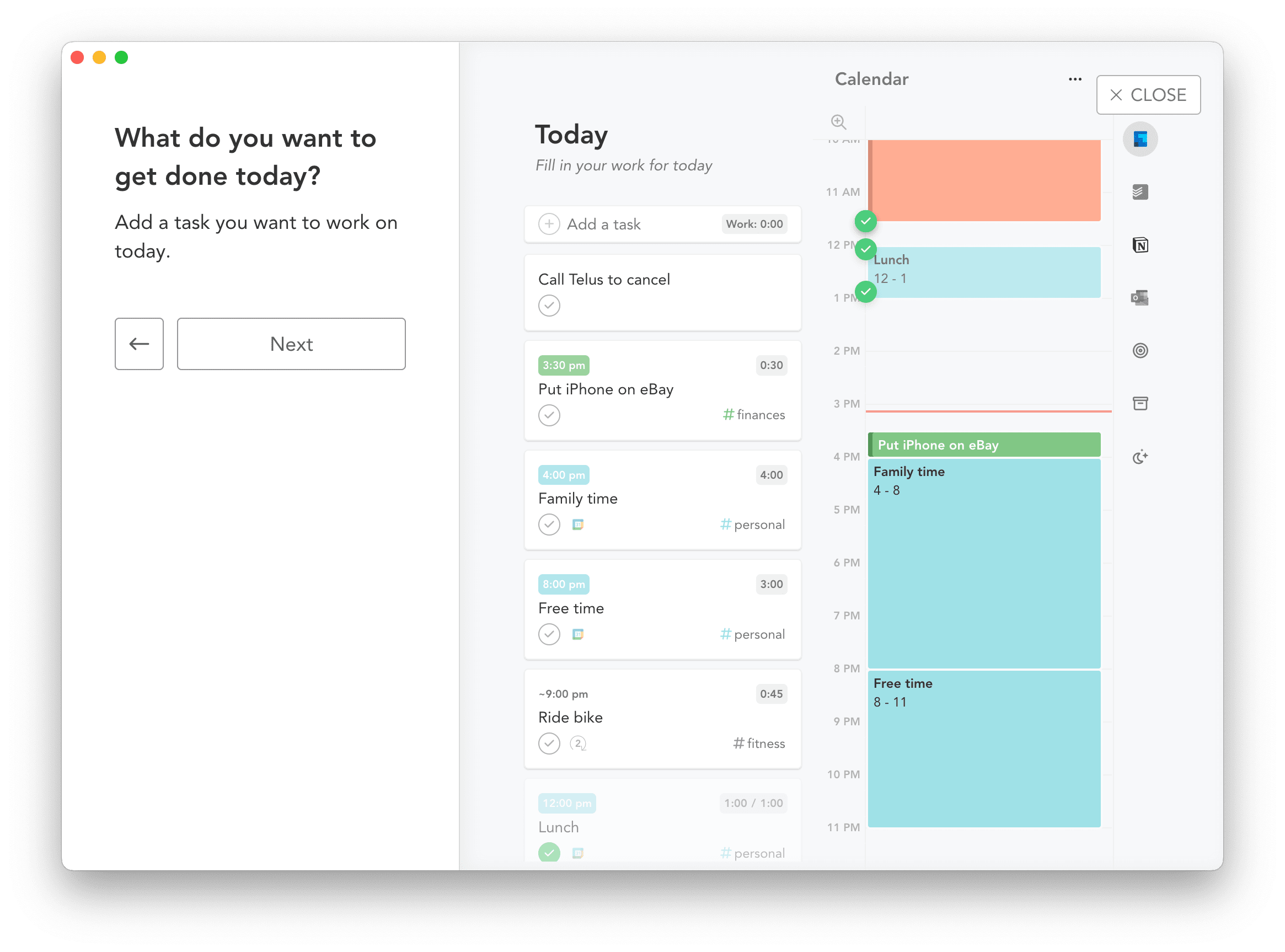
- Select tasks: Drag important tasks into today’s plan.
- Order tasks: Arrange tasks by priority or natural workflow.
- Estimate time: Assign time blocks to tasks to avoid overloading.
This flow helps maintain focus and complete high-impact work without stress.
Using Channels To Track Time And Activities
Channels in Sunsama organize your work by project, client, or theme. Use channels to track how you spend time.
- Create channels for different work areas or teams.
- Assign tasks to channels to group related activities.
- Use the timer inside Sunsama to start and stop task tracking.
- Review channel reports to understand where your time goes.
Channels provide clarity and help balance your workload.
Leveraging Search And Filters To View All Tasks
Sunsama’s search and filter tools make task management simple:
- Click the magnifying glass icon or press
CMD/Ctrl + Fto open search. - Enter keywords to find tasks across all lists and channels.
- Apply filters by date, channel, or status to narrow results.
- Save frequent filters for quick access later.
This helps you locate tasks quickly and stay organized.
Starting And Shutting Down Your Day With Sunsama Rituals
Begin your day with a clear plan:
- Review yesterday’s completed tasks and carry over unfinished ones.
- Set your top priorities for the day.
- Block focused work time and breaks.
End your day by:
- Checking off completed tasks.
- Reflecting on what you achieved.
- Planning the next day’s tasks to reduce stress.
These rituals help you stay calm and confident every workday.
Credit: thesweetsetup.com
Ideal Users And Scenarios For Sunsama
Sunsama is designed for people who want clear, calm, and focused daily planning. It fits various needs—from busy professionals to teams working together. The tool helps users manage tasks, reduce distractions, and maintain balance. Below are key groups and situations where Sunsama shines the most.
Professionals Seeking Focused Daily Planning
Professionals use Sunsama to plan their day with intention. The app blends calendar events and tasks into one view. This helps users:
- Prioritize important work
- Limit distractions
- Track progress clearly
The daily planning ritual in Sunsama encourages a calm start and confident finish. It helps maintain focus on high-impact tasks without feeling overwhelmed.
Individuals Managing Adhd And Attention Challenges
Sunsama supports people with ADHD by promoting mindfulness in task management. It requires some upfront setup but offers structure that guides attention well. Key benefits include:
- Breaking tasks into manageable steps
- Providing visual clarity of daily goals
- Reducing mental clutter through focused daily lists
This approach helps users stay on track and feel less stressed while handling tasks.
Teams Collaborating On Projects And Tasks
Teams benefit from Sunsama’s ability to integrate tasks with calendars. It offers:
| Feature | Benefit |
|---|---|
| Shared Task Lists | Keep everyone aligned on priorities |
| Real-Time Updates | Track progress and deadlines together |
| Daily Planning Sessions | Coordinate efforts and reduce overload |
Teams avoid confusion and improve productivity with a clear daily roadmap.
Anyone Looking To Balance Workload And Prevent Burnout
Sunsama helps users balance tasks and rest. It encourages planning realistic daily goals and setting limits. This prevents overwork and supports well-being. Features that aid balance include:
- Daily reflection on accomplishments
- Easy task rescheduling
- Focus on one day at a time
Users gain control over their workload and reduce stress by using Sunsama consistently.

Credit: www.sunsama.com
Frequently Asked Questions
What Is The Best Way To Use Sunsama?
Use Sunsama by planning daily tasks, prioritizing important work, and organizing with channels for focused productivity. Review and adjust plans each day.
Is Sunsama Worth It For Adhd?
Sunsama helps ADHD users manage tasks by promoting mindfulness and structured daily planning. It requires upfront setup but improves focus. Many find it worth using for task organization and reducing overwhelm.
How Do I See All Tasks In Sunsama?
Open the search panel by clicking the magnifying glass icon or pressing CMD/Ctrl + F. This shows all tasks filtered by your settings.
What Are The Channels In Sunsama?
Channels in Sunsama let you organize tasks, events, and goals by category. They help track how you spend daily time. Channels improve focus and productivity by showing task distribution clearly.
Conclusion
Using Sunsama helps you plan your day with ease and focus. It combines tasks, calendar, and daily planning in one place. You can choose what to work on and delay less important tasks. This keeps your work clear and calm. Try Sunsama to organize your day and reduce stress. Start your journey here: Sunsama.