Moleskine Actions Vs Todoist: Ultimate Productivity Showdown
Are you struggling to find the perfect app to organize your tasks and boost your productivity? You might have come across two popular options: Actions by Moleskine and Todoist.
Both promise to help you stay on top of your to-do list, but which one truly fits your style and needs? Whether you crave a simple, elegant interface or a powerful tool packed with features for collaboration and deep organization, this comparison will clear things up for you. Ready to discover which app can bring clarity to your busy life? Let’s dive into the key differences and help you decide which one deserves a spot in your daily routine. And if you want to explore Todoist right away, check it out here: Todoist.

Credit: www.todoist.com
Introduction To Moleskine Actions And Todoist
Choosing the right productivity tool shapes how tasks get done. Moleskine Actions and Todoist are popular options with distinct strengths. Both help users organize tasks but serve different needs and styles.
Overview Of Moleskine Actions And Its Purpose
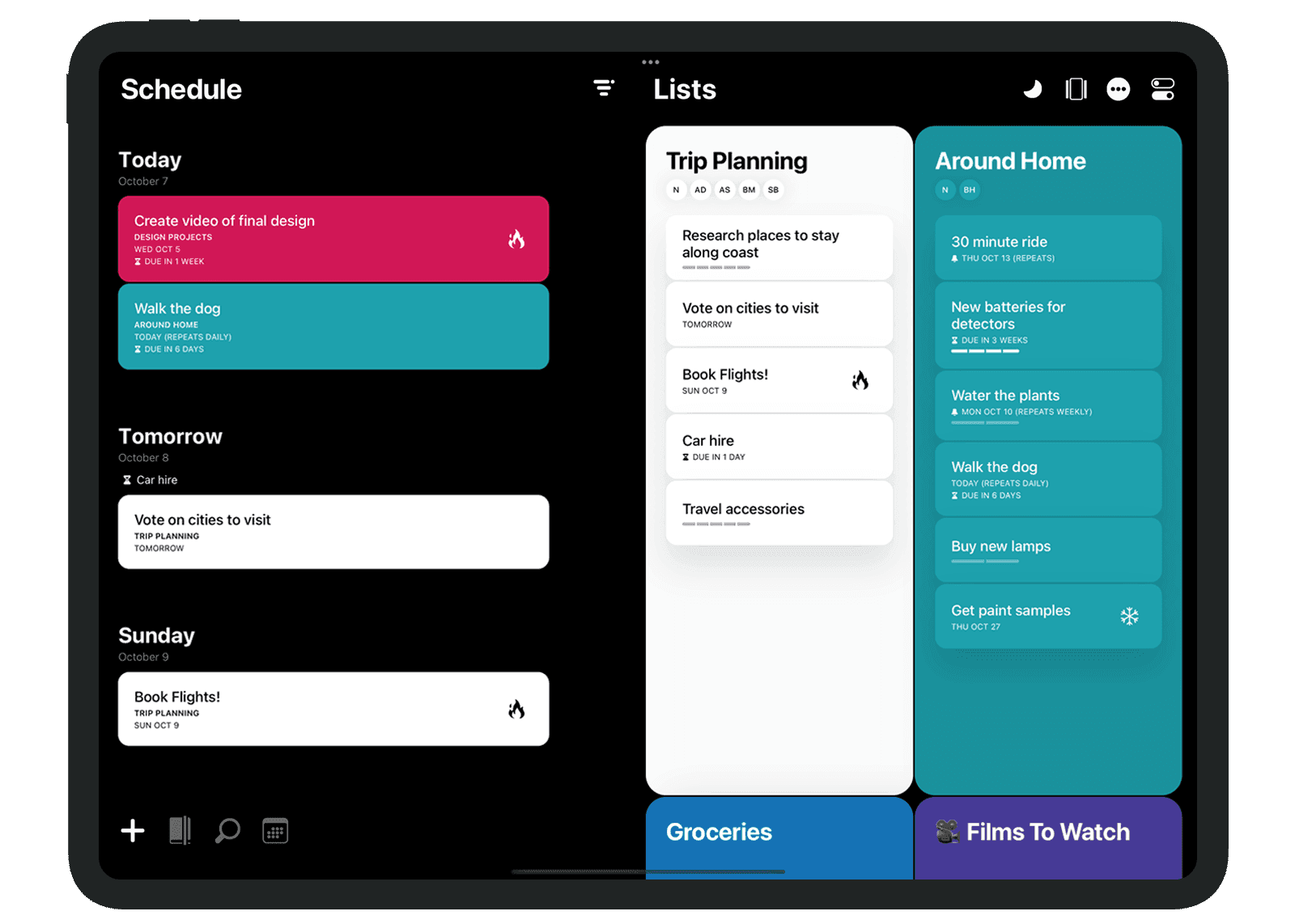
Actions by Moleskine offers a visually elegant task management experience. Its design follows Moleskine’s classic aesthetics, focusing on simplicity and beauty.
The app uses task cards that feel like physical notes. This appeals to users who like minimalistic and clean interfaces. Natural language input helps create tasks quickly without complex menus.
- Elegant visual task cards
- Simple, intuitive interface
- Natural language input
- Signature Moleskine design style
This tool suits users who want a neat, distraction-free way to manage daily tasks.
Introduction To Todoist And Its Core Functionality
Todoist is a powerful task management platform for individuals and teams. It supports detailed organization and collaboration with a wide set of features.
Key functions include natural language input, task reminders, and calendar views. Todoist connects with many apps, helping users keep work and life in sync.
| Feature | Description |
|---|---|
| Collaboration | Share projects and assign tasks to team members |
| Integrations | Works with calendars, email, and other productivity apps |
| Task Management | Supports reminders, labels, priorities, and recurring tasks |
| Customization | Multiple themes and views to fit user preferences |
Todoist offers a free plan with useful features and a Pro version for advanced needs.
Why Compare These Two Productivity Tools?
Both apps focus on task management but target different user styles. Moleskine Actions appeals to users who value simplicity and design. Todoist suits those needing rich features and teamwork options.
Comparing them helps decide which tool matches your work habits and goals. It clarifies the balance between visual appeal and functional depth.
- Understand strengths and limitations of each app
- Find the best fit for personal or professional use
- Choose based on interface preference and required features
This comparison guides a thoughtful choice for better daily productivity.
Credit: akiflow.com
Key Features Of Moleskine Actions
Moleskine Actions blends style and simplicity in task management. Its features focus on clear visualization and easy task handling. Users enjoy a smooth, elegant experience that supports productivity without distraction.
Elegant Visual Task Cards: Enhancing Task Visualization And Focus
Moleskine Actions uses visual task cards to display tasks clearly. Each card presents a task as a neat, organized element on the screen. This method helps users quickly scan and prioritize work.
- Tasks appear as distinct, colorful cards
- Cards can be reordered with simple gestures
- Visual separation reduces clutter and improves focus
This design keeps users engaged and makes task management intuitive and pleasant.
Signature Moleskine Design Philosophy: Combining Aesthetics With Functionality
The app reflects Moleskine’s classic design values: minimalism, elegance, and usability. It avoids overwhelming features and focuses on what matters most.
The interface is clean, with balanced white space and soft colors. This combination of aesthetics and function creates a calming environment that encourages productivity.
Natural Language Input: Simplifying Task Creation
Moleskine Actions supports natural language input, making task entry fast and effortless. Users can type tasks as they think about them.
- Simply write tasks in plain language
- The app understands dates, times, and priorities
- Tasks are automatically parsed and scheduled
This feature reduces friction and helps users add tasks without interruption.
Integration With Moleskine Ecosystem: Streamlining Workflow For Moleskine Users
Moleskine Actions connects smoothly with other Moleskine apps and products. This synergy supports users who rely on Moleskine tools for creativity and planning.
| Integration | Benefit |
|---|---|
| Moleskine Notes App | Sync notes and tasks seamlessly |
| Moleskine Paper Tablet | Combine digital and analog workflows |
| Cloud Backup | Protect tasks and access anywhere |
This ecosystem connection helps users maintain a smooth and continuous workflow across devices and platforms.
Key Features Of Todoist
Choosing the right task management app depends heavily on pricing and value. Both Actions by Moleskine and Todoist offer distinct pricing models. Understanding their costs and what you get is essential before making a decision.
Moleskine Actions Pricing Structure And Value For Money
Actions by Moleskine usually comes as a paid app with a one-time purchase or a single upfront cost. This fee grants access to its elegant design and simple interface without recurring charges.
The pricing suits users who want a visually pleasing and straightforward task organizer. It lacks tiered plans or subscription fees, making budgeting easy and predictable.
Key points:
- One-time purchase model
- No subscription fees
- Focus on aesthetics and simplicity
- Good for users who prefer a minimalist tool
Todoist Free Plan Vs Premium: Features And Costs
Todoist offers a free plan with many useful features like task creation, natural language input, and basic reminders. It supports up to 80 active projects and 5 people per project.
The Premium plan costs $4 per month (billed annually). It adds advanced features:
- Calendar views and task durations
- Location-based reminders
- Automatic backups
- Labels, filters, and comments
- Team collaboration tools
Todoist also offers a Business plan for teams but this review focuses on individual users.
| Plan | Cost | Main Features |
|---|---|---|
| Free | $0 | Basic task management, 80 active projects, 5 collaborators |
| Premium | $4/month (billed annually) | Advanced reminders, calendar views, labels, backups |
Which Tool Offers Better Affordability For Different User Needs?
For users wanting simple, elegant task management without ongoing fees, Actions by Moleskine fits well. One payment covers all features.
Users needing more powerful features, team collaboration, or advanced reminders benefit from Todoist. The free plan offers solid basics, while Premium adds professional tools at a reasonable monthly cost.
In summary:
- Casual users: Moleskine Actions for simple, no-subscription use.
- Power users: Todoist Premium for rich features and integrations.
- Budget-conscious: Todoist Free provides many functions at zero cost.
Pricing And Affordability Comparison
Choosing the right task management app depends on your needs and preferences. Both Actions by Moleskine and Todoist offer unique benefits and challenges. Real users share insights about their strengths and weaknesses. Understanding these helps pick the best tool for your daily tasks.
Strengths Of Moleskine Actions: Visual Appeal And User Experience
Actions by Moleskine stands out with its visually elegant task cards. The design is clean, simple, and easy on the eyes.
- Intuitive interface allows quick task entry and management.
- Natural language input makes adding tasks fast and natural.
- Signature Moleskine aesthetics offer a unique, stylish feel.
- Good for users who want a simple, attractive workspace.
The app suits those who prefer minimal distractions and a smooth user experience.
Limitations Of Moleskine Actions: Functionality Gaps And User Feedback
Users report some gaps in functionality compared to more comprehensive apps.
- Limited collaboration features restrict team use.
- Fewer integrations with other apps and calendars.
- Lack of advanced task tracking like reminders and durations.
- Some users desire more customization options.
This app fits well for simple task lists but may fall short for heavy productivity needs.
Advantages Of Todoist: Robust Features And Collaboration
Todoist offers a powerful set of features for personal and team use.
| Feature | Benefit |
|---|---|
| Collaboration Tools | Share tasks and projects easily with others |
| Natural Language Input | Add tasks quickly using simple sentences |
| Integrations | Connect with calendars, email, and other apps |
| Task Reminders and Durations | Stay on schedule with alerts and time estimates |
| Free Plan | Access many features without payment |
Todoist fits users needing strong organization and teamwork options.
Drawbacks Of Todoist: Complexity And Learning Curve
Todoist’s power comes with complexity that may overwhelm some users.
- Steeper learning curve compared to simpler apps.
- Interface can feel busy for those who want minimalism.
- Advanced features may require time to master.
- Customization options can confuse new users.
Users looking for quick setup might find Todoist less friendly initially.
Pros And Cons Based On Real-world Usage
Choosing the right task management app depends on your work style and needs. Both Actions by Moleskine and Todoist serve different types of users. Understanding who benefits most from each helps pick the best fit. Below, learn which tool suits your workflow and scenarios where each shines.
Who Should Choose Moleskine Actions: Creative Professionals And Visual Planners
Moleskine Actions suits users who value aesthetics and simplicity. Its elegant design and visual task cards appeal to creative professionals and visual planners.
- Artists, designers, and writers who enjoy a visually inspiring interface
- Users who prefer minimal, intuitive task management
- People who want quick, straightforward task entry with natural language
The app’s clean layout reduces distractions. It works well for personal projects, creative brainstorming, and small task lists. Visual thinkers benefit most from its style-focused approach.
Who Benefits Most From Todoist: Teams And Power Users
Todoist is built for users needing powerful organization and team collaboration. It suits power users and groups handling complex workflows.
- Teams coordinating tasks and projects in real time
- Professionals managing multiple priorities and deadlines
- Users who require integrations with calendars and other apps
- Those who want task reminders, durations, and advanced filters
Todoist’s extensive features support both personal productivity and professional use. Its free plan offers solid functionality for individuals starting out.
Scenarios Where Each Tool Excels: Personal Vs Professional Productivity
| Use Case | Actions by Moleskine | Todoist |
|---|---|---|
| Personal Task Management | Simple, visually appealing lists and notes | Robust task tracking with reminders and priorities |
| Creative Workflows | Ideal for visual brainstorming and idea organization | Less focused on visuals, more on task details |
| Team Collaboration | Limited collaboration features | Real-time task sharing and project management |
| Integration with Other Tools | Minimal integration options | Supports many apps and calendar syncing |
Tips For Maximizing Productivity With Each App
For Actions by Moleskine:
- Use visual task cards to map out creative projects.
- Keep task lists short for quick, manageable planning.
- Leverage natural language input to add tasks fast.
- Focus on aesthetics to stay motivated and organized.
For Todoist:
- Create projects and sub-tasks to organize complex workflows.
- Set reminders and deadlines to stay on track.
- Use labels and filters to prioritize effectively.
- Integrate with calendars and tools for seamless planning.
- Invite team members to collaborate on shared projects.

Credit: www.reddit.com
Ideal Users And Use Case Recommendations
Choosing between Actions by Moleskine and Todoist depends on your personal productivity style. Both tools offer unique features that can help organize your tasks effectively. Understanding their strengths will guide you to the best fit for your workflow.
Summary Of Key Differences And Strengths
| Feature | Actions by Moleskine | Todoist |
|---|---|---|
| Design | Elegant, minimalist, visually appealing task cards | Functional with multiple themes and customization options |
| Interface | Simple and intuitive | Comprehensive and feature-rich |
| Task Input | Natural language input | Natural language input with reminders and durations |
| Collaboration | Not focused on collaboration | Supports team collaboration and integrations |
| Integrations | Limited | Extensive with calendars and other apps |
| Pricing | Not specified | Free plan available with Pro subscription options |
Final Thoughts On Selecting Between Moleskine Actions And Todoist
Actions by Moleskine suits users who value a clean, simple, and elegant task experience. It focuses on visual appeal and ease of use. Great for those who want a distraction-free environment.
Todoist fits users who need a powerful, all-in-one task manager. It offers features for personal use and team collaboration. Ideal for users who want detailed control over tasks, reminders, and integrations.
Encouragement To Try Both Tools For Personal Fit
- Explore Actions by Moleskine to enjoy a visually calm and minimal interface.
- Test Todoist to experience advanced task management and teamwork options.
- Try both for a few days to see which matches your daily workflow better.
- Choose based on comfort, features you use most, and how each tool fits your style.
Personal experience is the best way to find your ideal productivity companion.
Frequently Asked Questions
What Is The Difference Between Todoist And Actions?
Todoist offers robust task management, collaboration, and integrations. Actions by Moleskine focuses on elegant visual task cards with a stylish design. Both support natural language input but cater to different productivity preferences.
What Is The 1/3/5 Rule In Todoist?
The 1/3/5 rule in Todoist helps prioritize tasks: 1 big task, 3 medium tasks, and 5 small tasks daily.
What Is The Best App For Organizing Tasks?
Todoist stands out as the best app for organizing tasks. It offers powerful features, easy collaboration, and seamless integrations. Users benefit from natural language input, task reminders, and calendar views. Its free plan delivers excellent value, balancing simplicity with robust functionality for personal and professional use.
Is Todoist Still Worth It?
Todoist remains worth it for users seeking powerful task management, collaboration, and seamless integrations. Its free plan offers great value. Pro features like calendar view and automatic backups boost productivity.
Conclusion
Choosing between Moleskine Actions and Todoist depends on your needs. Prefer a simple, beautiful design? Moleskine fits well. Need powerful tools and team features? Todoist stands out. Todoist’s free plan offers many useful options to start. It supports collaboration and syncs with other apps easily. Explore how Todoist can help organize your tasks better. Check it out here: Todoist. Make your daily planning clearer and smoother. Your productivity can improve with the right app.