Clickup Vs Azure Devops: Ultimate Comparison for Project Success
Choosing the right project management tool can make or break your team’s productivity. If you’re torn between ClickUp and Azure DevOps, you’re not alone.
Both platforms offer powerful features, but which one truly fits your workflow and saves you time and money? What if you could have an all-in-one AI-powered solution that not only manages your projects but also replaces multiple apps, streamlining your entire operation? Dive into this comparison to uncover which tool aligns best with your needs and discover how ClickUp can revolutionize the way you work. Ready to boost your productivity and cut costs? Check out ClickUp here: https://lifetimedeallab.com/clickup.
Introduction To Clickup And Azure Devops
Choosing the right tool for project management and development is key to success. ClickUp and Azure DevOps are two popular options. Each serves different needs and audiences. Understanding their purposes helps teams decide which fits best.
Overview Of Clickup: Purpose And Target Audience
ClickUp is an all-in-one project management platform. It aims to replace many apps with one tool, saving time and money. It combines tasks, chat, documents, and AI features in one place.
The main users of ClickUp include:
- Teams needing a simple, unified workspace
- Businesses wanting to reduce software costs
- Organizations seeking to improve team collaboration
ClickUp works well for companies of all sizes and industries. It suits teams focused on productivity and clear communication.
Overview Of Azure Devops: Purpose And Target Audience
Azure DevOps is a set of development tools by Microsoft. It supports software planning, coding, testing, and delivery. It integrates well with Microsoft products and cloud services.
Azure DevOps targets:
- Software development teams
- Enterprises using Microsoft Azure cloud
- Groups needing robust DevOps pipelines
It is ideal for teams focused on continuous integration and deployment in software projects.
Why Comparing Clickup And Azure Devops Matters For Project Success
Choosing between ClickUp and Azure DevOps impacts how teams work. Each tool offers unique features and workflows.
- ClickUp excels in task management and team communication.
- Azure DevOps specializes in software development lifecycle management.
Understanding these differences helps teams pick the best fit. This match improves project tracking, collaboration, and delivery speed. The right tool supports clear goals and efficient work.
Key Features Of Clickup And Their Benefits
ClickUp offers a powerful set of features designed to boost productivity and simplify project management. Its tools help teams stay organized, collaborate smoothly, and automate routine tasks. The platform adapts to different workflows, making work easier and faster.
Comprehensive Task Management: Simplifying Workflow And Collaboration
ClickUp provides a robust task management system to handle projects of all sizes. Users can create, assign, and track tasks with ease. Features include:
- Task Hierarchies: Break projects into smaller tasks and subtasks for clarity.
- Statuses and Priorities: Customize task stages and priority levels to match workflows.
- Comments and Mentions: Communicate directly within tasks to keep everyone informed.
- Time Tracking: Monitor the time spent on each task for better planning.
This setup streamlines workflows and boosts team collaboration, reducing confusion and missed deadlines.
Customizable Views And Dashboards: Enhancing User Experience And Efficiency
ClickUp lets users tailor their workspace with multiple view options. These help visualize work in the best way for each user or team.
| View Type | Purpose | Benefit |
|---|---|---|
| List View | Display tasks in a simple list | Easy task tracking and sorting |
| Board View | Visualize tasks as cards on a board | Ideal for Kanban workflows |
| Calendar View | Show tasks on a calendar timeline | Better deadline and schedule management |
| Gantt Chart | Track project progress over time | Clear overview of dependencies and timelines |
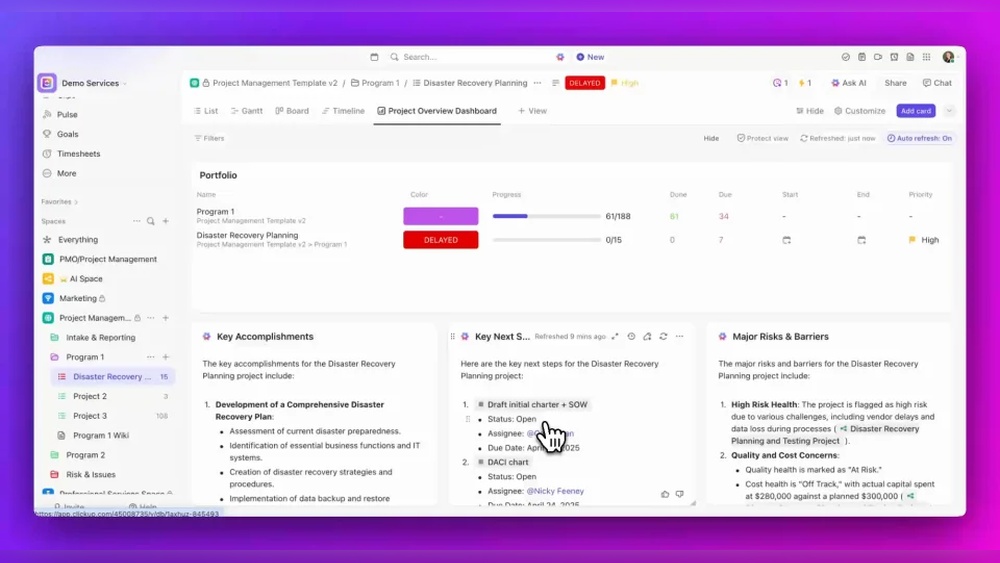
Dashboards combine widgets to summarize project data. They deliver quick insights and help prioritize work effectively.
Automation Capabilities: Reducing Manual Work And Improving Productivity
ClickUp’s automation features cut down repetitive tasks. Users can set rules to trigger actions automatically, such as:
- Changing task status when a condition is met
- Assigning tasks to team members based on specific triggers
- Sending notifications or reminders
- Creating recurring tasks
Automation saves time and reduces errors. Teams focus on important work, not routine updates.
Integrations And Syncing: Streamlining Tools And Communication
ClickUp supports syncing with many popular tools. This keeps all work connected and communication smooth.
- Azure DevOps Sync: Sync projects and ticket updates between ClickUp and Azure DevOps.
- Communication Apps: Integrate with Slack, Microsoft Teams, and email for instant alerts.
- File Sharing: Connect with Google Drive, Dropbox, and OneDrive to access files easily.
- Other Tools: Sync with calendars, CRM, and developer tools for seamless workflows.
These integrations reduce tool switching and keep all team members in perfect context.
Key Features Of Azure Devops And Their Benefits
Azure DevOps offers a comprehensive set of tools designed for software development teams. These features support every phase of the development lifecycle. From planning and coding to testing and deployment, Azure DevOps ensures smooth workflows. Its robust capabilities help teams deliver quality software faster and with greater confidence.
End-to-end Devops Pipeline: Facilitating Continuous Integration And Delivery
Azure DevOps provides an end-to-end DevOps pipeline that automates the build, test, and deployment processes. This pipeline supports continuous integration (CI) and continuous delivery (CD), making software releases faster and more reliable.
- Automated Builds: Automatically compile and test code after every change.
- Release Management: Deploy applications to multiple environments easily.
- Pipeline Customization: Create workflows tailored to project needs.
This automation reduces manual errors and speeds up delivery cycles, helping teams focus on coding.
Advanced Collaboration Tools: Supporting Agile And Software Development Teams
Azure DevOps includes tools that improve team collaboration and support Agile methodologies.
- Boards: Visualize work with Kanban and Scrum boards.
- Backlogs: Prioritize and manage tasks effectively.
- Work Items: Track bugs, user stories, and tasks in one place.
These tools keep teams aligned and improve communication, which leads to faster problem-solving.
Robust Reporting And Analytics: Driving Data-informed Decision Making
Azure DevOps offers built-in reporting and analytics to track project progress and performance.
| Feature | Benefit |
|---|---|
| Dashboards | Visualize key metrics in real-time for quick insights. |
| Analytics Views | Analyze trends and identify bottlenecks in development. |
| Custom Reports | Create tailored reports to meet team needs. |
Data-driven insights help teams make better decisions and improve project outcomes.
Security And Compliance Features: Ensuring Project Integrity And Trust
Azure DevOps emphasizes security and compliance to protect projects and data.
- Role-Based Access Control: Define who can view or edit resources.
- Audit Logs: Track all changes and actions for accountability.
- Compliance Certifications: Meets industry standards like ISO and SOC.
These features maintain project integrity and build trust with stakeholders.
Credit: unito.io
Pricing And Affordability Comparison
Choosing between ClickUp and Azure DevOps often depends on budget and value. Both tools offer distinct pricing models suited to different team sizes and project needs. Understanding their pricing structure helps businesses select the best option without overspending.
Clickup Pricing Structure And Value For Money
ClickUp provides a flexible pricing model designed for teams of all sizes. It offers a free plan with essential features, ideal for small teams or individual users.
| Plan | Price (per user/month) | Key Features |
|---|---|---|
| Free | $0 | Unlimited tasks, 100MB storage, 2 users |
| Unlimited | $5 | Unlimited storage, integrations, dashboards |
| Business | $12 | Advanced reporting, automation, goals |
| Enterprise | Custom pricing | Enhanced security, white-labeling, custom onboarding |
ClickUp combines project management, chat, and AI tools in one platform. This consolidation can reduce the need for multiple software, offering strong value for money.
Azure Devops Pricing And Cost Efficiency
Azure DevOps uses a tiered pricing system that caters mostly to development teams.
| Plan | Price (per user/month) | Key Features |
|---|---|---|
| Basic | Free for first 5 users | Work tracking, pipelines, repos |
| Basic + Test Plans | $52 | Test case management, manual testing |
| Visual Studio Subscriber | Included with subscription | Additional tools and services |
Azure DevOps charges higher for advanced testing and enterprise features. It suits teams focused on software development pipelines and continuous integration.
Which Tool Offers Better Roi Based On Project Needs
Assessing return on investment depends on project type and team size.
- ClickUp fits teams wanting an all-in-one platform at a low cost.
- Its pricing favors startups and small businesses needing versatile tools.
- Azure DevOps suits development teams needing robust CI/CD and testing features.
- Costs rise with user count and advanced testing requirements.
- ClickUp’s broad feature set may reduce costs on multiple subscriptions.
- Azure DevOps offers deep integration with Microsoft tools, valuable for enterprise users.
Choosing between them means balancing software needs against pricing and expected benefits.
Pros And Cons Based On Real-world Usage
Choosing between ClickUp and Azure DevOps depends on your team’s needs and workflows. Both tools offer distinct advantages and face certain challenges in daily use. Understanding their real-world strengths and weaknesses helps pick the best fit for your projects.
Strengths And Weaknesses Of Clickup In Project Management
ClickUp is designed as a versatile platform to replace multiple apps in one place. It combines project management, communication, and AI features for teamwork.
| Strengths | Weaknesses |
|---|---|
|
|
Strengths And Weaknesses Of Azure Devops In Devops And Agile Contexts
Azure DevOps focuses on software development, combining agile planning with CI/CD pipelines.
| Strengths | Weaknesses |
|---|---|
|
|
User Feedback And Common Challenges
Users of both platforms report benefits and challenges based on their workflows.
- ClickUp users appreciate the all-in-one setup but mention a steep learning curve initially.
- Some find task and notification management overwhelming without clear filters.
- Azure DevOps users value its development pipeline tools but note complexity for non-developer roles.
- Integration between ClickUp and Azure DevOps helps teams sync work across platforms.
- Both tools face challenges in balancing feature depth with ease of use.
Choosing depends on team size, project type, and technical skills. Testing both in your environment can clarify the best option.
Ideal Use Cases And Recommendations
Choosing between ClickUp and Azure DevOps depends on your team’s needs and project type. Both platforms offer powerful features but serve different purposes. Understanding ideal use cases helps select the best tool for your workflow and goals.
When To Choose Clickup: Best Scenarios And User Profiles
ClickUp suits teams seeking an all-in-one project management tool with AI-powered features. It works well for businesses wanting to replace multiple apps with one platform.
- Use ClickUp if your team needs:
- Task management with rich customization
- Collaboration tools like chat and document sharing
- Time tracking and goal setting
- Integration with various apps for smoother workflows
- Ideal user profiles:
- Small to medium businesses
- Creative teams and marketing departments
- Project managers needing flexible views (list, board, calendar)
- Teams wanting to save costs by consolidating software
When To Choose Azure Devops: Best Scenarios And User Profiles
Azure DevOps excels in software development projects requiring end-to-end DevOps workflows. It integrates deeply with Microsoft tools and supports continuous integration and delivery.
- Use Azure DevOps if your project demands:
- Source code management and version control
- Automated build and release pipelines
- Advanced testing and deployment features
- Strong integration with Visual Studio and GitHub
- Ideal user profiles:
- Software development teams
- DevOps engineers managing CI/CD pipelines
- Enterprises using Microsoft Azure infrastructure
- Teams focused on agile development and scrum
How To Decide Between Clickup And Azure Devops For Your Project
Assess your project’s main requirements before choosing. Consider the following factors:
| Factor | ClickUp | Azure DevOps |
|---|---|---|
| Primary Focus | Task and project management with AI and collaboration | Software development lifecycle and DevOps automation |
| Team Size | Small to medium teams across industries | Medium to large development teams |
| Integration Needs | Multiple apps and communication tools | Microsoft ecosystem and developer tools |
| Technical Expertise | Low to medium, user-friendly interface | Medium to high, requires DevOps knowledge |
| Cost Efficiency | Consolidates many tools saving money | Pricing based on Azure services and usage |
Match these factors with your team’s skills and project goals. This approach ensures the right choice for smooth delivery and better productivity.
Integration Possibilities And Workflow Synergies
ClickUp and Azure DevOps offer distinct strengths in project management and development operations. Combining both platforms can enhance productivity by bridging task management with code development workflows. Integration between these tools creates a seamless environment where teams stay aligned and processes flow smoothly.
Integrating ClickUp’s versatile project tracking with Azure DevOps’ powerful development pipelines promotes better communication and task visibility. This synergy reduces context switching and helps teams focus on delivering value efficiently.
Using Clickup And Azure Devops Together: Integration Options And Benefits
Teams can connect ClickUp and Azure DevOps through several integration tools and native sync options. These integrations allow task updates, comments, and statuses to move automatically between platforms.
| Integration Method | Key Features | Benefits |
|---|---|---|
| Azure DevOps Sync by ClickUp | Sync work items, comments, and status changes | Eliminates manual updates, ensures data consistency |
| Third-Party Connectors (e.g., Unito) | Bidirectional sync, customizable field mapping | Keeps both platforms up-to-date in real-time |
| API Integration | Custom workflows and automation scripts | Tailored syncing and advanced data handling |
Benefits include:
- Reduced task duplication across tools
- Improved communication between development and management teams
- Faster issue resolution due to shared context
- Centralized progress tracking with less switching
Best Practices For Synchronizing Data And Tasks Across Platforms
Maintaining accurate synchronization is crucial for smooth workflows. Follow these best practices to keep ClickUp and Azure DevOps in harmony.
- Define clear sync rules: Decide which tasks and fields sync between platforms.
- Limit sync scope: Sync only relevant projects or work items to avoid clutter.
- Use consistent status mapping: Align task statuses to prevent confusion.
- Regularly monitor sync health: Check logs to catch errors early.
- Set permissions carefully: Control who can update synced tasks to avoid conflicts.
- Leverage automation: Use automated workflows to update tasks and notify teams.
Example of status mapping code snippet for API sync:
{ "ClickUpStatus": { "To Do": "New", "In Progress": "Active", "Done": "Closed" } } Following these steps ensures both platforms reflect the latest project state. Teams remain aligned and focused on delivering results.

Credit: www.youtube.com
Conclusion: Making The Right Choice For Project Success
Choosing between ClickUp and Azure DevOps shapes how your team works. Both tools offer unique features that support project management and collaboration. Understanding their strengths helps pick the best fit for your projects and team needs. The right tool boosts productivity and keeps everyone aligned.
Summary Of Key Differences And Strengths
| Feature | ClickUp | Azure DevOps |
|---|---|---|
| Primary Focus | All-in-one project management with AI, chat, and apps | DevOps lifecycle management and software development |
| Integration | Syncs with Azure DevOps and Zendesk for seamless workflow | Supports integrations with multiple development tools |
| User Interface | Simple, user-friendly, ideal for all team members | Complex, designed for technical and development teams |
| Best For | Teams needing flexible project tracking and communication | Software development teams focused on CI/CD and code management |
| Cost Efficiency | Combines many tools in one, reducing software expenses | Focused tools, may require additional software for full coverage |
Final Thoughts On Selecting The Optimal Tool For Your Team
ClickUp suits teams aiming to unify work in a single app. It saves time and money by reducing app switching. Its AI features help keep everyone on track with perfect context.
Azure DevOps fits teams needing specialized development workflows. It manages code, builds, and releases efficiently. It remains actively supported by Microsoft with continuous updates.
Consider your team’s size, project type, and technical skills. Also, factor in budget and tool integration needs. Choose the tool that aligns best with your workflow and goals.
- For broad project management and team collaboration: ClickUp
- For focused software development and DevOps: Azure DevOps
- Use integration options to combine strengths if needed

Credit: www.youtube.com
Frequently Asked Questions
Is Azure Devops Going To Be Discontinued?
Microsoft has no plans to discontinue Azure DevOps. It remains actively developed and widely used in DevOps workflows.
Does Clickup Integrate With Azure Devops?
Yes, ClickUp integrates with Azure DevOps using the Azure DevOps Sync. It syncs projects and ticket updates efficiently.
What’s Better Than Clickup?
Wrike excels in managing complex workflows, Basecamp offers centralized communication, and Smartsheet provides scalable, spreadsheet-like project management features.
What Will Replace Azure Devops?
GitHub Actions and GitLab are popular alternatives replacing Azure DevOps. They offer integrated CI/CD and DevSecOps features. Jenkins provides customizable, plugin-based workflows. Harness delivers AI-assisted enterprise automation. Microsoft continues to support Azure DevOps alongside these evolving tools.
Conclusion
Choosing between ClickUp and Azure DevOps depends on your project needs. ClickUp offers an all-in-one platform with AI support and easy team collaboration. Azure DevOps focuses on software development with strong CI/CD tools. Both tools help manage tasks and workflows efficiently. For a flexible, user-friendly option, ClickUp stands out. Explore how ClickUp can simplify your work and save time by visiting ClickUp. Make the choice that fits your team and project style best.