Does Clickup Have Ai: Unlocking Smart Productivity Features
Are you wondering if ClickUp has AI features that can truly boost your productivity? The answer is a definite yes.
ClickUp AI, also known as ClickUp Brain, is built right into the platform to help you work smarter, not harder. Imagine having an intelligent assistant that can generate content, automate tasks, summarize meetings, and even manage your schedule—all within one tool. If you want to save time, reduce repetitive work, and keep your projects organized with ease, ClickUp AI could be a game-changer for you. Curious how it works and what it can do for your daily workflow? Keep reading to discover the powerful AI capabilities waiting for you inside ClickUp. Ready to explore ClickUp AI yourself? Check it out here: ClickUp AI
Introduction To Clickup Ai And Its Purpose
ClickUp AI is a powerful addition to the ClickUp platform. It helps teams work smarter by using artificial intelligence. The AI tools automate tasks, generate content, and provide smart assistance. This makes daily work easier and faster.
The main goal of ClickUp AI is to improve productivity. It reduces manual work and helps users focus on important tasks. With AI, ClickUp turns complex projects into smooth workflows.
What Is Clickup Ai And Clickup Brain?
ClickUp AI is a set of AI features built inside ClickUp. It includes tools for creating content, managing tasks, and summarizing information. These tools work together to support users in many ways.
ClickUp Brain is the AI assistant within ClickUp AI. It answers questions, performs actions on tasks, and searches across the workspace and connected apps like Google Drive. It acts like a smart helper for users.
How Clickup Ai Enhances Productivity
- Automates routine tasks: Creates subtasks and updates progress automatically.
- Generates and edits content: Writes, shortens, or summarizes text inside tasks and documents.
- Summarizes comments: Provides quick overviews of lengthy discussions.
- AI scheduling: Plans calendars based on tasks, events, and goals.
- AI Notetaker: Transcribes meeting notes with key points and action items.
- AI Agents: Runs complex workflows and repetitive actions without user input.
These features save time and reduce errors. Teams can communicate better and finish projects faster.
Overview Of Ai Integration Across Clickup Workspace
| AI Feature | Function | Benefit |
|---|---|---|
| ClickUp Brain | Answers questions, performs task actions, searches workspace | Quick access to information and task management |
| Content Generation & Editing | Create, shorten, and summarize text | Saves time on writing and editing content |
| AI Scheduling | Plans calendar based on tasks and goals | Improves time management |
| AI Notetaker | Records and transcribes meetings | Captures important details automatically |
| AI Agents | Automates workflows and repetitive tasks | Increases efficiency and consistency |
| Connected Search | Searches internal and external apps | Finds information quickly |
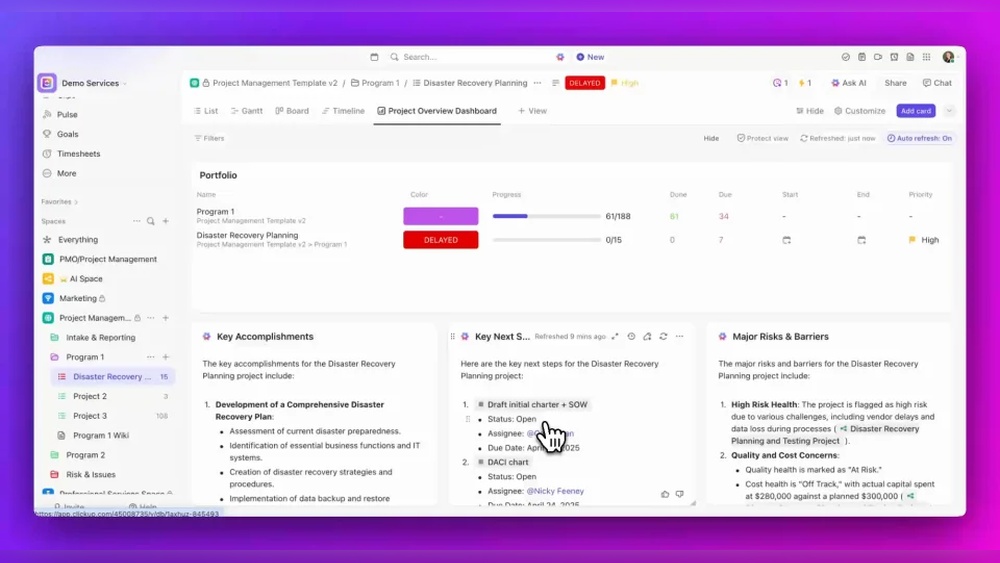
ClickUp AI is deeply integrated. It works across tasks, documents, calendars, and communication tools. This integration helps teams keep all work in one place with smart AI support.

Credit: stackset.com
Key Features Of Clickup Ai And Their Benefits
ClickUp AI integrates smart tools that improve productivity and save time. Its features help users manage tasks, create content, and automate workflows easily. Each tool is designed to work smoothly within the ClickUp platform, making work simpler and faster.
Clickup Brain: Your Conversational Ai Assistant
ClickUp Brain acts as a smart assistant. It answers questions and performs actions inside your workspace. You can ask it to find information or update tasks quickly.
- Searches across all tasks and documents
- Connects with external apps like Google Drive
- Executes commands to save manual work
Content Generation And Editing Capabilities
ClickUp AI helps create and improve text inside tasks and documents. It can write new content, shorten long paragraphs, or summarize key points.
- Generates clear and relevant text fast
- Edits and refines existing content
- Summarizes large texts to save reading time
Task Management With Ai: Summaries And Subtasks
The AI automatically creates subtasks and progress updates. It also summarizes comment threads to keep everyone informed without reading long conversations.
- Breaks down big tasks into smaller steps
- Tracks progress and updates status
- Summarizes comments for quick understanding
Ai Agents: Automating Complex Workflows
ClickUp offers AI Agents like Super Agents and Autopilot Agents. These tools handle repetitive actions and complex workflows without user input.
- Automate routine tasks
- Run multi-step processes automatically
- Save time on manual work
Connected Search Across Workspace And External Apps
The AI searches inside ClickUp and external apps. This connected search helps find files, notes, and tasks quickly, all in one place.
- Access information from Google Drive and others
- Search across all documents and tasks
- Improves workflow by reducing search time
Ai-powered Scheduling And Adaptive Calendar
ClickUp AI plans your calendar by understanding tasks, events, and goals. It adapts schedules to keep you on track and balanced.
- Creates smart schedules based on workload
- Adjusts plans as priorities change
- Helps manage deadlines and meetings
Ai Notetaker For Meeting Efficiency
The AI Notetaker records and transcribes meetings automatically. It highlights key points and action items for easy follow-up.
- Captures notes without manual typing
- Extracts important information and tasks
- Supports audio and video recordings
Pricing And Affordability Of Clickup Ai
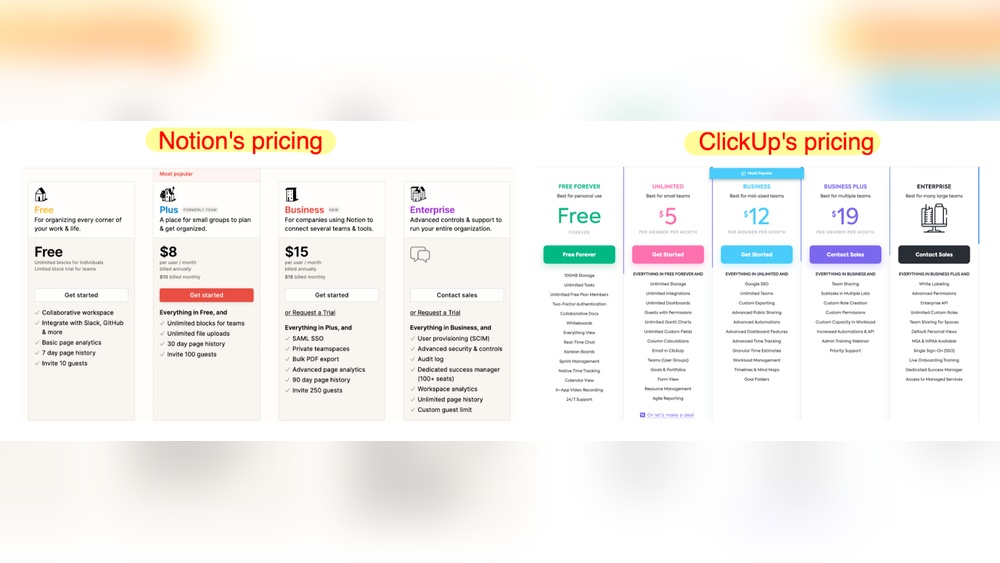
ClickUp AI offers advanced features to boost productivity. Understanding its pricing helps users choose the right plan. The cost depends on the plan and AI usage credits. Users can balance expenses and benefits by knowing what each plan offers.
Availability Of Ai Features Across Plans
ClickUp AI features are available on multiple pricing plans. Each plan includes a set amount of AI usage credits. Basic AI functions appear in all paid plans, while advanced AI agents and scheduling tools may require higher tiers.
| Plan | AI Features Included | AI Usage Credits |
|---|---|---|
| Free | Limited AI access (basic content generation) | Minimal or no AI credits |
| Unlimited | Full AI features including Brain and Autopilot Agents | Generous monthly AI credits |
| Business | All AI features with priority usage | High AI credit allowance |
| Enterprise | Customized AI feature access and credits | Flexible AI credit options |
Understanding Ai Super Credits And Their Usage
AI Super Credits control the use of advanced AI features. Each AI action, like content creation or task summarization, consumes credits. Credits reset monthly based on the plan. Users must monitor credit use to avoid extra costs.
- Credits are used for generating, editing, and summarizing text.
- Complex AI tasks, such as Autopilot Agent workflows, use more credits.
- Unused credits do not roll over to the next month.
- Extra credits can be purchased if needed.
Cost-benefit Analysis For Different User Types
Different users get varying value from ClickUp AI depending on their needs.
- Individual Users: The Free or Unlimited plan suits casual AI use. Costs stay low with limited AI tasks.
- Small Teams: Business plan offers a good balance of AI credits and features. It supports collaboration and automation.
- Large Enterprises: Enterprise plans provide custom AI credit packages. Ideal for heavy AI workflows and complex automations.
The value increases if AI saves time on repetitive tasks. Users should estimate AI usage before choosing a plan.
Pros And Cons Of Clickup Ai Based On Real-world Usage
ClickUp AI blends smart automation with task management tools. Users gain faster workflows and better task handling. Yet, some limits affect daily use. Examining real-world experiences reveals clear advantages and notable challenges.
Advantages: Streamlined Workflow And Increased Efficiency
ClickUp AI boosts productivity by automating many routine tasks. It acts like a smart assistant within the platform.
- Task Automation: Generates subtasks and progress updates automatically.
- Content Help: Creates, edits, and summarizes text within tasks and docs.
- AI Agents: Super Agents and Autopilot Agents handle complex workflows without manual input.
- Connected Search: Finds info inside ClickUp and linked apps like Google Drive.
- AI Scheduling: Plans calendars based on tasks and goals, saving time.
- Meeting Notes: AI Notetaker transcribes and highlights key points automatically.
These features reduce manual work and speed up project delivery. Teams can focus on important tasks instead of repetitive actions.
Limitations: Credit Consumption And Feature Accessibility
ClickUp AI uses a credit system that limits how much AI help users get. Credits run out with heavy use.
| Limitation | Impact |
|---|---|
| Credit Consumption | AI features require credits that can deplete quickly during heavy tasks. |
| Feature Accessibility | Some AI tools are only in higher-priced plans or limited to specific users. |
This means users must monitor credit use and may not access all AI functions. The credit system can cause interruptions for active teams.
User Feedback And Common Challenges
Users praise ClickUp AI for making projects smoother. Yet, they report some common challenges:
- Learning Curve: New users need time to understand AI features fully.
- Credit Limits: Frequent credit exhaustion slows work and frustrates teams.
- Feature Gaps: Some desired AI functions are missing or in development.
- Integration Issues: External app connections sometimes lag or fail.
Despite these, many find the AI assistant a helpful tool that grows better with use. Feedback encourages ClickUp to improve credit policies and expand AI capabilities.
Recommendations For Ideal Users And Use Cases
ClickUp AI offers smart tools designed to boost productivity and ease daily work. Its features fit different users and tasks well. Understanding who benefits most and how to use AI can improve work results. Below are recommendations to help choose the best users and use cases for ClickUp AI.
Who Benefits Most From Clickup Ai?
Teams and individuals who manage many tasks gain the most from ClickUp AI. It suits users needing quick content creation and task automation. Here are the key groups:
- Project managers needing clear updates and task summaries.
- Content creators who write, edit, or summarize text regularly.
- Remote teams requiring smooth collaboration and shared context.
- Executives looking for AI scheduling and meeting note automation.
- Anyone handling repetitive workflows who wants to save time.
ClickUp AI suits both small teams and large organizations aiming to reduce manual work.
Best Scenarios To Leverage Clickup Ai Features
ClickUp AI fits many work situations. Here are ideal scenarios to apply its features:
| Scenario | AI Feature | Benefit |
|---|---|---|
| Managing complex projects | ClickUp Brain & AI Agents | Automates task creation and progress updates |
| Writing and editing documents | Content Generation & Editing | Speeds up content creation and improves clarity |
| Team meetings | AI Notetaker | Captures notes and action items automatically |
| Scheduling tasks and events | AI Scheduling | Creates balanced calendars based on priorities |
| Searching for information | Connected Search | Finds relevant data inside and outside ClickUp |
Tips For Maximizing Ai Integration In Daily Workflows
To get the best from ClickUp AI, follow these tips:
- Use AI Fields to add summaries or translations directly in tasks.
- Automate repetitive actions with Super Agents and Autopilot Agents.
- Let AI take meeting notes so you can focus on discussions.
- Use AI scheduling to plan your day and meet deadlines.
- Regularly update task details to keep AI suggestions accurate.
- Combine AI with team chats to share instant insights and reduce emails.
Consistent AI use saves time and reduces errors in routine tasks.

Credit: tech.co

Credit: www.goodcall.com
Frequently Asked Questions
Does Clickup Have Ai Capabilities?
Yes, ClickUp includes AI capabilities called ClickUp Brain. It helps generate content, summarize tasks, answer questions, and automate workflows. AI features assist in writing, task management, scheduling, and note-taking to improve productivity within the platform.
How Do I Turn On Ai In Clickup?
To turn on AI in ClickUp, click the lightning bolt icon in the upper-right corner. Use AI Fields to summarize tasks, create content, and automate workflows across your Workspace.
Does Clickup Have Ai Scheduling?
Yes, ClickUp offers AI scheduling through its AI-powered calendar. It plans your schedule based on tasks, events, and priorities.
Does Clickup Have An Ai Notetaker?
Yes, ClickUp offers an AI Notetaker that records meetings, captures key insights, and creates action items automatically.
Conclusion
ClickUp offers useful AI tools that simplify daily work tasks. It helps create, organize, and manage projects with smart automation. Users can save time by letting AI handle routine jobs and generate content. The AI features also support better communication and note-taking. For teams wanting to improve productivity, ClickUp’s AI can be a helpful addition. Explore how it fits your needs and boosts efficiency by visiting ClickUp. Try it to see if its AI tools work well for your workflow.