Clickup Vs Ntask: Ultimate Comparison for Productivity Boost
Choosing the right project management tool can make or break your productivity. If you’re torn between ClickUp and nTask, you’re not alone.
Both platforms promise to simplify your work, but which one truly fits your style and needs? Whether you’re managing a small team or juggling multiple projects, understanding the strengths and weaknesses of these tools is crucial. Imagine having all your apps, AI features, projects, and chats seamlessly in one place—saving you time, money, and endless headaches. Ready to discover which tool will revolutionize your workflow? Dive into our detailed comparison to find out why many are switching to ClickUp and how it stacks up against nTask. Your path to smarter work starts here.
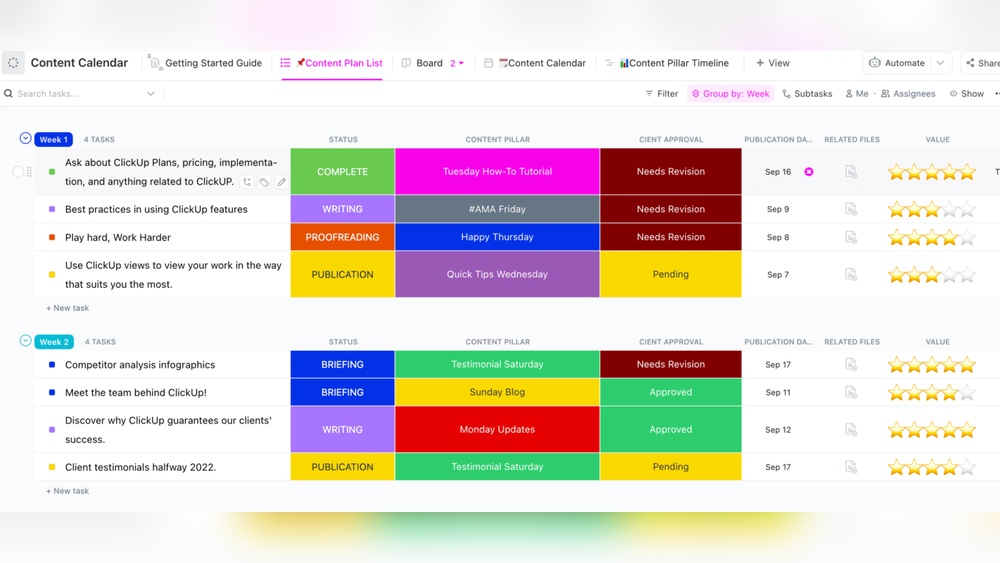
Credit: help.clickup.com
Introduction To Clickup And Ntask
ClickUp and nTask are popular tools for managing tasks and projects. Both help teams work better together and keep track of work. They offer features to organize tasks, track progress, and improve communication. Understanding their differences helps choose the right tool for your team’s needs.
Overview Of Clickup: Purpose And Target Audience
ClickUp is designed as an all-in-one productivity platform. It aims to replace multiple software by combining apps, AI, project management, and chat in one place.
- Targets teams of all sizes
- Works well for companies needing flexible task management
- Ideal for users wanting to save time and money by using fewer apps
- Supports collaboration with perfect context for all team members
ClickUp suits teams looking to centralize work and improve efficiency.
Overview Of Ntask: Purpose And Target Audience
nTask focuses on simple and effective project management. It offers tools for task tracking, meeting management, timesheets, and risk management.
- Targets small to medium teams
- Designed for users wanting an easy-to-use project management tool
- Includes features like meeting scheduling and time tracking
- Good choice for teams needing straightforward task and project control
nTask appeals to teams preferring simplicity and essential project features.
Why Comparing Clickup And Ntask Matters For Productivity
Choosing the right tool impacts how well teams manage projects and tasks. Both ClickUp and nTask offer task management but differ in complexity and features.
ClickUp provides a broad, all-in-one platform with many options. nTask offers a simpler, focused approach. Comparing helps teams pick software that fits their workflow and improves productivity.
| Factor | ClickUp | nTask |
|---|---|---|
| Complexity | High, many features | Low, simple interface |
| Target Users | Teams of all sizes | Small to medium teams |
| Core Strength | All-in-one productivity | Basic project management |
| Collaboration | Advanced tools and chat | Task and meeting focus |
Understanding these differences leads to better software choice and team success.
Key Features That Set Clickup Apart
ClickUp stands out with its rich set of features designed for teams of all sizes. It offers a versatile platform that enhances productivity and simplifies project management. These key features help users stay organized, track progress, and communicate efficiently.
Comprehensive Task Management: Enhancing Organization And Focus
ClickUp provides a powerful task management system that keeps work clear and structured. Users can create tasks, subtasks, and checklists with ease. Each task can have priorities, due dates, and assignees to maintain focus.
- Nested subtasks for breaking down complex projects
- Task priorities to highlight urgent work
- Due dates and reminders to meet deadlines
- Task dependencies to manage workflow order
This structure helps teams avoid confusion and stay organized, improving overall focus on important work.
Customizable Workflows And Views: Adapting To Diverse Team Needs
ClickUp offers multiple views to fit different work styles and project types. Users can switch between List, Board, Calendar, and Gantt chart views. This adaptability supports diverse team preferences.
- List View: Clear, task-focused layout
- Board View: Visual Kanban-style workflow
- Calendar View: Timeline of tasks and deadlines
- Gantt Chart: Visualize project timelines and dependencies
Workflows can be customized with statuses, tags, and automation to match team processes.
Time Tracking And Reporting: Improving Efficiency And Accountability
ClickUp includes built-in time tracking tools to monitor how long tasks take. This feature helps teams analyze productivity and optimize work hours.
- Start and stop timers directly within tasks
- Log time manually for accuracy
- Generate detailed reports for task and project time
- Identify bottlenecks and improve future planning
These insights promote accountability and help teams meet deadlines effectively.
Collaboration Tools And Integrations: Streamlining Team Communication
ClickUp integrates chat, comments, and document sharing to keep teams connected. Communication happens within tasks, reducing the need for separate apps.
- Real-time comments on tasks with mentions
- Chat feature for quick conversations
- Shared documents and notes inside projects
- Integration with tools like Slack, Google Drive, and Zoom
This unified communication improves clarity and speeds up decision-making.
Unique Features Of Ntask And Their Benefits
nTask offers several unique features designed to simplify project management and enhance team productivity. These features make it stand out, especially for smaller teams and those needing integrated tools for meetings, time tracking, and risk management. The platform focuses on being easy to use while providing powerful tools that help teams stay organized and proactive.
Simplified Project And Task Management: Ideal For Smaller Teams
nTask provides a clean and straightforward way to manage projects and tasks. It suits small teams who need to organize work without complex setups. Users can:
- Create and assign tasks quickly
- Track progress with simple status updates
- Set priorities and deadlines easily
This simplicity helps teams stay focused and complete tasks faster, without spending extra time on learning complicated features.
Built-in Meeting And Timesheet Modules: Boosting Team Coordination
nTask includes built-in modules for meetings and timesheets, which improves team coordination. These tools allow teams to:
- Schedule and record meeting agendas
- Assign action items directly from meetings
- Track hours worked with timesheets for better productivity analysis
Having these features in one place reduces the need for multiple apps, saving time and avoiding confusion.
Risk And Issue Management: Proactive Problem Solving
nTask offers a dedicated risk and issue management feature. Teams can:
- Identify potential risks early
- Log issues as they arise
- Assign responsible team members to resolve problems quickly
This proactive approach helps minimize project delays and keeps work on track.
User-friendly Interface: Reducing Learning Curve For New Users
nTask’s interface is designed to be intuitive and easy to navigate. New users can:
- Start managing tasks immediately
- Use drag-and-drop features for task organization
- Access clear menus and simple dashboards
This lowers the learning curve and helps teams adopt the software faster.
Credit: help.clickup.com
Pricing And Affordability Breakdown
Choosing the right project management tool depends heavily on pricing and value. Teams must balance features with cost. This section compares pricing models of ClickUp and nTask. It helps to find which suits different team sizes and budgets. The focus is on affordability and return on investment.
Clickup Pricing Plans: Value For Different Team Sizes
ClickUp offers a variety of plans made to fit small teams to large enterprises. Each plan increases in features and user allowances.
| Plan | Price (per user/month) | Key Features |
|---|---|---|
| Free | $0 | Unlimited tasks, 100MB storage, 100 uses of automation |
| Unlimited | $5 | Unlimited storage, unlimited integrations, unlimited dashboards |
| Business | $12 | Advanced automations, goals, time tracking, custom exporting |
| Enterprise | Custom pricing | Advanced security, priority support, custom onboarding |
ClickUp fits from startups to large teams with flexible pricing. Its free plan is good for simple task management. Paid plans add value for growing teams needing more tools.
Ntask Pricing Plans: Cost-effective Options For Startups And Smes
nTask focuses on small to medium businesses with affordable options. It offers fewer plan tiers, simplifying choices.
| Plan | Price (per user/month) | Key Features |
|---|---|---|
| Free | $0 | Basic task management, meeting management, risk tracking |
| Premium | $3 | Unlimited workspaces, Gantt charts, time tracking, integrations |
| Business | $8 | Advanced reporting, issue and risk management, custom roles |
nTask offers a lower starting price with essential features. Its plans suit startups and SMEs needing task and risk management without high costs.
Comparative Analysis: Which Offers Better Roi?
- ClickUp provides a wider range of features across more pricing tiers.
- Its free plan limits storage and automation, but paid plans unlock powerful tools.
- nTask has simpler plans with lower prices, focusing on core project needs.
- Best for teams wanting affordable, easy-to-use task and meeting tools.
- ClickUp’s advanced features benefit larger teams needing customization.
- nTask offers a strong value for small teams with budget limits.
| Criteria | ClickUp | nTask |
|---|---|---|
| Starting Price | Free | Free |
| Entry Paid Plan | $5/user/month | $3/user/month |
| Advanced Features | Extensive (automations, goals, dashboards) | Basic to moderate (risk, issue, reporting) |
| Best For | Growing teams needing full-featured PM | Startups and SMEs with budget limits |
Teams should match their needs and budget to each tool’s pricing. ClickUp suits users needing more complex project management. nTask fits those valuing simplicity and cost savings.
Pros And Cons Based On Real-world Usage
Choosing between ClickUp and nTask depends on real-world needs and experiences. Both tools serve project management well but differ in features and usability. Understanding their strengths and limitations helps make a better choice.
Strengths Of Clickup: Depth, Flexibility, And Feature Richness
ClickUp stands out with its extensive features. It combines task management, chat, time tracking, and AI tools into one platform. Users appreciate its ability to handle complex projects with detailed workflows.
- Highly customizable: Allows users to tailor dashboards and workflows.
- All-in-one platform: Integrates chat, project tracking, docs, and automation.
- AI-powered tools: Helps save time and reduce app switching.
- Supports large teams: Scales well for various project sizes.
This feature-rich approach supports diverse business needs and complex project structures.
Limitations Of Clickup: Complexity And Performance Concerns
ClickUp’s depth creates a steep learning curve. New users may find it overwhelming. The interface can feel cluttered due to many options and settings.
- Complex navigation: Takes time to master all functions.
- Performance issues: Some users report slow load times with large projects.
- Overwhelming features: May be too much for simple task tracking.
These factors can reduce productivity for teams wanting quick and easy task management.
Strengths Of Ntask: Simplicity, Clean Design, And Essential Features
nTask focuses on simplicity and clean design. It offers essential project management tools with less clutter. Users find it easy to adopt and navigate.
- Intuitive interface: Simple layout helps users get started fast.
- Core features: Task management, meetings, timesheets, and issue tracking.
- Good for small to medium teams: Keeps project tracking straightforward.
- Effective meetings and timesheets: Supports team collaboration and time tracking.
nTask works well for teams needing essential tools without extra complexity.
Limitations Of Ntask: Less Depth For Large Or Complex Projects
nTask’s simplicity limits its use for bigger projects. It lacks some advanced features needed for complex workflows.
- Limited customization: Fewer options to tailor workflows or dashboards.
- Not ideal for large teams: May struggle with scaling project complexity.
- Fewer integrations: Less connected with other business apps.
This makes nTask less suitable for enterprises or highly detailed project needs.
Credit: www.ntaskmanager.com
Ideal User Recommendations And Use Cases
Choosing the right project management tool depends on team size, project needs, and desired features. Both ClickUp and nTask serve distinct types of users and workflows. Understanding their ideal users and best use cases helps teams work smarter and save time.
When To Choose Clickup: Teams Needing Advanced Customization
ClickUp fits teams wanting deep control over workflows and task structures. It offers extensive customization options for tasks, views, and statuses.
- Supports complex project requirements with customizable dashboards
- Allows multiple task views: list, board, calendar, Gantt chart
- Advanced automation and integrations for streamlined workflows
- Ideal for medium to large teams managing diverse projects
Teams with specific needs for reporting, goals, and time tracking benefit greatly from ClickUp’s flexibility. It suits departments like marketing, product development, and IT.
When To Choose Ntask: Small Teams And Beginners Seeking Simplicity
nTask targets small teams and users new to project management software. It has a clean interface and simple features for quick adoption.
- Easy task creation and assignment without complex setup
- Basic project tracking with clear priorities and deadlines
- Built-in meeting scheduler and risk management tools
- Affordable pricing with essential features included
Startups, freelancers, and small teams find nTask helpful for straightforward task management. It reduces the learning curve and keeps project tracking clear.
Specific Scenarios: Remote Teams, Agile Projects, And Client Management
| Scenario | ClickUp | nTask |
|---|---|---|
| Remote Teams |
|
|
| Agile Projects |
|
|
| Client Management |
|
|
Conclusion: Making The Right Choice For Productivity Boost
Choosing between ClickUp and nTask depends on your team’s unique workflow. Both tools aim to enhance productivity but offer different strengths. Understanding their key features helps pick the best fit. Focus on which features support your daily tasks and collaboration style.
Summary Of Key Differences And Similarities
| Feature | ClickUp | nTask | Similarity |
|---|---|---|---|
| Task Management | Highly customizable with multiple views | Simple and straightforward task lists | Both support task creation and tracking |
| Project Planning | Advanced features like Gantt charts and dependencies | Basic project planning tools | Both offer project organization |
| Team Collaboration | Built-in chat, comments, and mentions | Comments and meeting management | Collaboration tools for teamwork |
| Complexity | More complex, suitable for larger teams | User-friendly, ideal for smaller teams | Both scalable but differ in ease of use |
| AI & Automation | Offers AI features and integrations | Focuses on task automation and reminders | Automation to save time |
Final Thoughts On Matching Tools To Team Needs
Teams valuing extensive customization and detailed project tracking lean toward ClickUp. Its features suit complex workflows and larger teams. nTask fits teams needing simplicity and easy adoption. It helps smaller teams stay organized without steep learning curves.
Consider the team size, project complexity, and preferred interface. Match the tool to your team’s skills and work style. Prioritize user-friendly solutions for quick adoption.
Tips For Trial And Adoption To Maximize Productivity
- Start with a free trial to explore core features without commitment.
- Involve your team in testing to gather feedback early.
- Set clear goals for what you want to achieve using the tool.
- Use templates to speed up setup and ensure consistency.
- Provide training sessions or tutorials for smooth onboarding.
- Integrate with existing apps to streamline workflows.
- Regularly review usage and adjust settings to fit evolving needs.
Following these steps improves adoption and boosts your team’s productivity.
Frequently Asked Questions
Is There Anything Better Than Clickup?
Some prefer simpler tools like Trello or Asana for ease, while Teamwork excels in client services. ClickUp suits versatile needs well.
Why Not Use Clickup?
ClickUp can feel complex and slow, which may reduce productivity. Smaller teams might prefer simpler, faster alternatives like nTask or Trello.
Is Clickup Good For Adhd?
ClickUp suits ADHD by enabling task breakdown, clear structure, and focus on priorities. It simplifies managing distractions effectively.
Is Clickup Really Better Than Jira?
ClickUp suits small teams with flexible needs, offering modern features. Jira excels for advanced software teams with strong agile tools and integrations. Each tool fits different workflows, so “better” depends on your team’s size and project complexity.
Conclusion
Choosing between ClickUp and nTask depends on your needs and team size. ClickUp offers many tools in one place for easy teamwork and project tracking. NTask focuses on simple task management with strong meeting and time tracking features. Both help organize work and improve productivity. For those wanting an all-in-one solution that saves time and money, ClickUp stands out. Explore what ClickUp can do for you by visiting ClickUp today. Make your work easier with the right tool.