Clickup Vs Notion: Ultimate Battle for Productivity Supremacy
Choosing the right productivity tool can change the game for your work and personal projects. If you’ve ever wondered whether ClickUp or Notion is the better fit for your needs, you’re not alone.
Both promise to organize your tasks, notes, and collaborations—but they do it in very different ways. You want a tool that saves you time, simplifies your workflow, and keeps everything perfectly in context, without the frustration of slow performance or a steep learning curve. We’ll break down the key differences between ClickUp and Notion so you can decide which one truly fits your style and helps you get more done. Ready to find out which tool can replace all your apps and AI needs while saving you money and headaches? Let’s dive in. If you’re eager to explore a powerful all-in-one platform that combines AI, project management, chat, and more, check out ClickUp and see how it can transform your workflow today!
Introduction To Clickup And Notion
Choosing the right productivity tool shapes your daily work experience. ClickUp and Notion stand out as popular options. Each offers unique features for managing tasks, projects, and collaboration. Understanding their core purposes helps decide which suits your needs best.
Overview Of Clickup And Its Purpose
ClickUp is an all-in-one productivity platform designed to replace multiple apps. It combines task management, project tracking, AI tools, and team chat in one place. Users save time by keeping everything connected and accessible.
- Centralizes projects, tasks, and communication
- Integrates AI to automate workflows
- Supports collaboration with perfect context among teams
- Aims to reduce costs by replacing many apps
This platform targets teams and individuals needing a streamlined workspace to boost efficiency without switching apps constantly.
Overview Of Notion And Its Purpose
Notion is a flexible workspace combining notes, databases, wikis, and task management. It allows users to build custom setups to organize their work and ideas.
- Highly customizable pages and templates
- Supports rich content like text, tables, and media
- Often used for knowledge management and personal planning
- Offers strong flexibility for various use cases
Notion suits users who want a versatile tool to capture and structure information in many formats.
Why Compare Clickup And Notion For Productivity
Both tools aim to improve productivity but serve different needs and styles. Comparing them clarifies:
- Which tool matches your workflow and team size
- How each handles task and project management
- The learning curve and ease of use
- Integration capabilities with other software
- Cost-effectiveness for your budget
Understanding these points guides choosing a tool that fits daily work habits and goals.

Credit: www.slammedialab.com
Unique Features Of Clickup
ClickUp offers a wide range of unique features designed to improve project management and teamwork. Its tools help users stay organized, save time, and boost productivity. Every feature focuses on making work easier and clearer for teams of all sizes.
Comprehensive Project Management Tools And Benefits
ClickUp includes many project management tools in one platform:
- Task Lists: Organize work with clear, detailed task lists.
- Kanban Boards: Visualize progress with easy drag-and-drop boards.
- Gantt Charts: Plan and track project timelines effectively.
- Goal Tracking: Set and monitor team goals in real time.
These tools help teams manage projects smoothly and reduce delays. Users can see all tasks and deadlines at a glance. This clarity improves focus and workflow.
Customizable Workflows And How They Enhance Productivity
ClickUp allows full workflow customization. Teams can create workflows that fit their unique needs.
- Set up custom statuses for tasks.
- Create automation to save time on repetitive work.
- Design templates for recurring projects.
- Adjust views like List, Board, or Calendar for better task handling.
Custom workflows reduce confusion and speed up task completion. Users spend less time managing tasks and more time doing the work.
Time Tracking And Reporting Features For Efficient Task Management
ClickUp includes built-in time tracking tools. Users can log time spent on tasks directly within the app.
| Feature | Benefit |
|---|---|
| Time Tracking | Monitor how long tasks take to complete |
| Time Estimates | Set expected durations to plan workload |
| Detailed Reports | Analyze productivity and project progress |
| Timesheets | Review logged hours for billing or review |
These features help managers assign tasks more accurately. Teams can avoid overwork and improve efficiency by tracking real time spent.
Collaboration Capabilities And Their Impact On Teamwork
ClickUp supports strong team collaboration with various tools:
- Comments & Mentions: Communicate directly on tasks.
- Real-time Chat: Discuss ideas without leaving the platform.
- Document Sharing: Store and share files easily.
- Notifications: Stay updated on task changes instantly.
These features reduce email overload and keep all communication in one place. Teams stay connected and aligned, improving overall teamwork and project outcomes.
Unique Features Of Notion
Notion stands out with a rich set of features that combine flexibility, powerful note-taking, and seamless customization. Its unique tools help users manage both simple tasks and complex projects in one place. The platform adapts easily to personal and professional needs, making it a versatile choice.
All-in-one Workspace Flexibility And Its Advantages
Notion offers an all-in-one workspace that lets users create documents, databases, and task boards within a single platform. This flexibility reduces the need to switch between apps.
- Mix notes, tasks, and databases in one page
- Customize page layouts with drag-and-drop
- Create nested pages for organized content
This setup improves focus and saves time. Teams and individuals can tailor their workspace to match their workflow style.
Advanced Note-taking And Database Functions For Knowledge Management
Notion shines in note-taking with rich-text editing and multimedia support. Users can embed images, videos, code snippets, and more.
Its database functions allow building structured knowledge bases easily. You can:
- Create tables, boards, lists, calendars, and galleries
- Filter, sort, and link databases to cross-reference data
- Use formulas and rollups for calculations and summaries
These features make Notion perfect for managing large amounts of information clearly.
Template Variety And Customization For Personal And Professional Use
Notion offers a wide range of templates for different needs:
| Category | Examples |
|---|---|
| Personal | Habit tracker, budget planner, reading list |
| Professional | Project roadmap, meeting notes, CRM system |
Users can easily modify templates to fit specific tasks. This flexibility helps save setup time and maintain consistency.
Integration With Other Apps And Its Role In Workflow Streamlining
Notion supports integrations with popular apps, improving workflow efficiency. Connections include:
- Google Drive for file access
- Slack for team communication
- Zapier to automate tasks with hundreds of apps
These integrations allow users to centralize work and reduce app switching. Automations help keep projects moving smoothly.
Credit: integrately.com
Pricing And Affordability Analysis
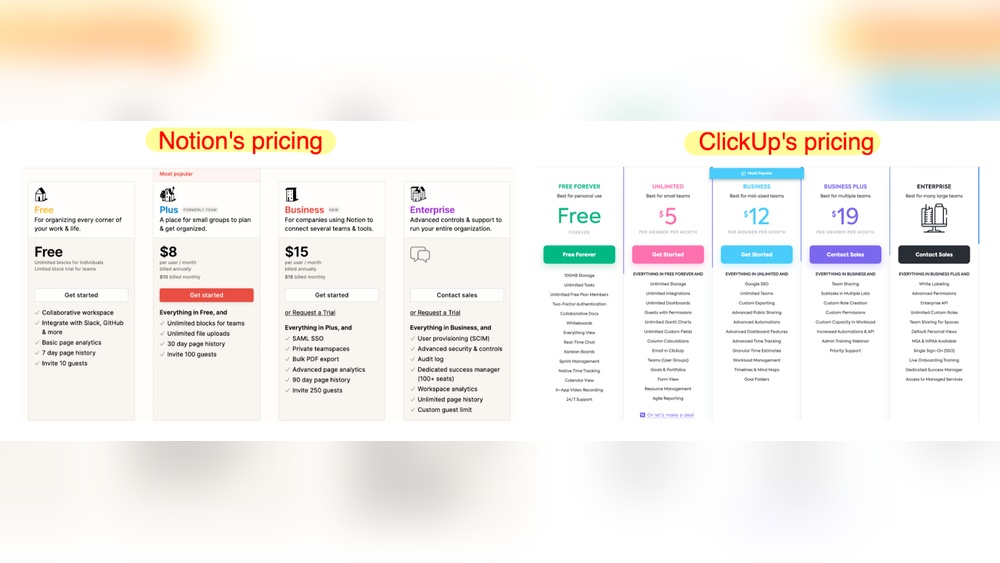
Pricing plays a crucial role in choosing between ClickUp and Notion. Both tools offer multiple plans tailored for different needs. This section breaks down their pricing structures and value to help users find the best fit for their budget and requirements.
Clickup Pricing Plans And Value Proposition
ClickUp provides a range of plans that cater to individuals and teams. Its pricing focuses on offering comprehensive features to replace multiple apps, combining AI, project management, and communication tools.
| Plan | Price (per user/month) | Main Features |
|---|---|---|
| Free | $0 | Unlimited tasks, 100MB storage, 2FA |
| Unlimited | $5 | Unlimited storage, integrations, dashboards |
| Business | $12 | Advanced automation, goal tracking, custom permissions |
| Enterprise | Custom pricing | Advanced security, tailored onboarding, dedicated support |
ClickUp’s value lies in its all-in-one platform approach. It replaces several software tools, saving money and time.
Notion Pricing Tiers And Cost-effectiveness
Notion offers flexible plans, focusing on note-taking, databases, and collaboration. It fits users who want a highly customizable workspace but with some limitations on storage and features.
| Plan | Price (per user/month) | Main Features |
|---|---|---|
| Free | $0 | Unlimited pages, blocks, up to 5 guests |
| Personal Pro | $4 | Unlimited file uploads, version history |
| Team | $8 | Collaboration, admin tools, unlimited members |
| Enterprise | Custom pricing | Advanced security, analytics, dedicated support |
Notion is cost-effective for individuals or small teams wanting customization without heavy project management.
Comparative Affordability For Different User Types
- Individuals: Notion’s free and Personal Pro plans offer enough features at lower costs.
- Small Teams: ClickUp’s Unlimited plan provides more project tools at just $5 per user.
- Businesses: ClickUp’s Business plan supports automation and permissions, useful for complex workflows.
- Enterprises: Both platforms offer custom pricing with advanced security and support.
ClickUp’s pricing targets users needing an all-in-one tool to reduce software costs. Notion suits those wanting flexibility and simpler collaboration at a lower price.
Pros And Cons Based On Real-world Usage
Understanding the strengths and weaknesses of ClickUp and Notion helps users choose the right tool. Both platforms offer unique features but also have drawbacks that affect daily work. Here, we explore practical experiences from real users.
Strengths Of Clickup In Practical Scenarios
- All-in-One Solution: ClickUp combines project management, chat, docs, and AI tools.
- Easy Team Collaboration: Teams work together with perfect context, reducing confusion.
- Customizable Workflows: Users create task statuses, views, and automations fitting their needs.
- Time-Saving Features: Integrated apps and AI reduce switching between tools.
- Strong Task Management: Supports subtasks, dependencies, and priorities clearly.
ClickUp works well for teams wanting a single platform to manage everything. It saves money by replacing multiple apps. Users report improved productivity and better project tracking.
Limitations And Challenges Experienced With Clickup
- Steep Learning Curve: New users may find ClickUp complex at first.
- Overwhelming Options: Many features can confuse users who want simplicity.
- Interface Clutter: Some find the UI busy and hard to navigate quickly.
- Performance Issues: Occasional slow loading on large projects.
Users suggest spending time learning the system to avoid frustration. Customization requires patience but pays off with better control.
Strengths Of Notion In Everyday Use
- Flexible Notes and Docs: Notion excels at organizing text, tables, and media.
- Highly Customizable Pages: Users build databases, wikis, and task lists easily.
- Clean Interface: Simple design helps focus on content without distractions.
- Template Variety: Many ready-made templates speed up setup.
- Good for Personal and Small Teams: Ideal for note-taking and light project tracking.
Notion suits users prioritizing document organization and knowledge management. It provides a calm workspace for creative and planning tasks.
Common Issues And Drawbacks Of Using Notion
- Slow Performance: Large workspaces can cause delays and lag.
- Steep Learning Curve: Complex features overwhelm new users.
- Unreliable Offline Access: Limited functionality without internet.
- Limited Project Management: Lacks advanced task features like dependencies.
- Migration Challenges: Moving data in and out is not simple.
Many users leave Notion due to frustration with speed and offline limits. It works best for those focusing on note-taking, not heavy project tracking.
User Recommendations And Ideal Use Cases
Choosing the right productivity tool depends on your work style and project needs. ClickUp and Notion serve different purposes and suit different users. This section helps identify who benefits most from each and the situations where one outshines the other.
Who Should Choose Clickup And Why
ClickUp fits teams and individuals needing a powerful, all-in-one platform. It suits users who want to manage projects, tasks, chats, and docs in one place.
- Teams requiring advanced project management features
- Users who want real-time collaboration with context
- Businesses aiming to replace multiple apps with one tool
- Those who value customizable workflows and automation
- People seeking fast, integrated communication alongside task management
ClickUp’s strength lies in combining AI tools with project tracking, saving time and money.
Who Benefits Most From Using Notion
Notion suits users focused on flexibility and content organization. It is ideal for those wanting to create databases, notes, and simple project boards.
- Individuals or small teams prioritizing personalized workspace
- Users who prefer rich text editing and document management
- Those who want a modular, creative environment for notes and planning
- People comfortable with a learning curve and crafting their own templates
- Users who value visual customization and page linking
Notion is powerful but can be complex and slow with large workspaces.
Best Scenarios To Use Clickup Over Notion
| Scenario | Why Choose ClickUp |
|---|---|
| Managing multiple projects with many collaborators | Advanced task dependencies and real-time updates |
| Need for integrated chat and AI-powered tools | All apps and AI features in one platform |
| Replacing several apps to reduce costs | Combines chat, docs, tasks, and AI in one |
| Fast onboarding and lower learning effort for teams | Clear UI with task templates and automation |
When Notion Is The Superior Choice
- Creating detailed, linked documents and knowledge bases
- Designing customized dashboards and databases
- Personal or small team use with focus on note-taking
- Users who prefer a flexible, creative workspace
- When offline use is not critical or workspace is small
Notion’s strength lies in its flexibility for varied content types. It fits best where project management is simpler but content organization is key.
Why Some Users Leave Notion And Alternatives They Consider
Notion is popular for note-taking and project management. Many start using it with excitement. Over time, some users find it complex and slow. They begin searching for alternatives that suit their needs better. These users want tools that are faster and easier to use. They look for software that offers better offline access and more reliable performance.
Challenges Leading To User Migration From Notion
Users leave Notion mainly due to several key challenges:
- Overwhelming Complexity: Notion’s many features can confuse new users.
- Steep Learning Curve: It takes time and effort to master the tool.
- Slow Performance: Large workspaces often cause lag and delays.
- Unreliable Offline Functionality: Users struggle to work without internet access.
These issues turn Notion from a helpful tool into a source of frustration. Users want simpler, faster, and more reliable options.
Popular Alternatives To Notion And Their Advantages
| Alternative | Main Advantages |
|---|---|
| ClickUp | All-in-one platform, fast performance, strong offline mode, easy project management. |
| Evernote | Simple note-taking, good offline access, easy syncing. |
| Trello | Visual task boards, intuitive interface, good for teams. |
| Asana | Focused on project tracking, clear task assignments, strong integrations. |
How Clickup Addresses Some Of Notion’s Limitations
ClickUp solves many problems faced by Notion users.
- Simpler Interface: Easier to learn with clear menus and options.
- Fast Performance: Handles large projects without lag.
- Reliable Offline Mode: Work continues smoothly without internet.
- All-in-One Tool: Combines chat, project management, docs, and AI features.
- Better Collaboration: Keeps teams connected with real-time updates.
ClickUp saves time and money by replacing many separate tools. It keeps everyone on the same page with perfect context.
Credit: blog.sketchnote.co
Conclusion: Which Tool Wins The Productivity Battle?
Choosing between ClickUp and Notion depends on your productivity needs. Both tools offer strong features but serve different styles of work. ClickUp focuses on task management and team collaboration. Notion excels in flexible note-taking and organization. Understanding their differences helps pick the right tool.
Summary Of Key Differences And Strengths
| Feature | ClickUp | Notion |
|---|---|---|
| Primary Use | Project and task management with AI support | Note-taking, databases, and content organization |
| Ease of Use | User-friendly with guided onboarding | Steep learning curve, complex for beginners |
| Performance | Fast even with large projects | Can be slow on large workspaces |
| Offline Access | Reliable offline functionality | Limited offline support |
| Collaboration | Strong real-time chat and task comments | Good for shared documents, less for chat |
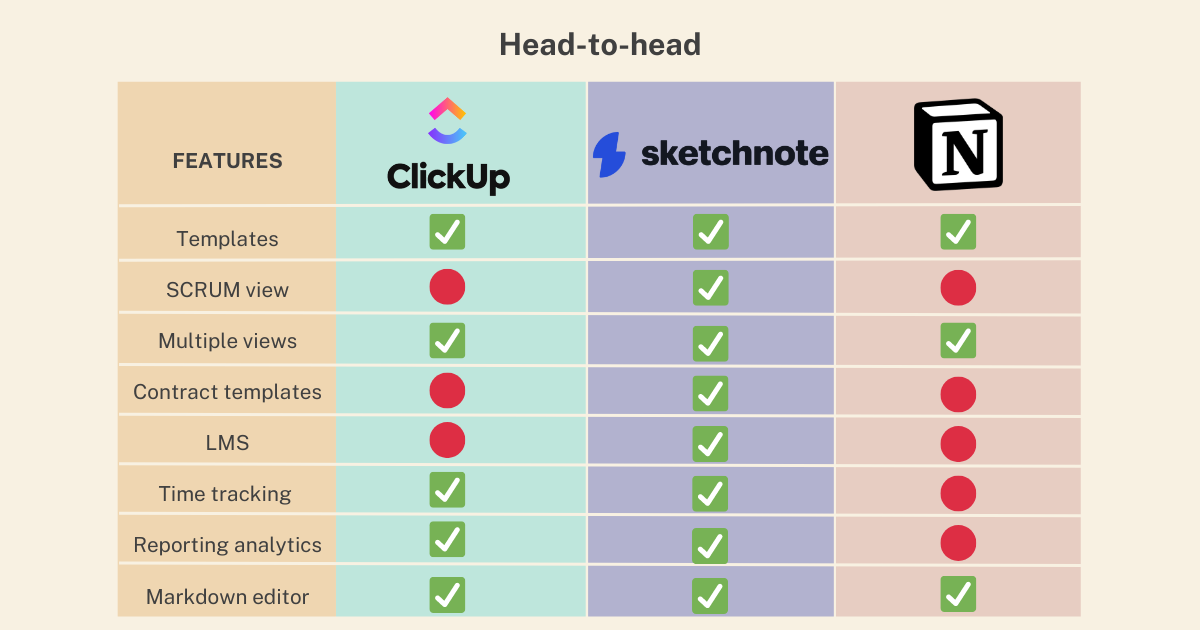
| Customization | Multiple views and automations | Highly flexible pages and templates |
Final Thoughts On Choosing Between Clickup And Notion
ClickUp suits teams needing clear task tracking and fast performance. It helps teams save time with AI tools and centralized chats.
Notion fits users who want a flexible workspace for notes and databases. It offers deep customization but requires time to learn.
Pick ClickUp for strong project management and easy team communication. Pick Notion for powerful content creation and organization.
Tips For Maximizing Productivity With Either Tool
- Set clear goals: Define tasks or notes before starting.
- Use templates: Save time by reusing project or page layouts.
- Leverage integrations: Connect with calendars, emails, and other apps.
- Regular reviews: Update tasks or notes daily to stay on track.
- Train your team: Ensure everyone knows basic features to avoid delays.
- Focus on essentials: Avoid overloading pages or projects with too many details.
Both tools can boost productivity with simple, consistent use. Choose what fits your style and needs best.
Frequently Asked Questions
Why Are People Leaving Notion?
People leave Notion due to its complexity, slow performance, poor offline support, and overwhelming features. They prefer simpler, faster, or more specialized tools.
Who Is Notions’ Biggest Competitor?
Notion’s biggest competitor is ClickUp, known for comprehensive project management and collaboration features. Both target productivity and team organization.
Is There Anything Better Than Clickup?
ClickUp ranks among the top project management tools, but alternatives like Asana, Trello, and Notion may suit specific needs better. Choose based on your workflow, features, and team size for optimal productivity.
What Are The Cons Of Clickup?
ClickUp can overwhelm new users with its many features. It sometimes suffers from occasional bugs and slow loading. Mobile app limitations affect user experience. Customization options may confuse beginners. Integration setup can be complex for some teams.
Conclusion
Choosing between ClickUp and Notion depends on your needs. ClickUp offers many tools in one place. It helps teams work together clearly and fast. Notion is flexible but can feel complex and slow. Many users find ClickUp easier for managing projects. ClickUp saves money by replacing many apps. It also uses AI to simplify work. Want to try ClickUp? Check it out here: clickup. Make your choice based on what fits your style best. Both tools aim to boost your productivity.