Clickup Vs Atlassian: Ultimate Productivity Showdown 2026
Are you struggling to choose between ClickUp and Atlassian for managing your projects and team workflows? You’re not alone.
Both platforms promise to boost your productivity, but which one truly fits your needs and helps you save time and money? If you want a single solution that can replace multiple apps like Confluence, Jira, and Airtable, while keeping your entire team perfectly in sync, ClickUp might be exactly what you’re looking for. Imagine having all your tasks, docs, chats, and project tracking in one place—customizable to how you work best. Ready to discover how ClickUp stacks up against Atlassian and why it could be the game-changer for your workflow? Dive in and see which platform will power your productivity better. Get started with ClickUp here: ClickUp
Introduction To Clickup And Atlassian
ClickUp and Atlassian are leading platforms in project management and productivity software. Both offer tools to help teams organize tasks, collaborate, and manage projects efficiently. Understanding their differences helps teams choose the best fit for their needs in 2026.
Overview Of Clickup: Purpose And Core Functions
ClickUp is a versatile platform designed to replace multiple software tools. It combines task management, documentation, databases, and automation into one workspace.
- All-in-One Workspace: Manage tasks, docs, and workflows together.
- Highly Customizable: Tailor dashboards and views for any team size.
- Rapid Updates: Frequent feature releases improve usability.
- Integration: Replaces tools like Confluence, Jira, Airtable, and Miro.
ClickUp’s design focuses on saving time and money by consolidating many apps into one platform.
Introduction To Atlassian Suite: Key Tools And Objectives
Atlassian provides a suite of tools aimed at software development and team collaboration. Its main products include Jira, Confluence, and Trello.
| Tool | Purpose | Key Features |
|---|---|---|
| Jira | Project and issue tracking | Agile boards, bug tracking, reporting |
| Confluence | Documentation and knowledge sharing | Collaborative pages, templates, integration with Jira |
| Trello | Visual task management | Kanban boards, checklists, simple collaboration |
Atlassian tools focus on structured workflows and strong integration between development and collaboration teams.
Why Compare Clickup And Atlassian? Understanding The Productivity Landscape In 2026
Productivity software evolves rapidly. Teams seek tools that simplify work and reduce costs. Comparing ClickUp and Atlassian highlights:
- Feature Coverage: Whether one platform can replace several tools.
- Ease of Use: How quickly teams adapt to the software.
- Flexibility: Support for different industries and team sizes.
- Cost Efficiency: Potential savings by consolidating software.
- Update Frequency: How often new features improve the user experience.
This comparison helps teams pick tools that match their goals and workflows in 2026.
Credit: www.frugaltesting.com
Unique Features Of Clickup And Their Benefits
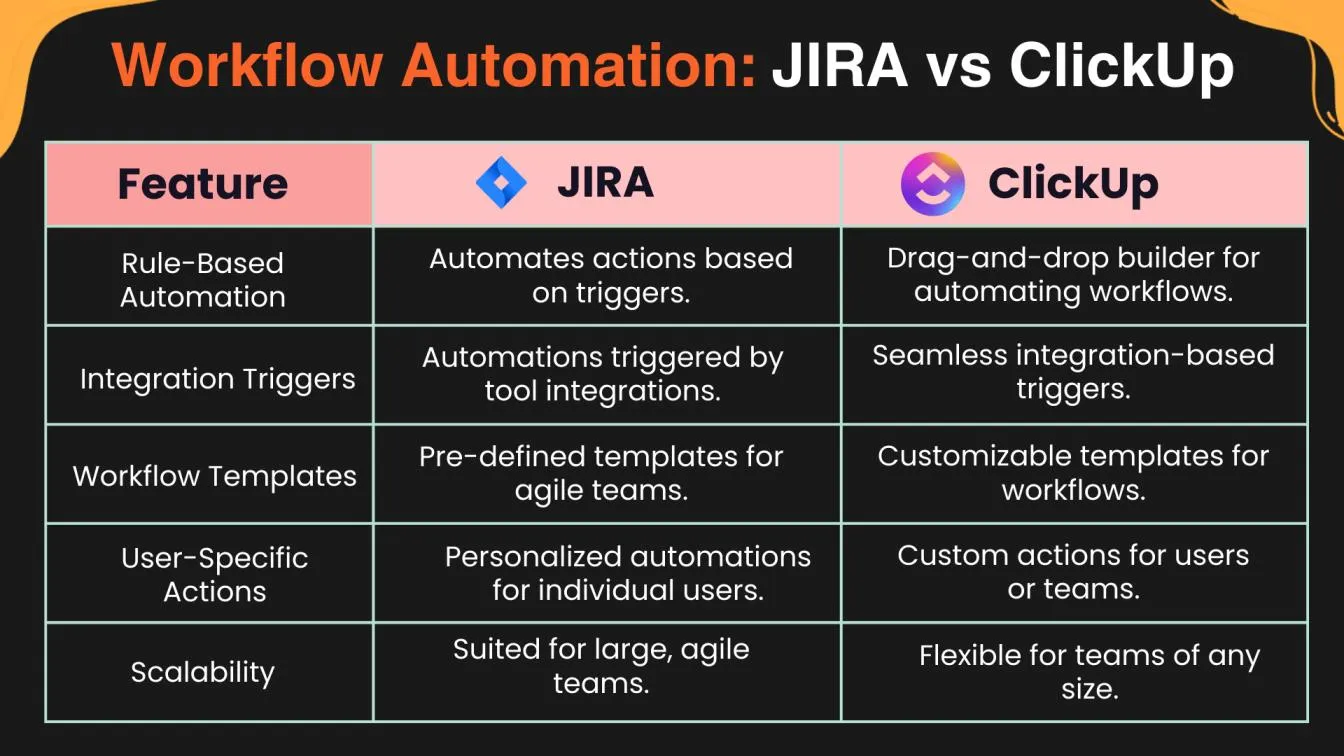
ClickUp stands out with unique features that simplify project management and boost team productivity. It merges many tools into one platform, offers flexible customization, delivers frequent updates, and enhances collaboration. These features help teams work smarter and faster.
All-in-one Platform: Streamlining Multiple Tools Into One
ClickUp combines task management, documents, databases, and automation in a single workspace. Teams no longer need separate apps like Jira, Confluence, or Airtable. This saves money and reduces the hassle of switching between tools.
- Manage tasks, projects, and docs all in one place
- Automate repetitive work with built-in automation
- Replace over 20 different apps with one platform
- Reduce software costs and simplify workflows
Customizable Views And Flexible Workflows: Enhancing User Experience
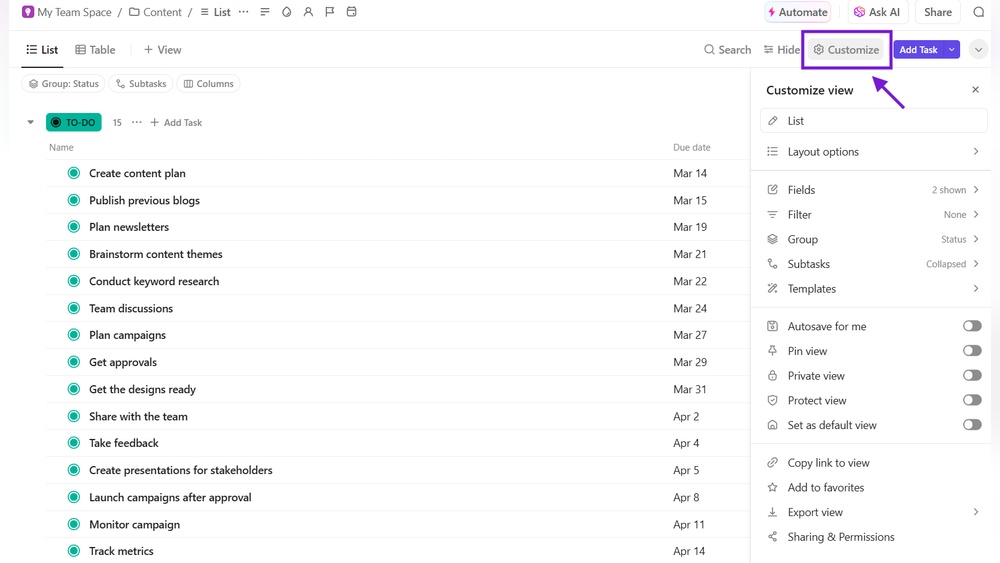
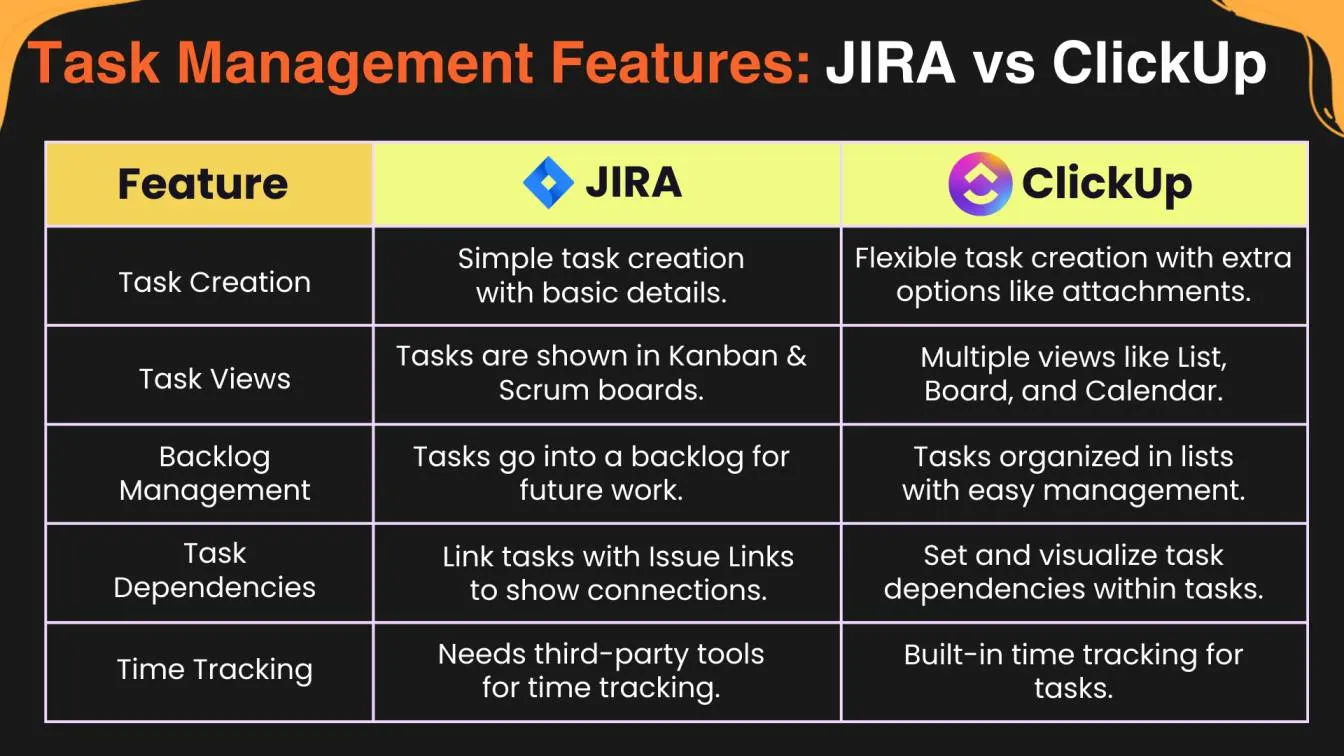
Users can tailor dashboards, task views, and workflows to fit their team’s style. ClickUp supports multiple views like lists, boards, and calendars. This flexibility helps teams organize work in the way that suits them best.
- Create custom dashboards for quick access to key info
- Switch between views like List, Board, Calendar, and Gantt
- Design workflows that match specific project needs
- Adapt platform easily for different industries and teams
Rapid Feature Updates: Staying Ahead With Innovation
ClickUp releases new features often to improve productivity and user experience. This keeps the platform fresh and up-to-date with the latest tools teams need to succeed.
| Benefit | Details |
|---|---|
| Frequent Updates | New tools and improvements delivered regularly |
| Improved Efficiency | Latest features help complete tasks faster |
| User Feedback | Updates often based on user suggestions |
Collaboration Capabilities: Boosting Team Productivity
ClickUp makes teamwork easier with built-in chat, comments, and real-time collaboration. Everyone stays on the same page, reducing misunderstandings and delays.
- Chat and comment directly on tasks
- Assign tasks and track progress in real time
- Share documents and updates instantly
- Keep all team members connected with perfect context
Distinctive Features Of Atlassian Products And Their Advantages
Atlassian offers a suite of tools designed for efficient team collaboration and project management. These products stand out for their focus on software development, documentation, and integration. Each tool addresses specific business needs, especially for tech-driven teams and large organizations. The Atlassian ecosystem supports agile workflows, centralized knowledge, and secure, scalable operations.
Agile Project Management With Jira: Tailored For Development Teams
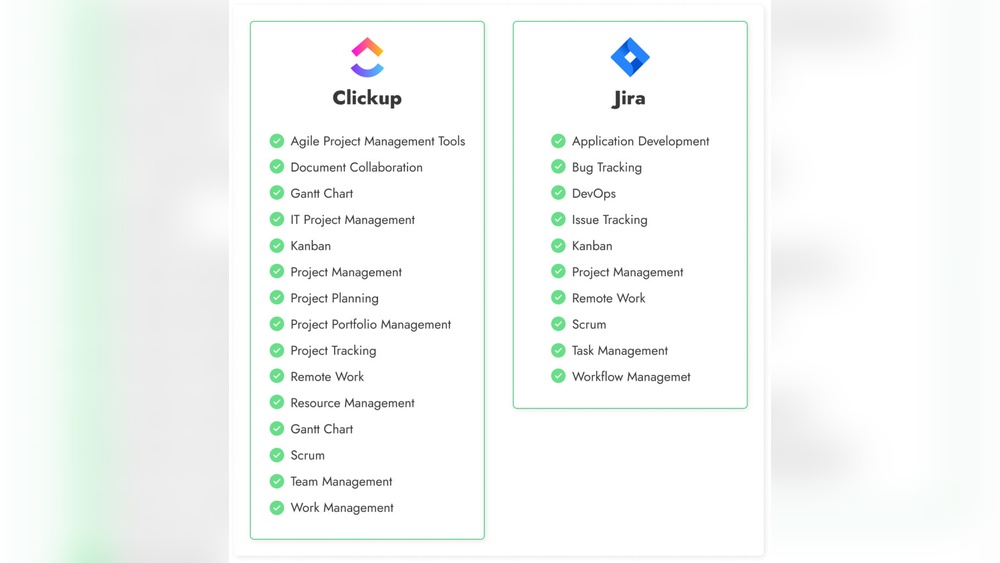
Jira is built specifically for software development teams practicing agile methods. It supports frameworks like Scrum and Kanban with customizable boards and workflows.
- Track issues, bugs, and tasks in real time
- Plan sprints and releases with clear timelines
- Visualize progress through detailed reports and charts
- Automate repetitive tasks to save time
These features help teams maintain focus on delivering quality software quickly and efficiently. Jira’s adaptability suits both small startups and large enterprises.
Robust Documentation With Confluence: Centralized Knowledge Sharing
Confluence acts as a central hub for team knowledge and documentation. It allows users to create, organize, and share content easily.
- Create pages with rich text, images, and multimedia
- Collaborate with inline comments and editing
- Organize information with spaces and labels for quick access
- Link documents to Jira issues for context
This centralized approach reduces information silos and keeps everyone informed. Teams can quickly find answers and maintain up-to-date project details.
Integration Ecosystem: Enhancing Workflow With Connected Tools
Atlassian products integrate smoothly with each other and third-party tools. This connectivity boosts productivity by linking workflows across platforms.
| Integration Type | Benefits |
|---|---|
| Jira + Confluence | Link issues with documentation for full project context |
| Jira + Bitbucket | Connect code repositories with issue tracking |
| Marketplace Apps | Extend capabilities with over 3,000 add-ons |
These integrations create seamless workflows, reduce manual work, and improve communication across teams.
Enterprise-grade Security And Scalability: Supporting Large Organizations
Atlassian prioritizes security and scalability to meet enterprise needs.
- Advanced user permissions and access controls
- Data encryption at rest and in transit
- Compliance with major standards like GDPR and SOC2
- Cloud and self-hosted deployment options
- Support for thousands of users and large data volumes
These features ensure data protection and reliable performance as organizations grow.
Credit: www.frugaltesting.com
Pricing And Affordability Comparison
Choosing the right project management tool depends heavily on cost and value. Pricing and affordability influence software adoption and long-term use. This section explores the pricing structures of ClickUp and Atlassian. It highlights how each platform supports different team sizes and budgets.
Clickup Pricing Structure: Plans And Value For Money
ClickUp offers multiple pricing tiers to fit diverse needs. The platform combines many tools into one, which can reduce overall costs.
- Free Plan: Provides basic task management and limited features.
- Unlimited Plan: Priced per user monthly, it unlocks unlimited storage and integrations.
- Business and Enterprise Plans: Include advanced automation, goals, and security features.
ClickUp’s all-in-one workspace can replace several separate tools, offering good value. Teams save money by consolidating software subscriptions.
Atlassian Pricing Model: Cost Breakdown Across Key Products
Atlassian’s pricing varies by product, such as Jira, Confluence, and Trello. Each product has its own fee structure.
| Product | Free Plan | Standard Plan | Premium Plan |
|---|---|---|---|
| Jira Software | Up to 10 users | $7.75/user/month | $15.25/user/month |
| Confluence | Up to 10 users | $5.75/user/month | $11/user/month |
| Trello | Free with limited boards | $5/user/month | $10/user/month |
Teams often need multiple Atlassian products, increasing total costs.
Comparing Free Plans And Trial Offers: Access For New Users
Both platforms offer free plans, but with different limits.
- ClickUp Free: Unlimited users, limited storage, and basic features.
- Atlassian Free: Up to 10 users per product, with feature restrictions.
Trial periods for paid plans allow teams to test advanced features before purchase.
Which Option Provides Better Roi For Different Team Sizes?
Small teams benefit from ClickUp’s free plan with no user limit. It offers many features without extra cost.
Medium to large teams may face higher Atlassian costs as they add products and users. ClickUp’s all-in-one model can reduce expenses by replacing multiple tools.
Enterprises might prefer Atlassian for specialized products but pay more overall.
| Team Size | Best ROI | Reason |
|---|---|---|
| Small (1-10 users) | ClickUp | Unlimited free users, many integrated tools |
| Medium (11-50 users) | ClickUp | Lower total cost, consolidated platform |
| Large (50+ users) | Atlassian | Product specialization and enterprise features |
Pros And Cons Based On Real-world Usage
Choosing between ClickUp and Atlassian tools depends on real-world experience. Both platforms offer powerful features but come with distinct trade-offs. Users report unique benefits and challenges based on daily use, team needs, and project complexity. Below is an overview of strengths and limitations of each tool based on practical feedback.
Strengths Of Clickup: Flexibility, Modern Interface, And Speed
- Flexibility: ClickUp supports various workflows, making it suitable for many industries and team sizes.
- Modern Interface: Its clean, intuitive design helps users navigate and manage tasks quickly.
- Speed: Frequent updates and fast feature releases keep ClickUp responsive to user needs.
- All-in-One Workspace: Combines task management, docs, databases, and automation seamlessly.
- Customization: Dashboards and workflows can be tailored to match specific project demands.
Challenges With Clickup: Learning Curve And Feature Overload
ClickUp’s wide range of features can overwhelm new users. The platform requires time to learn and customize effectively.
- Learning Curve: Beginners may struggle with the many options and settings.
- Feature Overload: Too many tools in one place can cause distraction and reduce focus.
- Complex Setup: Tailoring ClickUp to fit specific workflows may need effort and patience.
Advantages Of Atlassian Tools: Reliability, Integration, And Agile Focus
| Strength | Description |
|---|---|
| Reliability | Atlassian products like Jira and Confluence are stable and trusted by many large organizations. |
| Integration | Strong ecosystem connects with many developer and collaboration tools. |
| Agile Focus | Designed for agile teams, supporting sprint planning, tracking, and reporting. |
Limitations Of Atlassian: Complexity And Cost Considerations
Atlassian tools often come with complexity and higher costs, which may hinder small teams or simple projects.
- Complexity: Steeper learning curve due to technical features and configurations.
- Cost: Licensing and add-ons can increase expenses significantly.
- Setup Time: Initial configuration can be time-consuming and require specialized knowledge.
Ideal Users And Use Cases For Clickup And Atlassian
Choosing the right project management tool depends on team size, workflow needs, and project complexity. Both ClickUp and Atlassian offer powerful features but serve different user groups and scenarios. Understanding who benefits most from each platform helps in selecting the right fit.
Who Benefits Most From Clickup? Small To Medium Teams And Versatile Workflows
ClickUp excels with small to medium-sized teams that need a flexible and customizable workspace. Its all-in-one platform combines task management, docs, databases, and automation, making it ideal for teams wanting to replace multiple apps.
- Teams managing diverse workflows such as marketing, sales, and product development
- Users who prefer a modern, user-friendly interface for easier adoption
- Groups seeking cost efficiency by consolidating software subscriptions
- Teams requiring rapid updates and new features to stay productive
ClickUp’s adaptability suits projects with varying complexity levels and frequent changes in processes.
Best Scenarios For Atlassian Tools: Software Development And Large Enterprises
Atlassian tools like Jira and Confluence target software development teams and large enterprises. They focus on robust issue tracking, agile workflows, and deep technical integrations.
- Large organizations needing scalable and secure project management
- Development teams requiring detailed bug tracking and sprint planning
- Companies that depend on extensive documentation and knowledge bases
- Teams that benefit from integration with developer tools and APIs
Atlassian suits projects with high complexity, strict process control, and cross-department collaboration.
Choosing The Right Tool Based On Project Complexity And Collaboration Needs
| Factor | ClickUp | Atlassian |
|---|---|---|
| Project Size | Small to Medium Teams | Medium to Large Enterprises |
| Workflow Flexibility | Highly customizable, supports varied workflows | Structured, favors agile and software development processes |
| Collaboration Style | Cross-functional, versatile communication | Technical teams with integrated developer tools |
| Ease of Use | User-friendly interface for quick onboarding | Steeper learning curve but powerful for specialized needs |
| Cost Efficiency | Can replace multiple apps, reducing costs | May require multiple licenses and add-ons |
Recommendations For Hybrid And Cross-functional Teams
Teams combining different departments or skill sets benefit from tools offering flexibility and centralization.
- ClickUp supports hybrid teams with its all-in-one workspace and adaptable workflows.
- It allows easy switching between task views, docs, and chats, aligning various roles.
- Atlassian suits cross-functional teams with complex software projects requiring precise issue tracking.
- Its integration with developer tools and knowledge management supports technical collaboration.
Hybrid teams should evaluate workflow complexity and integration needs to choose effectively.
Alternatives And When To Consider Them
Choosing the right project management tool depends on your team’s specific needs. ClickUp and Atlassian offer powerful features, yet some teams may find other options better suited to their workflows or budgets. Understanding alternatives helps in selecting the best fit for your projects, team size, and work style.
Top Alternatives To Clickup And Atlassian: Overview Of Monday.com, Asana, Notion, And Others
Several popular tools serve as alternatives to ClickUp and Atlassian, each with unique strengths:
| Tool | Main Features | Ideal For |
|---|---|---|
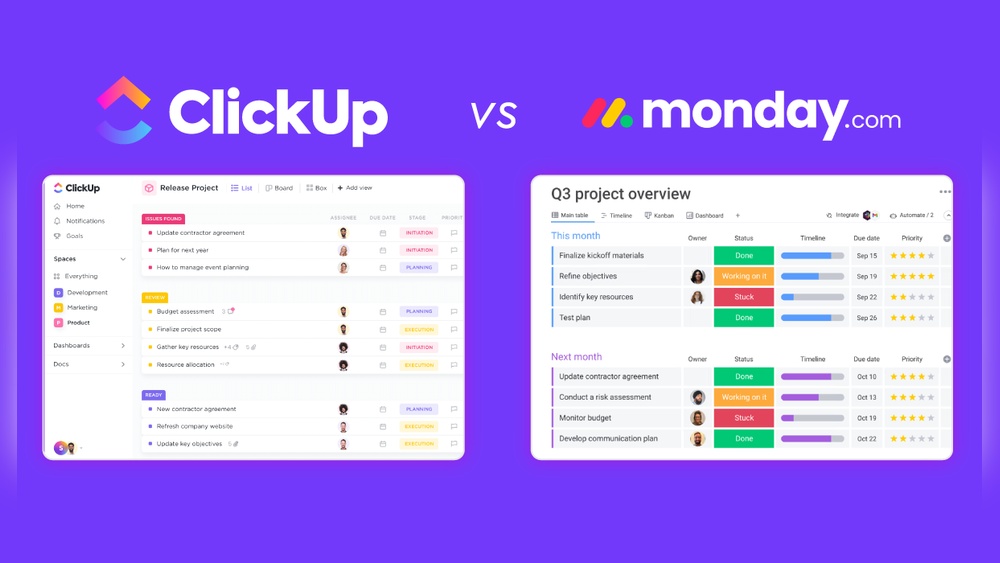
| Monday.com | Visual project boards, automation, integrations | Teams needing clear visual workflows and collaboration |
| Asana | Task tracking, timelines, team communication | Simple project management with strong task focus |
| Notion | All-in-one workspace for notes, databases, docs | Teams wanting flexible documentation and task management |
| Wrike | Custom workflows, real-time updates, reporting | Businesses needing detailed project tracking and analytics |
| Basecamp | Simple task lists, messaging, schedules | Small teams seeking straightforward communication tools |
Selecting Tools Based On Visual Workflow Needs, Simplicity, Or Customization
Consider your team’s workflow style first. Visual boards help teams track progress clearly.
- Visual Workflow: Monday.com offers colorful boards and easy drag-and-drop.
- Simplicity: Asana and Basecamp focus on clear, easy-to-use interfaces.
- Customization: ClickUp and Notion let users create tailored dashboards and workflows.
Teams needing flexibility often prefer tools with strong customization options.
Budget-friendly Options For Startups And Small Businesses
Cost matters for startups and small businesses. Many alternatives offer free or low-cost plans.
| Tool | Free Plan Available | Starting Paid Plan Cost |
|---|---|---|
| ClickUp | Yes | $5/user/month |
| Asana | Yes | $10.99/user/month |
| Monday.com | Limited | $8/user/month |
| Notion | Yes | $8/user/month |
| Basecamp | Limited | $99/month flat rate |
Free plans can support small teams but may limit features and storage.
How To Evaluate Your Team’s Core Requirements Before Deciding
Identify your team’s must-have features first. Consider these steps:
- List key workflows and collaboration needs.
- Decide on the importance of customization versus simplicity.
- Check integration needs with other software.
- Determine budget limits for software spending.
- Test free plans or trials to gauge usability.
Clear evaluation avoids choosing tools that overcomplicate or underdeliver.
Conclusion: Making The Ultimate Productivity Choice In 2026
Choosing the right productivity tool shapes how teams work and succeed. Both ClickUp and Atlassian offer powerful features. Understanding their strengths helps decide which fits your team best in 2026.
Summarizing Key Differences And Strengths
| Aspect | ClickUp | Atlassian |
|---|---|---|
| Core Focus | All-in-one workspace combining tasks, docs, and automation | Specialized tools for software development and collaboration |
| Customization | Highly customizable dashboards and workflows | Strong integration with developer tools and plugins |
| User Interface | Modern and user-friendly for all team sizes | More technical, suited for development teams |
| Integration | Replaces multiple apps, reducing tool clutter | Deep integrations with coding and project management tools |
| Update Frequency | Frequent feature releases enhancing productivity | Regular updates focused on developer needs |
Aligning Tool Selection With Team Goals And Workflow Preferences
Teams aiming for simplicity and cost savings lean towards ClickUp. It suits diverse industries and team sizes.
Teams focused on software development and complex projects find Atlassian tools helpful. Its ecosystem supports coding workflows.
- Small to mid-sized teams: ClickUp’s all-in-one design reduces tool switching.
- Development teams: Atlassian’s Jira and Confluence provide advanced tracking and documentation.
- Flexible workflows: ClickUp allows easy customization for unique processes.
- Technical projects: Atlassian integrates tightly with code repositories and CI/CD pipelines.
Future Trends In Productivity Software To Watch
- AI Integration: Smarter automation and task suggestions across platforms.
- Unified Workspaces: More tools combining communication, task, and documentation.
- Customization: Increased ability to tailor software to individual team needs.
- Cross-Platform Collaboration: Better support for remote and hybrid work models.
- Security Enhancements: Stronger data protection and compliance features.
Final Thoughts On Clickup Vs Atlassian For 2026
ClickUp fits teams wanting a single platform for all work. It saves money and time by replacing many apps.
Atlassian suits teams needing advanced tools for software projects. It excels in technical collaboration.
Choosing depends on team size, goals, and workflow style. Both tools keep evolving with user needs.
Credit: jadealm.com
Frequently Asked Questions
Who Is Atlassian’s Biggest Competitor?
Atlassian’s biggest competitors include Microsoft, Asana, Monday. com, ClickUp, and Trello. These platforms offer alternative project management and collaboration tools.
Is There Anything Better Than Clickup?
Several tools like Monday. com, Asana, Notion, Trello, Wrike, and Smartsheet offer unique features. The best alternative depends on your team’s specific needs and workflow preferences.
Can Clickup Replace Confluence?
ClickUp can replace Confluence by offering versatile workspace, document collaboration, and project management features in one platform.
Why Is Clickup So Popular?
ClickUp is popular for its all-in-one platform that combines task management, collaboration, and customization. It offers flexibility, automation, and integrations that boost productivity for teams of all sizes.
Conclusion
Choosing between ClickUp and Atlassian depends on your team’s needs. ClickUp offers an all-in-one workspace that combines many tools in one place. It helps save time and money by reducing the number of apps you use. Its user-friendly design makes managing projects easier for everyone. Atlassian tools focus more on software development and large enterprises. For small to medium teams wanting flexibility, ClickUp is a strong choice. Explore ClickUp’s features and see if it fits your workflow by visiting ClickUp. Find the right tool to boost your productivity today.