Samepage Vs Clickup: Ultimate Comparison for Productivity Boost
Choosing the right project management tool can make or break your productivity. You want something that keeps your team aligned without adding confusion or delays.
When it comes to Samepage vs ClickUp, the choice isn’t always straightforward. Both promise to streamline your work, but which one truly fits your needs and helps you save time and money? If you’re tired of juggling multiple apps and crave a solution that brings everything—AI, chat, projects, and more—into one place, then ClickUp might just be what you’re looking for. Ready to see if it’s the perfect fit for your workflow? Check out ClickUp here and discover how it could transform your productivity: ClickUp. Keep reading to find out how these two platforms stack up and which one can help you get more done with less hassle.
Introduction To Samepage And Clickup
Choosing the right tool can boost your team’s productivity. Samepage and ClickUp are popular choices for managing tasks and collaboration. Each offers unique features designed to help teams work together smoothly. Understanding their core functions helps you pick the best fit for your needs.
Overview Of Samepage: Purpose And Core Functionality
Samepage focuses on real-time team collaboration. It combines chat, video calls, file sharing, and task management in one place.
- Team Communication: Instant messaging and video conferencing.
- Document Collaboration: Shared pages with live editing.
- Task Management: Assign tasks with deadlines and track progress.
- File Sharing: Centralized storage for easy access.
Samepage aims to reduce app switching by uniting communication and project tools. It suits teams that want simple, clear collaboration.
Overview Of Clickup: Purpose And Core Functionality
ClickUp is an all-in-one platform for project management and productivity. It combines tasks, docs, chat, and AI features to replace many apps.
| Feature | Description |
|---|---|
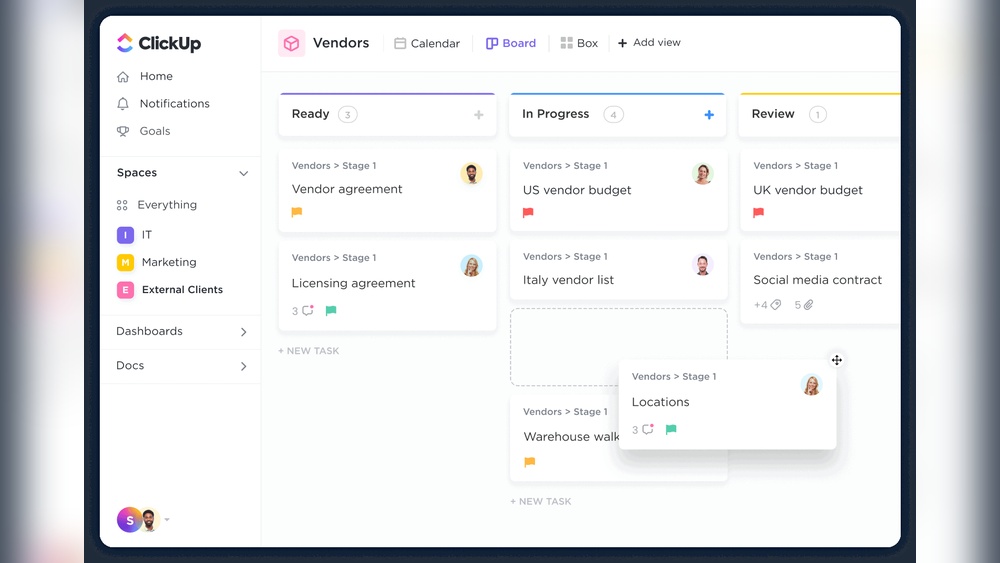
| Task Management | Create, assign, and track tasks with multiple views (list, board, calendar). |
| Docs & Wikis | Write and share documents inside the platform. |
| Team Chat | Communicate instantly without switching apps. |
| AI Tools | Automate workflows and generate content with built-in AI. |
| Integrations | Connect with many other software tools. |
ClickUp targets teams needing a powerful, customizable tool to handle complex projects and workflows.
Why Compare Samepage And Clickup For Productivity?
Both tools aim to improve productivity but approach it differently. Samepage offers a simple, unified space for teamwork. ClickUp provides extensive features for detailed project control.
- Team Size: Small teams may prefer Samepage’s ease of use.
- Project Complexity: Larger projects benefit from ClickUp’s depth and customization.
- Tool Integration: ClickUp supports many integrations; Samepage focuses on built-in tools.
- User Experience: Samepage is straightforward; ClickUp can be complex but powerful.
Comparing these options helps pick the right tool to match your workflow and team style.
Credit: www.chanty.com
Key Features Of Samepage And Their Benefits
Samepage offers a range of features designed to boost team productivity and simplify project management. These features help teams communicate clearly, manage tasks efficiently, and access important documents easily. Each tool within Samepage works together to create a smooth workflow and improve overall time management.
Real-time Collaboration And Communication: Enhancing Team Interaction
Samepage allows teams to work together instantly. Users can chat, video call, and share ideas on one platform. This real-time interaction reduces delays and misunderstandings. Teams stay updated without switching apps.
- Live chat and video conferencing for quick discussions
- Comments and mentions to keep conversations focused
- Shared workspaces that bring everyone on the same page
These features create a connected environment where teams solve problems faster.
Integrated Task Management: Streamlining Workflow
Task management in Samepage is simple and clear. Users can create, assign, and track tasks within the same system. This integration avoids task loss and confusion.
| Feature | Benefit |
|---|---|
| Task creation and assignment | Clear responsibilities for team members |
| Task status tracking | Easy progress updates and deadline management |
| Task comments and attachments | Context and resources available in one place |
Document Sharing And Editing: Centralizing Information Access
Samepage centralizes documents for easy access and editing. Teams can upload, share, and work on files together. This reduces scattered files and version conflicts.
- Real-time document editing to update content instantly
- File sharing with permissions to control access
- Version history to track changes and restore files
Centralized documents help teams find information quickly and work without interruptions.
Calendar And Scheduling Tools: Improving Time Management
Samepage’s calendar tools keep track of deadlines and meetings easily. Users can create events, set reminders, and view schedules in one place.
- Shared calendars for team visibility
- Event reminders to avoid missed deadlines
- Integration with other calendar apps for seamless planning
These tools help teams manage time better and stay organized.
Key Features Of Clickup And Their Benefits
ClickUp offers a powerful suite of features that combine multiple productivity tools into one platform. It supports diverse workflows with advanced customization, boosts efficiency with AI-powered tools, and connects seamlessly to other business apps. These capabilities help teams save time, reduce costs, and work better together with clear context.
Comprehensive Workspace: Replacing Multiple Productivity Tools
ClickUp creates a central workspace for all project needs. It replaces many separate tools like task managers, chat apps, and document editors. Users can:
- Manage tasks and projects in one place
- Chat with teammates without switching apps
- Create and share documents easily
- Track goals and deadlines clearly
This reduces the need for multiple subscriptions and simplifies workflows. Teams spend less time switching between apps and more time getting work done.
Advanced Customization And Views: Tailoring To Diverse Workflows
ClickUp offers flexible views and settings for different team needs. Users can choose from:
- List, Board, Calendar, or Gantt chart views
- Custom statuses, fields, and workflows
- Personalized dashboards to track progress
These options fit many industries and styles. Teams can adapt the tool to their processes, making work easier to follow and manage.
Ai-powered Tools: Boosting Efficiency And Automation
ClickUp integrates AI features to help automate tasks and speed up work. Key benefits include:
- Automatic task prioritization and reminders
- AI-generated summaries and content suggestions
- Smart search to find information quickly
- Automation of repetitive actions like status updates
These tools save time and reduce manual effort, letting teams focus on high-value tasks.
Integrations With Third-party Apps: Connecting Essential Business Tools
ClickUp connects with many popular apps to keep workflows smooth. Supported integrations include:
| Category | Examples |
|---|---|
| Communication | Slack, Microsoft Teams |
| Cloud Storage | Google Drive, Dropbox |
| Development | GitHub, GitLab |
| Calendars | Google Calendar, Outlook |
These integrations bring all tools into one flow. Teams avoid extra steps and keep data consistent across platforms.
Pricing And Affordability Breakdown
Choosing the right tool means understanding its pricing clearly. Both Samepage and ClickUp offer tiered plans, but their pricing models differ. This section breaks down their pricing structures, highlights what each tier offers, and compares their value for different budgets.
Samepage Pricing Tiers And What They Offer
Samepage provides simple pricing plans designed for teams of all sizes. The focus is on collaboration and project management features.
| Plan | Price (per user/month) | Main Features |
|---|---|---|
| Free | $0 | Basic collaboration, limited storage, unlimited users |
| Pro | $7 | Advanced task management, 20 GB storage, integrations |
| Business | $14 | Unlimited storage, priority support, custom branding |
Samepage’s free tier suits small teams needing basic tools. The paid tiers add more storage and premium support for growing businesses.
Clickup Pricing Structure Including Ai Add-ons
ClickUp offers flexible plans with extensive features including AI tools. Its pricing reflects the broad scope of functionality.
| Plan | Price (per user/month) | Main Features |
|---|---|---|
| Free | $0 | Unlimited tasks, 100MB storage, basic integrations |
| Unlimited | $5 | Unlimited storage, integrations, dashboards |
| Business | $12 | Advanced automation, goals, workload management |
| Business Plus | $19 | Advanced permissions, custom exporting, onboarding |
| Enterprise | Custom pricing | Tailored solutions, dedicated support, security |
AI add-ons are available as extra purchases. They offer AI-powered writing, task automation, and analytics to improve workflow efficiency.
Comparing Value For Money: Which Fits Different Budgets?
- Small teams or startups: Samepage’s free or Pro plan is budget-friendly with solid collaboration tools.
- Growing businesses: ClickUp’s Unlimited or Business plans offer extensive features at competitive prices.
- Large enterprises: ClickUp’s Enterprise plan provides custom solutions and advanced security.
Samepage’s pricing is straightforward, good for teams wanting easy setup. ClickUp’s pricing fits users needing deep customization and AI features.
For teams on a tight budget, Samepage’s free plan may suffice. For teams needing broad functionality and AI integration, ClickUp delivers more value but at a higher cost.
Pros And Cons Based On Real-world Usage
Understanding the strengths and weaknesses of Samepage and ClickUp helps pick the right tool. Users share honest feedback about each platform’s performance and usability. This section breaks down key points from actual experiences.
Samepage Strengths And Potential Limitations
Samepage excels in team collaboration with a simple interface. It offers effective real-time chat, file sharing, and task management features. Users appreciate its easy setup and straightforward design.
- Strengths:
- Intuitive and user-friendly layout
- Strong real-time collaboration tools
- Good integration with popular apps
- Effective for small to medium teams
- Potential Limitations:
- Lacks some advanced project management features
- Fewer customization options compared to ClickUp
- Limited reporting and automation tools
- May not scale well for large enterprises
Clickup Advantages And Common User Challenges
ClickUp is packed with features aimed at replacing many software tools. It supports project management, chat, AI tools, and more. Users praise its all-in-one platform approach.
| Advantages | Common Challenges |
|---|---|
|
|
Performance And User Experience: Desktop Vs Mobile Insights
Desktop Experience: Both Samepage and ClickUp perform better on desktop. ClickUp’s rich features demand more resources, which can slow down performance on older machines. Samepage runs smoothly due to its simpler design.
Mobile Experience: ClickUp’s mobile app faces criticism for bugs and inconsistent syncing. Users report crashes and slow load times that interrupt workflows. Samepage’s mobile version is more stable but lacks some desktop features.
- Samepage: Stable mobile app, fewer features than desktop
- ClickUp: Powerful desktop app, buggy and slow mobile app
Real users recommend testing both platforms on devices before committing. User experience varies based on team size and workflow complexity.

Credit: www.slammedialab.com
Recommendations: Who Should Choose Samepage?
Samepage fits teams that want simple, clear, and effective collaboration tools. It works best for small to mid-sized groups focused on easy communication and project tracking. Teams needing a less complex platform with strong real-time collaboration prefer Samepage over feature-heavy alternatives.
Ideal Teams And Use Cases For Samepage
- Small to mid-sized teams with 5-50 members
- Remote or hybrid teams needing real-time chat and video
- Project groups requiring shared document editing and task management
- Teams focusing on clear, straightforward workflows without complexity
- Organizations wanting an all-in-one collaboration hub
How Samepage Solves Specific Collaboration Problems
Samepage reduces communication gaps by combining chat, video, and file sharing in one place. It helps avoid lost emails and scattered files by centralizing all project info.
Team members can edit documents together live, which cuts down on version confusion. Tasks link directly to conversations, making follow-ups easier.
| Problem | Samepage Solution |
|---|---|
| Disjointed communication | Unified chat, video, and file sharing |
| Confused document versions | Real-time collaborative editing |
| Missing task context | Tasks linked with comments and files |
Why Samepage’s Features Matter For Small To Mid-sized Teams
Samepage keeps tools simple and focused. It avoids overwhelming users with too many options.
The platform supports essential collaboration with:
- Instant messaging and video calls
- Shared documents and spreadsheets
- Task lists and calendar views
- File sharing with easy access
Small teams get a clear view of progress without extra setup. Mid-sized teams benefit from smoother communication and faster decision-making.
Recommendations: Who Should Choose Clickup?
ClickUp suits teams and individuals needing a powerful, all-in-one workspace. It fits well for users who manage complex projects or require deep customization. The platform’s rich features help streamline tasks, communication, and project tracking in one place. Its AI tools and flexibility offer value for those wanting to enhance productivity beyond basic task management.
ClickUp works best for users ready to invest time learning its interface. It supports large teams and diverse workflows, making it ideal for growing businesses and enterprises. Simple projects might find ClickUp too complex, but for those with advanced needs, it shines.
Best Scenarios For Using Clickup’s Advanced Features
- Teams handling multiple projects with varied requirements
- Users needing detailed task views like Gantt charts, timelines, and custom dashboards
- Workflows requiring automation to reduce repetitive tasks
- Organizations using AI tools for smarter task prioritization and project insights
- Teams wanting integrated chat and document collaboration inside a single app
Handling Complex Projects And Large Workspaces With Clickup
ClickUp handles complexity through its hierarchical structure of Spaces, Folders, and Lists. This setup helps break down large projects into manageable parts. Users can assign roles, track progress, and set dependencies clearly.
The platform supports thousands of tasks without losing speed, given proper setup. It provides multiple views to suit different team needs, such as Kanban for agile teams or Calendar for deadline tracking.
| Feature | Benefit for Complex Projects |
|---|---|
| Task Dependencies | Visualize task order and avoid bottlenecks |
| Custom Statuses | Track unique workflow stages |
| Automations | Reduce manual updates and errors |
| Multiple Views | Adapt project monitoring to user preference |
When Clickup’s Customization And Ai Tools Add The Most Value
ClickUp’s customization shines when teams need tailored workflows. Users can create custom fields, statuses, and templates to match their exact process. This flexibility helps align the tool perfectly with team needs.
Its AI tools assist in task prioritization, summarization, and automation suggestions. These features save time and reduce decision fatigue. Teams with repetitive task flows or data-heavy projects gain from AI-driven insights.
- Custom views and dashboards for focused work
- AI-powered task creation and reminders
- Automated reporting for better project tracking
- Smart suggestions for task dependencies and deadlines
Users seeking a single platform for project management, communication, and AI assistance find ClickUp valuable. Its tools help maintain perfect context across teams, improving collaboration and output quality.
Conclusion: Making The Right Choice For Productivity Boost
Choosing between Samepage and ClickUp shapes your team’s productivity. Each tool offers unique features suited to different workflows and team needs. Understanding their differences helps in picking the best fit. Productivity gains depend on matching the tool’s strengths with your requirements.
Summary Of Key Differences And Benefits
| Feature | Samepage | ClickUp |
|---|---|---|
| User Interface | Simple, easy to use, minimal learning curve | Feature-rich but complex, steep learning curve |
| Collaboration | Strong real-time chat and file sharing | All-in-one workspace with chat, docs, and tasks |
| Customization | Basic templates and workflows | Highly customizable views and automations |
| Performance | Fast and reliable for small to medium teams | Can slow down with heavy use; buggy mobile app |
| Integrations | Supports common apps for collaboration | Wide range but missing some niche tools like payroll |
| Pricing | Affordable for small teams | Varied plans, can be costly for full features |
Factors To Consider Based On Team Size, Needs, And Budget
- Team Size: Samepage fits small to medium teams well. ClickUp suits larger or growing teams needing advanced features.
- Project Complexity: Use Samepage for simple projects with direct collaboration. Choose ClickUp for complex workflows and multiple task views.
- Budget: Smaller budgets benefit from Samepage’s straightforward pricing. ClickUp offers more features but may cost more.
- Learning Time: Samepage requires less time to start. ClickUp needs training due to its many options.
- Mobile Use: Samepage’s mobile app is stable. ClickUp’s app can be slow or buggy under heavy use.
Final Thoughts On Maximizing Productivity With Samepage Or Clickup
Both tools improve team productivity in different ways. Samepage offers simplicity and smooth collaboration. ClickUp provides powerful features for detailed project management.
Choose Samepage for fast onboarding and effective teamwork without complexity. Opt for ClickUp to manage multiple projects with deep customization and automation.
Focus on your team’s workflow, skills, and budget limits. Match the tool to your daily needs for the best results. Productivity grows when tools fit your work style and reduce friction.

Credit: databox.com
Frequently Asked Questions
Is There A Better App Than Clickup?
Apps like Asana, Trello, and Monday. com offer simpler interfaces and better performance for some users. Preferences vary by needs.
What Are The Cons Of Clickup?
ClickUp’s cons include a steep learning curve, complex interface, slow performance with heavy use, buggy mobile app, inconsistent syncing, slow search, limited niche integrations, and occasional poor customer support.
Is Clickup A Unicorn?
Yes, ClickUp is a unicorn. It achieved a valuation over $1 billion after multiple funding rounds.
Why Is Clickup So Popular?
ClickUp is popular for its all-in-one platform that boosts productivity with task management, customization, and collaboration tools. It offers flexible views, integrations, and automation, making teams work efficiently and stay organized in one place.
Conclusion
Choosing between Samepage and ClickUp depends on your team’s needs. Samepage offers simple collaboration and easy communication. ClickUp provides many features but can feel complex at first. Both tools help organize tasks and projects well. For those wanting all-in-one software with AI and chat, ClickUp stands out. Its learning curve may take time but rewards with powerful options. Explore ClickUp and see if it fits your workflow: ClickUp. Make a choice that boosts your team’s productivity today.