Does Clickup Integrate With Hubspot: Ultimate Guide to Seamless Sync
Are you juggling multiple tools to manage your sales and projects? Imagine if your CRM and project management software could work seamlessly together, saving you time and headaches.
You might be wondering: does ClickUp integrate with HubSpot? The answer is yes—and this integration can transform how you handle deals, tasks, and team collaboration. By connecting HubSpot’s powerful CRM features with ClickUp’s all-in-one productivity platform, you get automatic syncing of data, smooth workflow automation, and fewer manual updates. Curious how this works and how it can benefit your business? Keep reading to discover everything you need to know about the ClickUp and HubSpot integration—and how it can streamline your daily operations. Ready to simplify your software stack? Check out ClickUp here: ClickUp and see how it replaces multiple tools with one smart solution.
Credit: ecosystem.hubspot.com
Introduction To Clickup And Hubspot Integration
The integration of ClickUp and HubSpot connects project management with customer relationship management. This link automates workflows and syncs data between sales and service teams. It helps businesses keep their records consistent and up to date. The combined power of these tools improves teamwork and reduces repetitive tasks.
Overview Of Clickup And Hubspot: Purpose And Capabilities
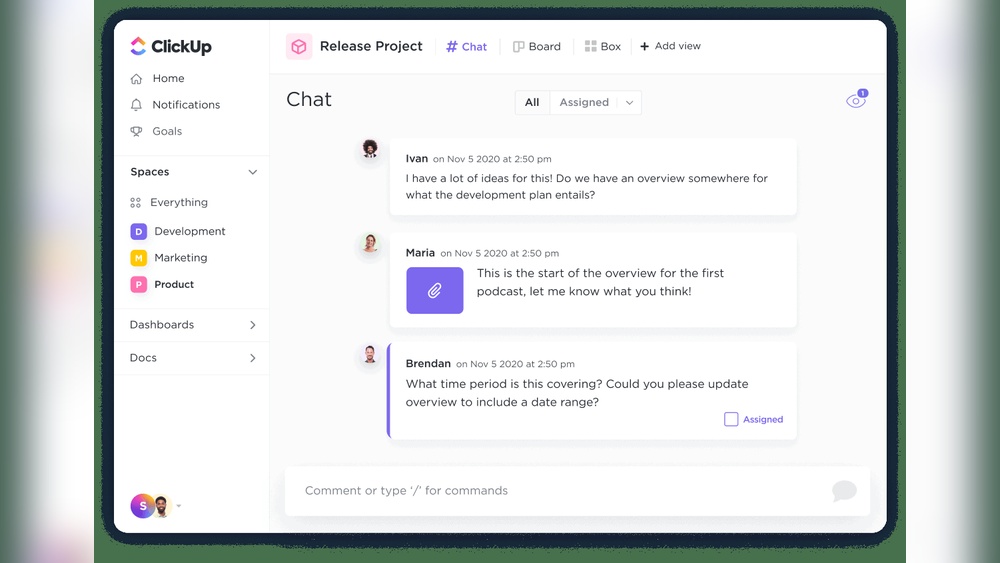
ClickUp is an AI-powered platform that combines project management, communication, and automation in one place. It aims to replace many apps by offering tasks, chat, and AI features to save time and money.
HubSpot is a customer relationship management (CRM) system that helps manage sales, marketing, and customer service. It tracks deals, contacts, and customer interactions.
| Feature | ClickUp | HubSpot |
|---|---|---|
| Main Use | Project and task management | Customer relationship management |
| Key Capabilities | Task tracking, automation, AI tools | Deal tracking, contact management, marketing automation |
| User Focus | Teams managing projects and communication | Sales, marketing, and service teams |
Why Integrate Clickup With Hubspot? Benefits Of A Seamless Sync
Connecting ClickUp with HubSpot creates a smooth flow of data and tasks. This reduces errors and saves time spent on manual updates. The integration offers:
- Two-way sync to keep ClickUp tasks and HubSpot records aligned.
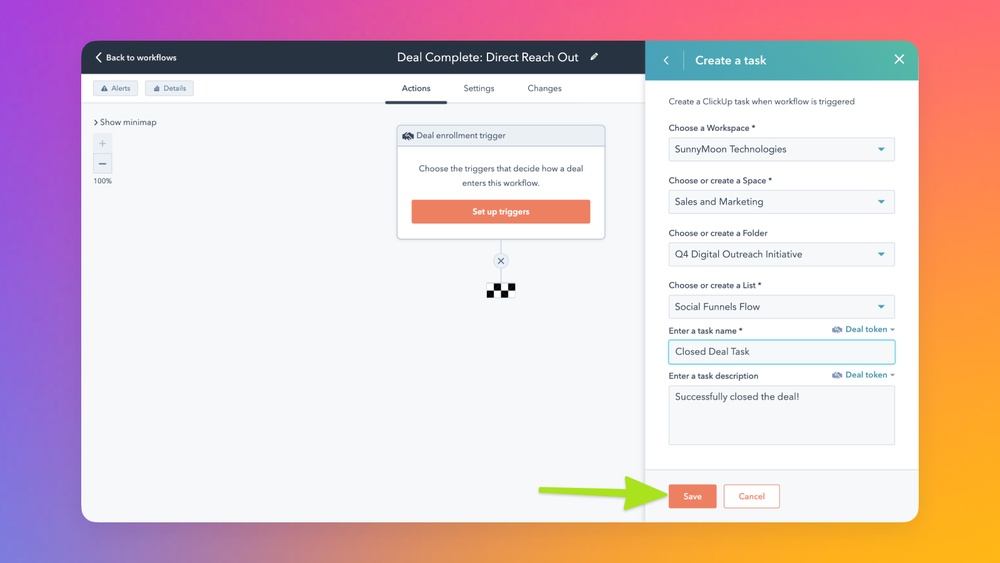
- Workflow automation that triggers task creation based on HubSpot deal stages.
- Custom field mapping to match HubSpot data with ClickUp fields.
- Lead-to-project handoff that creates ClickUp checklists when deals close.
These benefits improve collaboration between sales and project teams. Teams work with the latest information, reducing confusion and delays. The automation cuts down repetitive tasks and human errors.
Key Features Of The Clickup-hubspot Integration
The ClickUp-HubSpot integration offers powerful features to connect your sales and project management tools. It ensures smooth data flow and automates task management. Teams benefit from improved collaboration and less manual work. Here are the main features that make this integration effective.
Two-way Data Sync: Maintaining Consistency Between Platforms
This integration provides two-way synchronization between ClickUp and HubSpot. Data like tasks, deals, and records stay consistent across both platforms.
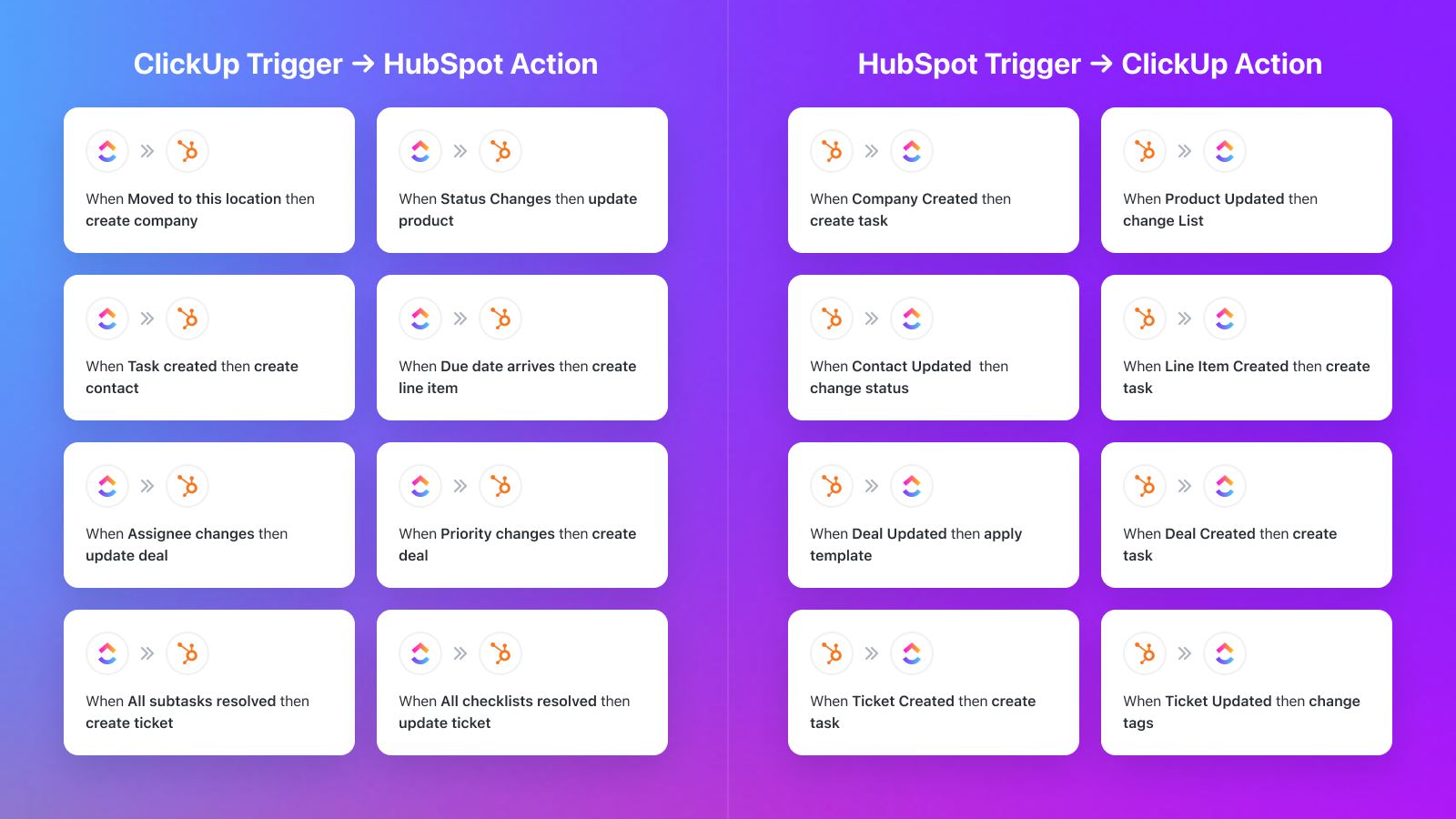
- Updates in HubSpot reflect instantly in ClickUp tasks.
- Changes in ClickUp are synced back to HubSpot records.
- Reduces manual data entry and errors.
This feature keeps your sales and project teams on the same page at all times.
Workflow Automation: Triggering Tasks And Actions Based On Hubspot Deal Stages
The integration automates workflows by triggering actions when HubSpot deal stages change.
- Create tasks or folders in ClickUp automatically as deals progress.
- Set reminders or assign team members based on deal status.
- Speeds up response times and task follow-ups.
Automation simplifies managing deal pipelines and project workloads.
Custom Field Mapping: Tailoring Data Transfer To Your Business Needs
Custom field mapping lets you control what data moves between HubSpot and ClickUp.
| HubSpot Property | ClickUp Custom Field | Purpose |
|---|---|---|
| Deal Amount | Project Budget | Track financials in project tasks |
| Close Date | Deadline | Set task deadlines automatically |
| Deal Owner | Assigned Team Member | Assign responsibility in ClickUp |
This flexibility adapts the integration to your unique workflow.
Lead-to-project Handoff: Automating Task And Checklist Creation From Closed Deals
When a HubSpot deal is marked closed-won, this feature automatically creates tasks and checklists in ClickUp.
- Generate new project tasks from deal details.
- Create checklists for onboarding or delivery steps.
- Assign tasks to relevant team members instantly.
This automation ensures smooth transition from sales to project execution without delays.
Setting Up The Integration: Requirements And Process
Integrating ClickUp with HubSpot requires certain plans and permissions. This section explains what you need and how to connect both platforms effectively. Following the right steps ensures smooth data sync and workflow automation.
Subscription Requirements: Understanding Clickup Plans Needed
The ClickUp – HubSpot integration is available for users on the Unlimited Plan or higher. Free or lower-tier plans do not support this integration.
| ClickUp Plan | Integration Access |
|---|---|
| Free Plan | Not Available |
| Unlimited Plan | Available |
| Business Plan | Available |
| Enterprise Plan | Available |
Make sure your workspace is on the right plan to enable the integration features.
User Permissions: Who Can Configure The Integration?
Only users with Workspace owner or admin roles can set up the ClickUp – HubSpot integration.
- Workspace Owners: Full control over settings and integrations.
- Admins: Authorized to manage integrations and workspace configurations.
Regular members or guests do not have permission to configure this integration. Verify your role before starting the setup.
Step-by-step Guide To Connecting Clickup With Hubspot Via App Center
- Log in to your ClickUp workspace with owner or admin access.
- Go to the App Center in ClickUp, usually found in the sidebar or settings menu.
- Search for HubSpot in the App Center search bar.
- Select the ClickUp – HubSpot Integration app from the results.
- Click on Connect or Install to start the linking process.
- You will be redirected to HubSpot’s login page; sign in with your HubSpot credentials.
- Authorize ClickUp to access your HubSpot account by granting the requested permissions.
- Return to ClickUp and configure the integration settings, such as:
- Mapping HubSpot deal stages to ClickUp task statuses.
- Setting up custom field mappings.
- Choosing which workflows to automate.
- Save your settings to activate the integration.
After setup, the integration will sync data automatically and trigger actions based on your HubSpot deal stages.

Credit: www.youtube.com
Pricing And Affordability Breakdown
The cost of using ClickUp’s integration with HubSpot depends largely on the ClickUp plan chosen. This section explains the pricing structure, any extra fees for automation tools, and whether this integration offers good value for money. Understanding the pricing helps businesses decide if the integration fits their budget and needs.
Cost Of Clickup Plans Supporting Hubspot Integration
ClickUp’s integration with HubSpot is available starting from the Unlimited Plan and above. Here is a quick breakdown of relevant plans:
| Plan | Price (per user/month) | HubSpot Integration Support |
|---|---|---|
| Free | $0 | No |
| Unlimited | Approx. $5 | Yes |
| Business | Approx. $12 | Yes |
| Enterprise | Custom Pricing | Yes |
Only users with admin or owner access can set up the integration. The Unlimited Plan unlocks essential features to connect HubSpot for syncing and automation.
Additional Costs: Third-party Tools Like Zapier For Advanced Automation
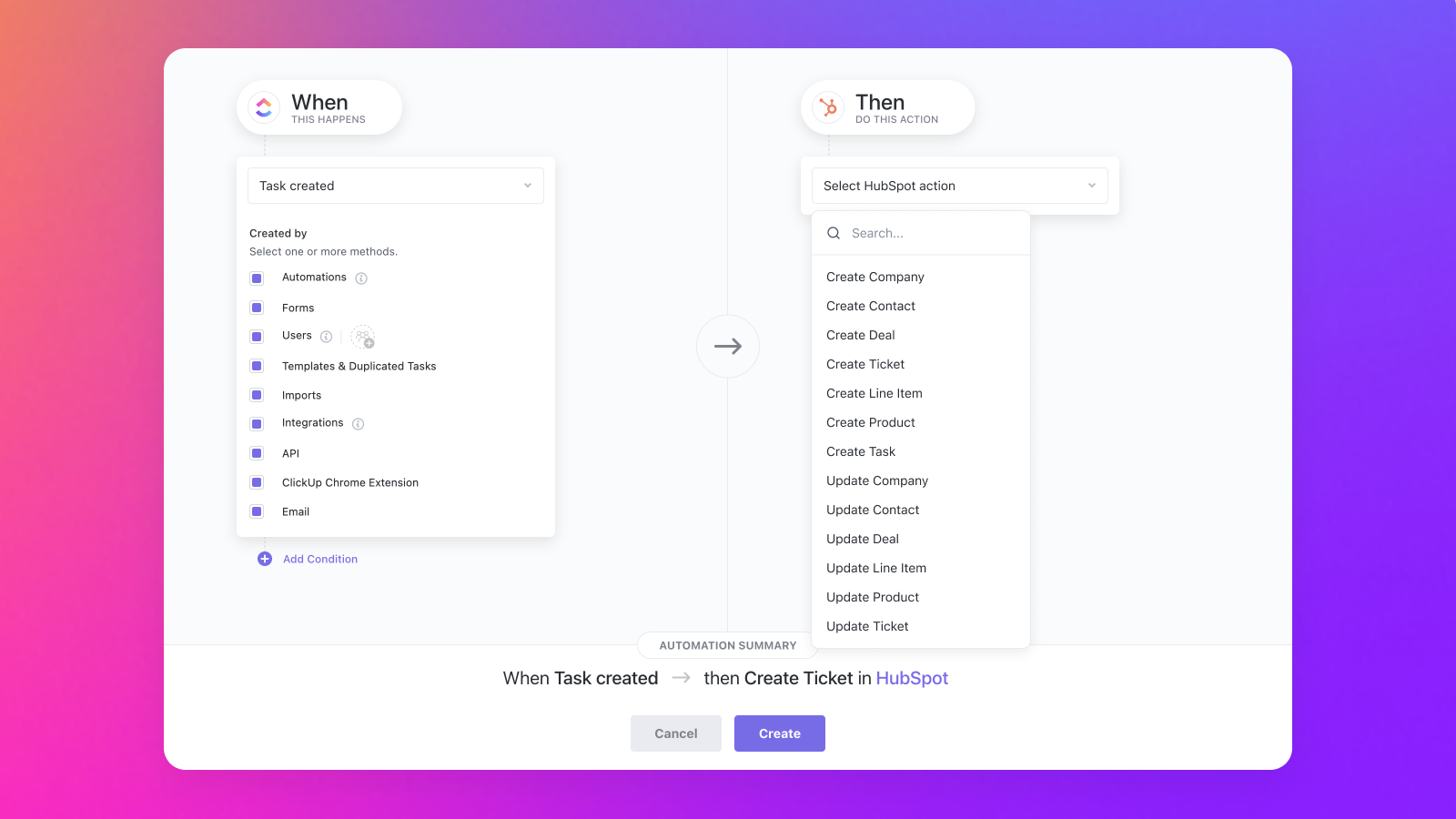
ClickUp’s native integration covers basic syncing and task automation with HubSpot. For more complex workflows, third-party tools such as Zapier may be required.
- Zapier plans start from free with limited tasks per month.
- Paid Zapier plans range from $20 to $125+ monthly depending on task volume.
- Advanced automation can increase overall expenses beyond ClickUp’s base plan.
Businesses should consider these extra fees if they need more tailored automation beyond the native integration.
Evaluating Roi: Is The Integration Worth The Investment?
The integration helps reduce manual data entry and errors by syncing HubSpot with ClickUp tasks automatically.
Teams save time by triggering task creation based on deal stages without switching apps.
Improved collaboration between sales and project teams can speed up deal closing and project delivery.
Return on investment depends on how much value your business places on automation and workflow efficiency.
- Calculate time saved by automating manual tasks.
- Estimate error reduction and better data accuracy benefits.
- Compare costs of ClickUp plans plus any third-party tools.
- Decide if improved team productivity justifies the monthly spend.
For many small to medium teams, the integration offers good value by streamlining processes and saving time.
Pros And Cons Based On Real-world Usage
The integration of ClickUp with HubSpot offers practical benefits and some challenges. Users experience improved teamwork and automation but face certain limits. This section covers the real-world advantages, limitations, and user feedback for a clear view.
Advantages: Enhanced Collaboration, Automation Efficiency, And Data Accuracy
- Enhanced Collaboration: Syncs sales and project teams by sharing deal data instantly.
- Automation Efficiency: Automatically creates tasks or checklists when deal stages update, saving time.
- Data Accuracy: Two-way sync keeps HubSpot records and ClickUp tasks consistent, reducing manual errors.
These features help teams work with perfect context and reduce duplicated work.
Limitations: Plan Restrictions, Learning Curve, And Customization Boundaries
| Limitation | Details |
|---|---|
| Plan Restrictions | Integration requires ClickUp’s Unlimited Plan or higher, limiting access for some users. |
| Learning Curve | Setup needs admin rights and understanding of workflow automation, which may confuse new users. |
| Customization Boundaries | Some users find custom field mapping helpful but limited for complex business needs. |
User Feedback: Common Praise And Critiques From Businesses
Common Praise:
- Teams appreciate the smooth handoff from sales to project management.
- Automation reduces repetitive tasks and errors, improving productivity.
- Real-time data sync enhances communication and decision-making.
Common Critiques:
- Setup can be tricky without technical knowledge or admin access.
- Some users want more flexible options for custom data fields.
- Limited integration features on lower-tier ClickUp plans frustrate smaller teams.
Credit: ecosystem.hubspot.com
Who Should Use The Clickup-hubspot Integration?
The ClickUp-HubSpot integration is ideal for teams needing smooth collaboration between sales and project management. It connects CRM data with task management, cutting down manual work. This integration helps teams keep track of deals and projects without switching apps. Teams focused on improving workflow, communication, and data accuracy will find this integration valuable.
Ideal Users: Sales Teams, Customer Success Managers, And Project Coordinators
Sales teams benefit from automatic task creation as deals progress in HubSpot. This keeps sales reps focused on closing deals while tasks update in ClickUp.
Customer success managers use synced data to track client onboarding and support tasks, ensuring no step is missed after a sale.
Project coordinators get real-time updates on project status linked to sales activities, helping them plan resources and deadlines better.
- Sales teams: track deals and follow-ups easily
- Customer success managers: manage onboarding and support tasks
- Project coordinators: oversee project progress tied to sales
Best Use Cases: Streamlining Sales-to-service Handoffs And Project Management
The integration shines in sales-to-service handoffs. When a deal closes in HubSpot, tasks and checklists auto-generate in ClickUp. This ensures smooth transition from sales to project teams without loss of information.
For project management, syncing deal stages with task workflows helps teams stay updated. Automation reduces manual data entry, lowering errors.
| Use Case | Benefit |
|---|---|
| Sales-to-Service Handoffs | Automatic task generation from HubSpot deals |
| Project Management | Real-time task updates linked to CRM data |
When To Consider Alternative Solutions Or Additional Tools
This integration fits best with teams already using ClickUp on the Unlimited Plan or higher. Small teams or those without admin access may face setup challenges.
Complex workflows needing advanced customization might require extra tools or custom development. Teams needing deep marketing automation beyond CRM-task sync may look for specialized platforms.
- Limited by ClickUp plan level and user permissions
- Advanced workflows may need extra apps or coding
- Marketing-heavy automation might need dedicated software
Advanced Tips And Additional Integration Options
ClickUp and HubSpot work well together natively, but you can expand their power. Using extra tools and smart setups, teams improve workflows and notifications. These tips help customize your integration to fit unique needs.
Leveraging Zapier For Custom Workflows Beyond Native Integration
Zapier acts as a bridge to connect ClickUp and HubSpot in new ways. It lets you create custom workflows beyond built-in features. For example, you can:
- Trigger ClickUp tasks from specific HubSpot form submissions.
- Update HubSpot contacts when ClickUp tasks change status.
- Send personalized emails based on project progress.
Zapier supports many triggers and actions, making automation flexible. It suits teams needing workflows that the native integration doesn’t cover.
Incorporating Slack And Other Tools For Enhanced Notifications
Combining Slack with ClickUp and HubSpot keeps teams instantly informed. Notifications can alert you about:
- New HubSpot deals entering a stage.
- Task assignments or updates in ClickUp.
- Critical project deadlines approaching.
This setup reduces missed updates and speeds response times. Other tools like email platforms or calendars also help:
| Tool | Use Case |
|---|---|
| Google Calendar | Sync deadlines and meetings from ClickUp and HubSpot |
| Email Automation | Send follow-ups when deals progress or tasks complete |
Optimizing Your Onboarding And Automation Processes With Clickup And Hubspot
Use the integration to streamline onboarding new clients or employees. Automate task creation and assign roles based on HubSpot deal stages.
- Set HubSpot deal stage triggers to create ClickUp checklists automatically.
- Map HubSpot custom fields to ClickUp to pass client details.
- Assign team members tasks for next onboarding steps.
Automation cuts manual work and improves accuracy. Teams can focus on personal communication, not data entry.
Review automation rules regularly. Adjust them for changes in sales or project processes to keep workflows smooth.
Conclusion: Maximizing Productivity With Clickup And Hubspot
Combining ClickUp and HubSpot creates a powerful productivity duo. This integration helps teams save time and work smarter. It bridges the gap between sales and project management, keeping data in sync and reducing manual tasks. The result is a smoother workflow and better collaboration across departments.
Summary Of Integration Benefits And Key Takeaways
- Two-Way Sync: Data between ClickUp tasks and HubSpot records stays consistent.
- Workflow Automation: Tasks and folders in ClickUp are created automatically when HubSpot deal stages change.
- Custom Field Mapping: HubSpot properties map directly to ClickUp custom fields for personalized data handling.
- Lead-to-Project Handoff: Closed deals in HubSpot trigger task or checklist creation in ClickUp to start projects quickly.
- Reduced Manual Work: Automation cuts down errors and frees up team time.
- Better Collaboration: Real-time syncing keeps sales and project teams aligned.
| Feature | Benefit |
|---|---|
| Two-Way Sync | Ensures up-to-date information across platforms |
| Workflow Automation | Triggers actions to speed up processes |
| Custom Field Mapping | Matches data fields to fit business needs |
| Lead-to-Project Handoff | Quickly converts deals into actionable projects |
Final Recommendations For Seamless Sync And Workflow Automation
- Set Clear Field Mappings: Define which HubSpot properties sync with ClickUp fields.
- Use Workflow Triggers: Automate task creation based on deal stage changes.
- Assign Admin Access: Ensure workspace owners handle integration setup for smooth activation.
- Test Sync Processes: Run tests before going live to catch errors early.
- Train Teams: Help both sales and project teams understand the synced workflows.
- Monitor Regularly: Check sync status to prevent data mismatches.
Following these steps keeps your integration running smoothly. It boosts efficiency by automating routine work and maintaining accurate data.
Frequently Asked Questions
How Do I Integrate Hubspot With Clickup?
To integrate HubSpot with ClickUp, go to ClickUp App Center, select HubSpot, and click Add. Authorize your HubSpot account, then sync deal data and automate task creation based on deal stages. Requires ClickUp Unlimited Plan or higher and admin access.
Use Zapier for advanced automation.
Is Clickup A Crm Or Hubspot?
ClickUp offers CRM features within its platform, while HubSpot is a dedicated CRM and marketing tool. Both serve different business needs.
What Platforms Integrate With Hubspot?
HubSpot integrates with platforms like Zoom, Microsoft Teams, Slack, Gmail, Salesforce, Google Meet, and ClickUp. These integrations sync data, automate workflows, and enhance collaboration across marketing, sales, and service teams. Third-party tools like Zapier also enable custom HubSpot connections with numerous apps.
Does Clickup Have A Crm System?
Yes, ClickUp offers a built-in CRM system that manages pipelines, customer collaboration, and sales workflows efficiently.
Conclusion
ClickUp integrates smoothly with HubSpot to keep your data in sync. It helps automate tasks and saves time for your team. Sales and project teams can work better together using this integration. You can customize fields and trigger actions based on deal progress. This reduces errors and manual work significantly. For those who want an efficient workflow, ClickUp with HubSpot is a solid choice. Explore how it fits your needs at ClickUp. Simple, smart, and designed to help your business run smoothly.