Todoist Vs Things: Ultimate Comparison for Productivity Pros
Trying to pick the perfect task manager can feel overwhelming. You want something that fits your style, helps you stay on track, and actually makes life easier.
That’s why the showdown between Todoist and Things matters so much to you. Both apps promise to boost your productivity, but which one truly matches your needs? Whether you juggle multiple devices, collaborate with others, or crave a sleek, simple interface, this comparison will clear the fog and guide you straight to the best choice for your workflow. Ready to find out which app can bring clarity to your busy life? Let’s dive into Todoist vs Things and see which one wins your time and attention. If you’re curious about Todoist, you can check it out here: Todoist.
Introduction To Todoist And Things
Choosing the right productivity tool helps manage tasks efficiently. Todoist and Things are popular apps designed to organize daily work and personal tasks. Both tools aim to boost productivity but offer different features and experiences. Understanding each app’s purpose clarifies which suits your needs best.
Overview Of Todoist And Its Purpose
Todoist is a task manager used by over 50 million people worldwide. It provides a clean, simple interface that allows quick task entry and organization. The app supports features like recurring tasks, subtasks, labels, and filters, helping users handle complex task lists.
Todoist works well for professionals who need advanced task management. Its core strengths include:
- Easy task adding and completion
- Customizable recurring tasks
- Labels and filters for sorting tasks
- Integration with calendars and other apps
Some features, such as reminders and file uploads, require a paid subscription. Todoist focuses on clarity and simplicity, making task management smooth.
Overview Of Things And Its Purpose
Things is a to-do list app designed mainly for Apple users. It offers a minimalist design with a focus on task organization through projects and areas of responsibility. The app emphasizes a clean user interface and smooth user experience.
Key features of Things include:
- Simple task creation and editing
- Project and area-based task grouping
- Natural language input for deadlines
- Integration with Apple ecosystem apps
Things suits users who prefer a visually neat environment and use Apple devices exclusively.
Why Comparing These Two Productivity Tools Matters For Pros
Professionals need tools that fit their workflow and device preferences. Comparing Todoist and Things highlights differences in:
- Task management features and flexibility
- User interface and design philosophy
- Platform compatibility and integrations
- Pricing and feature access
This comparison helps users pick a tool that improves productivity without complexity. Knowing each app’s strengths aids in making an informed choice for work and life task management.
Credit: upbase.io
Key Features That Set Todoist Apart
Things stands out with features designed to enhance focus and efficiency. Its design and tools help users manage tasks without distractions. The app is ideal for those who want a clear, simple way to stay organized and productive.
Polished Interface And Fluid User Experience
Things offers a clean, polished interface that feels natural and smooth. The app uses clear typography and spacious layouts. This reduces visual noise and helps users focus on their tasks.
The experience is fluid and fast. Adding, editing, and organizing tasks takes just a few taps or clicks. Animations and transitions are subtle but effective, making task management enjoyable.
Focused Scope For Streamlined Task And Project Management
Things focuses on core task and project management without extra clutter. It provides:
- Simple task creation with support for deadlines and checklists.
- Project grouping to keep related tasks organized.
- Today and Upcoming views to prioritize daily and future work.
This focused approach helps users avoid overwhelm and stay on track.
Integration With Apple Ecosystem And Exclusive Mac/ios Features
Things is built specifically for Apple devices, offering deep integration with macOS, iOS, and iPadOS.
- Syncs seamlessly across iPhone, iPad, and Mac via iCloud.
- Supports Siri commands to add tasks hands-free.
- Widgets and Quick Actions on iOS for fast task access.
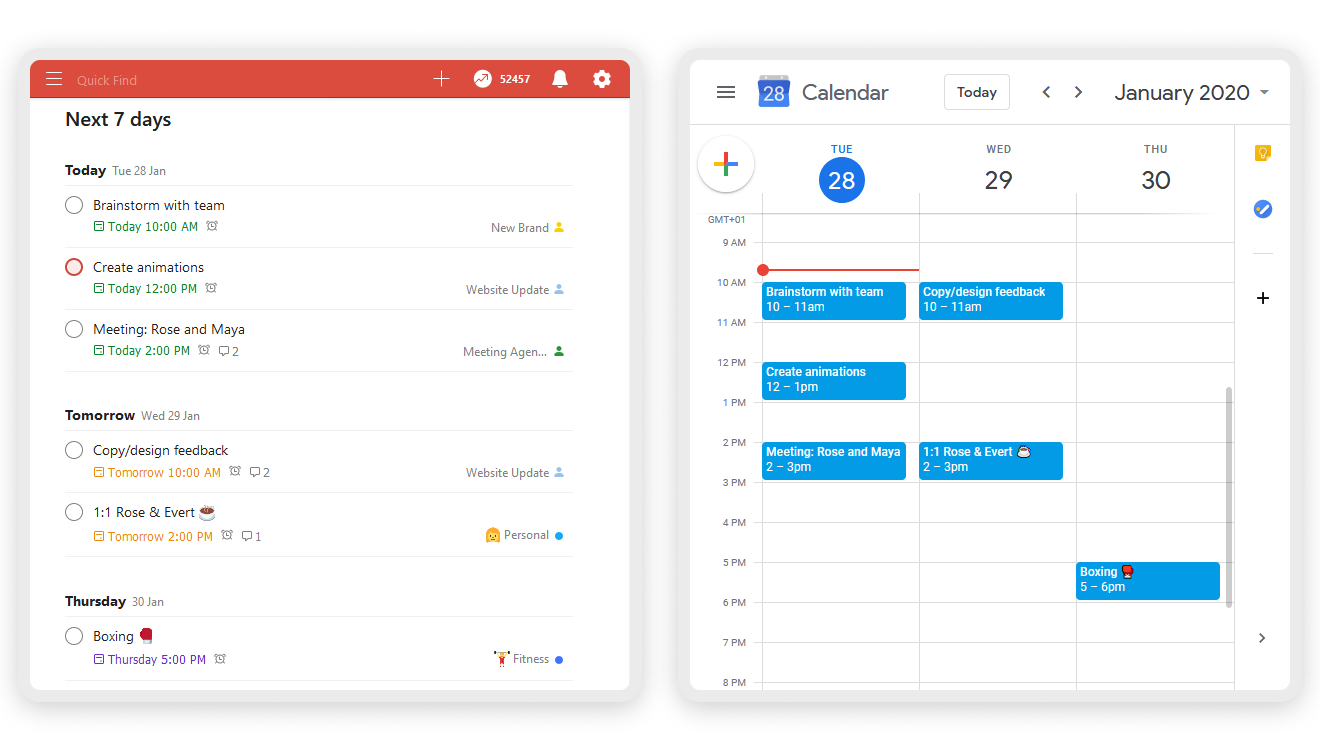
- Calendar integration to view events alongside tasks.
These features create a unified experience tailored for Apple users.
Ease Of Use For Individual Users Seeking Simplicity
Things keeps task management simple and intuitive. The app avoids complicated settings or extra features that confuse users.
Users can start adding tasks immediately without a learning curve. The app’s design encourages focus on one task at a time and clear daily goals. This makes it suitable for individuals wanting basic yet effective productivity tools.
Distinctive Features Of Things That Boost Productivity
Choosing between Todoist and Things depends heavily on pricing and value. Both offer different payment models that suit different user needs and budgets. Understanding these models helps pick the best tool without overspending.
Todoist Pricing Plans And Value For Money
Todoist uses a subscription model with multiple plans:
| Plan | Cost | Main Features |
|---|---|---|
| Free | $0 | Basic task management, 80 active projects, 5 collaborators per project |
| Pro | $4/month (billed annually) | Reminders, labels, filters, comments, file uploads, automatic backups |
| Business | $6/user/month (billed annually) | Team features, admin controls, priority support |
Todoist’s Pro plan fits individuals needing advanced task management. The subscription ensures ongoing updates and cloud storage.
Things Pricing Model And One-time Purchase Approach
Things offers a one-time purchase for each platform:
- Mac: $49.99
- iPhone/iPad: $9.99
This model means no monthly fees. Users pay once per device type and get full access.
Things does not require subscriptions. Updates are included for free within major versions.
Assessing Cost Against Features And User Needs
Todoist suits users wanting flexible plans and cloud syncing across devices. Its subscription model supports regular feature additions.
Things appeals to those preferring a one-time payment without ongoing costs. It offers deep Apple integration but lacks a free tier.
| Factor | Todoist | Things |
|---|---|---|
| Payment Model | Subscription (monthly/yearly) | One-time purchase per device |
| Free Version | Yes, with basic features | No free version available |
| Best For | Users needing frequent updates and collaboration | Users wanting simple, powerful Apple-only task manager |
Choosing depends on your budget and device preference. Subscriptions suit multi-device users. One-time payment fits Apple users who want simplicity.

Credit: modernweb.com
Pricing And Affordability Comparison
Choosing the right task manager depends on daily needs and workflow style. Both Todoist and Things offer unique benefits and face certain limitations.
This section breaks down their strengths and weaknesses based on actual user experience. It also highlights common feedback and challenges reported by users.
Strengths And Limitations Of Todoist In Daily Workflow
Todoist shines in handling complex tasks with ease. It supports recurring tasks, subtasks, labels, and filters.
- Strengths:
- Simple, clean interface for quick task entry and review.
- Advanced task management tools fit users with busy schedules.
- Cross-platform support allows access from desktop and mobile.
- Limitations:
- Many key features like reminders and file uploads require a paid plan.
- Some users find the free version too basic for heavy use.
- Automatic backups and comments also locked behind paywall.
Strengths And Limitations Of Things In Practical Use
Things offers a visually appealing and intuitive design. It is ideal for Apple device users focused on simplicity.
- Strengths:
- Clean, minimal interface that reduces clutter.
- Seamless integration with Apple ecosystem.
- Easy to organize tasks with tags and projects.
- Limitations:
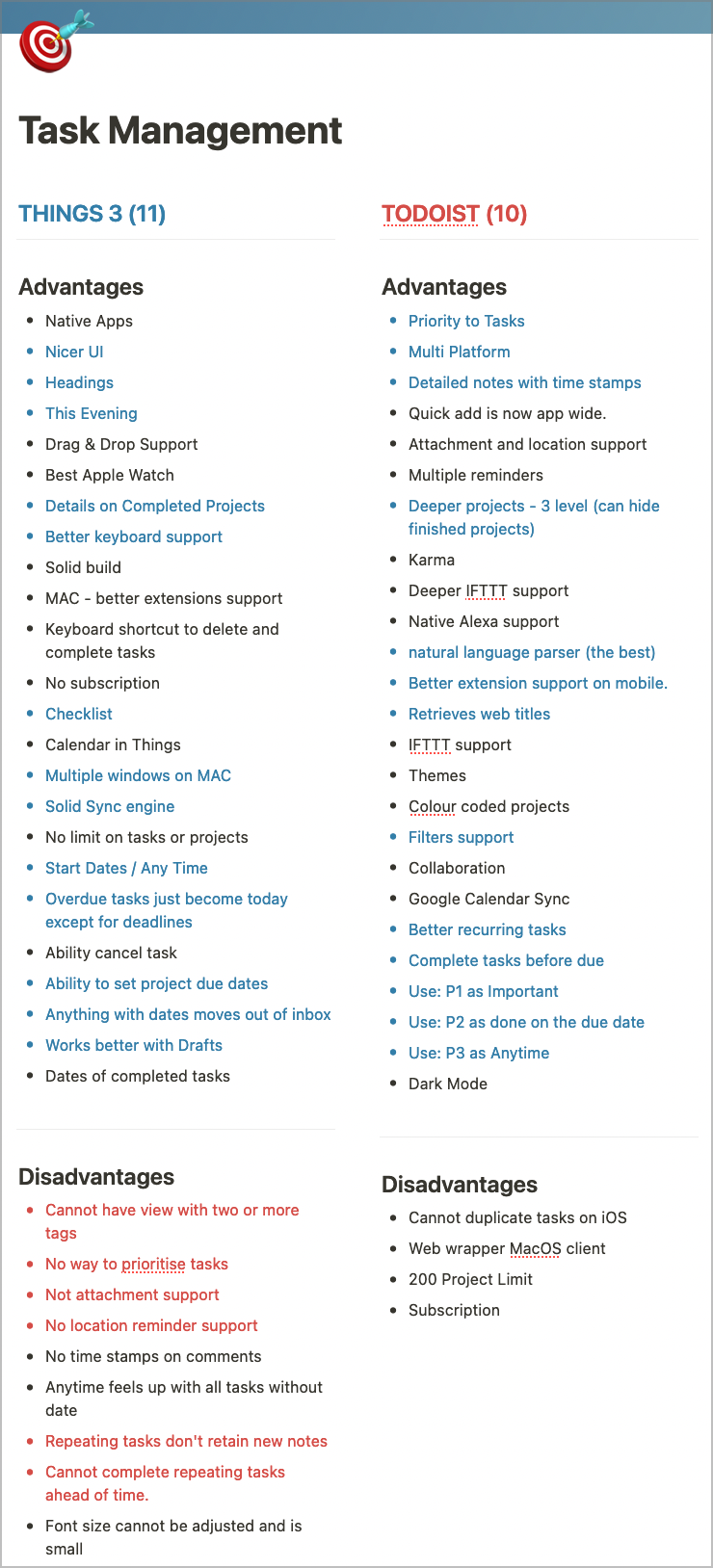
- Limited to Apple devices, no Windows or Android support.
- Lacks some advanced features like labels or filters found in Todoist.
- Less suited for very complex task hierarchies.
Common User Feedback And Reported Challenges
| Aspect | Todoist | Things |
|---|---|---|
| Ease of Use | Easy to navigate but some features hidden behind paywall. | Very user-friendly, especially for Apple users. |
| Feature Set | Robust with advanced task options. | Focused on simplicity, fewer advanced options. |
| Platform Availability | Available on multiple platforms including Windows and Android. | Only available on macOS and iOS. |
| Cost | Many essential features require subscription. | One-time purchase but limited to Apple devices. |
| Common Challenges |
|
|
Pros And Cons Based On Real-world Usage
Choosing the right productivity tool can shape your daily workflow. Both Todoist and Things offer unique strengths. This section guides you through key factors and helps match features to your style. It ends with a clear summary to aid your decision.
Factors To Consider When Selecting A Productivity Tool
Focus on these aspects to find the best app for your needs:
- Platform compatibility: Todoist works on multiple systems, including Windows, Android, iOS, and web. Things is exclusive to Apple devices.
- Task complexity: Todoist supports advanced task management with recurring tasks, subtasks, labels, and filters. Things has a simpler, elegant design for straightforward task tracking.
- User interface: Todoist has a clean, minimal look with fast navigation. Things offers a polished, visually pleasing layout with smooth animations.
- Pricing model: Todoist has a free version with essential features and a Pro subscription for advanced tools. Things is a one-time purchase app.
- Collaboration needs: Todoist allows team sharing and comments. Things focuses on individual productivity without collaboration features.
Matching Features To Your Workflow And Productivity Style
Match app features with your daily habits and goals:
- For detailed task organization: Todoist’s labels, filters, and project views help manage complex workflows.
- For simple, distraction-free planning: Things keeps tasks clear and easy to track without extra clutter.
- If you need cross-device syncing: Todoist syncs seamlessly across all platforms, including Android and Windows.
- For Apple ecosystem users: Things integrates deeply with iOS and macOS features like Siri and calendar.
- For team projects: Todoist supports sharing and collaboration, ideal for group task management.
Summary: Which Tool Wins For Different Productivity Pros
| Productivity Style | Recommended Tool | Why |
|---|---|---|
| Complex Task Management | Todoist | Advanced features like subtasks, labels, and filters. |
| Simple Personal Planning | Things | Clean interface with focus on individual tasks. |
| Cross-Platform Use | Todoist | Available on Android, Windows, iOS, and web. |
| Apple-Only User | Things | Deep integration with Apple ecosystem. |
| Team Collaboration | Todoist | Task sharing and comments for teams. |
Credit: merecivilian.com
Frequently Asked Questions
Which Is Better, Todoist Or Things?
Todoist excels in cross-platform use, advanced task management, and team collaboration. Things offers a polished, simple, Mac-only experience. Choose Todoist for flexibility and collaboration; choose Things for streamlined Apple-focused productivity.
Is Todoist Still Worth It?
Todoist remains worth it for users needing cross-platform support, advanced task management, and team collaboration. Its intuitive design boosts productivity.
Which Is Better, Todoist Or Any Do?
Todoist excels in advanced task management, cross-platform use, and team collaboration. Any. do suits simple task tracking and daily reminders. Choose Todoist for powerful features; pick Any. do for ease and basic needs.
What Are The Pros And Cons Of Todoist?
Todoist offers cross-platform support, advanced task management, and collaboration features. Its simple interface boosts productivity. Paid plans unlock reminders, labels, filters, and backups. Some users find key features behind a paywall.
Conclusion
Choosing between Todoist and Things depends on your needs and devices. Todoist works well across many platforms and suits team collaboration. Things fits best for Apple users wanting a simple, elegant planner. Both apps help organize tasks and boost focus. For those needing advanced features and flexibility, Todoist stands out. Explore how Todoist can bring clarity to your work and life by visiting this link. Find the tool that fits your style and start managing tasks better today.