Truconversion Vs Hotjar: Ultimate Comparison for Marketers
When it comes to understanding how visitors interact with your website, choosing the right tool can make all the difference. You might have heard about Hotjar, a popular name in heatmaps and session recordings.
But have you ever wondered how it stacks up against Truconversion? If you’re looking to boost your funnel tracking, optimize user experience, and gather meaningful insights with ease, this comparison is exactly what you need. You’ll discover the key differences between Truconversion and Hotjar, and which one fits your needs better. Whether you want simple heatmaps, session recordings, or a more comprehensive approach including live chat and form analytics, knowing your options will save you time and money. Ready to find out which tool gives you the edge? Let’s dive in. And if you’re curious to explore Truconversion right away, check it out here: Truconversion.
Introduction To Truconversion And Hotjar
Understanding user behavior online is key for marketers. TruConversion and Hotjar are two popular tools that help analyze how visitors interact with websites. Each tool offers unique features for tracking, recording, and optimizing user experiences. This section introduces both platforms and highlights their roles in digital marketing.
Overview Of Truconversion And Hotjar As User Behavior Analytics Tools
TruConversion focuses on easy funnel tracking and optimization. It provides:
- Heatmaps to visualize clicks and scrolls
- Session recordings to watch real user interactions
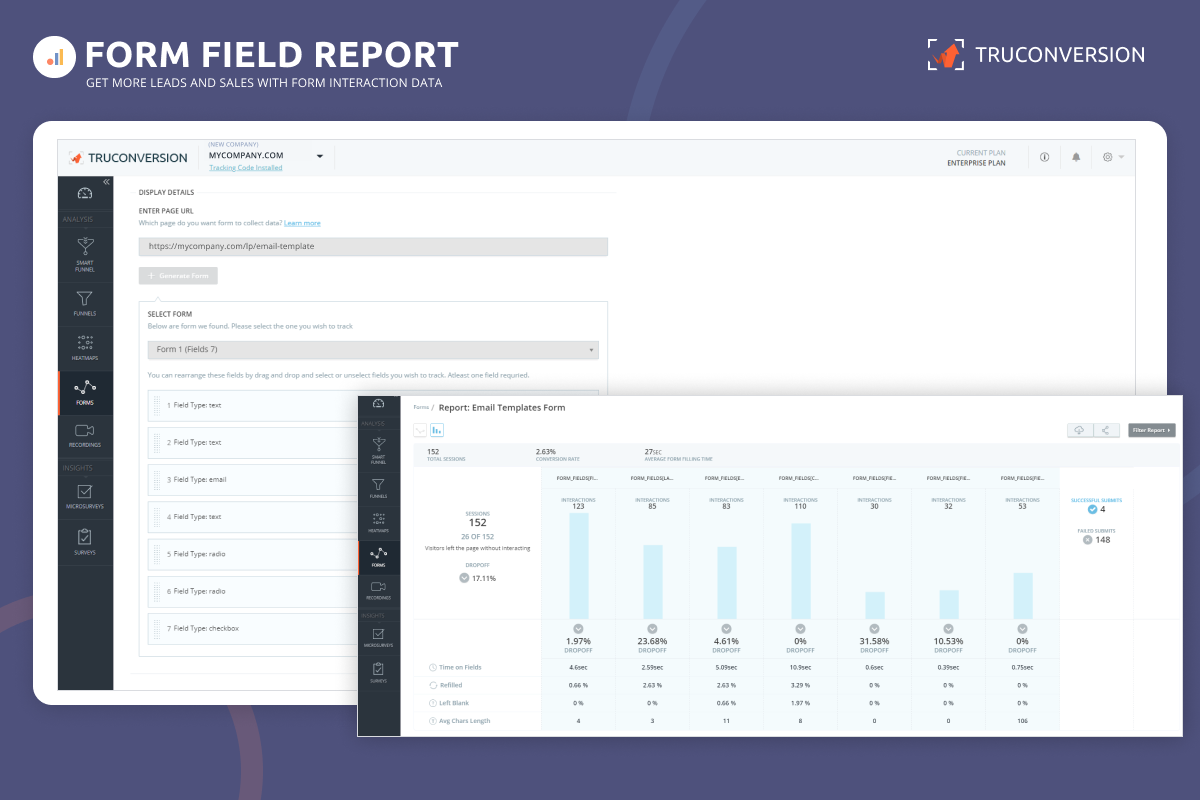
- Form analytics to identify drop-off points
The tool is designed for marketers who want clear insights without complexity.
Hotjar offers a broad set of behavior analytics features, including:
- Heatmaps that show where users click and move
- Session recordings to review browsing sessions
- User feedback tools like surveys and polls
Hotjar is widely used for understanding visitor motivations and improving website usability.
Purpose And Importance Of These Tools For Marketers
Both tools help marketers make informed decisions by revealing real user behavior. Key benefits include:
- Identifying problem areas in the customer journey
- Improving website design and usability
- Increasing conversion rates through data-driven changes
- Reducing guesswork in marketing strategies
Using these tools leads to better user experiences and higher ROI.
Recent Developments: Hotjar’s Integration With Contentsquare
Hotjar recently joined Contentsquare, a leading experience analytics platform. This integration offers:
- Deeper insights by combining Hotjar’s data with Contentsquare’s analytics
- Smarter decision-making using advanced AI-driven tools
- Faster website improvements through unified reporting
This evolution expands Hotjar’s capabilities beyond traditional behavior tracking.

Credit: conversion-uplift.co.uk
Key Features Comparison
TruConversion and Hotjar both offer tools for website analysis and user behavior tracking. Understanding their key features helps choose the right fit for your needs. Below, we compare their main capabilities in detail.
Heatmaps: Detailed Insights Vs. User-friendly Visuals
TruConversion provides in-depth heatmaps that reveal precise click patterns, scroll depth, and mouse movements. These insights help identify exact user engagement areas on your site.
Hotjar offers easy-to-understand heatmaps that visualize clicks, taps, and scrolling. Its interface is simple and designed for quick analysis by beginners.
| Feature | TruConversion | Hotjar |
|---|---|---|
| Click Tracking | Detailed and precise | Clear and user-friendly |
| Scroll Heatmaps | Advanced scroll depth analysis | Basic scroll visualization |
| Mouse Movement | Fully tracked and displayed | Limited or no tracking |
Session Recordings: Understanding Visitor Behavior In Depth
TruConversion captures comprehensive session recordings. Watch how visitors interact, where they hesitate, and what causes drop-offs.
Hotjar provides high-quality session replays but focuses on ease of use and fast playback.
- TruConversion records every mouse movement and click.
- Hotjar offers quick session snapshots for fast review.
- Both allow filtering by visitor type or behavior.
Surveys And Feedback Tools: Direct User Interaction Capabilities
TruConversionsurvey and feedback widgets. Ask visitors questions during their visit to collect real-time opinions.
Hotjarpolls and surveys, with easy setup and design customization.
- TruConversion supports multiple question types and targeting rules.
- Hotjar emphasizes simple, visually appealing surveys.
- Both enable user feedback without leaving the page.
Live Chat Integration: Truconversion’s Unique Engagement Feature
TruConversionlive chat integration. Engage visitors instantly to answer questions or resolve issues.
Hotjar does not offer native live chat functionality.
- TruConversion’s chat helps increase conversions and reduce bounce rates.
- Chat can be customized and triggered by user behavior.
Additional Analytics: Funnels, Form Analytics, And User Segmentation
TruConversionfunnel tracking, form analytics, and user segmentation to improve conversion paths and identify form drop-offs.
Hotjar
| Analytics Feature | TruConversion | Hotjar |
|---|---|---|
| Funnel Analysis | Available with detailed reports | Not included |
| Form Analytics | Tracks field interactions and drop-offs | Limited or no form insights |
| User Segmentation | Advanced filtering by behavior and attributes | Basic segmentation |
Pricing And Affordability Breakdown
Choosing the right tool involves balancing features and costs. Pricing and affordability play key roles for marketers. This section breaks down the subscription plans and pricing tiers of TruConversion and Hotjar. It also highlights value for money and special deals to help decide which fits your budget best.
Subscription Plans And Pricing Tiers For Truconversion
TruConversion offers straightforward pricing with multiple tiers designed for various business sizes. Each plan includes core features like heatmaps, session recordings, and form analytics.
| Plan | Monthly Price (Billed Annually) | Key Features | Session Limit |
|---|---|---|---|
| Starter | $49 | Heatmaps, Session Recording, Form Analytics | 5,000 |
| Growth | $99 | All Starter Features + Funnel Tracking, API Access | 20,000 |
| Scale | $199 | All Growth Features + Priority Support, Custom Reports | 50,000 |
Monthly billing options are available but slightly higher in cost. Plans scale with session limits and features to match business needs.
Hotjar’s Pricing Structure And How It Compares
Hotjar uses a tiered pricing model based on daily session recordings and features. It suits small to large businesses but can become costly at higher usage.
| Plan | Monthly Price (Billed Annually) | Key Features | Daily Sessions |
|---|---|---|---|
| Basic (Free) | $0 | Limited Heatmaps, Session Recordings | 100 |
| Plus | $39 | All Basic Features + Feedback Polls, Unlimited Heatmaps | 1,000 |
| Business | Starting at $99 | Advanced Analysis, API, More Sessions | Up to 10,000 |
Hotjar’s pricing rises significantly with increased session volume. The free plan is limited but useful for small sites.
Value For Money: What Marketers Get At Different Price Points
TruConversion provides a balanced offering with solid heatmaps and funnel tracking at moderate prices. Its session limits are generous for the price.
Hotjar offers a free entry point and strong user feedback tools. Larger plans deliver more advanced features but cost more.
- TruConversion’s Growth plan offers detailed analytics for under $100/month.
- Hotjar’s Business plan is suitable for higher traffic but at a higher price.
- Both platforms include session recordings and heatmaps, but feature depth varies.
Marketers should consider traffic volume and needed features to maximize value.
Special Deals And Lifetime Offers: Opportunities To Save
TruConversion often appears on platforms like AppSumo with lifetime deals. These offers provide full access at a one-time cost, reducing long-term expenses.
Hotjar rarely offers lifetime deals but has seasonal discounts and flexible monthly plans.
Opportunities to save include:
- AppSumo lifetime deals for TruConversion starting around $49.
- Hotjar discounts during major sales events.
- Annual billing to lower monthly costs on both platforms.
Exploring these deals can stretch your budget further, especially for small businesses.
Pros And Cons Based On Real-world Usage
Choosing between TruConversion and Hotjar depends on your specific needs. Both tools offer valuable insights into user behavior but have distinct strengths and limitations. Real users highlight differences in ease of use, feature depth, and market presence. Understanding these points helps pick the right fit for your business.
Strengths Of Truconversion: Ease Of Use And Comprehensive Features
TruConversion stands out for its simple interface and wide range of features. Users appreciate its:
- Easy funnel tracking that helps monitor customer journeys clearly.
- Heatmaps that visualize where visitors click and scroll effectively.
- Session recordings that replay user interactions smoothly.
- Form analytics that identify form drop-offs quickly.
This all-in-one package suits businesses wanting detailed insights without complex setups. The platform’s design reduces learning time, making it accessible for teams with varied skill levels.
Advantages Of Hotjar: Depth Of Data And Established Market Presence
Hotjar offers deep data collection and has a strong reputation in the market. Benefits include:
- Comprehensive heatmaps with rich visual data on user behavior.
- Advanced feedback tools like surveys and polls to capture visitor opinions.
- Large user community and extensive support resources.
- Integration capabilities with popular platforms and tools.
Its long presence builds trust and reliability. Hotjar suits companies needing detailed feedback and proven solutions.
Limitations And Challenges With Truconversion
Despite many features, TruConversion faces some challenges:
- Less extensive user feedback options compared to competitors.
- Smaller community and fewer third-party integrations.
- Some users report minor bugs in session recordings.
- Limited brand recognition outside its core market.
These limits may affect larger businesses needing broad ecosystem support.
Potential Drawbacks Of Hotjar And Its Evolution Under Contentsquare
Hotjar recently joined Contentsquare, aiming to expand its capabilities. Yet, some users note:
- Higher pricing tiers for advanced features.
- Occasional complexity for new users due to feature depth.
- Changes in platform focus as it integrates with Contentsquare’s tools.
- Concerns over data privacy and compliance in some markets.
Hotjar’s evolution may lead to more powerful features but could increase learning curves and costs.
Ideal Users And Use Case Recommendations
Choosing the right tool depends on your business size, goals, and the depth of user insights needed. TruConversion and Hotjar serve different user groups and use cases. Understanding which tool fits best can save time and improve your website optimization efforts.
Who Should Choose Truconversion: Small To Mid-sized Businesses And Engagement-focused Marketers
TruConversion suits small to mid-sized businesses aiming for straightforward funnel tracking and user engagement analysis.
- Offers heatmaps, session recordings, and form analytics in one platform.
- Designed for marketers focused on user engagement and conversion optimization.
- Easy to set up and use with minimal technical skills.
- Ideal for teams wanting quick insights without complex data processing.
Businesses with limited resources benefit from TruConversion’s simple, all-in-one solution.
Best Fit For Hotjar: Enterprises Needing In-depth Behavioral Analytics
Hotjar works well for enterprises and large teams requiring detailed behavioral data and advanced analysis.
- Part of Contentsquare, offering deeper insights and smarter decision-making.
- Focuses on heatmaps, session replays, and extensive user feedback collection.
- Supports large-scale websites needing complex user behavior analysis.
- Integrates with other analytics and testing tools for comprehensive data.
Enterprises aiming to understand why users behave a certain way benefit from Hotjar’s advanced features.
Scenarios Where Each Tool Excels: From Quick Insights To Complex Analysis
| Scenario | TruConversion | Hotjar |
|---|---|---|
| Quick setup and fast insights | Simple dashboard, easy to interpret | More setup steps, deeper learning curve |
| Basic funnel tracking and form analysis | Built-in, easy to use | Requires integration with other tools |
| Comprehensive user behavior and feedback | Limited feedback options | Rich feedback, surveys, and polls |
| Large-scale data for enterprise teams | Less suited for huge data volumes | Designed for complex data and multiple users |
Complementary Tools And When To Consider Alternatives
Neither tool covers every need perfectly. Sometimes pairing or switching tools helps.
- TruConversion pairs well with lightweight A/B testing tools for optimization.
- Hotjar integrates with advanced analytics platforms for full data depth.
- Consider alternatives like Microsoft Clarity or Smartlook for specific features or pricing.
- Choose based on factors like pricing, ease of use, and required features.
Match tools to your team’s skills, budget, and analysis needs for best results.
Credit: appsumo.com
Conclusion: Making The Right Choice For Your Marketing Needs
Choosing between TruConversion and Hotjar depends on your marketing goals and needs. Both tools offer valuable insights, but their strengths differ. Understanding these differences helps you pick the best fit for your business.
Summary Of Key Differences And Unique Strengths
| Feature | TruConversion | Hotjar |
|---|---|---|
| Heatmaps | Detailed and easy to interpret for funnel tracking | Comprehensive and integrates with Contentsquare for deeper insights |
| Session Recording | Records user sessions with form analytics focus | Rich session replay with user feedback options |
| User Feedback | Basic feedback tools | Advanced feedback and survey tools |
| Integration | Standalone with easy setup | Part of Contentsquare ecosystem, offering broader analytics |
| Pricing | Simple pricing, suited for small to mid businesses | Varies, often higher due to enterprise features |
Factors To Consider When Selecting Between Truconversion And Hotjar
- Business Size: Smaller teams may prefer TruConversion’s simplicity.
- Feature Depth: Hotjar offers more advanced feedback and analytics options.
- Budget: TruConversion is more cost-effective for basic tracking needs.
- Integration Needs: Hotjar fits better in complex marketing stacks.
- User Experience Focus: Hotjar’s feedback tools help understand user emotions.
- Ease of Use: TruConversion is easier to set up and learn.
Future Outlook: How Evolving Features Impact Marketer Decisions
Hotjar’s integration into Contentsquare adds new layers of data and analytics. This evolution offers marketers more powerful tools for customer journey analysis. It could mean a steeper learning curve but greater insights.
TruConversion continues focusing on user-friendly funnel tracking and optimization. Its steady improvements keep it ideal for marketers seeking straightforward tools.
Marketers should watch updates closely. Feature expansions and integrations will shape which tool fits best over time. Keeping flexibility in mind ensures adapting to new marketing challenges.

Credit: findfahim.com
Frequently Asked Questions
What Happened To Hotjar?
Hotjar merged with Contentsquare, enhancing user insights by combining heatmaps, session recordings, and feedback tools for smarter decisions.
Who Are Hotjar Competitors?
Hotjar competitors include Microsoft Clarity, Smartlook, Mouseflow, Crazy Egg, FullStory, and PostHog. They offer session replays, heatmaps, funnels, and user feedback tools with varying features and pricing.
What Is The Difference Between Hotjar And Vwo?
Hotjar offers heatmaps, session recordings, and user feedback to show how users behave. VWO focuses on A/B testing, split testing, and personalization to explain why users act that way.
Is Hotjar Better Than Ms Clarity?
Hotjar offers deeper insights with advanced heatmaps and recordings. MS Clarity is free and user-friendly but less detailed. Choose based on budget and feature needs.
Conclusion
Both Truconversion and Hotjar offer useful tools for website tracking. Hotjar provides detailed heatmaps and session recordings. Truconversion adds live chat and survey features. Your choice depends on what features you need most. For easy funnel tracking and form analytics, Truconversion fits well. Explore more about Truconversion and decide if it suits your needs better by visiting this link. Both tools help improve user experience and website performance. Choose the one that matches your goals and budget best.