Sendpliot Review: Ultimate Guide to Boost Your Email Campaigns
Are you tired of spending hours crafting LinkedIn messages and managing your outreach? If growing your network and generating leads feels overwhelming, you’re not alone.
That’s where Sendpilot steps in—promising to simplify and automate your LinkedIn outreach with smart AI tools and an easy-to-use platform. But does it really deliver on its promises? In this Sendpilot review, you’ll discover what makes this tool stand out, how it can save you time, and whether it’s the right fit for your business goals.
Keep reading to find out if Sendpilot can boost your LinkedIn game without the usual headaches.

Credit: www.salesforge.ai
Sendpilot Features
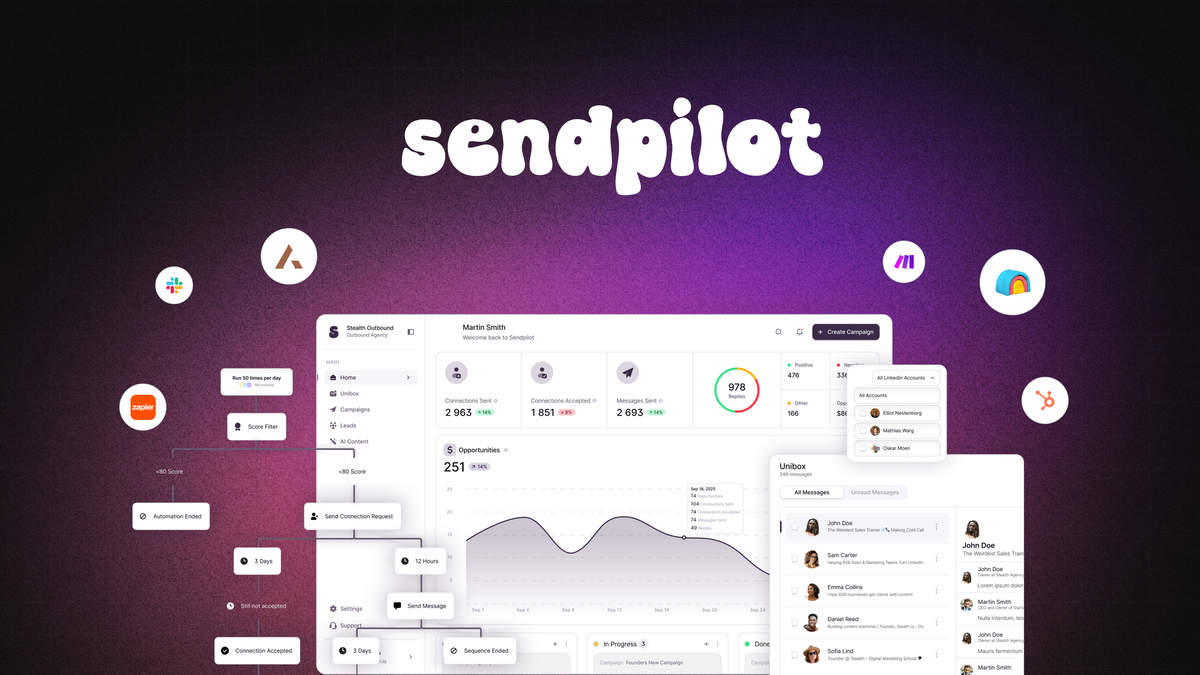
Sendpilot offers a robust set of features designed to simplify LinkedIn outreach and lead generation. Its tools focus on automating routine tasks while improving the quality of engagement. The platform blends AI technology with user-friendly functions to help professionals manage connections and communications efficiently.
Each feature targets a specific challenge in LinkedIn marketing. From content creation to inbox management, Sendpilot aims to save time and increase productivity for users in sales, marketing, and recruitment.
Ai-powered Content Creation
Sendpilot uses artificial intelligence to help craft LinkedIn posts and messages. The AI suggests relevant topics and writes content that feels natural. This feature reduces the time spent on writing and improves message quality. It also minimizes errors often seen in automated content.
Automated Connection Requests
The platform automates sending connection requests to targeted users. You can set up personalized messages that feel genuine. This automation ensures steady growth of your LinkedIn network without manual effort. Follow-ups are also automated to keep conversations alive.
Unified Inbox Management
Sendpilot combines messages from multiple LinkedIn accounts into one inbox. This helps users track all conversations in one place. It prevents missing important replies and makes managing leads easier. The unified inbox saves time and keeps communication organized.
Icp Scoring For Lead Targeting
Ideal Customer Profile (ICP) scoring ranks leads based on their fit with your target audience. Sendpilot analyzes profiles and scores them to prioritize the best prospects. This feature helps focus efforts on leads most likely to convert. It improves outreach efficiency and results.
Built-in Residential Proxies
Sendpilot includes residential proxies to protect LinkedIn accounts from restrictions. These proxies mask your IP address and mimic real user behavior. This reduces the risk of being flagged or blocked by LinkedIn. The feature ensures safer and smoother automation over time.
Credit: appsumo.com
User Experience
User experience plays a vital role in choosing any software, including Sendpilot. It affects how quickly users can complete tasks and enjoy the platform. This section breaks down the user experience into key areas. Understanding these helps users decide if Sendpilot fits their needs.
Intuitive Interface
Sendpilot features a clean and simple interface. Users can find tools and options without confusion. The dashboard is well-organized, showing important details at a glance. Icons and buttons are clear and easy to understand. This design helps users focus on their LinkedIn outreach without distraction.
Ease Of Use
The platform allows users to start campaigns quickly. Setting up connection requests and follow-ups takes only a few clicks. Most tasks are automated, reducing manual work. Users appreciate how the unified inbox manages all messages in one place. This saves time and keeps communication smooth.
Learning Curve Insights
Sendpilot is beginner-friendly but has advanced features too. New users may need a short time to explore all functions. Helpful guides and tooltips assist during the first steps. Some users noted occasional bugs, which might slow early use. Overall, the learning curve is moderate and manageable.
Ui/ux Compared To Competitors
Compared to similar LinkedIn automation tools, Sendpilot stands out for clarity. Its interface is less cluttered and more modern. The AI-powered content creation feels natural and less robotic. Some competitors offer more features but can overwhelm new users. Sendpilot balances power and simplicity well.
Performance And Reliability
Sendpliot’s performance and reliability are critical for users who rely on automation daily. A smooth experience means less time fixing issues and more time growing connections. The platform must deliver accurate automation, quick bug fixes, and stable operation to keep users satisfied and productive.
Automation Accuracy
Sendpliot performs automation tasks with strong precision. It sends connection requests and follow-ups on time. The AI helps create relevant messages that fit the target audience. This reduces errors and improves response rates. The accuracy of automation helps users maintain a professional LinkedIn presence without manual effort.
Bug Reports And Fixes
Users occasionally report bugs, but the Sendpliot team responds quickly. Fixes are usually rolled out within days. Regular updates improve the user experience and add new features. Transparent communication about issues builds trust with users. Prompt bug resolution keeps workflows running smoothly.
Platform Stability
Sendpliot maintains a stable platform with minimal downtime. The cloud-based system manages multiple users without slowdowns. This reliability supports consistent outreach and lead management. Stability is vital for users who depend on automation for daily tasks. Overall, the platform runs smoothly under normal conditions.

Credit: www.andrewmurrayhq.com
Support And Resources
Support and resources play a vital role in choosing the right LinkedIn automation tool. Sendpliot offers various ways to assist users and provide helpful information. This section explores the quality of customer support, available help materials, and community channels. Understanding these aspects helps users feel confident and supported while using the platform.
Customer Support Responsiveness
Sendpliot provides customer support through email and chat. Response times are generally quick, often within a few hours. The support team answers questions clearly and politely. They help solve technical issues and guide users through features. Fast and reliable support reduces downtime and frustration.
Help Materials And Tutorials
The platform offers detailed help articles and step-by-step tutorials. These guides cover setup, automation, and advanced features. Video tutorials simplify complex tasks and show real use cases. Updated materials ensure users stay informed about new updates. Easy-to-follow resources make learning Sendpliot smooth and stress-free.
Community And Feedback Channels
Sendpliot has an active user community for sharing tips and advice. Users can join forums and social media groups to connect with peers. Feedback channels let users suggest improvements and report bugs. This open communication helps Sendpliot grow and adapt to user needs. Being part of a community enhances the overall experience.
Pricing And Plans
Sendpliot offers clear and flexible pricing plans designed to fit different user needs. Understanding these options helps users decide which plan matches their goals and budget. The pricing structure focuses on account-based fees, giving businesses control over their expenses. It also includes a lifetime deal option that many find valuable.
Account-based Pricing Explained
Sendpliot charges users based on the number of LinkedIn accounts connected. Each account adds to the total monthly cost. This method allows businesses to pay only for what they use. Small teams pay less, while larger teams scale their costs accordingly. This pricing style supports growth without surprise fees.
Lifetime Deal Benefits
Sendpliot offers a lifetime deal for early adopters. This one-time payment grants permanent access to the tool. Users avoid monthly or yearly subscriptions. The lifetime deal often includes full features and updates. It suits users who prefer a single investment over recurring costs.
Tier Options And Features
Sendpliot has multiple tiers to meet varied needs. Each tier provides different levels of features and account limits. Basic tiers cover essential automation tools and limited accounts. Higher tiers include advanced AI content creation and more LinkedIn profiles. Users can upgrade as their requirements grow.
Use Cases And Benefits
Sendpliot offers many uses and clear benefits for different users. Its tools help save time and improve outreach efforts. People from various fields find it useful for managing LinkedIn and social media tasks. The platform’s automation and scheduling features make workflows smoother and more efficient.
Individual Professionals
Freelancers and job seekers use Sendpliot to grow their LinkedIn network. It automates connection requests and messages, saving hours daily. Users can focus on building relationships instead of manual outreach. The AI content suggestions help create engaging posts quickly. This keeps profiles active and visible to potential employers or clients.
Marketing Agencies
Agencies manage multiple client accounts easily with Sendpliot’s unified inbox. It tracks conversations and follow-ups in one place. Automated workflows reduce repetitive tasks and increase productivity. Agencies can target ideal customers using built-in ICP scoring. The platform supports scaling outreach without losing personalization.
Linkedin Outreach Automation
Sendpliot automates LinkedIn outreach, sending personalized connection invites and follow-ups. It uses AI to craft messages that feel natural and relevant. Users avoid repetitive manual work and reach more prospects faster. The tool helps maintain consistent contact without spamming. It also protects accounts with built-in proxies for safer automation.
Content Scheduling Advantages
The scheduling feature lets users plan LinkedIn posts in advance. This keeps profiles active, even during busy days. Users can maintain a steady content flow without logging in daily. Scheduled posts increase visibility and engagement with minimal effort. The AI-powered suggestions help create relevant posts that attract attention.
Limitations And Considerations
Sendpilot offers useful features but also has some limits to consider. These affect how well it fits different outreach needs. Understanding these points helps set clear expectations before using the tool.
Linkedin-only Focus
Sendpilot works exclusively with LinkedIn. It does not support other social media or email channels. This focus limits its use for campaigns needing multi-platform outreach. Businesses wanting broader reach may need extra tools.
Feature Gaps For Multi-channel Outreach
Sendpilot lacks features for managing other communication channels. It does not handle email marketing or social media posts outside LinkedIn. This reduces its effectiveness for integrated marketing strategies. Users must combine it with other software for full coverage.
Early Stage Bugs And Improvements
Some users report bugs and glitches in Sendpilot’s early versions. These issues can cause delays or errors in automation tasks. The company is actively working on updates to fix problems. Patience is required as the platform matures and improves.
Comparisons With Similar Tools
Comparing Sendpilot with other tools helps to understand its strengths and weaknesses. Many users want to see how it performs against popular alternatives. This section breaks down key differences and unique features. It shows why some choose Sendpilot over others for LinkedIn automation and social media management.
Sendpilot Vs Socialpilot
Sendpilot focuses mainly on LinkedIn automation. SocialPilot covers multiple social media platforms. SocialPilot offers broad scheduling and content planning features. Sendpilot excels with AI-driven LinkedIn outreach and lead targeting. SocialPilot’s interface is user-friendly for various social accounts. Sendpilot’s AI tools create personalized LinkedIn messages. SocialPilot lacks advanced LinkedIn-specific automation. Sendpilot supports multiple LinkedIn accounts in one inbox. SocialPilot is better for managing overall social media presence. Sendpilot suits users aiming to grow LinkedIn networks deeply.
Sendpilot Vs Other Linkedin Automators
Sendpilot stands out with its AI-powered content creation. Other LinkedIn tools often require manual message writing. Sendpilot’s Ideal Customer Profile scoring helps target leads precisely. Many LinkedIn automators lack this advanced targeting feature. Sendpilot offers built-in residential proxies to protect accounts. Some competitors do not provide strong safety measures. Users find Sendpilot’s interface clean and easy to use. Other tools can feel cluttered or complex. Occasional bugs appear but updates improve stability. Overall, Sendpilot balances automation and user control well.
Unique Selling Points
Sendpilot uses AI to write LinkedIn posts and messages. Its unified inbox manages multiple accounts smoothly. The platform scores leads based on fit and engagement likelihood. Residential proxies safeguard user accounts from LinkedIn restrictions. Automation handles connection requests and follow-ups automatically. The tool integrates content scheduling with outreach in one place. Its simple design reduces the learning curve for new users. These features combine to save time and increase LinkedIn effectiveness.
Tips For Maximizing Sendpilot
Maximizing Sendpilot boosts your LinkedIn outreach results. Small changes can improve efficiency and response rates. Focus on using the right features smartly. Organize your workflow to save time and reach more leads.
These tips help you work faster and smarter with Sendpilot. Follow them to keep your campaigns smooth and effective.
Best Practices For Automation
Set clear goals before starting automation. Create simple, personalized messages for better replies. Avoid sending too many connection requests at once. Space out your follow-ups to stay respectful. Test different message sequences to find what works best. Always monitor your campaign and adjust if needed. Automation saves time but requires careful setup.
Optimizing Lead Targeting
Use Sendpilot’s Ideal Customer Profile (ICP) feature well. Define your target audience by job title, location, and industry. Focus on quality leads, not quantity. Check your lead list regularly to remove irrelevant contacts. Tailor your messages to match your audience’s needs. Better targeting means higher chances of engagement and response. Keep refining your criteria as you learn more about your market.
Managing Multiple Accounts
Sendpilot supports managing many LinkedIn accounts in one place. Label accounts clearly to avoid mix-ups. Use the unified inbox to track all conversations easily. Schedule campaigns separately for each account to prevent overlaps. Monitor each account’s performance to spot issues early. Keep account settings updated to maintain security. Managing multiple accounts helps scale your outreach without confusion.
Frequently Asked Questions
How To Tell If A Review Is Real Or Fake?
Check review language for authenticity and detail. Look for verified purchase badges and consistent reviewer profiles. Watch for extreme praise or negativity. Compare multiple reviews across sites. Real reviews often mention specific experiences and balanced opinions.
Is Trustpilot Still Trustworthy?
Trustpilot remains popular but faces criticism for fake positive reviews and biased moderation. Use it alongside other sources for balanced insights.
Is Social Pilot Worth It?
SocialPilot offers an easy-to-use interface and flexible AI tools for efficient social media scheduling. Many users find it valuable for organizing content and saving time across platforms. Its responsive support enhances the experience, making it worth considering for businesses and individuals managing multiple social accounts.
Which Review Site Is Most Trustworthy?
Google Reviews and Trustpilot remain among the most trustworthy sites. They verify reviews and highlight genuine customer experiences. Always check multiple sources to ensure balanced opinions.
Conclusion
Sendpliot offers useful features for LinkedIn outreach and lead generation. It simplifies tasks with an easy-to-use interface and AI tools. Some users mention occasional bugs but appreciate steady improvements. The platform focuses mainly on LinkedIn, which suits specific outreach needs.
Customer support helps users overcome the learning curve effectively. Overall, Sendpliot provides good value for those wanting to automate LinkedIn connections.