Quickbase Vs Clickup: Ultimate Comparison for Productivity Boost
Choosing the right tool to manage your projects and workflows can be overwhelming. You want something that saves you time, keeps your team on the same page, and helps you work smarter—not harder.
That’s exactly why comparing Quickbase and ClickUp matters. Quickbase focuses on building custom internal apps with automation and strong database capabilities. ClickUp, on the other hand, is designed to boost your productivity with all-in-one project management, AI features, and seamless collaboration. Which one fits your needs better? Keep reading to discover how these platforms stack up, so you can pick the perfect solution for your team’s success. Ready to explore ClickUp’s powerful features? Check it out here: ClickUp.

Credit: latenode.com
Introduction To Quickbase And Clickup
Quickbase and ClickUp serve distinct but essential roles in business operations. Both improve how teams work but focus on different needs. Understanding their core features helps choose the right tool.
Overview Of Quickbase: Low-code Platform For Internal Apps
Quickbase is a low-code platform designed to build custom internal applications fast. It enables users to create apps without deep coding skills. The platform supports:
- Structured data management with relational databases
- Automation of workflows
- Compliance tracking
Businesses use Quickbase to streamline operations and manage complex processes internally.
Overview Of Clickup: Project And Task Management For Productivity
ClickUp is a project and task management platform focused on boosting team productivity. It combines many work tools into one place:
- Task and project tracking
- Team collaboration and chat
- AI features to save time and reduce software needs
ClickUp helps teams plan, organize, and communicate effectively in real-time.
Purpose And Target Audience Of Both Tools
| Aspect | Quickbase | ClickUp |
|---|---|---|
| Primary Purpose | Build custom internal business apps | Manage projects and tasks for teams |
| Target Audience | Businesses needing tailored automation and data apps | Teams wanting centralized productivity and collaboration |
| Key Strength | Low-code customization and data handling | All-in-one workspace with AI and chat |
Both tools improve efficiency but suit different business needs. Choose based on app building or task management priorities.
Key Features Of Quickbase
Quickbase offers a powerful set of features designed for building custom business applications without deep coding knowledge. It focuses on creating structured apps that help teams manage complex data, automate workflows, and maintain security standards. These key features make Quickbase suitable for businesses needing tailored solutions with strong data organization and control.
Low-code App Building: Empowering Non-developers To Customize
Quickbase allows users to build applications with minimal coding skills. Its low-code platform provides drag-and-drop tools and pre-built templates. This lets non-technical users create apps that fit their specific business processes quickly.
- Create forms, reports, and dashboards easily
- Customize workflows without writing complex code
- Adjust apps on the fly as business needs change
This feature reduces reliance on IT teams and speeds up app development.
Relational Databases: Structuring And Managing Complex Data
Quickbase supports relational databases that connect multiple data tables. This helps manage complex information clearly and efficiently. Users can link related records across apps for better data integrity and insight.
| Benefit | Description |
|---|---|
| Data Organization | Connects related information across tables |
| Improved Reporting | Generates comprehensive reports from linked data |
| Data Accuracy | Prevents duplication and inconsistencies |
Automation Capabilities: Streamlining Repetitive Processes
Quickbase offers strong automation tools to reduce manual work. Users can set rules to trigger actions like notifications, updates, or task assignments.
- Automate routine tasks and reminders
- Integrate with other software via APIs
- Monitor data changes and respond instantly
Automation saves time and improves workflow accuracy.
Compliance And Audit Tracking: Ensuring Security And Accountability
Quickbase includes features that help businesses stay compliant with regulations. It tracks all changes and user activities for full audit trails.
- Logs data access and modifications
- Supports role-based permissions
- Provides reports for compliance audits
This builds trust and ensures accountability within teams.
Key Features Of Clickup
ClickUp stands out as a versatile platform designed to improve team productivity and project management. It offers a wide range of tools that help teams organize tasks, communicate effectively, and customize their workspaces. Each feature aims to simplify workflows and keep projects on track.
Task And Project Management: Organizing Workflows And Deadlines
ClickUp provides powerful tools to manage tasks and projects with ease. Users can create tasks, set priorities, and assign deadlines to keep everything on schedule.
- Task Lists and Boards: Visualize work through lists, boards, or calendars.
- Dependencies: Link tasks to show order and sequence.
- Due Dates and Reminders: Avoid missed deadlines with alerts.
- Templates: Use pre-built templates to save setup time.
These tools help break down complex projects into manageable parts. Teams stay focused and meet deadlines efficiently.
Collaboration Tools: Enhancing Team Communication And Coordination
ClickUp promotes seamless communication among team members. It combines chat, comments, and notifications in one place.
- Comments on Tasks: Discuss work directly where it happens.
- Real-time Chat: Instant messaging to reduce email clutter.
- Mentions and Notifications: Keep everyone informed and involved.
- File Sharing: Upload and share documents easily.
These features reduce misunderstandings and speed up decision-making. Team members stay aligned and coordinated.
Customizable Workspaces: Adapting To Various Team Needs
ClickUp lets teams shape their workspace to fit unique workflows. Custom views and layouts make managing work simpler.
| Customization Option | Description |
|---|---|
| Multiple Views | Choose from list, board, calendar, Gantt, and more. |
| Custom Fields | Add unique data points to tasks and projects. |
| Statuses and Tags | Create tailored statuses and tags for better tracking. |
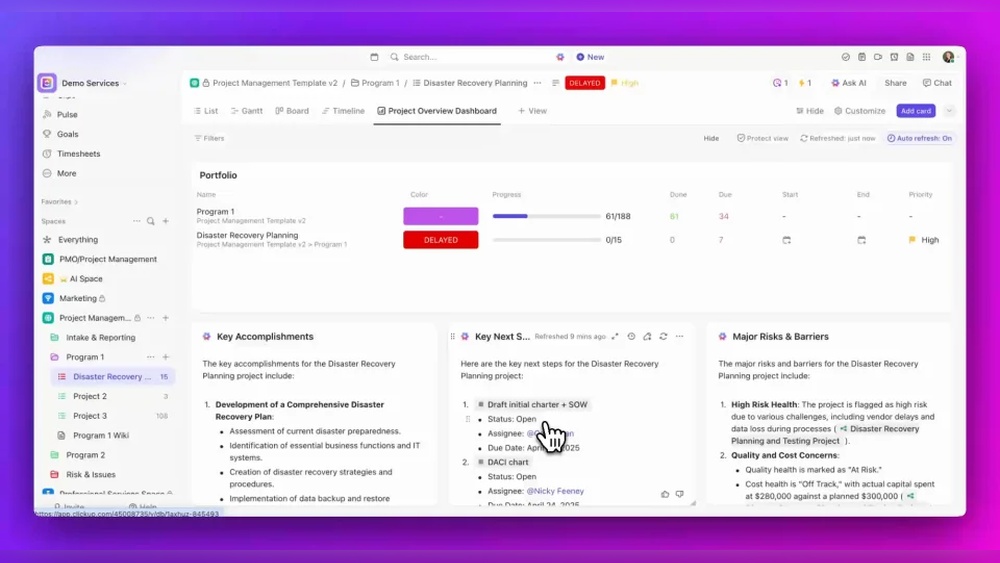
| Dashboards | Build personal or team dashboards with key metrics. |
These options allow teams to work the way they want. Flexibility supports different industries and project types.
Productivity Boosters: Time Tracking, Goals, And Reporting
ClickUp integrates tools that help measure and improve productivity. Tracking time and progress keeps projects moving forward.
- Built-in Time Tracking: Log hours spent on tasks without third-party apps.
- Goal Setting: Define, monitor, and achieve team goals easily.
- Automated Reporting: Generate reports on task status, time, and productivity.
- Reminders and Notifications: Stay aware of upcoming deadlines and milestones.
These features provide clear insights into team performance. Teams can adjust priorities based on real data.

Credit: www.smartsuite.com
Pricing And Affordability Comparison
Understanding the pricing and affordability of Quickbase and ClickUp helps businesses choose the right tool. Both platforms offer different plans tailored to various needs and budgets. This section breaks down their pricing structures and reveals which tool provides better value for different business sizes.
Quickbase Pricing Structure And Value For Money
Quickbase offers a subscription model focused on low-code app building. Its pricing includes:
- Team Plan: Starting at $600 per month for up to 50 users
- Business Plan: Custom pricing, includes advanced features and support
Quickbase targets businesses needing custom internal apps with automation and compliance.
Value for money depends on usage of its powerful database and automation features. It suits companies needing tailored apps more than simple task management.
Clickup Pricing Plans And Cost-effectiveness
ClickUp provides flexible pricing aimed at wide productivity needs. Its main plans include:
| Plan | Price | Key Features |
|---|---|---|
| Free | $0 | Unlimited tasks, 100MB storage, basic integrations |
| Unlimited | $5 per user/month | Unlimited storage, integrations, dashboards |
| Business | $12 per user/month | Advanced automation, goals, portfolios |
ClickUp offers cost-effective plans for startups to large teams. The free version supports small teams well.
Which Tool Offers Better Roi For Different Business Sizes?
ROI varies by business size and needs. Here is a quick guide:
- Small Businesses: ClickUp’s free and low-cost plans provide solid features with minimal investment.
- Medium Businesses: ClickUp’s Business plan balances price and productivity tools well.
- Large Enterprises: Quickbase’s custom pricing and app-building flexibility support complex workflows.
Quickbase suits enterprises needing custom apps and automation. ClickUp fits teams wanting broad project and task management.
Pros And Cons Based On Real-world Usage
Understanding the strengths and weaknesses of Quickbase and ClickUp helps users pick the right tool. Both platforms serve different purposes. Quickbase focuses on low-code app building and database management. ClickUp aims at project and task management for teams. Real-world usage reveals how these differences affect daily work.
Strengths And Limitations Of Quickbase In Practical Scenarios
Quickbase excels in creating custom internal apps without heavy coding. It supports automation, compliance, and relational databases, making it ideal for structured data management.
- Strengths:
- Easy low-code app creation for specific business needs
- Strong automation capabilities reduce manual work
- Built-in compliance features support regulated industries
- Handles complex data relations effectively
- Limitations:
- Steeper learning curve for new users
- Less suited for general task or project management
- Interface can feel complex for simple workflows
- Higher cost for advanced features
Advantages And Drawbacks Of Using Clickup Day-to-day
ClickUp focuses on productivity, collaboration, and team planning. It combines many tools like chat, project tracking, and AI-powered features.
| Advantages | Drawbacks |
|---|---|
|
|
User Feedback And Common Challenges
User reviews highlight specific challenges and praises for both platforms.
- Quickbase: Users value its power in app creation but mention the need for training.
- ClickUp: Praised for flexibility and feature set, but some find it difficult to master initially.
- Both platforms face challenges in balancing simplicity and advanced capabilities.
- Support quality varies; users recommend thorough onboarding.
Real users suggest starting with clear goals to pick the best platform fit.

Credit: switchonbusiness.com
Ideal Users And Use Cases For Quickbase And Clickup
Quickbase and ClickUp serve different business needs. Choosing the right tool depends on your team’s goals, project type, and workflow style. Both tools improve efficiency but focus on distinct areas.
When To Choose Quickbase: Building Data-driven Internal Tools
Quickbase is best for teams needing custom internal apps without heavy coding. It suits companies that manage complex data and require relational databases with automation.
- Teams building structured apps for workflows and compliance
- Businesses needing automation to reduce manual tasks
- Departments managing data integration and relational databases
- Organizations focusing on custom internal tools for specific processes
Quickbase fits industries like finance, healthcare, and manufacturing where data accuracy and compliance matter.
When To Opt For Clickup: Enhancing Team Productivity And Collaboration
ClickUp excels at project and task management, designed for team productivity and smooth collaboration. It combines tasks, chat, docs, and AI in one platform.
- Teams managing projects and tasks with clear priorities
- Groups needing real-time collaboration and communication
- Companies wanting an all-in-one workspace for planning and tracking
- Businesses aiming to save time by uniting apps and workflows
ClickUp works well for marketing teams, startups, agencies, and remote teams that require flexible task tracking.
Comparative Scenarios: Which Tool Fits Your Business Needs?
| Criteria | Quickbase | ClickUp |
|---|---|---|
| Primary Use | Custom internal apps, data management | Task and project management, team collaboration |
| Best For | Data-driven teams needing automation and compliance | Teams focused on productivity and communication |
| Complexity | Requires some technical setup (low-code platform) | User-friendly with minimal setup |
| Collaboration Features | Limited collaboration tools, focused on data apps | Robust chat, docs, and real-time collaboration |
| Use Case Examples |
|
|
Conclusion: Making The Right Choice For Productivity Boost
Choosing between Quickbase and ClickUp depends on your team’s needs. Both tools improve productivity but serve different purposes. Quickbase builds custom internal apps with automation and databases. ClickUp focuses on project and task management with strong collaboration features.
Understanding each platform’s strengths helps match the right tool to your team’s workflow. Clear insights guide your decision for better efficiency.
Summary Of Key Differences And Strengths
| Aspect | Quickbase | ClickUp |
|---|---|---|
| Primary Use | Low-code platform for building internal apps | Project and task management platform |
| Core Features | Relational databases, automation, compliance tools | Task tracking, team collaboration, AI tools, chat |
| Customization | High, for structured app development | Flexible, with many views and integrations |
| Team Collaboration | Limited to app workflows and data sharing | Strong real-time collaboration and communication |
| Best For | Complex data-driven apps and compliance needs | Managing projects, tasks, and team productivity |
Final Recommendations Based On Team Size, Complexity, And Goals
- Small Teams: ClickUp suits small teams needing simple task tracking and clear communication.
- Medium to Large Teams: Quickbase fits teams requiring custom internal apps and complex workflows.
- Project Complexity: Use ClickUp for straightforward project management. Choose Quickbase for data-heavy processes.
- Goals: For saving time and uniting all work in one place, ClickUp is ideal.
- Automation and Compliance: Quickbase offers strong automation and compliance options.
Teams focused on collaboration and task clarity gain from ClickUp’s features. Teams needing tailored apps and database solutions benefit from Quickbase.
Frequently Asked Questions
What Is The Difference Between Clickup And Quickbase?
Quickbase is a low-code platform for building custom internal apps with automation and databases. ClickUp focuses on project management, team collaboration, and task tracking. Quickbase suits structured app creation, while ClickUp enhances productivity and planning for teams.
Is There Anything Better Than Clickup?
Several tools may suit specific needs better than ClickUp. Monday. com excels in visual workflows, Asana offers clean task management, Notion provides flexible workspaces, and Wrike supports complex projects. The best alternative depends on your team’s priorities and project complexity.
Who Are Quickbase’s Competitors?
Quickbase’s competitors include OutSystems, Appian, Microsoft Power Apps, Mendix, Salesforce Platform, and Oracle APEX. These platforms offer low-code app development and automation.
What Are The Limitations Of Quickbase?
Quickbase has limitations like a steeper learning curve, higher cost for small teams, and less flexibility in UI customization. It may lack advanced reporting and mobile app features compared to competitors. Integration options can be limited for some specialized tools.
Conclusion
Choosing between Quickbase and ClickUp depends on your specific needs. Quickbase suits those who want custom internal apps with automation. ClickUp works well for teams needing task management and collaboration tools. Both offer unique features that improve productivity and organization. Explore ClickUp’s full capabilities by visiting ClickUp here. Consider your project goals and team style before deciding. Either platform can help your work run smoother and save time. Take a step toward better workflow today.