Startinfinity Vs Clickup: Ultimate Comparison for Productivity Boost
Looking for the perfect project management tool can feel overwhelming. You want something flexible, powerful, and easy to use — but which one fits your needs best?
That’s where the battle of StartInfinity vs ClickUp comes in. You’ll discover how StartInfinity’s deep customization stacks up against ClickUp’s all-in-one workspace designed to replace multiple apps. If saving time, money, and keeping your team perfectly aligned sounds like your goal, you’ll want to keep reading. Ready to find the tool that truly works for you? Check out ClickUp here and see if it’s the game-changer you need.
Introduction To Startinfinity And Clickup
Startinfinity stands out for its exceptional flexibility and depth in project management. It allows users to build a workspace that fits their exact needs. Unlike many platforms, it offers extensive control over how data is structured and displayed. This helps teams adapt the tool to their unique workflows.
The platform’s design supports complex projects without confusion. It manages everything from broad overviews to detailed tasks effortlessly. Here are the core features that make Startinfinity different from ClickUp.
Advanced Workspace Structuring: Unlimited Boards, Folders, And Subfolders
Startinfinity provides an unlimited number of boards, folders, and subfolders. This hierarchical system gives teams freedom to organize projects with multiple levels of detail.
- Create boards to separate major projects or departments.
- Use folders within boards to group related tasks or phases.
- Break down folders further with subfolders to manage smaller components.
This structure helps keep work clear and accessible. It supports both simple and complex workflows without limits.
Flexible Data Display Options To Match Workflow Preferences
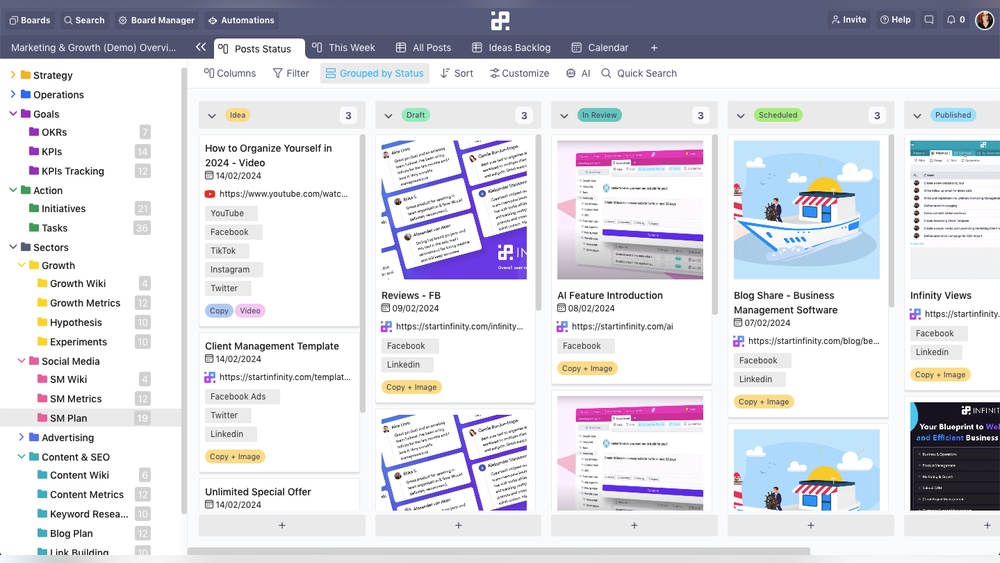
Startinfinity offers various ways to display data. Users can switch between views to find the best fit for their tasks.
- List view for straightforward task tracking.
- Kanban boards to visualize work stages.
- Table view for spreadsheet-style management.
- Calendar view to see deadlines and schedules.
These options help teams work in the style they prefer. It also makes data easier to understand at a glance.
Customization Capabilities: Tailoring Workspaces To Specific Needs
Startinfinity allows deep customization of workspaces. Teams can adjust settings to fit their exact processes.
- Custom fields: Add unique data points to tasks and items.
- Tags and labels: Organize and filter content efficiently.
- Tabs: Separate different types of information within boards.
- Templates: Save and reuse setups for common projects.
This level of control helps every user create an environment that suits their workflow. It reduces clutter and increases productivity.
Key Features That Set Startinfinity Apart
ClickUp offers a variety of unique features designed to simplify project management and boost productivity. Its versatile tools adapt to different workflows and team needs. The platform combines task management, communication, and automation in one place, reducing the need for multiple apps.
These features focus on clarity, ease of use, and accessibility. They help users manage tasks efficiently, organize projects with flexibility, and support diverse work styles. Teams gain better control over deadlines, priorities, and collaboration.
Multi-view Task Management: Kanban, List, Calendar, And More
ClickUp supports multiple task views to suit different project styles and preferences. Users can switch between:
- Kanban boards for visual task progress
- List views for detailed task breakdown
- Calendar views to track deadlines and schedules
- Box view to see workload distribution
- Gantt charts for timeline planning
This variety allows teams to organize work in the way that fits best. It also helps users quickly understand project status and adjust plans.
Templates And Tools Tailored For Neurodivergent Users And Adhd Support
ClickUp includes specialized templates designed for neurodivergent users and people with ADHD. These templates simplify task setup and reduce overwhelm. Features include:
- Clear, step-by-step task breakdown
- Visual progress indicators
- Custom reminders to stay on track
- Minimal distractions with clean layouts
These tools help users maintain focus, manage time better, and reduce anxiety. The platform’s flexibility allows customization to match individual needs.
Integrated Reminders And Micro-tasking For Managing Complex Projects
ClickUp’s built-in reminders and micro-tasking features support handling large projects with many details. Users can:
- Create small, manageable sub-tasks within bigger tasks
- Set automated reminders for deadlines and follow-ups
- Track progress with clear checklists and statuses
This approach breaks down complexity and keeps users focused on immediate next steps. It prevents tasks from becoming overwhelming and ensures nothing is missed.
Distinctive Features Of Clickup And Their Benefits
Understanding the pricing and affordability of StartInfinity and ClickUp helps teams choose the best fit. Budget matters for every team size. Costs should match features and value delivered. Both tools offer project management solutions but differ in pricing models and included benefits.
Startinfinity Pricing Structure And Value For Money
StartInfinity focuses on customizable workflows with flexible workspace levels. Its pricing adapts to the depth of customization needed. Although exact prices are not publicly detailed, StartInfinity typically offers plans based on:
- Number of users
- Access to unlimited boards, folders, and tabs
- Advanced customization features
This structure suits teams needing detailed control over project data. Value for money comes from its ability to scale with complex workflows without forcing tool changes.
Clickup Pricing Tiers And What They Include
ClickUp offers multiple pricing tiers designed for different team sizes and needs. Key tiers usually include:
| Plan | Price (per user/month) | Main Features |
|---|---|---|
| Free | $0 | Basic tasks, limited storage, unlimited users |
| Unlimited | Approx. $5 | Unlimited storage, integrations, dashboards |
| Business | Approx. $12 | Advanced automation, goals, workload management |
| Enterprise | Custom pricing | Security, advanced permissions, dedicated support |
ClickUp’s tiered pricing targets teams wanting an all-in-one workspace. It replaces many tools under one platform.
Which Tool Offers Better Roi Based On Team Size And Needs
StartInfinity suits teams needing deep customization and flexible data views. It fits small to medium teams with complex workflows.
ClickUp fits teams seeking consolidation of tools and features for collaboration, automation, and project tracking. Ideal for small to large teams needing scalable solutions.
ROI depends on team size and task complexity:
- Small teams: ClickUp’s free or lower tiers may offer better ROI due to multiple integrated features.
- Medium teams: StartInfinity offers value if workflow customization is a priority.
- Large teams: ClickUp’s advanced plans provide comprehensive tools to manage projects at scale.
Teams should weigh feature needs against pricing tiers to maximize returns.
Pricing And Affordability Comparison
Understanding the strengths and weaknesses of StartInfinity and ClickUp helps choose the right tool. Real users share insights on how these platforms perform in daily project management. Both software have unique features and limitations that affect productivity and workflow.
Strengths And Weaknesses Of Startinfinity In Project Management
StartInfinity excels in offering a highly customizable workspace. Users can create unlimited boards, folders, subfolders, tabs, and items. This flexibility allows teams to structure projects exactly as needed.
- Strength: Deep customization fits complex workflows.
- Strength: Multiple data display options improve clarity.
- Weakness: Can be overwhelming for new users due to many options.
- Weakness: Lacks some integrated productivity tools found in competitors.
This makes StartInfinity ideal for teams wanting control over data layout but less suited for those needing ready-to-use productivity features.
Advantages And Limitations Of Clickup For Productivity Boost
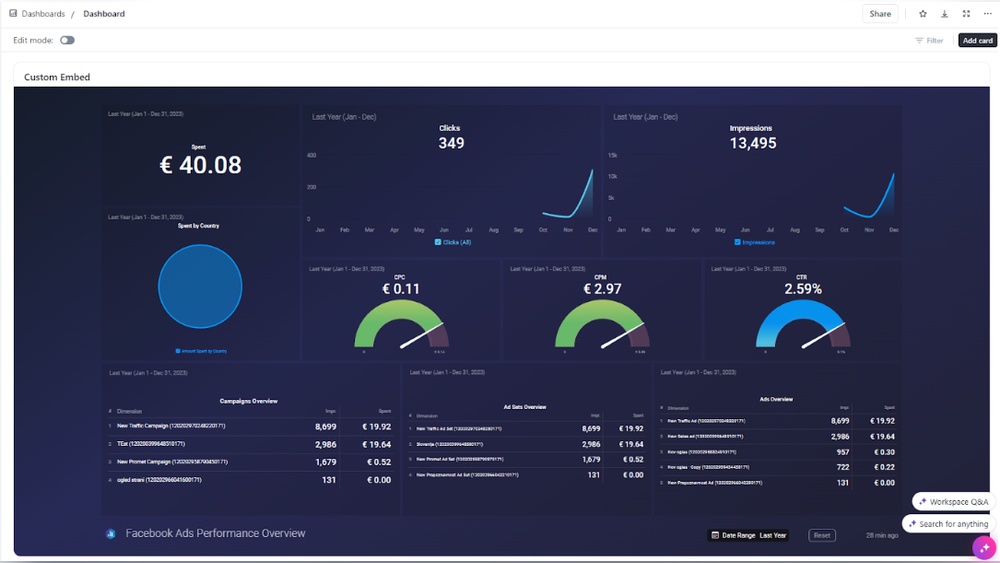
ClickUp aims to replace multiple software tools by consolidating them into one platform called Spaces. This all-in-one approach helps teams save time and money.
- Advantage: Combines project management, chat, and AI tools in one place.
- Advantage: Supports a variety of project types with easy organization.
- Limitation: Interface can feel complex for beginners.
- Limitation: Some users report occasional slow loading times.
ClickUp suits teams wanting a comprehensive workspace but may require time to learn all features.
User Feedback Highlights And Common Pain Points
| Platform | Positive Feedback | Common Pain Points |
|---|---|---|
| StartInfinity |
|
|
| ClickUp |
|
|
Users appreciate StartInfinity’s customization and ClickUp’s integration. Both platforms require adjustment time and may present challenges based on team needs.
Pros And Cons Based On Real-world Usage
Choosing between StartInfinity and ClickUp depends on team needs and project complexity. Each tool suits different workflows and team types. Understanding ideal use cases helps pick the right software for better productivity.
When To Choose Startinfinity: Best Scenarios And Teams
StartInfinity fits teams that need deep customization in project management. It works well for groups that require detailed data structuring. Teams benefit from its multiple hierarchical levels like boards, folders, and subfolders.
- Teams managing complex projects with many layers
- Users wanting flexible ways to organize and display data
- Groups needing custom workflows tailored to unique processes
- Small to medium-sized teams seeking adaptable project layouts
StartInfinity’s strength lies in its flexibility. It allows unlimited boards and tabs, making it ideal for projects that evolve over time or require extensive detail.
Optimal Situations For Selecting Clickup
ClickUp is best for teams aiming to consolidate multiple tools into one platform. It suits organizations seeking a unified workspace for all tasks and communication.
- Teams requiring an all-in-one solution for projects, chat, and files
- Groups wanting to replace several productivity apps with one platform
- Businesses managing varied projects across departments
- Teams focused on saving time and cost by using integrated tools
ClickUp organizes work within “Spaces,” supporting diverse project types. Its design caters to users looking for a comprehensive, easy-to-access workspace.
How Team Focus And Workflow Complexity Influence The Choice
Workflow complexity and team focus shape the decision between StartInfinity and ClickUp.
| Factor | StartInfinity | ClickUp |
|---|---|---|
| Workflow Complexity | High complexity with layered data and custom views | Moderate to high, but with streamlined, integrated tools |
| Team Focus | Teams needing flexible project structures and detailed organization | Teams wanting a unified workspace for all tasks and collaboration |
| Tool Integration | Primarily project management with customizable layouts | All-in-one platform replacing multiple software tools |
| Best For | Custom workflows, complex data handling, evolving projects | Simplified work consolidation, cost saving, cross-team use |
Teams with simple, unified needs prefer ClickUp. Those handling complex, multi-layered projects lean toward StartInfinity.

Credit: www.youtube.com
Ideal Use Cases And User Recommendations
Choosing the right project management tool is key for productivity. Many teams explore options beyond StartInfinity and ClickUp. Popular alternatives offer unique features that fit different workflows. Comparing these tools helps find the best match for your team’s style and needs.
Brief Overview Of Popular Clickup Alternatives Like Monday.com, Asana, And Notion
Monday.com provides a colorful, easy-to-use interface. It focuses on visual project tracking with boards and timelines. Teams appreciate its simple setup and automation options.
Asana is known for task management and team collaboration. It offers list views, boards, and calendar integrations. Asana suits teams needing clear task assignments and deadlines.
Notion combines notes, databases, and project management in one tool. Its flexibility allows users to create custom workflows. Notion is ideal for teams that want a mix of documentation and task tracking.
| Tool | Key Features | Best For |
|---|---|---|
| Monday.com | Visual boards, timelines, automation | Teams needing visual tracking |
| Asana | Task lists, deadlines, calendars | Teams focused on task management |
| Notion | Notes, databases, custom workflows | Teams wanting flexible documentation |
How Startinfinity And Clickup Differ From Other Market Leaders
StartInfinity offers deep customization with unlimited boards and nested folders. It suits teams needing complex data structures and varied display options.
ClickUp acts as an all-in-one workspace. It replaces many tools by combining chat, tasks, and AI features in one platform.
Unlike Monday.com or Asana, StartInfinity focuses more on flexible data layout. ClickUp focuses on tool consolidation and broad functionality.
Choosing Based On Core Needs: Visual Tracking, Simplicity, Or Customization
Pick a tool that fits your main priority:
- Visual Tracking: Monday.com’s colorful boards and timelines help monitor progress clearly.
- Simplicity: Asana offers easy task management with clear assignment and deadlines.
- Customization: StartInfinity provides unlimited nesting and display options for tailored workflows.
- All-in-One Workspace: ClickUp combines chat, AI, and projects to reduce tool overload.
Decide which feature matters most. Visual clarity, ease of use, or flexible structure guides the best choice.
Alternative Tools And How They Compare
Choosing between StartInfinity and ClickUp depends on how teams work and what they need. Both tools boost productivity but in different ways. StartInfinity focuses on deep customization and flexible data views. ClickUp aims to combine many tools into one powerful workspace. Understanding their differences helps decide which suits your workflow best.
Summary Of Key Differences And Strengths
| Aspect | StartInfinity | ClickUp |
|---|---|---|
| Structure | Unlimited boards, folders, subfolders, tabs, items | Organizes work within Spaces |
| Customization | Highly flexible, multiple hierarchical levels | All-in-one workspace with preset integrations |
| Main Benefit | Custom workflows and data display options | Consolidates many tools into one platform |
| Target Users | Teams needing tailored project structures | Teams wanting to save time by using fewer apps |
Final Recommendations Based On User Priorities
- Choose StartInfinity for deep customization and flexible data views.
- Choose ClickUp for an integrated workspace replacing many apps.
- StartInfinity fits teams building complex workflows.
- ClickUp suits teams aiming to save time with one platform.
- Consider ease of use: ClickUp offers a ready-to-use environment.
- StartInfinity requires more setup but allows detailed control.
Future Outlook: Evolving Features And User Support
Both tools evolve with user feedback and technology trends. ClickUp invests in AI and expanding features to cover more needs. StartInfinity focuses on improving customization and data handling.
User support plays a role in productivity. ClickUp’s large user base ensures active updates and community help. StartInfinity grows steadily with personalized support.
Watch for updates that add new integrations, automation, and easier navigation. These improvements can increase productivity further over time.

Credit: startinfinity.com

Credit: startinfinity.com
Frequently Asked Questions
Is There Anything Better Than Clickup?
Top ClickUp alternatives include Monday. com, Asana, Notion, Trello, Wrike, and Smartsheet. Each suits different needs like visual workflows, simple task management, or complex projects. The best tool depends on your team’s focus and project requirements.
What Is The Difference Between Clickup And Infinity?
ClickUp organizes tasks within Spaces and offers robust features. Infinity allows more flexible work structuring with unlimited boards and customizable data views.
Is Clickup Good For Adhd?
ClickUp offers customizable task views, reminders, and goal tracking, which help users with ADHD stay organized and focused effectively.
Is Clickup A Unicorn?
Yes, ClickUp is a unicorn. It achieved a valuation over $1 billion, marking its status as a successful startup.
Conclusion
Both StartInfinity and ClickUp offer strong project management tools. StartInfinity suits users who want deep customization and flexible data views. ClickUp fits teams needing an all-in-one workspace to replace many apps. Choosing depends on your team’s size, needs, and workflow style. For a unified platform that saves time and money, consider exploring ClickUp. Test both to find the best fit for your projects and productivity.