Smart Suite Vs Clickup: Ultimate Showdown for Productivity Tools
Are you struggling to choose the right tool to manage your projects and tasks efficiently? When it comes to all-in-one work management platforms, two names often come up: Smart Suite and ClickUp.
Both promise to streamline your workflow, save you time, and keep your team perfectly aligned—but which one truly fits your needs? Whether you’re looking to replace multiple apps with one smart solution or want the best AI-powered features to boost productivity, understanding the key differences between Smart Suite and ClickUp is essential. Ready to discover which platform can transform how you work? Let’s dive into a detailed comparison that will help you pick the perfect match for your team—and if you want to check out ClickUp right away, here’s the link: ClickUp.
Introduction To Smartsuite And Clickup
SmartSuite and ClickUp are popular productivity tools helping teams work better. Both offer features to manage projects, tasks, and collaboration. Understanding their purpose and users helps choose the right tool for your needs.
Overview Of Smartsuite: Purpose And Target Audience
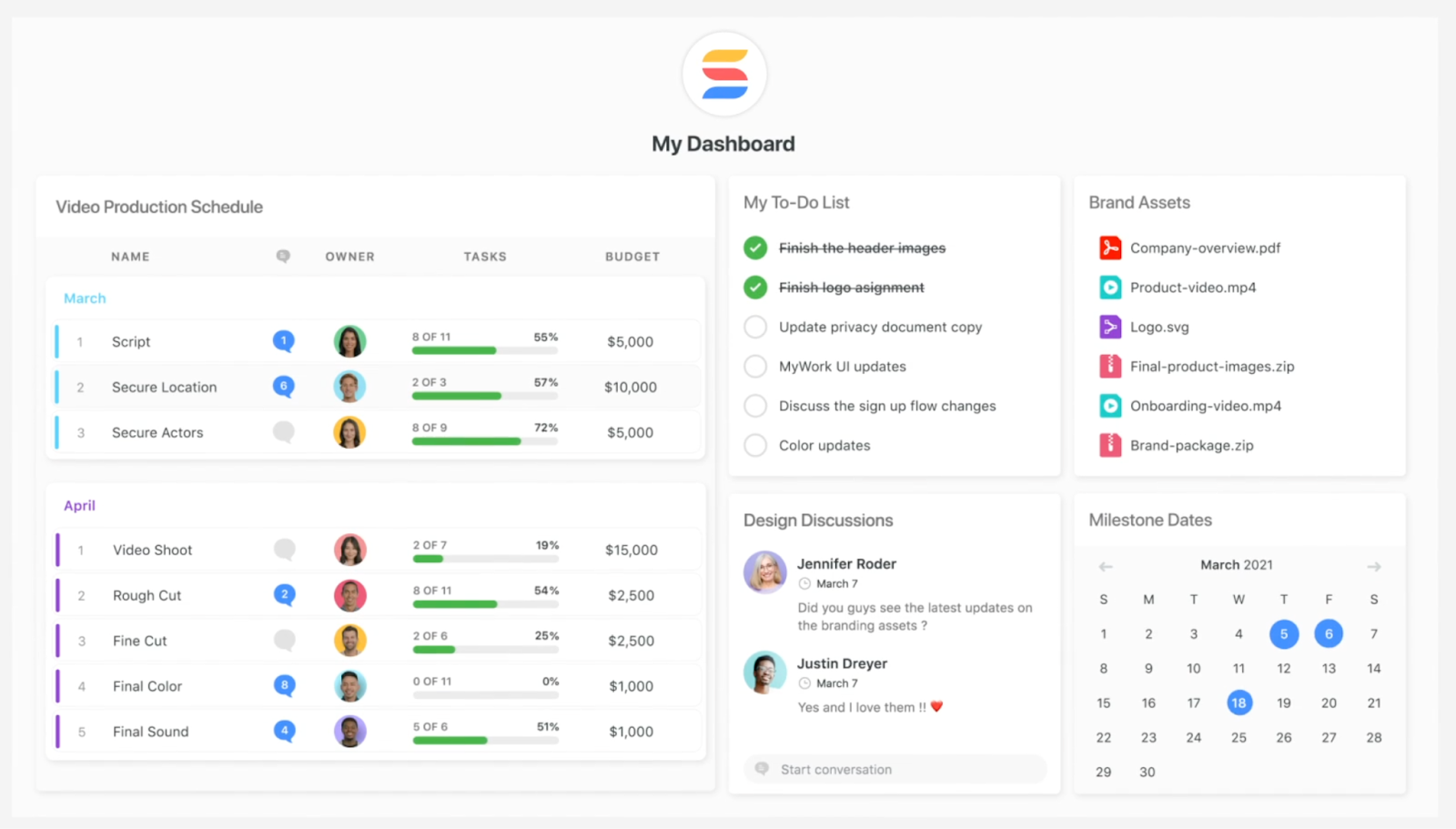
SmartSuite is designed as an all-in-one platform for businesses seeking flexible project and workflow management. It aims to centralize work by combining task tracking, document management, and process automation.
The tool suits:
- Small to medium businesses
- Teams needing customizable workflows
- Users who want to manage projects and data in one place
Overview Of Clickup: Purpose And Target Audience
ClickUp focuses on replacing multiple apps with one platform. It integrates AI, chat, project management, and more to save time and money.
ClickUp targets:
- Teams wanting all work tools in one app
- Businesses aiming to improve team communication
- Users who value AI features to boost productivity
Why Compare These Two Productivity Tools?
Both SmartSuite and ClickUp offer broad solutions for managing work. Comparing them helps find the best fit based on:
- Features: What tools and options each platform provides
- Ease of use: How simple it is to get started and stay organized
- Target users: Which teams or businesses benefit most
- Cost efficiency: Saving money by choosing the right tool
This comparison guides teams to pick the tool matching their workflow and goals.

Credit: www.youtube.com
Key Features Of Smartsuite And Their Benefits
SmartSuite offers a rich set of features designed to improve productivity and simplify project management. Its tools suit various business sizes and types, enhancing team collaboration and process efficiency. This section highlights SmartSuite’s key features and explains how they benefit users.
Customizability And Adaptability Across Business Sizes
SmartSuite adapts to the unique needs of small, medium, and large businesses. It provides flexible templates and an easy drag-and-drop interface to customize workflows.
- Adjust dashboards and fields without coding.
- Supports multiple industries with tailored solutions.
- Scales easily as your business grows.
This flexibility helps teams work exactly the way they want. It reduces the need for multiple apps and simplifies training.
Integrated Workflow Automation For Streamlined Processes
Automation in SmartSuite cuts down repetitive tasks and speeds up project cycles. Users can create custom rules to trigger actions based on conditions.
- Automate task assignments and notifications.
- Sync updates across connected workflows.
- Reduce manual errors and delays.
These features save time and let teams focus on important work. Automation ensures smoother, more reliable processes.
Comprehensive Project Management Tools And Collaboration
SmartSuite combines project tracking, resource management, and communication tools in one platform.
| Feature | Benefit |
|---|---|
| Task Management | Organize tasks with priorities, deadlines, and dependencies. |
| Collaboration | Share files, comment, and update in real-time. |
| Reporting | Visual dashboards show progress and bottlenecks. |
Teams stay aligned and can track progress effortlessly. Centralized communication avoids lost information.
Affordable Pricing Model For Small To Medium Businesses
SmartSuite offers competitive pricing suitable for small and medium businesses. Its plans provide access to most features without high costs.
- Flexible subscription tiers based on team size.
- No hidden fees for essential tools.
- Good value compared to similar platforms.
This pricing helps businesses manage budgets while getting powerful tools. It supports growth without expensive upgrades.
Key Features Of Clickup And Their Benefits
ClickUp offers a powerful set of features designed to boost productivity and streamline teamwork. Its flexible tools support task management, document collaboration, and team communication all in one place. These features adapt to different workflows, helping teams work smarter and faster. The platform’s design suits both small groups and large organizations, offering a wide range of benefits.
Highly Flexible Workspace With Multiple Views And Docs
ClickUp provides a versatile workspace that adapts to how teams work best. Users can switch between various views such as:
- List view for detailed task tracking
- Board view for visual project management (Kanban style)
- Calendar view to see deadlines and schedules
- Gantt charts for timeline planning
Alongside these, ClickUp includes built-in Docs for easy note-taking and document collaboration. Teams can write, edit, and share documents without leaving the workspace, ensuring all information stays connected to tasks and projects.
Built-in Ai And Fast Feature Updates Enhancing Productivity
ClickUp integrates AI-powered tools to speed up routine tasks. These tools help generate ideas, automate workflows, and summarize information quickly. The AI supports users by reducing manual work and improving focus.
The platform receives frequent updates, adding new features and improvements regularly. This ensures users always have access to the latest tools that enhance daily productivity and team collaboration.
All-in-one Platform Supporting Task, Team, And Document Management
ClickUp combines multiple functions in one platform:
| Function | Benefit |
|---|---|
| Task Management | Organize, assign, and track tasks with clear deadlines |
| Team Collaboration | Real-time chat, comments, and notifications to keep everyone aligned |
| Document Management | Create, share, and store documents linked to projects |
This all-in-one approach reduces the need for multiple apps, saving time and simplifying workflows.
Scalability For Teams Of All Sizes And Diverse Use Cases
ClickUp scales smoothly from solo users to large enterprises. It supports a variety of industries and team setups by offering:
- Customizable workflows to fit unique project needs
- Permission controls to manage user access and security
- Integrations with popular tools for expanded functionality
This flexibility makes ClickUp suitable for startups, agencies, remote teams, and complex corporate environments alike.

Credit: thebusinessdive.com
Pricing And Affordability Comparison
Understanding the pricing plans helps choose the right tool for your needs. Both SmartSuite and ClickUp offer multiple pricing tiers. They target different user groups and budgets. This section breaks down their costs and value to help you decide.
Smartsuite Pricing Tiers And Value For Money
SmartSuite provides clear pricing levels based on features and team size. Here are the main tiers:
| Plan | Price (per user/month) | Key Features |
|---|---|---|
| Basic | $10 | Core workflows, limited integrations, basic reporting |
| Professional | $25 | Advanced workflows, custom automations, enhanced security |
| Enterprise | Custom pricing | Full feature set, priority support, dedicated account manager |
SmartSuite suits teams needing customizable workflows and strong security.
The pricing reflects good value for teams requiring advanced project handling.
Clickup Pricing Structure And Available Plans
ClickUp offers a flexible pricing model with several plans:
| Plan | Price (per user/month) | Key Features |
|---|---|---|
| Free | $0 | Unlimited tasks, 100MB storage, basic integrations |
| Unlimited | $5 | Unlimited storage, integrations, dashboards |
| Business | $12 | Advanced automations, goals, and workload features |
| Enterprise | Custom pricing | Custom onboarding, security, and support |
ClickUp covers a wide range from free to enterprise-level solutions.
It fits small teams to large organizations needing scalable tools.
Cost-effectiveness Based On Features And User Needs
- Small teams or startups benefit from ClickUp’s free and low-cost plans.
- Medium to large teams may find SmartSuite’s professional tier worth the price.
- ClickUp offers more extensive free usage, helping teams save initially.
- SmartSuite focuses on deeper customization and security at higher tiers.
Both platforms provide good value, depending on your team size and feature needs.
Choosing depends on whether you prioritize cost, customization, or included features.
Pros And Cons Based On Real-world Usage
Understanding the real-world pros and cons of SmartSuite and ClickUp helps users make informed decisions. Both platforms offer robust features but also present unique challenges in daily use. This section breaks down the strengths and weaknesses of each tool and shares common user feedback.
Strengths And Weaknesses Of Smartsuite
SmartSuite offers a flexible and customizable workspace. It excels in managing complex workflows with ease. Users appreciate its database-like structure and automation capabilities.
- Strengths:
- Highly customizable dashboards and workflows
- Strong database and automation features
- Good for structured project management
- Supports collaboration with clear task organization
- Weaknesses:
- Steeper learning curve for new users
- Interface can feel overwhelming at first
- Limited third-party integrations compared to competitors
- Some users report occasional performance lag
Strengths And Weaknesses Of Clickup
ClickUp is an all-in-one platform designed to replace multiple apps. It combines projects, chat, AI tools, and more in one place.
- Strengths:
- Wide range of features including AI assistance
- Highly flexible task and project management
- Strong integration with many external apps
- Good for teams needing a single workspace
- Weaknesses:
- Interface can become cluttered with many features
- Some users find the setup complex
- Mobile app sometimes less stable than desktop
- Notifications can be overwhelming without customization
User Feedback And Common Challenges Encountered
Users of both tools share similar challenges. They mention initial complexity and a learning period to maximize the platforms’ benefits.
| Aspect | SmartSuite Feedback | ClickUp Feedback |
|---|---|---|
| Ease of Use | Needs time to master due to many options | Feature-rich but can feel overwhelming |
| Customization | Excellent but complex setup | Highly customizable with many templates |
| Performance | Occasional lag reported | Generally smooth, mobile app less stable |
| Integrations | Fewer third-party apps supported | Broad integration options available |
| Collaboration | Strong task organization | Excellent communication tools |
Common challenges include managing notifications and customizing workflows effectively. Patience and training improve user experience greatly.
Ideal Users And Use Cases For Smartsuite
SmartSuite fits well for businesses needing adaptable and customizable project management tools. Its strength lies in offering flexibility and robust features without high costs. Teams across different industries find it useful for managing varied projects.
Businesses Needing Customizable Project Management
SmartSuite allows businesses to build tailored workflows with ease. Users can create custom dashboards, forms, and reports to match their unique processes.
- Custom fields and templates adjust to any project style.
- Workflows can be automated for repetitive tasks.
- Supports complex project structures with linked items and dependencies.
This makes SmartSuite ideal for companies that cannot use one-size-fits-all solutions and require a system that adapts to their specific needs.
Teams Seeking Affordable Yet Feature-rich Solutions
SmartSuite offers a balance of cost and functionality. It provides many premium features without the steep price tag of some competitors.
| Feature | Benefit |
|---|---|
| Multiple project views | Visualize work as lists, boards, or calendars |
| Collaboration tools | Team chat and commenting keep communication clear |
| Automation | Saves time by reducing manual updates |
Small and medium teams get advanced tools without overpaying. This lowers barriers to efficient project management.
Projects Requiring Adaptability Across Various Industries
SmartSuite suits projects in marketing, IT, consulting, and more. Its flexible design fits diverse workflows and data types.
- Marketing teams can track campaigns with custom KPIs.
- IT departments manage software development and bug tracking.
- Consultants organize client work and reports efficiently.
Its versatility helps teams handle different project scopes and complexities without switching platforms.
Ideal Users And Use Cases For Clickup
ClickUp suits a wide range of users and teams. Its design aims to replace multiple apps with one platform. This helps teams save money and time by uniting tasks, projects, chat, and AI tools in one place. The platform fits diverse work styles and grows with an organization’s needs.
Teams Requiring An All-in-one Productivity Platform
ClickUp works well for teams needing one tool to manage all work. It combines task management, document creation, chat, and project tracking. Teams avoid switching between many apps. This reduces confusion and speeds up workflows.
- Small to medium teams wanting easy collaboration
- Teams handling projects, tasks, and communication together
- Groups needing centralized information and updates
The platform supports various views such as lists, boards, and calendars. This helps teams match their preferred work styles.
Users Prioritizing Fast Feature Releases And Ai Integration
ClickUp offers frequent updates with new features. Users who want cutting-edge tools benefit from this pace. The platform includes AI to automate tasks and improve productivity.
- Users seeking AI-powered writing and task automation
- Teams wanting quick access to the latest productivity tools
- Organizations ready to adopt emerging technology in workflows
AI features help with content creation, task suggestions, and data insights. This saves time and reduces manual work.
Organizations Needing Scalable Solutions For Diverse Workflows
ClickUp scales well for growing businesses. It adapts to many industries and work processes. Organizations with varied teams find it flexible enough to support all.
| Feature | Benefit |
|---|---|
| Customizable workflows | Match specific team and project needs |
| Multiple integrations | Connect with existing tools for smooth operations |
| Role-based permissions | Control access and maintain security |
This makes ClickUp ideal for companies expanding in size and complexity. It supports simple tasks and advanced project management equally.
Conclusion: Making The Right Choice Between Smartsuite And Clickup
Choosing between SmartSuite and ClickUp depends on your team’s needs and project demands. Both tools offer strong features for managing tasks and workflows, but they cater to different preferences and complexities. Understanding their key differences helps in selecting the best fit for your productivity.
Summary Of Key Differentiators
| Feature | SmartSuite | ClickUp |
|---|---|---|
| Primary Focus | Structured workflows with flexible items | All-in-one platform combining tasks, chat, and AI |
| Customization | Strong item-based customization | Highly customizable dashboards and views |
| AI Integration | Limited AI features | Built-in AI to save time and automate tasks |
| Usability | Good for structured project management | User-friendly with a focus on collaboration |
| Best For | Teams needing detailed workflow structuring | Teams wanting an all-in-one productivity suite |
Factors To Consider Based On Team Size And Project Complexity
Team Size:
- Small teams benefit from ClickUp’s simple setup and AI tools.
- Medium to large teams may prefer SmartSuite for detailed workflow control.
Project Complexity:
- Complex projects with multiple dependencies suit SmartSuite’s item-based system.
- Projects needing flexible task management and real-time collaboration fit ClickUp.
Final Recommendations For Selecting The Best Productivity Tool
- Choose SmartSuite if your team needs structured workflows and detailed project tracking.
- Pick ClickUp for an all-in-one tool with AI support and easy collaboration.
- Consider team size and how much customization your projects require.
- Test both tools with free trials to check which fits your workflow best.
Credit: www.smartsuite.com
Frequently Asked Questions
Is There Anything Better Than Clickup?
Top ClickUp alternatives include Monday. com, Asana, Notion, Trello, Wrike, and Smartsheet. Each excels in different areas like visual workflows, simplicity, or complex projects. The best tool depends on your team’s unique needs and preferences.
Which Is Better, Smartsheet Or Clickup?
Smartsheet suits users needing spreadsheet-style data management and enterprise features. ClickUp excels as a flexible all-in-one productivity app with diverse views, docs, and built-in AI, ideal for teams of all sizes. Choose based on your workflow style and team needs.
Is Smartsuite Good For Project Management?
SmartSuite offers customizable workflows, task tracking, and collaboration tools, making it effective for project management. It suits teams needing flexibility and automation.
What Are The Pros And Cons Of Smartsuite?
SmartSuite offers customizable workflows and robust automation but can have a steep learning curve. It suits complex projects but may overwhelm beginners.
Conclusion
Choosing between Smart Suite and ClickUp depends on your needs. Smart Suite offers strong customization and workflow features. ClickUp combines many tools in one platform, saving time and cost. It supports AI and team collaboration well. Visit ClickUp to explore its benefits. Both tools help manage projects effectively. Decide based on your team’s size and workflow style. Either choice can improve your project management experience.