Kanbanchi Vs Todoist: Ultimate Productivity Showdown 2026
Struggling to keep your tasks organized and your projects on track? Choosing the right productivity app can make all the difference for your focus and efficiency.
That’s why comparing Kanbanchi and Todoist matters—both tools offer unique features to help you conquer your to-do list. Kanbanchi keeps your files secure on your Google Drive and offers strong encryption, making it a solid choice if privacy is your priority. On the other hand, Todoist shines with its clean interface and ADHD-friendly features that help you break down big tasks, set reminders, and stay focused without getting overwhelmed. If you want a powerful, flexible system trusted by over 50 million professionals worldwide, take a closer look at Todoist. Ready to discover which app fits your style best? Keep reading to find out how Kanbanchi and Todoist stack up against each other—and which one could transform your productivity starting today.
Credit: www.kanbanchi.com
Introduction To Kanbanchi And Todoist
Kanbanchi stands out as a project management tool designed for teams using Google Workspace. It combines task management with visual clarity, security, and seamless collaboration. Its unique features make it a strong choice for users who want simplicity and powerful integration within Google’s ecosystem.
The tool focuses on visual project tracking, secure cloud storage, and easy team communication. These features help teams stay organized and productive without switching between multiple apps.
Integration With Google Drive And Cloud Security Benefits
Kanbanchi stores all your project files directly on your Google Drive. This means you keep control over your data and easily access your documents alongside your tasks.
- Files and boards are saved in your own Google Drive account.
- Easy sharing and access control using Google Drive permissions.
- No third-party storage—your data stays with Google’s secure cloud.
This integration reduces the need for extra backups or export steps. Teams already using Google Workspace find Kanbanchi fits naturally into their workflow.
Visual Kanban Boards For Project Tracking
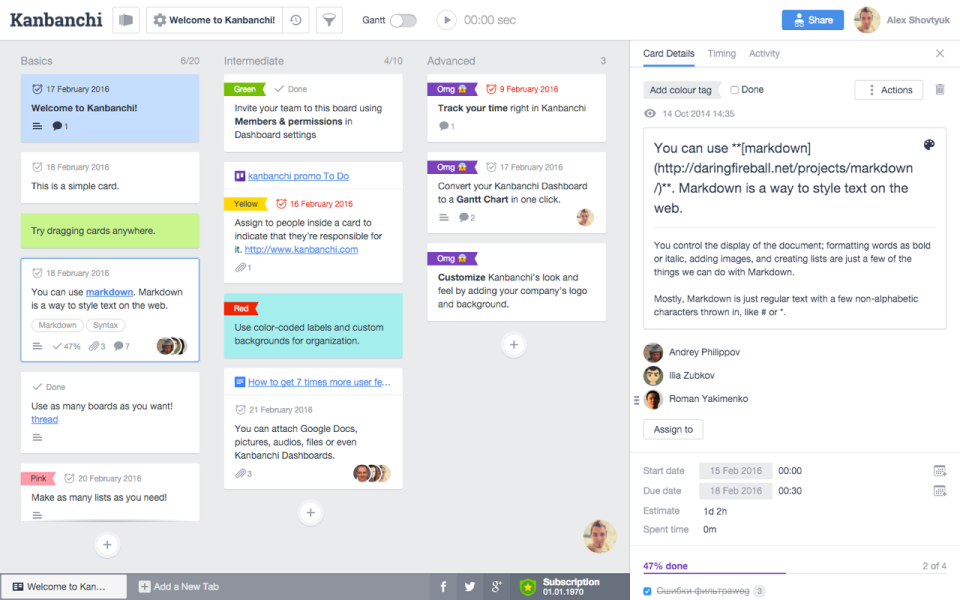
Kanbanchi’s core feature is its visual Kanban boards. These boards show tasks as cards that move across columns. This setup makes project progress clear at a glance.
- Drag-and-drop cards to update task status.
- Color-coded labels and tags highlight priorities.
- Task details, comments, and attachments inside each card.
The visual layout helps teams focus on what matters now. It reduces confusion and keeps everyone aligned on deadlines and responsibilities.
Real-time Collaboration And Team Communication
Kanbanchi supports real-time updates so team members see changes instantly. This reduces email overload and speeds up decision-making.
- Live updates on task status and comments.
- Built-in chat and comment threads on tasks.
- Notifications keep everyone informed without interrupting work.
Teams can work together smoothly, share ideas, and solve issues fast. The app makes remote collaboration feel natural and connected.
Automatic Encryption And Authentication By Google
Security is a top priority for Kanbanchi. It uses Google’s encryption and authentication methods to protect your data.
- All boards and files are encrypted by default.
- Login and access managed through Google authentication.
- Kanbanchi does not store user passwords.
This strong security model gives peace of mind. Your project data stays safe inside Google Cloud, protected from unauthorized access.
Credit: www.softwareadvice.com
Unique Features And Benefits Of Kanbanchi
Todoist offers a mix of powerful tools that make task management simple and clear. Its unique features suit a wide range of users, including those with ADHD. The app balances flexibility and structure, helping users stay focused and organized without feeling overwhelmed.
These features allow users to capture tasks fast, organize projects, and customize their workflow. Todoist’s design reduces distractions and supports daily routines, making it easier to complete tasks on time.
Flexible Task Management With Natural Language Input
Todoist lets users add tasks using natural language. Just type “Buy groceries tomorrow” and the app sets the task and date automatically.
This feature saves time and reduces errors. Users can quickly enter tasks without switching screens or menus. The system understands dates, times, and priorities in regular sentences.
- Automatic due dates and reminders
- Easy task entry on all devices
- Supports recurring tasks with simple phrases
Adhd-friendly Design: Quick Capture And Visual Clarity
Todoist’s layout focuses on speed and clarity. Tasks can be captured instantly using shortcuts or voice commands.
The interface uses clear colors and simple fonts. It highlights important tasks to keep users focused. This design helps reduce overwhelm, especially for people with ADHD.
- Fast task entry without clutter
- Clear priority levels and labels
- Minimal visual distractions
Task Breakdown With Subtasks And Recurring Reminders
Large projects break down into smaller parts using subtasks. This lets users focus on one step at a time.
Recurring reminders keep tasks fresh in mind. Users never miss deadlines or important routines.
| Feature | Benefit |
|---|---|
| Subtasks | Organize complex tasks into manageable steps |
| Recurring reminders | Stay consistent with daily or weekly tasks |
Custom Filters, Labels, And Minimal Distraction Interface
Todoist lets users create custom filters and labels to organize tasks by context, priority, or project.
The interface stays clean with options to hide completed tasks and reduce noise. Users focus only on what matters right now.
- Custom filters for tailored task views
- Labels to group similar tasks quickly
- Minimalist design to avoid distractions
Unique Features And Benefits Of Todoist
Choosing between Kanbanchi and Todoist depends on specific needs. Both tools offer unique strengths. Real users share insights from daily use. Their experiences reveal how each app performs under real conditions. This section explores their advantages and drawbacks to help decide which fits best.
Strengths And Limitations Of Kanbanchi In Team Environments
Kanbanchi excels in team collaboration, especially for Google Workspace users. Files stay on your Google Drive, ensuring data control and security. Authentication is handled by Google, so passwords are not stored by Kanbanchi.
- Boards are encrypted and stored in Google Cloud, enhancing privacy.
- Its visual Kanban boards suit teams managing complex projects.
- Integration with Google apps simplifies workflow for teams already using Google tools.
Limitations:
- Primarily built for teams, it can feel complex for solo users.
- Less flexible for personal task management compared to dedicated apps.
- Users report a learning curve with its interface and setup.
Advantages And Drawbacks Of Todoist For Personal Productivity
Todoist is popular for personal task management and clarity. It supports quick task entry using natural language. This feature helps users capture ideas fast.
- Highly praised for ADHD-friendly features, aiding focus and routine.
- Allows breaking down tasks into manageable steps, reducing overwhelm.
- Minimal distractions and an intuitive design improve consistency.
Drawbacks:
- Too many features can cause overcomplication for some users.
- The Kanban board option exists but is less robust than Kanbanchi’s.
- Limited team collaboration features compared to Kanbanchi.
User Feedback Highlights And Common Pain Points
| Aspect | Kanbanchi | Todoist |
|---|---|---|
| Security | Files on Google Drive, encrypted boards | Standard cloud security, no local file control |
| Ease of Use | Steeper learning curve for new users | Simple interface, quick task capture |
| Collaboration | Strong Google Workspace integration for teams | Basic sharing features, better for individuals |
| Task Management | Visual Kanban boards, project focus | Flexible task lists, great for ADHD support |
| Common Pain Points | Interface complexity and setup time | Feature overload and less team focus |

Credit: www.softwareadvice.com
Pricing And Affordability Comparison
Choosing the right productivity tool depends on your specific needs and work style. Kanbanchi and Todoist both serve distinct user groups and excel in different scenarios. Understanding who benefits most from each app helps maximize efficiency and task management success.
Who Should Choose Kanbanchi: Teams Needing Google Drive Integration
Kanbanchi is perfect for teams that rely heavily on Google Workspace. It integrates directly with Google Drive, keeping all files secure and accessible in one place. Authentication is managed by Google, ensuring high security.
- Projects involving multiple team members
- Users needing real-time collaboration on tasks and documents
- Teams wanting encrypted boards stored on Google Cloud
- Businesses that prioritize data privacy within Google environments
Kanbanchi’s visual boards and task cards help teams track progress and deadlines clearly. It fits well with companies already using Google apps daily.
Who Should Choose Todoist: Individuals Seeking Adhd-friendly Task Management
Todoist suits individuals who need a task manager designed to support focus and reduce overwhelm. It is widely recognized as ADHD-friendly thanks to its structured yet flexible system.
- Quick task capture for sudden ideas
- Visual organization to avoid clutter
- Custom reminders to maintain routines
- Breaking down large tasks into small steps
- Minimal distractions with intuitive design
Todoist’s natural language input and simple interface help users stay consistent. It supports executive function by making task management easier and less stressful.
Best Scenarios For Each Tool In 2026 Productivity Workflows
| Scenario | Kanbanchi | Todoist |
|---|---|---|
| Team projects with file sharing | Ideal for storing files on Google Drive and collaborating | Less suited for file-heavy teamwork |
| Personal daily task management | Basic task tracking possible, but limited for individuals | Excellent for managing daily to-dos and routines |
| Managing ADHD or focus challenges | Not specifically designed for ADHD needs | Highly recommended for ADHD due to task breakdown and reminders |
| Visual project planning | Strong visual Kanban boards and timelines | Supports Kanban views but less visual than Kanbanchi |
| Security and data privacy | Boards encrypted and secured by Google Cloud | Standard cloud security with broad access |
Each tool fits distinct roles. Kanbanchi works best for collaborative Google Workspace teams. Todoist thrives with individuals needing ADHD-friendly task support and simple daily task management.
Frequently Asked Questions
Is Kanbanchi Safe?
Kanbanchi keeps your files on Google Drive, uses Google authentication, and encrypts boards by default. It offers strong security and privacy.
Does Todoist Have A Kanban Board?
Yes, Todoist supports Kanban boards through its Boards view. Users can organize tasks visually using columns for better workflow management.
Is Kanbanchi Free?
Kanbanchi offers a free trial but requires a paid subscription for full features. Basic use is limited without payment.
Is Todoist Adhd Friendly?
Yes, Todoist suits ADHD users by offering quick task capture, clear visuals, reminders, subtasks, and flexible organization to reduce overwhelm.
Conclusion
Choosing between Kanbanchi and Todoist depends on your needs. Kanbanchi keeps your data safe on Google Drive. It offers encrypted boards and strong security. Todoist has a clean interface and supports ADHD-friendly features. It lets you add tasks quickly and organize them easily. Both tools offer Kanban boards for visual task tracking. Visit Todoist to explore its features and simplify your task management today.