Clickup Dynamic Scheduling Features: Boost Productivity Instantly
Are you tired of juggling endless tasks and struggling to keep your schedule on track? Imagine having a tool that not only helps you plan but also adapts instantly as your priorities shift.
That’s exactly what ClickUp’s dynamic scheduling features offer. With ClickUp, you get a smart planner that adjusts your tasks in real time, helping you stay focused and organized no matter how busy your day gets. Whether you’re managing work projects, personal goals, or even complex team workflows, this AI-powered software can save you time and stress by keeping everything perfectly aligned. Ready to transform your productivity and take control of your schedule? Discover how ClickUp’s dynamic scheduling can work for you by checking it out here: ClickUp. Keep reading to learn how these features can revolutionize the way you manage your time and tasks!
Credit: max-productive.ai
Introduction To Clickup Dynamic Scheduling Features
ClickUp offers powerful dynamic scheduling features designed to help teams and individuals manage their time effectively. These features adjust tasks and deadlines automatically based on changing priorities and resource availability. This ensures plans stay realistic and up-to-date without manual updates.
Dynamic scheduling in ClickUp creates a flexible work environment. It adapts quickly to new tasks or delays. The result is less downtime and better use of available resources. Users gain clear visibility of their workload and deadlines, making daily planning smoother and more reliable.
What Is Dynamic Scheduling And Why It Matters
Dynamic scheduling means plans shift automatically when conditions change. It helps teams respond to unexpected events like new tasks, delays, or resource changes. This adaptability is critical in fast-moving projects and busy work environments.
Without dynamic scheduling, teams risk missed deadlines and wasted effort on outdated plans. It reduces stress by keeping schedules realistic. Tasks reorder themselves to fit current priorities, so work flows better.
Overview Of Clickup’s Dynamic Scheduling Capabilities
- Auto-adjusting deadlines: Task due dates change based on progress and dependencies.
- Resource-aware scheduling: Assignments update when team availability changes.
- Task dependencies: Tasks automatically reorder to respect linked priorities.
- Visual timeline updates: Gantt charts and calendars reflect real-time changes.
- AI assistance: Suggestions for task reallocation and time estimates improve accuracy.
These features work together to keep projects on track. Users see a clear picture of what needs attention. Automatic updates remove guesswork and manual rescheduling.
How Dynamic Scheduling Boosts Productivity Instantly
- Reduces manual updates: Less time spent fixing schedules.
- Improves focus: Clear priorities prevent task overload.
- Enhances teamwork: Everyone works with the latest plan.
- Prevents bottlenecks: Early warnings on delays keep projects moving.
- Supports better decision-making: Data-driven insights guide task adjustments.
Teams using ClickUp’s dynamic scheduling save time and cut stress. Workflows become smoother. Productivity rises because plans stay aligned with reality.
Key Features Of Clickup Dynamic Scheduling
ClickUp’s Dynamic Scheduling offers powerful tools that adapt your plans in real time. It helps teams stay organized, handle changes smoothly, and keep workflows efficient. These features reduce downtime and improve task management across projects.
Adaptive Task Rescheduling: Handling Unexpected Changes Seamlessly
Tasks shift often. ClickUp’s adaptive rescheduling updates your schedule automatically. When delays or new priorities arise, it adjusts deadlines and task order instantly. This keeps your project timeline realistic and prevents bottlenecks.
- Automatically moves tasks based on new inputs
- Keeps dependencies intact
- Reduces manual updates and errors
Automated Recurring Tasks: Streamlining Routine Workflows
Routine work repeats. ClickUp automates these tasks so you never miss deadlines. Set recurring tasks with flexible intervals to fit your workflow.
- Choose daily, weekly, or custom schedules
- Auto-generates new tasks after completion
- Saves time on repetitive task entry
Customizable Views: Tailoring Schedule Visualization To Your Needs
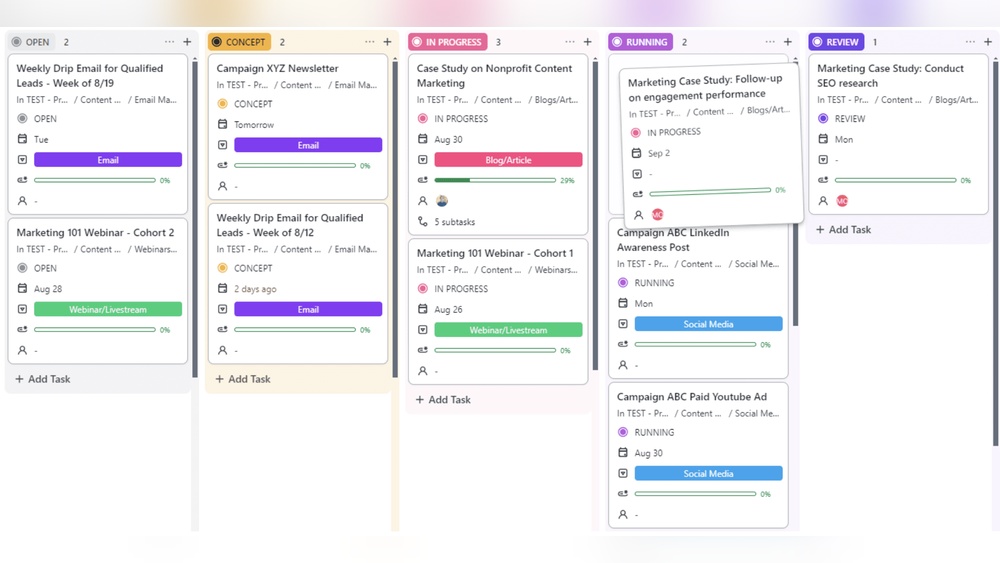
View your schedule your way. ClickUp offers multiple views to fit different needs and preferences.
| View Type | Description |
|---|---|
| List View | Simple, detailed list of tasks and deadlines |
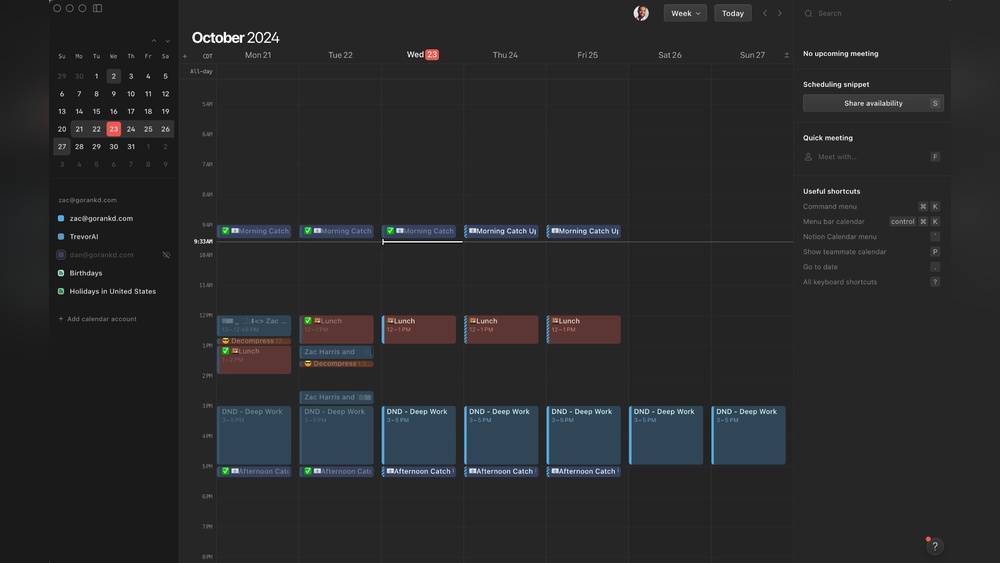
| Calendar View | Visual timeline of tasks by date |
| Board View | Kanban style for easy task movement |
Switch views anytime to match your current focus or project style.
Integration With Ai Notetaker: Enhancing Meeting Follow-ups And Action Items
Meetings generate ideas and tasks. ClickUp’s AI Notetaker captures meeting notes automatically. It highlights key points and creates follow-up tasks without manual input.
- Records transcripts and summaries
- Extracts action items instantly
- Keeps meeting outcomes linked to schedules
Dynamic People Fields: Automating Resource Allocation And Collaboration
Assigning tasks is faster with Dynamic People Fields. This feature auto-updates task owners based on availability and skill set.
- Automates team member assignment
- Balances workload among resources
- Improves collaboration and accountability
Pricing And Affordability Breakdown
ClickUp offers a variety of pricing plans to fit different needs and budgets. Understanding these plans helps you choose the right option for your dynamic scheduling needs. Each plan includes different features that impact how effectively you can manage tasks and projects.
Overview Of Clickup Pricing Plans And What They Include
ClickUp has several pricing tiers designed for individuals, teams, and businesses. The main plans are:
| Plan | Price (per user/month) | Key Features Included |
|---|---|---|
| Free | $0 | Unlimited tasks, 100MB storage, 2FA, Integrations |
| Unlimited | $5 | Unlimited storage, Unlimited integrations, Goals, Time tracking |
| Business | $12 | Advanced automation, Custom permissions, Workload view |
| Enterprise | Custom pricing | White labeling, Advanced security, Dedicated support |
Value For Money: Comparing Features Across Plans
Each plan offers a different set of tools for dynamic scheduling. The Free plan covers basic needs but limits storage and integrations.
The Unlimited plan adds essential features like goals and time tracking. This improves scheduling flexibility and task management.
The Business plan is best for teams needing advanced automation and workload views. It helps to better allocate resources and adapt to changes quickly.
Enterprise suits large organizations requiring top-level security and support. It offers full customization to fit complex workflows.
Free Vs Paid Tiers: What Dynamic Scheduling Features Are Accessible
- Free Tier: Basic task scheduling, limited storage, and simple integrations. Good for personal use or small projects.
- Paid Tiers: Access to advanced dynamic scheduling tools such as automation, workload balancing, and custom views.
- Paid plans support AI-powered planning and real-time updates, improving adaptability.
- Higher tiers allow multiple users and complex project structures.
The choice depends on your team size and scheduling complexity. Paid plans offer more control and efficiency.

Credit: thebusinessdive.com
Pros And Cons Based On Real-world Usage
ClickUp’s dynamic scheduling features offer powerful ways to manage tasks and time. Users experience both clear benefits and some challenges. Understanding these helps decide if ClickUp fits your workflow.
Advantages: Increased Flexibility, Better Task Management, And Focus
Increased Flexibility stands out as a key benefit. ClickUp adjusts schedules based on changing priorities and new tasks. This means less manual rescheduling and more time saved.
The better task management comes from features like recurring tasks, customizable views, and automated updates. Users can switch between List, Kanban, and Calendar views easily. This helps track progress and deadlines effectively.
Dynamic scheduling also improves focus. By breaking down large projects into smaller tasks, it reduces overwhelm. Reminders and alerts keep users on track without constant checking.
Challenges: Complexity, Learning Curve, And Potential Overwhelm
The biggest challenge is the tool’s complexity. New users find many features to explore, which can feel overwhelming at first.
The learning curve requires time and effort. Mastering dynamic scheduling and automation needs patience. Some users need days or weeks to feel comfortable.
Potential overwhelm happens if too many tasks or automations run simultaneously. Without proper setup, schedules can become confusing or cluttered.
User Feedback Highlights: Success Stories And Common Pitfalls
| Success Stories | Common Pitfalls |
|---|---|
|
|
Real users agree: ClickUp’s dynamic scheduling works well once learned. It fits especially well in fast-changing environments or for users needing structure and adaptability.
Ideal Users And Use Cases For Clickup Dynamic Scheduling
ClickUp’s dynamic scheduling adapts to changing priorities and resources. It suits a variety of users who need flexible, real-time task management. The feature helps improve focus, organization, and productivity in fast-moving environments. Different groups benefit from its agility and smart automation.
Project Managers And Teams Needing Agile Scheduling
Project managers often face shifting deadlines and resource changes. ClickUp’s dynamic scheduling updates tasks automatically to fit new priorities.
- Adjusts timelines based on task progress and availability
- Supports collaboration with real-time schedule updates
- Helps teams stay aligned and avoid downtime
Teams managing complex projects gain from the feature’s flexibility and visibility. It reduces manual rescheduling and keeps everyone on track.
Individuals With Adhd: Leveraging Features For Focus And Organization
People with ADHD benefit from tools that reduce overwhelm and improve focus. ClickUp’s dynamic scheduling offers:
- Clear task prioritization that changes as needed
- Reminders and notifications that adapt to progress
- Visual timelines that make planning simpler
This helps users break work into manageable steps and avoid distractions. The system’s adaptability reduces stress and supports consistent productivity.
Businesses Operating In Dynamic Environments Like It And Manufacturing
IT and manufacturing sectors face constant changes in workflow and resources. ClickUp’s dynamic scheduling:
| Benefit | Impact |
|---|---|
| Automatic task reallocation | Minimizes delays during unexpected changes |
| Real-time updates | Keeps all teams informed instantly |
| Resource optimization | Reduces downtime and improves efficiency |
These features allow businesses to maintain smooth operations despite frequent disruptions.
Freelancers And Small Teams Requiring Flexible Task Management
Freelancers and small teams often juggle multiple roles. ClickUp’s dynamic scheduling offers:
- Easy adjustments to deadlines and priorities
- Simple visual task boards for quick overviews
- Automation to reduce manual planning efforts
This flexibility helps manage workloads effectively and meet client demands without stress.
Maximizing Productivity With Clickup Dynamic Scheduling
ClickUp’s Dynamic Scheduling adapts your tasks and plans automatically. It shifts deadlines and priorities based on changes. This helps keep your work on track without manual updates.
Dynamic Scheduling suits fast-changing projects and busy workflows. It reduces downtime by adjusting tasks to new conditions. Users save time and avoid stress from rescheduling tasks themselves.
Tips For Setting Up Dynamic Scheduling Efficiently
- Start Small: Begin with a few key projects to test dynamic scheduling.
- Set Clear Priorities: Assign task priorities to help ClickUp adjust schedules properly.
- Use Dependencies: Link tasks so changes in one update related tasks automatically.
- Review Regularly: Check your schedule daily to confirm adjustments fit your needs.
- Customize Notifications: Set alerts for schedule changes to stay informed.
Combining Dynamic Scheduling With Templates For Adhd And Neurodivergent Users
Templates bring structure and consistency to your workflow. Pairing them with dynamic scheduling helps manage distractions and changing focus.
Use templates that break work into small, clear steps. Dynamic scheduling will adjust timing but keep the task order intact.
| Benefit | How It Helps |
|---|---|
| Routine | Templates create predictable task patterns. |
| Flexibility | Dynamic scheduling shifts deadlines without losing structure. |
| Focus | Small, clear tasks reduce overwhelm and improve concentration. |
Avoiding Common Set-up Mistakes To Prevent Overwhelm
- Don’t Overload Tasks: Keep your task list manageable and clear.
- Avoid Complex Dependencies: Use simple links to prevent confusion.
- Limit Notifications: Too many alerts can increase stress.
- Test Changes Gradually: Adjust settings step-by-step, not all at once.
- Keep Priorities Updated: Ensure task priority reflects your current goals.
Leveraging Visual Progress Tracking And Reminders
Visual tools in ClickUp help track progress and keep focus on goals. Use boards, timelines, and calendars to see task status at a glance.
- Color-Coded Status: Quickly spot overdue or high-priority tasks.
- Progress Bars: Show task completion percentage visually.
- Automated Reminders: Receive alerts before deadlines or key milestones.
- Daily and Weekly Views: Plan work effectively by reviewing upcoming tasks.
These features reduce missed deadlines and keep motivation high.
Conclusion: Is Clickup Dynamic Scheduling Right For You?
ClickUp’s Dynamic Scheduling offers a flexible way to manage tasks and projects. It adjusts your plans automatically based on changes and new information. This feature helps teams and individuals stay organized without constant manual updates. Understanding its benefits and limitations can guide your decision to use it effectively.
Summary Of Key Benefits And Considerations
- Automatic Adjustments: Schedules update in real-time with task changes or new priorities.
- Time Savings: Reduces manual rescheduling, freeing time for important work.
- Improved Flexibility: Adapts to unexpected changes, such as resource availability or urgent tasks.
- Multiple Views: Supports calendar, list, and Kanban views for better task visualization.
- Team Collaboration: Keeps everyone aligned with live updates and shared schedules.
- Consideration: May require initial setup time to customize for specific workflows.
- Learning Curve: Users new to ClickUp might need time to explore dynamic features fully.
Final Recommendations Based On User Needs And Preferences
ClickUp Dynamic Scheduling suits users who:
- Handle multiple projects with changing priorities.
- Need to save time on manual planning.
- Value team coordination and clear task updates.
- Prefer flexible task views like calendar and Kanban.
It may be less ideal for those who:
- Work on very simple, static tasks without many changes.
- Prefer minimal tool features or very basic scheduling.
Next Steps: Getting Started With Clickup’s Dynamic Scheduling
- Sign up or log in at
https://clickup.com/. - Create a new project or select an existing one.
- Enable dynamic scheduling in your task settings.
- Set task durations, priorities, and dependencies.
- Use calendar or list views to monitor your schedule.
- Adjust tasks as needed and watch your schedule update automatically.
- Explore built-in reminders and AI notetaker for better task tracking.
Start simple, then customize as you learn. Dynamic scheduling helps keep work clear and flexible.

Credit: www.creatio.com
Frequently Asked Questions
What Is Dynamic Scheduling?
Dynamic scheduling adapts plans based on real-time changes like new tasks or resource shifts. It improves efficiency and reduces downtime, especially in fast-changing environments such as project management, manufacturing, and IT operations.
How To Auto Schedule In Clickup?
To auto schedule in ClickUp, enable the Automations feature, set task dependencies, and use the ClickUp Scheduler. This dynamically adjusts task dates based on changes, optimizing your project timeline effortlessly.
Is Clickup Good For Adhd?
ClickUp suits ADHD by breaking tasks into subtasks, offering customizable views, reminders, and ADHD-friendly templates. It boosts focus and reduces overwhelm but may feel complex initially. Tailoring ClickUp enhances structure and motivation, making it a strong tool for ADHD task management and organization.
Does Clickup Do Scheduling?
Yes, ClickUp offers scheduling features like task due dates, calendar views, and automated recurring tasks to organize your workflow effectively.
Conclusion
ClickUp’s dynamic scheduling features help you stay organized and flexible. They adjust your tasks as priorities change. This means less stress and more focus on what matters. You can plan, track, and update projects easily in one place. Teams work better together with clear task assignments and deadlines. Explore how ClickUp can simplify your workflow by visiting this link. Start managing your time smarter and get things done more smoothly.