Openproject Vs Clickup: Ultimate Battle for Project Management Supremacy
Looking for the best way to manage your projects and boost your team’s productivity? You’ve probably come across OpenProject and ClickUp—two popular tools that promise to organize your tasks and streamline collaboration.
But which one really fits your needs? Whether you want a simple, open-source solution or an all-in-one powerhouse that replaces multiple apps, this comparison will help you decide. By the end of this article, you’ll know exactly which platform can save you time, money, and headaches. Ready to find out which project management tool suits your style? Let’s dive in! If you want to explore ClickUp right away, check it out here: ClickUp — your all-in-one workspace that brings AI, tasks, chats, and more into perfect harmony.

Credit: www.reddit.com
Introduction To Openproject And Clickup
Choosing the right project management tool is key for team success. OpenProject and ClickUp are two popular options. Both offer strong features but serve different user needs. Understanding their purpose and core functions helps in making an informed choice. This section introduces each platform and explains why comparing them matters.
Overview Of Openproject: Purpose And Core Functionality
OpenProject is an open-source project management software. It focuses on collaboration, task tracking, and project planning. Teams use it to manage projects with clear workflows and timelines.
- Task management with customizable statuses and priorities
- Robust Gantt charts for timeline visualization
- Issue tracking and bug reporting
- Time tracking and cost reporting
- Wiki and document management for knowledge sharing
- Strong support for agile and traditional project methods
OpenProject suits organizations that prefer open-source tools with strong project control and transparency.
Overview Of Clickup: Purpose And Core Functionality
ClickUp is an all-in-one project management platform. It helps teams organize work, collaborate, and meet deadlines in one place. ClickUp combines tasks, docs, chat, and project tracking seamlessly.
| Main Features | Description |
|---|---|
| All-in-One Workspace | Integrates tasks, docs, wikis, and project tracking |
| Gantt Charts | Visualize timelines and task dependencies |
| Collaboration Tools | Facilitates real-time team communication |
| Customization | Flexible workflows and dashboards for diverse needs |
| Task Management | Organize tasks with lists, statuses, priorities, deadlines |
| Integration | Connects with many third-party apps |
ClickUp fits teams needing a centralized, customizable platform with strong collaboration features.
Why Comparing These Two Project Management Tools Matters
Both OpenProject and ClickUp improve project visibility and team coordination. Yet, they serve different workflows and team types.
- OpenProject appeals to teams valuing open-source and detailed project control.
- ClickUp suits teams wanting an all-in-one, flexible workspace.
- Understanding differences helps choose a tool that fits your team size and style.
- Choosing the right tool boosts productivity and reduces tool switching.
Comparing features, pricing, and usability guides you to the best project management solution.

Credit: www.youtube.com
Key Features That Set Openproject Apart
OpenProject stands out as a project management tool with unique features tailored for detailed planning, team collaboration, and security. Its design supports transparency and flexibility, catering to diverse project needs. This section explores the core aspects that differentiate OpenProject from other platforms like ClickUp.
Comprehensive Project Planning And Timeline Management
OpenProject offers a clear and structured approach to project planning. It provides:
- Gantt charts to visualize project timelines and task dependencies.
- Milestone tracking to monitor critical deadlines.
- Work package management for breaking down complex projects into manageable parts.
These tools help teams keep projects on schedule and ensure tasks align with overall goals.
Robust Collaboration Tools For Team Transparency
OpenProject fosters open communication and teamwork through features such as:
- Shared project timelines visible to all team members.
- Real-time task updates and status changes.
- Integrated forums and wiki pages for knowledge sharing.
- Commenting on tasks to clarify details and provide feedback.
This transparency improves team alignment and reduces misunderstandings.
Advanced Security And Privacy Controls
OpenProject ensures data safety with strong security measures, including:
- Role-based access control to limit data visibility.
- Secure hosting options, including on-premises deployment.
- Compliance with privacy standards to protect sensitive information.
These controls give organizations confidence in managing confidential projects.
Open-source Advantage: Customization And Community Support
As an open-source platform, OpenProject provides benefits that proprietary tools lack:
- Customization: Users can modify the software to fit specific workflows and needs.
- Community Support: A large, active user base contributes plugins, fixes, and improvements.
- Transparency: The source code is publicly available, ensuring trust and flexibility.
This open nature allows organizations to adapt OpenProject deeply and access ongoing community-driven innovation.
Key Features That Make Clickup Unique
ClickUp stands out with its powerful features designed to centralize work and boost productivity. Its tools help teams manage projects smoothly while adapting to different workflows. The platform combines task management, documentation, and goal tracking in one place. Customization and automation options make it flexible and efficient. Integration with many apps enhances teamwork and simplifies complex tasks.
All-in-one Workspace Integrating Tasks, Docs, And Goals
ClickUp offers a unified workspace where teams handle tasks, documents, wikis, and project goals together. This reduces the need to switch between apps, saving time and avoiding confusion.
- Tasks: Organize work with lists, priorities, and deadlines.
- Docs and Wikis: Create and share knowledge without leaving the platform.
- Goals: Track progress and align team efforts toward targets.
The centralized design helps keep all project information accessible and up-to-date.
Highly Customizable Workflows And Views
ClickUp adapts to various project styles through flexible workflows and multiple view options. Users can tailor dashboards and task statuses to fit their needs.
- Custom Statuses: Define task stages that match your process.
- Views: Choose from List, Board, Box, or Gantt chart to visualize work.
- Dashboards: Build personalized summaries with widgets and reports.
This customization allows teams from different industries to work comfortably and efficiently.
Powerful Automation To Streamline Repetitive Tasks
ClickUp includes automation features that save time by handling routine actions automatically.
- Auto-assign tasks based on status changes.
- Send notifications when deadlines approach.
- Move or update tasks triggered by specific events.
These automations reduce manual work and minimize errors in task management.
Rich Integrations Ecosystem For Enhanced Productivity
ClickUp connects with many popular tools, creating a smooth workflow across apps.
| Integration Type | Examples |
|---|---|
| Communication | Slack, Microsoft Teams |
| File Sharing | Google Drive, Dropbox |
| Development Tools | GitHub, GitLab |
| Calendar & Email | Google Calendar, Outlook |
Integrations ensure data flows smoothly between tools, improving team collaboration and productivity.
Pricing And Affordability Breakdown
Understanding the pricing structure of OpenProject and ClickUp helps teams choose the best fit. Cost matters for small startups and large enterprises alike. Both platforms offer tiered pricing with different features. This section breaks down their pricing plans and value for money.
Openproject Pricing Tiers And Value Proposition
OpenProject offers clear pricing tiers based on team size and feature needs. The plans include:
- Community Edition: Free, open-source, self-hosted with basic features.
- Cloud Basic: Small teams get essential project management tools.
- Cloud Plus: Advanced features for growing teams.
- Enterprise: Custom pricing for large organizations with premium support.
OpenProject focuses on transparency and flexibility. The cloud plans include regular updates and support. The self-hosted option suits teams with IT resources.
| Plan | Price (per user/month) | Main Features |
|---|---|---|
| Community Edition | Free | Basic project management, self-hosted |
| Cloud Basic | €7.95 | Task management, project timelines, support |
| Cloud Plus | €14.95 | Advanced features, analytics, priority support |
| Enterprise | Custom | Full features, custom integrations, dedicated support |
Clickup Pricing Plans And Cost Effectiveness
ClickUp provides several pricing plans designed for different team sizes and needs. The plans include:
- Free Plan: Basic features with unlimited users and tasks.
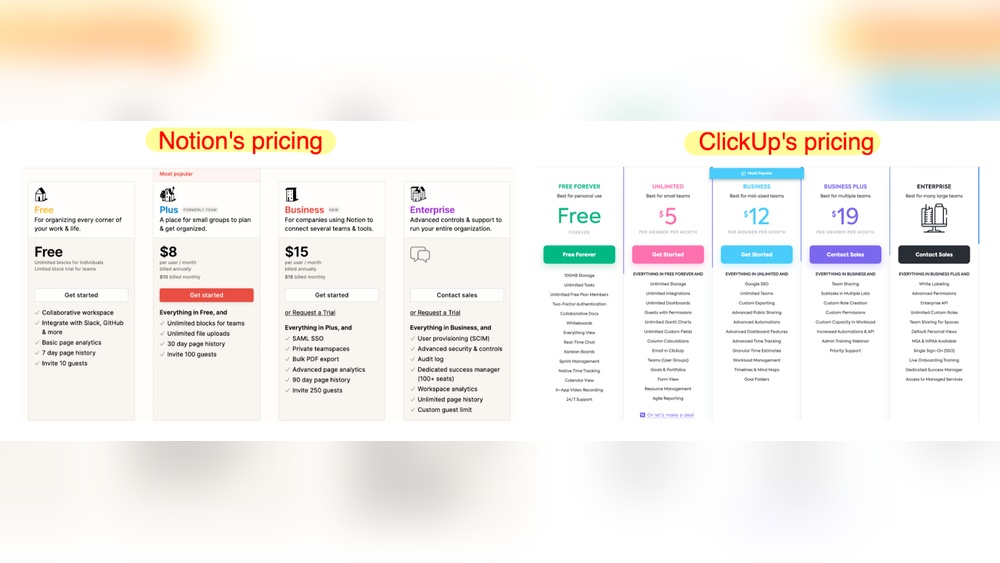
- Unlimited Plan: $5 per user/month for unlimited storage and integrations.
- Business Plan: $12 per user/month with advanced automation and reporting.
- Enterprise Plan: Custom pricing with enhanced security and support.
ClickUp’s free plan offers generous features, making it affordable for startups. Paid plans add more tools and customization options.
| Plan | Price (per user/month) | Main Features |
|---|---|---|
| Free | $0 | Unlimited tasks, users, 100MB storage |
| Unlimited | $5 | Unlimited storage, integrations, dashboards |
| Business | $12 | Advanced automation, goals, portfolios |
| Enterprise | Custom | Security, white labeling, premium support |
Comparative Analysis: Which Offers Better Roi For Different Teams
OpenProject suits teams needing strong project planning and self-hosting. The free Community Edition is ideal for tech-savvy users with IT support.
ClickUp fits teams wanting an all-in-one platform with many integrations. Its free plan supports small teams with essential tools.
- Small Teams: ClickUp’s free and Unlimited plans offer great value.
- Mid-Sized Teams: OpenProject Cloud Plus and ClickUp Business deliver advanced features.
- Large Enterprises: Both offer Enterprise plans; choice depends on support and customization needs.
Consider team size, feature needs, and hosting preferences to find the best ROI.
Pros And Cons Based On Real-world Usage
Choosing the right project management tool depends on understanding its real-world strengths and weaknesses. Both OpenProject and ClickUp offer unique features that suit different team needs. Examining their pros and cons from actual users’ perspectives helps reveal practical benefits and challenges.
Strengths And Limitations Of Openproject
OpenProject excels in providing a transparent and structured project management environment. It is favored for its strong focus on traditional project management with tools like Gantt charts, task tracking, and time management.
- Strengths:
- Robust Gantt chart functionality for clear timeline visualization.
- Strong support for classic project management methods.
- Open-source option allows customization and self-hosting.
- Effective issue tracking and project documentation.
- Limitations:
- Interface can feel less modern or intuitive compared to newer tools.
- Limited built-in communication features; external tools often needed.
- Customization options are fewer and less flexible than competitors.
- Learning curve may be steep for users unfamiliar with traditional PM software.
Strengths And Limitations Of Clickup
ClickUp provides a highly flexible and all-in-one workspace that combines tasks, docs, and communication. It suits teams seeking an adaptable platform with extensive integrations and customization.
- Strengths:
- All-in-one workspace merges project tracking, docs, and chat.
- Highly customizable workflows and dashboards.
- Robust collaboration tools support real-time communication.
- Integration with many third-party apps boosts productivity.
- Visual tools like Gantt charts improve deadline management.
- Limitations:
- Interface can be overwhelming for new users.
- Some advanced features require paid plans.
- Customization options may lead to inconsistent setups without clear guidelines.
- Performance may slow down with very large projects.
User Experience Insights And Common Feedback
Users appreciate OpenProject for its reliability and strong project structure. Teams managing traditional projects find it stable and clear. Yet, some users mention difficulty adjusting to its dated interface and limited communication tools.
ClickUp receives praise for flexibility and all-in-one design. Many users highlight how it reduces the need for multiple apps. Challenges reported include a learning curve and occasional interface clutter. Users recommend investing time in setup to maximize efficiency.
| Aspect | OpenProject | ClickUp |
|---|---|---|
| Ease of Use | Moderate; traditional design | Complex; highly customizable |
| Collaboration | Basic; external tools needed | Advanced; built-in chat and comments |
| Customization | Limited | Extensive |
| Performance | Consistent for small to medium projects | May slow with large datasets |
| Integration | Few third-party integrations | Wide range of app integrations |
Ideal Users And Use Cases For Openproject
OpenProject suits users seeking a powerful project management tool focused on collaboration and detailed planning. It works best for teams that need transparency and control over complex projects. The platform’s open-source nature attracts users who want flexibility and customization. Its robust features support diverse project types, especially those requiring strict process adherence and technical oversight.
Best Fit For Large Enterprises And Technical Teams
OpenProject is designed to meet the needs of large enterprises and technical teams. These groups benefit from its structured project planning and comprehensive tracking tools. The software handles:
- Multiple projects with complex dependencies
- Detailed time tracking and budgeting
- Role-based access for secure collaboration
- Advanced issue and risk management
Technical teams appreciate OpenProject’s support for agile and traditional methodologies. It helps coordinate developers, engineers, and IT professionals with clear task assignments and progress monitoring.
Suitability For Open-source Advocates And Customization Seekers
OpenProject attracts users who prefer open-source software. Its source code is publicly available, allowing:
- Full control over software modifications
- Customization of workflows and interfaces
- Integration with existing in-house tools
This flexibility suits organizations with specific needs that off-the-shelf products cannot fulfill. OpenProject’s community-driven development ensures continuous improvements and security updates.
Scenarios Where Openproject Excels
OpenProject shines in scenarios demanding detailed documentation and structured processes. Ideal use cases include:
- Construction and engineering projects requiring strict timelines and compliance
- Software development teams needing bug tracking and sprint planning
- Research projects with complex task dependencies and reporting needs
- Organizations focused on transparent workflows and audit trails
The software’s built-in Gantt charts, wiki pages, and time reports help teams stay organized and aligned.
Ideal Users And Use Cases For Clickup
ClickUp suits teams needing a flexible, all-in-one platform. It supports diverse workflows and industries. Teams benefit from its centralized workspace and customizable tools. ClickUp fits both simple and complex project needs. Understanding its ideal users helps select the right tool for your team.
Optimal For Small To Medium Teams Seeking Flexibility
ClickUp works best for small to medium-sized teams that require adaptability. Its flexible workflows allow easy changes as projects evolve. Teams can customize task views, statuses, and dashboards to match their style.
This flexibility helps teams avoid rigid structures. Users can switch between list, board, and calendar views. It adapts to different project types, from marketing campaigns to software development.
- Teams with 5-50 members
- Projects needing varied task management
- Groups preferring customizable workflows
Use Cases Benefiting From Clickup’s Automation And Integration
ClickUp shines in environments that depend on automation and third-party integrations. Automations reduce manual tasks, saving time and avoiding errors.
Integration with apps like Slack, Google Drive, and Zoom connects work tools smoothly. Automated notifications and task updates keep everyone aligned without constant check-ins.
| Use Case | Automation Benefit | Integration Advantage |
|---|---|---|
| Marketing Teams | Auto-assign leads and set deadlines | Sync with email and CRM tools |
| Software Development | Trigger testing tasks after coding | Connect with GitHub and Jira |
| Customer Support | Auto-update ticket status | Integrate with Zendesk and Slack |
Environments Where Clickup Drives Maximum Efficiency
ClickUp boosts productivity in settings needing clear communication and task tracking. It works well for teams managing multiple projects at once.
Its real-time collaboration tools keep everyone on the same page. Visual tools like Gantt charts help spot delays early. ClickUp also supports remote and hybrid teams with its cloud-based system.
- Creative agencies juggling client projects
- IT teams handling sprints and releases
- Consulting firms tracking deliverables
Teams that value transparency and deadline control gain the most from ClickUp.
Final Verdict: Choosing Between Openproject And Clickup
Choosing the right project management tool depends on your team’s unique needs. Both OpenProject and ClickUp offer strong features but serve different purposes. Understanding their strengths helps pick the best fit.
Summary Of Comparative Strengths
| Feature | OpenProject | ClickUp |
|---|---|---|
| Project Planning | Robust Gantt charts and timeline views | Advanced Gantt charts with task dependencies |
| Collaboration | Strong open-source community and issue tracking | Real-time updates, chat, and docs integration |
| Customization | Focus on traditional project management | Highly flexible workflows and dashboards |
| Integrations | Limited compared to proprietary tools | Wide range of third-party app integrations |
| Pricing | Open-source with paid enterprise options | Free trial with tiered pricing plans |
Decision Factors Based On Team Size, Budget, And Workflow Needs
Team Size:
- Small to medium teams benefit from ClickUp’s all-in-one platform.
- Large teams with complex projects may prefer OpenProject’s structured approach.
Budget:
- OpenProject offers a free open-source version, good for tight budgets.
- ClickUp’s pricing scales with features; free trial available to test.
Workflow Needs:
- Agile and flexible workflows fit well with ClickUp’s customization.
- Traditional project management suits OpenProject’s design.
Tips For Trialing Both Tools To Make An Informed Choice
- Define key project goals before starting trials.
- Test core features
- Invite team members to try and give feedback.
- Evaluate ease of use and how well each tool fits your workflow.
- Check integration needs with your existing software stack.
- Monitor support and community resources for quick problem solving.
Trial periods help see which platform feels natural and boosts productivity.

Credit: www.youtube.com
Frequently Asked Questions
Is There Anything Better Than Clickup?
Top ClickUp alternatives include Monday. com for visual workflows, Asana for simple task management, Notion for flexible workspaces, Trello for Kanban boards, Wrike for complex projects, and Smartsheet for spreadsheet-style planning. The best tool depends on your team’s specific needs and workflow preferences.
What Is Better Than Openproject?
Monday. com offers more visual customization, Asana provides clean task management, and Notion combines flexible docs with tasks. Choose based on your team’s needs.
Is Openproject Really Free?
OpenProject offers a free Community Edition with essential features for unlimited users. Advanced features require paid plans.
What Is Openproject Used For?
OpenProject is used for planning, tracking, and managing projects collaboratively. It supports task management, timelines, and team communication.
Conclusion
Both OpenProject and ClickUp offer solid project management tools. OpenProject suits teams needing open-source flexibility. ClickUp provides an all-in-one workspace with strong customization. Teams benefit from ClickUp’s integrated docs, Gantt charts, and communication features. Its ability to replace many apps saves time and money. Choose based on your team size and workflow needs. Explore ClickUp further to see if it fits your projects. Learn more about ClickUp’s features and pricing here.