Newoldstamp Vs Wisestamp: Ultimate Email Signature Showdown
Looking to create a professional email signature that truly represents your brand? You might be torn between two popular options: Newoldstamp and Wisestamp.
Both promise to boost your brand consistency with just a few clicks, but which one fits your needs better? Whether you want simplicity, powerful customization, or seamless integration, understanding their differences can save you time and effort. Keep reading to discover how Newoldstamp stands out and why it might be the perfect choice for your email signature needs. Ready to explore? Check out Newoldstamp here: Newoldstamp.
Introduction To Newoldstamp And Wisestamp
Email signatures shape first impressions and strengthen brand identity. Choosing the right tool to create these signatures matters for every business. Newoldstamp and Wisestamp are two popular options that help users design professional email signatures easily. Both tools offer customization features, but each has unique strengths and purposes.
Overview Of Newoldstamp And Its Purpose
Newoldstamp focuses on creating professional email signatures that boost brand consistency. It allows users to design signatures quickly with a few clicks. The platform supports editing HTML templates and offers a wide range of fonts and styles. Newoldstamp is ideal for businesses wanting uniform signatures across teams.
- Easy-to-use editor for custom signatures
- Supports HTML email signature templates
- Ensures consistent branding across emails
- Suitable for small to large teams
Overview Of Wisestamp And Its Purpose
Wisestamp provides tools to create personalized email signatures with rich customization options. Users can add social links, banners, and disclaimers. It supports HTML editing and various fonts to match brand identity. Wisestamp suits professionals and companies looking for detailed signature customization.
- Rich customization including social icons and banners
- HTML signature template editing
- Works well for individuals and businesses
- Focus on personal branding and marketing
Why Comparing These Two Email Signature Tools Matters
Choosing between Newoldstamp and Wisestamp impacts brand presentation and marketing. Each tool offers different features and pricing plans. Comparing helps identify which fits your needs and budget. Both tools lead in email signature customization but serve slightly different purposes.
| Feature | Newoldstamp | Wisestamp |
|---|---|---|
| Primary Focus | Brand consistency for teams | Personalized signatures with marketing options |
| Customization | HTML templates, fonts, simple editor | HTML editing, social icons, banners |
| Best For | Businesses needing uniform signatures | Individuals and businesses wanting rich features |
| Ease of Use | Quick setup with few clicks | More detailed customization options |

Credit: newoldstamp.com
Key Features That Set Newoldstamp Apart
Newoldstamp stands out by offering a strong blend of design flexibility, easy integration, and insightful tracking. It focuses on helping businesses keep their brand consistent across all emails. The platform simplifies creating professional email signatures that reflect company identity clearly and quickly.
Customizable Professional Templates For Branding Consistency
Newoldstamp provides a wide range of professional email signature templates. Each template can be customized to match your brand’s colors, fonts, and logos. This ensures every employee’s email looks consistent and polished.
- Variety of modern, clean designs
- Easy editing of text, images, and social icons
- Supports custom HTML for advanced tweaks
- Templates adapt well to desktop and mobile devices
This level of customization helps maintain brand identity across all email communications, making your messages more trustworthy.
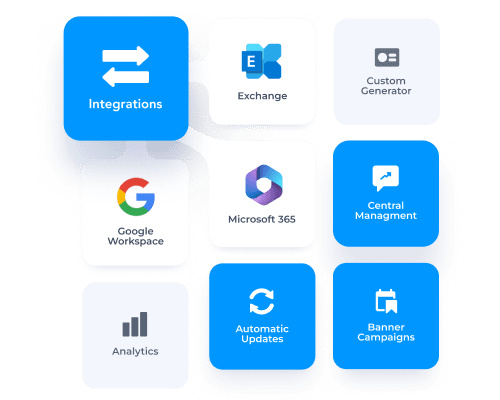
Seamless Integrations With Popular Email Platforms
Newoldstamp works smoothly with major email services. It supports platforms like:
- Gmail and Google Workspace
- Microsoft Outlook and Office 365
- Apple Mail
- Thunderbird
Integration happens quickly without technical hassle. Users can update signatures centrally, and changes apply instantly to all accounts. This saves time and ensures uniform signature updates across teams.
User-friendly Interface Designed For Quick Setup
The platform’s interface is clean and intuitive. Users can create or edit signatures in minutes. No design or coding skills are necessary.
- Select a template
- Customize with drag-and-drop tools
- Preview changes live
- Publish signatures instantly
This easy process suits businesses needing fast deployment. It reduces the learning curve and increases user adoption.
Advanced Analytics For Signature Performance Tracking
Newoldstamp offers detailed analytics to measure email signature impact. Track how recipients interact with your signature, such as:
| Metric | Description |
|---|---|
| Click-through Rates | Number of clicks on links and banners |
| Impressions | Emails sent with the signature |
| Engagement Trends | Activity over time for signature elements |
This data helps improve marketing efforts and ensures your email signatures deliver value beyond just contact details.
Distinctive Features Of Wisestamp
Wisestamp stands out with a variety of features that make email signature creation simple and effective. Its tools serve both individuals and businesses, offering flexibility and customization. The platform focuses on enhancing email signatures with social and promotional elements. Teams benefit from collaboration features that improve management and consistency.
Wide Range Of Personal And Company Signature Plans
Wisestamp provides multiple plans designed for both personal use and companies. Users can choose from:
- Individual plans for freelancers and professionals
- Business plans tailored for small to large teams
- Custom solutions for enterprises
Each plan includes various templates and options to fit different branding needs. This wide selection supports diverse email signature goals.
Rich Html Editing Tools For Signature Customization
Wisestamp offers advanced HTML editing tools that allow deep customization of signatures. Users can:
- Edit HTML code directly for precise design control
- Choose from multiple fonts, colors, and layouts
- Add images, logos, and clickable links
The editor is user-friendly, making customization accessible even for beginners. This flexibility ensures each signature matches brand identity perfectly.
Social Media And Promotional Banner Integration
Adding social media icons and promotional banners is effortless with Wisestamp. Features include:
- Integration of popular social network icons
- Option to add clickable promotional banners
- Support for seasonal or campaign-specific banners
This helps users promote content or special offers directly through their email signatures. Such integration increases engagement and brand reach.
Team Management And Collaboration Capabilities
Wisestamp supports team collaboration with tools designed for easy management:
| Feature | Description |
|---|---|
| Centralized Control | Manage all team signatures from one dashboard |
| Role Assignments | Assign roles like admin, editor, or viewer |
| Template Sharing | Share approved templates across team members |
| Bulk Updates | Apply signature changes to all users simultaneously |
These features help maintain brand consistency and simplify signature updates for organizations.

Credit: www.wisestamp.com
Pricing And Affordability Breakdown
Understanding the pricing and affordability of email signature tools helps choose the best fit. Both Newoldstamp and Wisestamp offer plans tailored to different needs. This section breaks down their pricing tiers and compares their value for money.
Newoldstamp Pricing Tiers And Value For Money
Newoldstamp provides clear pricing tiers suitable for individuals and teams. The plans focus on brand consistency and easy signature management.
| Plan | Price (per user/month) | Key Features |
|---|---|---|
| Basic | $4 | Simple templates, basic customization |
| Pro | $6 | Advanced templates, team management |
| Enterprise | Custom pricing | Full branding, priority support |
Newoldstamp’s pricing is competitive for businesses aiming for professional and consistent email signatures. The tiered approach suits small teams and large companies alike.
Wisestamp Pricing Structure And Flexibility
Wisestamp offers flexible pricing plans with a focus on individual professionals and businesses.
| Plan | Price (per user/month) | Key Features |
|---|---|---|
| Free | $0 | Basic signature, limited templates |
| Pro | $6 | More templates, social icons |
| Teams | $9 | Team management, analytics |
Wisestamp gives users more flexibility with a free plan and team options. It fits freelancers and growing businesses well.
Comparing Cost-effectiveness For Different User Needs
Choosing between Newoldstamp and Wisestamp depends on user needs and budget.
- Individuals: Wisestamp’s free plan is great for basic use.
- Small teams: Newoldstamp’s Pro plan offers good value for brand consistency.
- Large businesses: Newoldstamp Enterprise provides customized solutions and support.
- Flexible budgets: Wisestamp’s tiered plans allow easy upgrades.
Both tools deliver cost-effective options. Newoldstamp leans toward team branding, while Wisestamp appeals to users needing flexible pricing and features.
Pros And Cons Based On Real-world Usage
Choosing the right email signature tool depends on real-world performance. Both Newoldstamp and Wisestamp offer unique benefits and have some drawbacks. Understanding their strengths and limitations helps make an informed choice. User reviews highlight practical insights beyond features and pricing.
Strengths And Limitations Of Newoldstamp
Newoldstamp excels in creating professional, brand-consistent email signatures quickly. It offers:
- Easy-to-use interface for fast setup
- Strong branding options with customizable templates
- Centralized management for teams
Limitations include:
- Less variety in creative design options
- Some advanced features require higher pricing plans
- Occasional issues with signature display on certain email clients
Strengths And Limitations Of Wisestamp
Wisestamp is known for its rich customization and creative signature options. Key strengths are:
- Wide range of templates and fonts
- HTML editing tools for custom designs
- Social media and promotional banner integration
Its limitations include:
- More complex setup for beginners
- Some users report occasional glitches with email clients
- Pricing can be high for small teams
User Experience Insights From Customer Reviews
| Aspect | Newoldstamp | Wisestamp |
|---|---|---|
| Ease of Use | Users find it simple and quick to create signatures. | Some users need time to learn all features. |
| Customization | Good for professional, clean designs. | Offers more creative and flexible options. |
| Customer Support | Responsive support with helpful guides. | Support quality varies; some report slow replies. |
| Value for Money | Better suited for businesses focused on branding. | Great for users wanting advanced customization. |
Overall, Newoldstamp appeals to users needing simplicity and brand consistency. Wisestamp fits those wanting deeper customization and creative control.
Credit: newoldstamp.com
Ideal Users And Use Cases For Each Tool
Choosing the right email signature tool depends on your specific needs and work style. Both Newoldstamp and Wisestamp offer strong customization options and branding features. Understanding who benefits most from each tool helps you make a smart choice. Below is a detailed look at ideal users and best use cases for both platforms.
Who Should Choose Newoldstamp And Why
Newoldstamp suits users focused on brand consistency across teams. It offers easy management of multiple signatures for companies. The tool shines in simple setup and quick deployment.
- Businesses needing uniform email signatures for large teams
- Marketing teams aiming to maintain brand identity
- Users who want fast signature updates without complex steps
Newoldstamp’s centralized control makes it ideal for organizations wanting professional, consistent signatures across all employees. Its user-friendly interface reduces setup time and errors.
Best Scenarios For Using Wisestamp
Wisestamp fits users seeking advanced customization and personal branding options. It offers a wide range of templates, fonts, and social media integrations.
- Freelancers and professionals building a personal brand
- Small businesses wanting creative, standout email signatures
- Users needing flexible, editable HTML signature templates
Wisestamp is great for those who want more design freedom and social links in their signatures. It helps create a unique look that represents individual style and skills.
Recommendations For Businesses, Freelancers, And Agencies
| User Type | Recommended Tool | Reason |
|---|---|---|
| Businesses | Newoldstamp | Centralized control for consistent branding across teams |
| Freelancers | Wisestamp | More creative options for personal branding |
| Agencies | Newoldstamp | Easy management of client signatures with team collaboration |
Each tool serves different purposes. Newoldstamp fits structured team environments. Wisestamp suits those valuing design flexibility.
Final Verdict: Which Email Signature Tool Wins?
Choosing between Newoldstamp and Wisestamp depends on your needs. Both tools excel in creating professional email signatures that boost brand consistency. They offer customization, easy editing, and support for various email clients.
Understanding their key differences and benefits helps make the right choice. Let’s explore what sets them apart and how to start with the best fit for you.
Summary Of Key Differences And Benefits
| Feature | Newoldstamp | Wisestamp |
|---|---|---|
| Customization | Advanced HTML editing, multiple fonts, and templates | Strong HTML editing, diverse fonts, and templates |
| User Interface | Simple and intuitive, easy for beginners | User-friendly with rich design options |
| Brand Consistency | Excellent for company-wide signature management | Good for individual and small team branding |
| Integration | Supports major email clients and platforms | Compatible with most email services and CRMs |
| Pricing | Affordable plans for small to large teams | Flexible pricing, suitable for freelancers to enterprises |
Making The Right Choice Based On Your Needs
Consider these factors to pick the best tool:
- Team Size: Newoldstamp fits larger teams needing uniform signatures.
- Customization: Both offer strong options; Newoldstamp is better for detailed HTML edits.
- Budget: Wisestamp offers flexible pricing for small businesses and freelancers.
- Ease of Use: Newoldstamp has a straightforward interface for quick setup.
- Integration Needs: Check your email and CRM compatibility before deciding.
Focus on what matters most: branding control, customization depth, and cost-effectiveness.
Tips For Getting Started With Your Selected Tool
- Sign Up: Create an account on the official website.
- Choose a Template: Pick a design that fits your brand style.
- Customize: Add logos, social links, and contact info.
- Test: Send test emails to check appearance across devices.
- Deploy: Roll out signatures company-wide or for individual use.
Use available tutorials and support resources. Keep your signature simple and professional for best impact.
Frequently Asked Questions
What Are The Main Differences Between Newoldstamp And Wisestamp?
Newoldstamp offers advanced team management and integrations, while Wisestamp focuses on individual customization. Newoldstamp suits businesses needing centralized control. Wisestamp is ideal for freelancers and small teams wanting easy-to-use templates and social media links.
Which Platform Is Better For Business Email Signatures?
Newoldstamp is better for businesses due to its robust admin controls and analytics. It supports large teams and multiple signatures. Wisestamp works well for small businesses or individuals prioritizing design flexibility over management features.
How Do Newoldstamp And Wisestamp Pricing Compare?
Newoldstamp pricing is competitive with scalable plans for teams and enterprises. Wisestamp offers affordable individual and company plans with fewer advanced features. Pricing depends on user needs, such as team size and required integrations.
Can Newoldstamp And Wisestamp Integrate With Other Tools?
Both platforms offer integrations with popular tools like Gmail, Outlook, and Google Workspace. Newoldstamp provides deeper integration options suited for enterprises. Wisestamp focuses on easy setup with common email clients and social media.
Conclusion
Both Newoldstamp and Wisestamp offer solid email signature solutions. Newoldstamp stands out for easy brand consistency and quick setup. Wisestamp provides strong customization with various templates. Your choice depends on your business needs and budget. Explore features carefully before deciding. Try Newoldstamp for professional email signatures that save time and look great. Learn more about Newoldstamp here.