Clickup Vs Anytype: Ultimate Comparison for Productivity Pros
Are you struggling to choose between ClickUp and Anytype for managing your projects and tasks? You’re not alone.
Both tools promise to boost your productivity, but they do it in very different ways. If you want a platform that replaces multiple apps with one powerful AI-driven workspace, ClickUp might be the game-changer you need. It combines tasks, docs, chat, and more, helping your entire team work smarter and faster. But how does it stack up against Anytype? Which one fits your unique workflow better? Keep reading to uncover the strengths and weaknesses of each, so you can make a decision that saves you time, money, and hassle. Ready to explore ClickUp’s all-in-one power? Check it out here: ClickUp.
Credit: clickup.com
Introduction To Clickup And Anytype
Choosing the right productivity tool matters for any team or individual. ClickUp and Anytype both aim to enhance how people manage tasks and information. Each has unique features and purposes. Understanding these will help decide which fits your workflow best.
Overview Of Clickup: Purpose And Core Functionality
ClickUp is an all-in-one productivity platform designed to replace many apps with one solution. It helps teams save time by keeping projects, chats, documents, and tasks in one place.
- Task Management: Create, assign, and track tasks with subtasks and deadlines.
- Project Planning: Use lists, boards, and timelines to visualize work.
- Collaboration: Real-time chat and document sharing keep teams aligned.
- Integration: Connects with many other tools to centralize work.
- AI Features: Automates routine work and helps organize tasks smartly.
ClickUp aims to make teamwork smoother by combining many features in one app.
Overview Of Anytype: Purpose And Core Functionality
Anytype focuses on personal knowledge management and privacy. It offers a flexible workspace to organize notes, tasks, and files without relying on the cloud.
- Decentralized Storage: Keeps data private and secure on your device.
- Modular Blocks: Build pages using different content blocks like text, images, and lists.
- Offline Access: Work anytime without internet connection.
- Customizable Structure: Adapt the workspace to fit your needs and style.
- Collaboration: Share and work with others while keeping control of your data.
Anytype suits users seeking control over their information in a private, flexible system.
Why Compare Clickup And Anytype? Understanding Productivity Needs
Both tools support productivity but serve different goals. ClickUp targets teams needing a unified platform for projects and communication. Anytype appeals to users wanting private, customizable knowledge management.
| Feature | ClickUp | Anytype |
|---|---|---|
| Main Focus | Team productivity and project management | Personal knowledge and data privacy |
| Data Storage | Cloud-based with integrations | Decentralized, device-based |
| Collaboration | Built-in chat and sharing | Selective sharing with privacy |
| Customization | Templates and views for tasks | Modular block system |
| Offline Use | Limited | Full offline access |
Understanding these differences helps pick a tool that fits your work style and priorities.
Unique Features That Set Clickup Apart
ClickUp stands out with features designed to handle diverse work needs in one place. It offers tools that combine task tracking, document creation, brainstorming, and team communication seamlessly. This makes it more than just a project management app. ClickUp adapts to different workflows and helps teams stay organized and productive.
All-in-one Platform: Combining Tasks, Docs, Whiteboards, And Chat
ClickUp integrates multiple work tools into a single platform. Users can manage tasks, write documents, collaborate on whiteboards, and chat with team members without switching apps.
- Tasks: Track to-dos, set due dates, and assign responsibilities.
- Docs: Create and share rich documents linked to tasks and projects.
- Whiteboards: Visualize ideas and workflows with interactive boards.
- Chat: Communicate instantly within projects to keep context clear.
This integration reduces app clutter and improves workflow efficiency.
Advanced Customization And Views For Complex Project Management
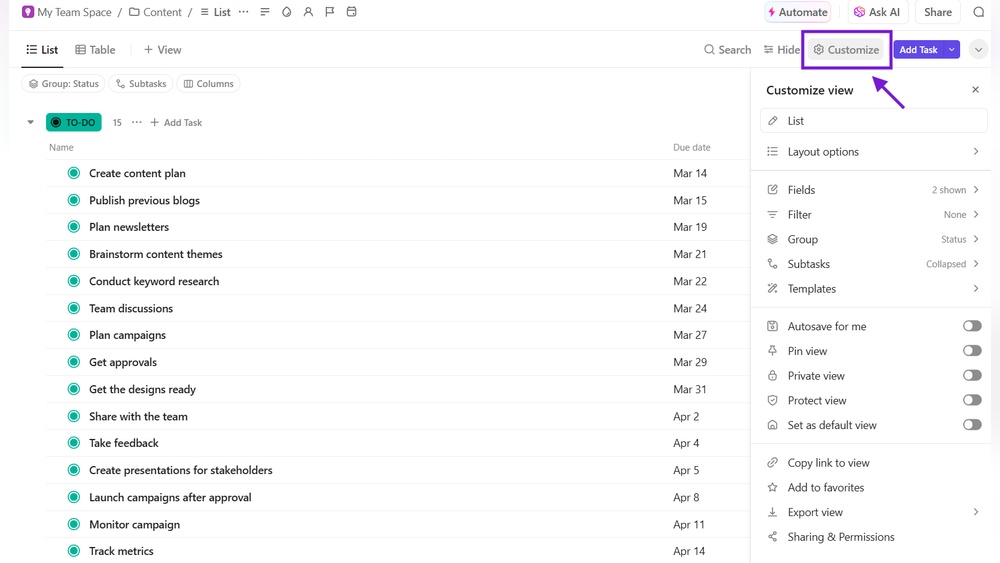
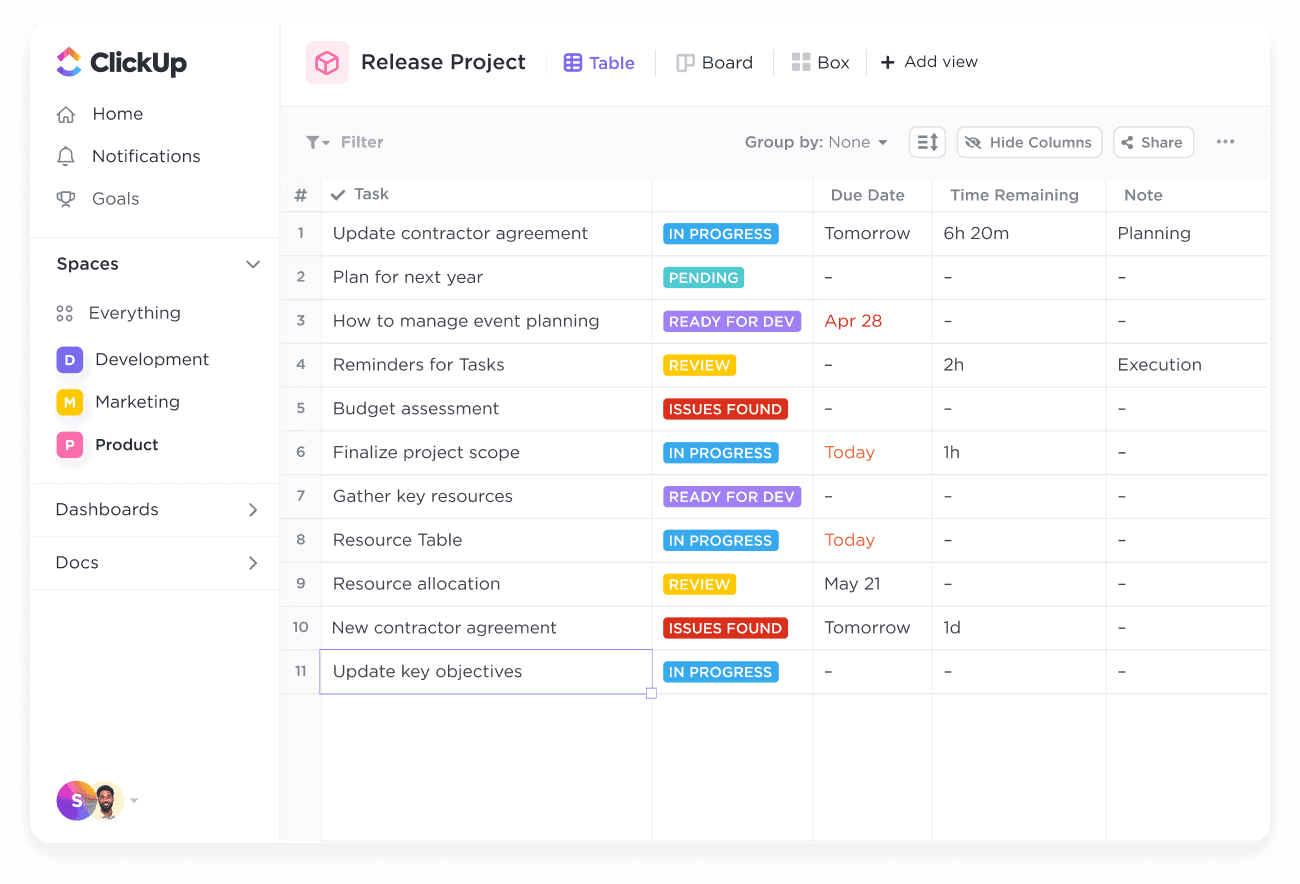
ClickUp offers several ways to view and customize projects to fit any team’s needs.
| View Type | Description |
|---|---|
| List View | Simple checklist style for straightforward task management. |
| Board View | Kanban-style boards for visual task tracking and progress. |
| Gantt View | Timeline charts to plan and track project deadlines. |
| Calendar View | Visualize tasks and deadlines on a monthly or weekly calendar. |
Users can customize statuses, priorities, and workflows. This flexibility supports complex projects with varying needs.
Clickup Brain Ai: Enhancing Productivity With Artificial Intelligence
ClickUp Brain AI uses artificial intelligence to help users work smarter and faster.
- Task Automation: Automates repetitive tasks to save time.
- Smart Suggestions: Offers ideas for task priorities and improvements.
- Content Generation: Assists in writing docs, emails, and messages.
These AI features reduce manual work and support clearer communication across teams.
Distinctive Features That Make Anytype Stand Out
Anytype offers unique features that appeal to users seeking more control and privacy. Its design focuses on secure, flexible productivity tools that differ from traditional platforms. The app blends note-taking, task management, and data privacy in one seamless experience.
Decentralized And Privacy-focused Productivity Management
Anytype prioritizes user privacy through a decentralized system. It stores data locally on your device, not on external servers. This reduces risks of data breaches or unauthorized access.
- Own your data completely without cloud dependency
- End-to-end encryption for all your notes and tasks
- Collaboration happens through secure peer-to-peer connections
This approach ensures your information stays private and under your control. It suits users who value confidentiality in their productivity tools.
Intuitive Interface For Note-taking And Task Organization
Anytype’s interface is clean and easy to navigate. It combines notes, tasks, and databases into a single workspace. Users can create linked pages that connect ideas naturally.
| Feature | Benefit |
|---|---|
| Drag-and-drop blocks | Easy content rearrangement without losing structure |
| Customizable templates | Quick setup for different project types |
| Rich media support | Add images, files, and links seamlessly |
The simple layout reduces distractions. Users can focus on organizing ideas and tracking tasks efficiently.
Offline-first Approach For Seamless Work Anywhere
Anytype works fully offline, syncing data only when online. This offline-first model allows uninterrupted work without internet access.
- Create and edit notes anytime
- Manage tasks without delays
- Sync changes automatically once connected
This feature is valuable for users who travel or have unstable internet. It guarantees productivity without relying on constant connectivity.
Pricing And Affordability Analysis
Choosing the right productivity tool depends heavily on cost and value. Pricing affects long-term use and accessibility. This section compares ClickUp and Anytype pricing to help decide which fits your budget and needs. Both offer different models targeting various users.
Clickup Pricing Tiers And Value For Money
ClickUp provides a clear tier system that suits teams of all sizes. Plans start with a free option for basic use.
| Plan | Price (per user/month) | Key Features |
|---|---|---|
| Free | $0 | Unlimited tasks, 100MB storage, 2 users |
| Unlimited | $5 | Unlimited storage, integrations, dashboards |
| Business | $12 | Advanced automation, goals, team sharing |
| Enterprise | Custom pricing | Security, control, custom onboarding |
ClickUp’s pricing offers strong value. The free plan covers small teams well. Paid plans add powerful features for growing teams. The cost stays competitive compared to similar tools.
Anytype’s Pricing Model And Accessibility
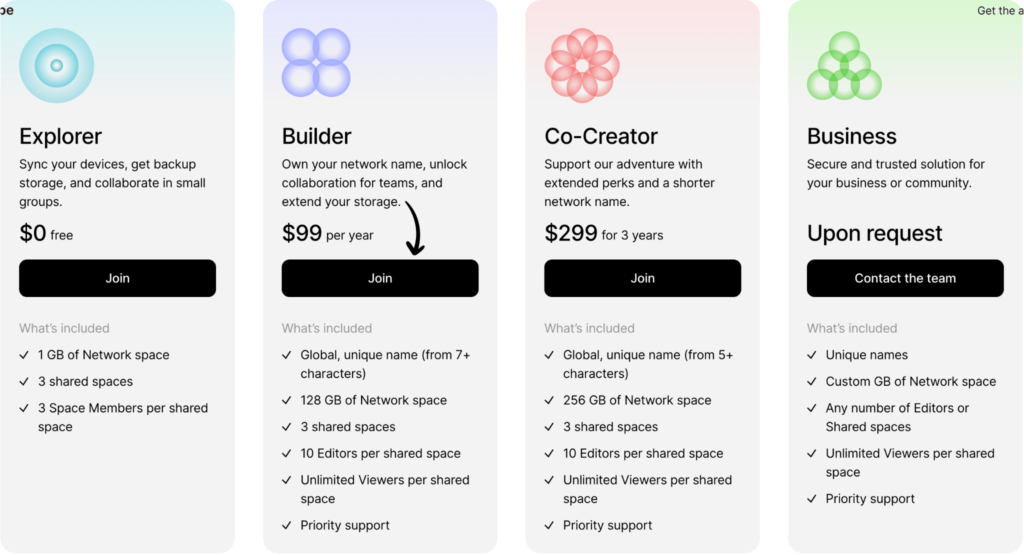
Anytype uses a different approach. It focuses on privacy and decentralization. Currently, Anytype is free, aiming to attract users early.
- No paid tiers yet
- All features available to all users
- Works offline and syncs securely
This free access lowers barriers for individuals and small teams. The model may evolve with premium features later. For now, it suits users valuing privacy and open access.
Which Tool Offers Better Roi For Productivity Pros?
Return on investment (ROI) depends on features and cost balance. ClickUp’s tiered pricing fits businesses needing scalable tools.
- ClickUp provides extensive integrations and automation.
- Anytype offers free, secure, and private workspace.
- ClickUp suits teams needing robust project management.
- Anytype appeals to users focused on privacy and simplicity.
ClickUp’s paid plans deliver strong value for active teams. Anytype’s free model offers great accessibility but may lack advanced features. Productivity pros should weigh their workflow needs against cost.
Pros And Cons Based On Real-world Usage
ClickUp suits a wide range of users who need a powerful tool for project and task management. It fits well with teams and individuals who want to keep all their work in one place. The platform’s flexibility and rich features adapt to many workflows. Below are the key user groups and situations where ClickUp performs best.
Best For Teams Needing Comprehensive Project Management
ClickUp offers a full set of tools to handle complex projects. Teams can plan, track, and deliver work smoothly. It supports:
- Task assignments with deadlines and priorities
- Multiple views like lists, boards, and Gantt charts
- Time tracking and workload management
- Document collaboration inside the platform
Teams with many moving parts find ClickUp ideal. It keeps all project details organized and transparent. Managers gain clear oversight of progress and bottlenecks.
Ideal For Users Who Value Advanced Customization And Ai
ClickUp stands out with its customization options. Users can tailor workflows, statuses, and fields to fit unique needs. It also offers AI tools to save time:
- Automated task creation and prioritization
- Smart suggestions for task descriptions and comments
- AI-powered document generation and editing
This suits users who want a flexible system that adapts as their work changes. AI features help reduce manual effort and improve focus.
Scenarios Where Clickup’s Integration Ecosystem Excels
ClickUp connects with many popular apps. This makes it a hub for different tools teams rely on. Key integration benefits include:
| Integration Type | Use Case | Example Apps |
|---|---|---|
| Communication | Streamline team chats and updates | Slack, Microsoft Teams |
| File Sharing | Attach and manage documents effortlessly | Google Drive, Dropbox |
| Development | Sync code repositories and track bugs | GitHub, GitLab |
| Marketing & Sales | Align campaigns and customer management | HubSpot, Salesforce |
Workflows improve as data flows smoothly between tools. Teams avoid switching apps constantly.
Credit: www.fahimai.com
Ideal Users And Use Cases For Clickup
Anytype suits users who want control over their data and simple tools. It focuses on privacy, offline use, and decentralization. This makes it unique for specific needs and work styles.
Best For Individuals Prioritizing Privacy And Data Ownership
Anytype is perfect for people who want to keep their information private. It stores data locally, not on external servers. Users own their data fully, with no third-party access.
This setup protects sensitive notes, plans, and projects. It avoids risks of data breaches or unauthorized tracking.
Ideal For Users Seeking Simple, Offline-first Tools
Anytype works well without internet connection. Users can create, edit, and organize content offline. Changes sync automatically when reconnected.
- Work from anywhere without Wi-Fi
- Stay productive in low-connectivity areas
- Avoid distractions from constant online syncing
The interface is easy to use, focusing on essential features without clutter.
Scenarios Benefiting From Anytype’s Decentralized Approach
Decentralization means no single server controls the data. This benefits:
- Teams needing secure collaboration without central servers
- Users wary of cloud service outages or censorship
- Projects requiring long-term data availability without vendor dependence
Decentralized storage spreads data across devices. This adds resilience and privacy.
| Use Case | Benefit |
|---|---|
| Private Research | Data stays on local devices; less risk of leaks |
| Remote Team Projects | Collaborate securely with no central point of failure |
| Offline Work | Full functionality without internet connection |

Credit: www.fahimai.com
Frequently Asked Questions
Who Are The Competitors Of Clickup?
ClickUp competitors include Monday. com, Asana, Trello, Jira, Smartsheet, Wrike, Notion, Airtable, Basecamp, Teamwork, Workfront, and Zoho Projects. These tools offer varied project management and collaboration features to suit different business needs.
What Is The Best Alternative To Clickup?
The best ClickUp alternative depends on your needs. Popular choices include Trello for simplicity, Asana for task management, and Monday. com for versatility.
What Is The Difference Between Clickup And Any Do?
ClickUp offers an all-in-one platform with tasks, docs, chat, and whiteboards. Any. do focuses on simple task management with lists, reminders, and recurring tasks. ClickUp suits complex projects; Any. do fits personal or light task tracking.
What Are The Cons Of Clickup?
ClickUp has a steep learning curve and complex interface, causing user overwhelm. It may lag with heavy use and has a buggy mobile app. Search can be slow and inaccurate. Some users report poor customer support and missing niche integrations like payroll or accounting.
Conclusion
Choosing between ClickUp and Anytype depends on your needs. ClickUp offers many features for task and project management. It helps teams work together clearly and save time. Anytype focuses more on personal knowledge and note-taking. ClickUp may feel complex at first but grows powerful with use. For a tool that combines apps, AI, and chat in one place, ClickUp stands out. Explore more about ClickUp and its benefits by visiting ClickUp here. Make your work easier with the right choice.