Truconversion Vs Salesblink: Ultimate Comparison for Marketers
Looking to boost your sales and optimize your funnels but unsure whether Truconversion or Salesblink is the right tool for you? You’re not alone.
Choosing between two powerful platforms can feel overwhelming, especially when both promise to improve your marketing efforts. But what if you could quickly understand how each one works, what they offer, and which fits your unique needs? You’ll discover the key differences between Truconversion and Salesblink, so you can make a confident decision that drives real results for your business. Ready to find out which tool can take your sales game to the next level? Let’s dive in. Explore Truconversion here: Truconversion.
Credit: paperform.co
Introduction To Truconversion And Salesblink
Understanding the right tools helps marketers improve their campaigns. TruConversion and SalesBlink serve different marketing needs. Both offer features to boost business growth. This section introduces each tool and explains why comparing them matters.
Overview Of Truconversion: Purpose And Core Functionality
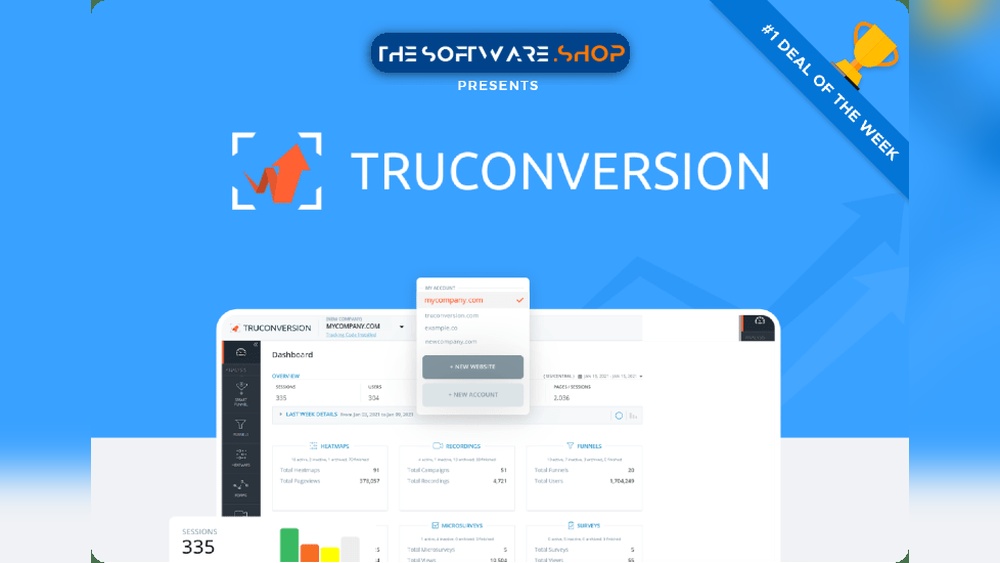
TruConversion focuses on website funnel tracking and optimization. It uses data like heatmaps, session recordings, and form analytics to reveal user behavior. Marketers get clear insights on how visitors interact with their sites.
- Tracks visitor clicks and movements through heatmaps
- Records user sessions for detailed behavior analysis
- Analyzes form performance to reduce drop-offs
- Helps improve conversion rates by identifying funnel leaks
Its main goal is to simplify the process of understanding website traffic and optimizing funnels for better results.
Overview Of Salesblink: Purpose And Core Functionality
SalesBlink is built for outbound sales and lead generation. It helps marketers find leads, send personalized cold emails, and manage outreach campaigns all in one platform.
- Automates lead sourcing and email prospecting
- Supports bulk and personalized email sequences
- Tracks email opens and responses
- Offers CRM-like features for managing leads and deals
SalesBlink aims to streamline sales outreach and increase lead conversion through automation and personalization.
Why Comparing These Tools Matters For Marketers
Both tools serve different parts of the marketing funnel. TruConversion focuses on website optimization, while SalesBlink targets lead generation and outreach.
Marketers must choose tools that fit their specific goals. Understanding each tool’s strengths helps make smart decisions.
| Aspect | TruConversion | SalesBlink |
|---|---|---|
| Main Use | Website funnel tracking and user behavior analysis | Lead generation and cold email outreach |
| Key Features | Heatmaps, session recordings, form analytics | Lead sourcing, email automation, CRM features |
| Target Users | Marketers optimizing website conversions | Sales teams and marketers running outbound campaigns |
Choosing the right tool saves time and improves marketing results.
Key Features That Set Truconversion Apart
TruConversion offers a suite of features designed for deep insights into user behavior and effective funnel optimization. These features help marketers understand visitors, improve conversion rates, and enhance campaign results. The tools stand out by combining heatmaps, session recordings, detailed form analytics, and real-time visitor data.
Heatmaps And Session Recording: Understanding User Behavior
Heatmaps visually display where users click, scroll, and move their mouse on a webpage. This helps identify which areas attract attention and which are ignored.
- Click Heatmaps: Show exact points users interact with.
- Scroll Heatmaps: Reveal how far visitors scroll down pages.
- Mouse Movement Heatmaps: Track cursor movement patterns.
Session recordings capture every visitor’s journey, showing mouse movements, clicks, and page interactions in video form. This provides real user experience insights, revealing obstacles or confusion points.
These tools together help businesses pinpoint usability issues and improve website design.
Conversion Funnels And Form Analytics: Optimizing Lead Capture
TruConversion tracks visitor progress through conversion funnels. It shows where users drop off, enabling quick fixes to increase leads and sales.
| Feature | Benefit |
|---|---|
| Funnel Visualization | Identify exact steps causing visitor loss |
| Form Analytics | Analyze form field engagement and abandonment |
| Field-Level Insights | Detect which fields cause friction or delays |
By understanding form behavior and funnel leaks, marketers can simplify processes, reduce friction, and increase completed sign-ups or purchases.
Real-time Visitor Segmentation: Targeted Marketing Insights
TruConversion segments visitors based on behavior, source, location, and device in real-time. This allows marketers to tailor messages and offers precisely.
- Segment visitors by traffic source (e.g., organic, paid ads)
- Group by device type (mobile, desktop, tablet)
- Filter by geography or new vs returning visitors
- Target based on on-site behavior patterns
These segments help create personalized campaigns that resonate with specific audience groups, improving engagement and conversions.
How These Features Improve Marketing Roi And Campaign Performance
Using heatmaps and session recordings leads to better website designs that boost user engagement.
Conversion funnels and form analytics highlight problem areas, allowing faster fixes to increase leads and sales.
Real-time segmentation enables personalized marketing, improving message relevance and click rates.
Together, these features help marketers spend budgets more wisely and achieve higher returns on investment.
Distinctive Features Of Salesblink For Marketers
SalesBlink offers a robust platform tailored for marketers seeking efficient sales outreach and lead management. Its features focus on streamlining the sales process, improving engagement, and enhancing productivity. The tool combines automation with personalization, multi-channel communication, and integrated prospecting—all within a single platform.
Automated Cold Email Outreach With Ai-powered Personalization
SalesBlink automates cold email campaigns, saving time for marketers. Its AI-powered system personalizes emails based on recipient data. This personalization increases open rates and response chances.
- Generates tailored email copies automatically.
- Schedules emails to send at optimal times.
- Tracks email opens, clicks, and replies in real-time.
- Allows easy follow-up automation to nurture leads.
This feature reduces manual work while keeping outreach highly relevant and engaging.
Multi-channel Sales Engagement: Email, Calls, And Linkedin Integration
SalesBlink supports multiple outreach channels from one dashboard. Marketers can connect via email, phone calls, and LinkedIn seamlessly.
| Channel | Key Capabilities |
|---|---|
| Automated sequences, personalization, tracking | |
| Calls | Click-to-call, call logging, call scheduling |
| Connection requests, message automation, profile viewing |
This multi-channel approach ensures marketers reach prospects through preferred communication methods.
Comprehensive Lead Prospecting And Crm Capabilities
SalesBlink includes built-in tools for lead discovery and management. It helps marketers find quality leads and organize them efficiently.
- Advanced lead search with filters for industry, role, and location.
- Lead enrichment adds contact details and social profiles automatically.
- Integrated CRM tracks interactions and lead status.
- Customizable pipelines visualize the sales journey.
These features centralize lead data and simplify follow-ups, improving sales team coordination.
Benefits Of Full-stack Sales Automation For Lead Generation
SalesBlink’s full-stack automation covers every step of lead generation. It reduces repetitive tasks and speeds up outreach.
- Automates lead research and contact info gathering.
- Personalizes and schedules multi-channel outreach campaigns.
- Tracks engagement and triggers follow-ups automatically.
- Manages leads through CRM pipelines for clear sales visibility.
Marketers gain time to focus on strategy and closing deals, with consistent lead nurturing throughout the funnel.

Credit: salesblink.io
Pricing And Affordability Comparison
Understanding the pricing and value offered by TruConversion and SalesBlink is crucial for marketers. Both platforms serve different purposes but aim to optimize sales and marketing efforts effectively. This section breaks down their pricing plans, features, and cost efficiency to help you decide which fits your budget and needs.
Truconversion Pricing Plans: What’s Included And Cost Efficiency
TruConversion offers straightforward pricing focused on funnel tracking and website analytics. Its plans include:
- Basic Plan: Heatmaps, session recordings, and form analytics to track visitor behavior.
- Pro Plan: Advanced funnel tracking, more sessions per month, and detailed reports.
- Enterprise Plan: Custom limits, priority support, and tailored features for large businesses.
The pricing is competitive for businesses that want deep insights into user interactions. TruConversion provides cost efficiency by combining multiple analytics tools in one platform. Users save on buying separate tools for heatmaps, recordings, and form tracking.
Salesblink Pricing Tiers: Features Per Plan And Value For Money
SalesBlink focuses on outbound sales and cold email campaigns. Its pricing tiers are designed to fit different sales team sizes:
| Plan | Monthly Cost | Key Features |
|---|---|---|
| Starter | $29 | Personalized cold emails, limited campaigns, basic analytics |
| Growth | $79 | More campaigns, automation features, lead management |
| Pro | $149 | Unlimited campaigns, advanced automation, team collaboration |
SalesBlink offers good value for money if outbound sales and email outreach are your priorities. The tiered plans help scale efforts while controlling costs.
Which Platform Offers Better Roi For Different Marketing Budgets
Choosing between TruConversion and SalesBlink depends on your marketing goals and budget size.
- Small Budgets: TruConversion’s basic plan suits small businesses wanting affordable website insights.
- Mid-range Budgets: SalesBlink’s Growth plan provides balanced features for growing sales teams.
- Large Budgets: Both platforms’ premium plans offer advanced tools, but TruConversion excels in user behavior analysis, while SalesBlink shines in sales automation.
Return on investment depends on your focus—website optimization or outbound sales. Both platforms deliver solid ROI when matched to your marketing needs and budget.
Pros And Cons Based On Real-world Usage
Users rely on TruConversion and SalesBlink for different marketing and sales needs. Understanding their strengths and weaknesses helps choose the right tool. Real-world feedback reveals how each tool performs beyond features.
Strengths And Limitations Of Truconversion In Practical Scenarios
TruConversion excels at tracking user behavior on websites. Its heatmaps and session recordings provide clear insights into visitor actions.
- Strength: Easy setup for funnel tracking and form analytics.
- Strength: Visual data helps optimize website conversion rates.
- Limitation: Some users report a learning curve for advanced features.
- Limitation: Limited integrations with other marketing tools compared to competitors.
These points show TruConversion suits teams focused on detailed visitor analysis but may need patience during onboarding.
Advantages And Drawbacks Of Salesblink From User Feedback
SalesBlink focuses on outbound sales automation, especially cold email campaigns.
- Advantage: Simplifies sending personalized emails at scale.
- Advantage: Includes prospecting tools to find leads efficiently.
- Drawback: Some users find email templates less customizable.
- Drawback: Occasional issues with email deliverability reported.
SalesBlink suits sales teams aiming to automate outreach but may require tweaking for best results.
Comparative Analysis: Ease Of Use, Customer Support, And Reliability
| Feature | TruConversion | SalesBlink |
|---|---|---|
| Ease of Use | Intuitive UI for basic tracking; advanced tools need time. | Simple interface; quick to launch campaigns. |
| Customer Support | Responsive support with helpful resources. | Support is good but slower during peak times. |
| Reliability | Stable with rare downtime. | Generally reliable; occasional email sending delays. |
Both tools offer solid performance. TruConversion suits data-focused users. SalesBlink fits outreach-driven teams.

Credit: paperform.co
Ideal Users And Best Use Cases For Each Tool
Choosing between TruConversion and SalesBlink depends on specific business needs. Both tools serve distinct marketing and sales functions. Understanding who benefits most from each tool helps maximize their value.
Who Should Choose Truconversion: Businesses Focused On Website Optimization
TruConversion is designed for businesses aiming to improve website performance through detailed insights. It offers:
- Heatmaps to visualize user interaction
- Session recordings for real user behavior analysis
- Form analytics to optimize lead capture
Ideal users include:
- Website owners focused on increasing conversions
- Digital marketers optimizing landing pages
- E-commerce businesses enhancing customer journeys
TruConversion helps identify roadblocks on websites. It supports data-driven decisions to improve user experience.
Who Benefits Most From Salesblink: Sales Teams And Outbound Marketers
SalesBlink targets sales teams and marketers focused on outbound campaigns. Its core features include:
- Personalized cold email outreach
- Automated follow-ups
- Lead prospecting tools
Best suited for:
- Sales professionals managing outbound pipelines
- Small to medium businesses expanding lead generation
- Marketers running email outreach campaigns
SalesBlink streamlines lead contact and boosts sales outreach efficiency.
Scenario-based Recommendations: Matching Features To Marketing Goals
| Scenario | Recommended Tool | Key Features |
|---|---|---|
| Improve website user experience | TruConversion | Heatmaps, Session Recordings, Form Analytics |
| Boost outbound sales outreach | SalesBlink | Cold Emails, Automated Follow-ups, Lead Prospecting |
| Optimize landing pages for better conversion | TruConversion | User Behavior Analytics, Conversion Funnels |
| Generate and nurture leads via email | SalesBlink | Email Campaigns, Personalized Messaging |
Match tools to marketing goals for best results. TruConversion excels in website optimization. SalesBlink shines in sales outreach.
Final Verdict: Choosing Between Truconversion And Salesblink
Choosing the right marketing tool can affect your campaign’s success. TruConversion and SalesBlink serve different marketing needs. TruConversion focuses on funnel tracking and website behavior analytics. SalesBlink centers on outreach and cold email campaigns. Understanding their strengths helps pick the best fit for your goals.
Summary Of Key Differences And Unique Selling Points
| Feature | TruConversion | SalesBlink |
|---|---|---|
| Main Function | Heatmaps, session recordings, form analytics | Cold email outreach and personalized campaigns |
| Primary Use | Track and optimize website funnels | Generate leads and automate email sequences |
| Unique Selling Point | In-depth visitor behavior insights | All-in-one cold email and prospecting tool |
| Best For | Marketers focusing on website conversions | Sales teams needing outreach automation |
Decision-making Guide Based On Marketing Needs And Priorities
Match your marketing goals with the tools’ core strengths.
- Want to understand visitor behavior? Choose TruConversion.
- Need to automate cold emails? SalesBlink is ideal.
- Focus on improving website funnels? TruConversion fits best.
- Prioritize lead generation via outreach? Go with SalesBlink.
Consider your team’s skills too. TruConversion works well if you prefer visual data. SalesBlink suits those comfortable with email marketing campaigns.
Tips For Trialing Both Tools To Determine The Best Fit
- Start with a clear goal: Define what you want to improve—funnels or outreach.
- Use free trials: Test TruConversion’s heatmaps and session recordings on your site.
- Set up SalesBlink campaigns: Try creating and sending cold emails to a small list.
- Compare ease of use: Note which tool feels more intuitive for your team.
- Measure results: Track improvements in conversions and lead responses.
- Get team feedback: Ask which tool fits your workflow better.
Trialing both tools helps make a confident choice. This hands-on approach reveals which one suits your marketing style.
Frequently Asked Questions
What Will Replace Salesforce?
SAP CRM, Zoho CRM, Pipedrive, and Monday CRM are popular alternatives replacing Salesforce with strong features and customization.
What Are The Main Differences Between Truconversion And Salesblink?
Truconversion focuses on website analytics like heatmaps and session recordings. Salesblink specializes in cold email outreach and lead generation. Both serve sales growth but address different stages of the sales funnel.
Which Platform Is Better For Email Outreach?
Salesblink is better suited for personalized cold email campaigns. It offers AI-powered tools for fast, effective email writing. Truconversion does not provide email outreach features.
Can Truconversion Help Improve Website Conversions?
Yes, Truconversion uses heatmaps and session recordings to analyze user behavior. This data helps optimize website elements and improve conversion rates effectively.
Conclusion
Both Truconversion and Salesblink offer valuable tools for businesses. Truconversion focuses on heatmaps, session recording, and form analytics to improve funnels. Salesblink helps with personalized cold email outreach and lead generation. Choosing the right tool depends on your specific needs and budget. Try both platforms to find your best fit. For easy funnel tracking and optimization, consider truconversion to enhance your website’s performance and user insight.